
Linux 磁盘使用查看 查看使用磁盘程序 Monitoring disk activity in linux
5 TOOLS FOR MONITORING DISK ACTIVITY IN LINUX
Here is a quick overview of 5 command-line tools that come in incredibly handy when troubleshooting or monitoring real-time disk activity in Linux. These tools are available in all major Linux distros.
IOSTAT
iostat can be used to report the disk read/write rates and counts for an interval continuously. It collects disk statistics, waits for the given amount of time, collects them again and displays the difference. Here is the output of the command iostat -y 5:

Each report, every 5 seconds, include the CPU stats and the disk stats. The CPU stats is a break up of where CPU time was spent during the interval. The disk stats includes the number of I/O requests per second (tps), the rate of read and write (kB_read/s and kB_write/s) and the amount of data read and written (kB_read and kB_wrtn).
The -y argument instructs iostat to discard the first report which are the stats since boot and are rarely useful. The “5” in the command line specifies the interval in seconds. The CPU stats can be omitted by including the -dflag, although practically it is useful to have it there.
IOTOP
iotop is a top-like utility for displaying real-time disk activity. It can list the processes that are performing I/O, alongwith the disk bandwidth they are using. Here is how iotop -o looks like:
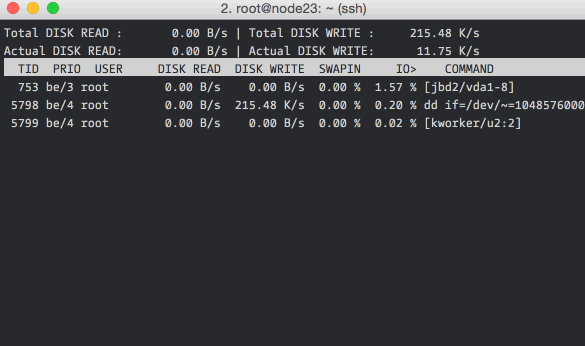
The -o flag restricts the display to processes that are doing I/O, omitting it shows all the processes. You can also see the total disk bandwidth usage on the top two lines.
In case you are wondering, the “total” values show the amount of data read from or written to the disk block device driver, and the “actual” values show the numbers for the actual hardware disk I/O. File system caching is one of the reasons for the difference in the values.
DSTAT
dstat is a little more user-friendly version of iostat, and can show much more information than just disk bandwidth. Here is dstat in action, showing cpu and disk stats:
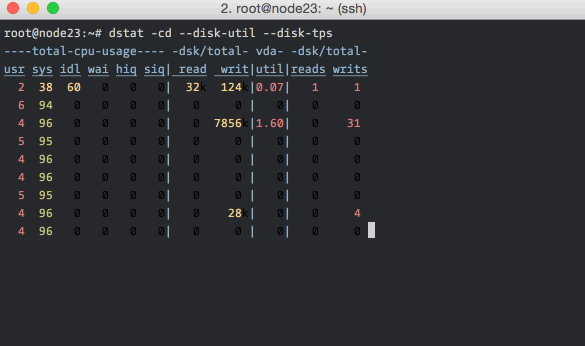
As you can see, it has nicely colored output. The command-line flags include -c for CPU stats, -d for disk stats, --disk-util for disk utilization and --disk-tps for disk transactions (I/O requests) per second. You can read more about dstat here.
ATOP
atop is particularly good for quickly grasping changes happening to the system. It does an excellent job of summarizing changes in each interval. Unlike the others, it can list all the processes that caused any system-level changes (like doing disk I/O) during the interval – this feature is present only in atop.
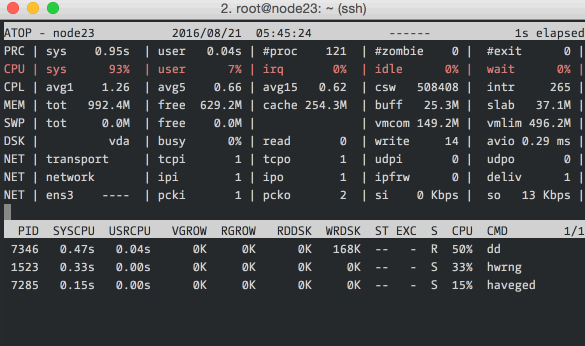
Here we’re running atop with an interval of 1 second. The top section should be read from left to right: PRC shows process information, CPU the split of CPU usage, CPL the load averages, MEM the memory usage, SWP the swap file usage and DSK and NET the disk and network information respectively. The bottom section shows processes that did interesting things during the interval. You can read more about atop here.
IOPING
ioping is a quick and dirty storage volume latency checker. It is useful for checking if the elevated disk times that you’re seeing are because of a degradation of the underlying virtual disk / network / hardware.
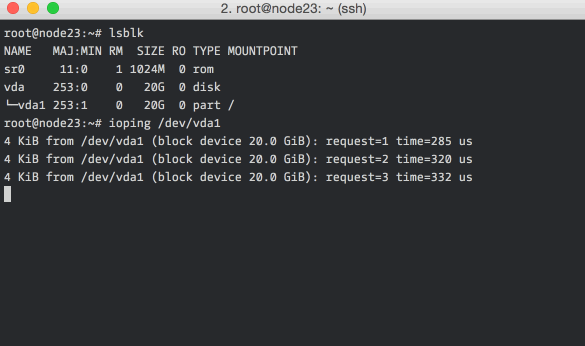
Low numbers (<1ms) and low variance in the numbers are indicators of a healthy storage volume.
CLOSING NOTES
All the tools listed above have more features and options, here are good places to start digging further: iostat,iotop, dstat, atop and ioping.
If you’re interested in measuring disk performance, you should definitely also look at fio and sysbench. Both are fairly complicated, but are standard tools for the job.
Linux 磁盘使用查看 查看使用磁盘程序 Monitoring disk activity in linux的更多相关文章
- linux 磁盘挂载及查看磁盘
blkid命令实例 .列出当前系统中所有已挂载文件系统的类型: sudo blkid .显示指定设备 UUID: sudo blkid -s UUID /dev/sda5 .显示所有设备 UUID: ...
- Linux Centos下查看cpu、磁盘、内存使用情况,关闭MySQL日志
Linux Centos下查看cpu.磁盘.内存使用情况,关闭MySQL日志 lsblk 查看分区和磁盘df -h 查看空间使用情况fdisk -l 分区工具查看分区信息cfdisk /dev/sda ...
- Linux命令_磁盘管理_查看磁盘或目录的容量
软件环境:虚拟机VM12,Linux版本 CentOS 7.3 命令 df (disk filesystem) 用于查看已挂载磁盘的总容量.使用容量.剩余容量等,可以不加任何参数,默认以KB为单位显示 ...
- 【linux】linux磁盘空间 目录查看清理 和 文件查看清理
=========================大目录排查============================= 一.首先查看磁盘挂载,磁盘空间使用情况 1.进入根路径 cd / 2.查看磁盘挂 ...
- [转帖]linux下使用 du查看某个文件或目录占用磁盘空间的大小
linux下使用 du查看某个文件或目录占用磁盘空间的大小 du -ah --max-depth= 去年用过一次 后来忘记了.. 命令这个东西 熟能生巧.. https://www.cnblogs.c ...
- 未加星标 Linux磁盘下查看I/O磁盘的性能
iostat查看linux硬盘IO性能 rrqm/s:每秒进行merge的读操作数目.即delta(rmerge)/s wrqm/s:每秒进行merge的写操作数目.即delta(wmerge)/s ...
- 磁盘io负载查看
转自:http://blog.csdn.net/i_am_jojo/article/details/7698458 为了方便各位和自己今后遇到此类问题能尽快解决,我这里将查看linux服务器硬盘IO访 ...
- mysql数据库查看各实例磁盘占用情况
1.总体查看: use information_schema; select TABLE_SCHEMA, concat(truncate(sum(data_length)/1024/1024,2),' ...
- 脚本_查看所有虚拟机磁盘以及 CPU 的使用量
#!bin/bash#作者:liusingbon#功能:查看所有虚拟机磁盘使用量以及 CPU 使用量信息read -p "按任意键进入查看页面.比如按下Enter键" keyvir ...
随机推荐
- shell 脚本中的当前工作目录等于执行脚本时所在的工作目录
1. 测试脚本 在当前目录下创建 h1 h2两个文件夹 2. 在脚本所在目录执行脚本 在当前目录下创建了h1 h2两个目录 3. 在其他目录爱=下执行脚本 在其他目录下执行脚本时,在执行脚本所在的目录 ...
- 天了噜,Java 8 要停止维护了!
前些天的中兴事件,已经让国人意识到自己核心技术的不足,这次的 JDK 8 对企业停止免费更新更是雪上加霜.. 以下是 Oracle 官网提示的 JDK8 终止更新公告. 原文内容:Oracle wil ...
- Python进程-理论
进程定义 程序: 计算机程序是存储在磁盘上的可执行二进制(或其他类型)文件.只有把它们加载到内存中,并被操作系统调用,它们才会拥有其自己的生命周期. 进程: 进程则是表示的一个正在执行的程序.每个进程 ...
- 【sping揭秘】18、使用spring访问数据
统一的数据访问异常层次体系 基于基本的jdbc封装dao层访问接口,封装不论是访问,csv文件,关系数据库(RDBMS),ladp都可以封装成一个个DAO对象来进行访问 抛出问题 可是对于我们忽略了一 ...
- 关于iscroll插件的使用
本次项目有一个需要多信息展示,需要左右滑动的效果,查资料了解到iscroll,就拿来用,如下调用: var myscroll = new IScroll("#wrapper", { ...
- 高手速成android开源项目【tool篇】
主要包括那些不错的开发库,包括依赖注入框架.图片缓存.网络相关.数据库ORM建模.Android公共库.Android 高版本向低版本兼容.多媒体相关及其他. 一.依赖注入DI 通过依赖注入减少Vie ...
- 关于springmvc json交互产生的406错误
产生错误的背景:springmvc使用<mvc:annotation-driven>进行配置,那么只要引入响应的json解析包就可以了.在pom中已经引入了如下: <dependen ...
- vuejs深入浅出—基础篇
一.从HelloWorld说起 任何语言的都是从Hello World开始的,VueJs也不例外,直接上代码: <script src="https://unpkg.com/vue/d ...
- Vuejs的指令及组件用法总结
vuejs介绍 Vue.js是当下很火的一个JavaScript MVVM库,它是以数据驱动和组件化的思想构建的.相比于Angular.js,Vue.js提供了更加简洁.更易于理解的API,使得我们能 ...
- input框限制只能输入正整数、字母、小数、汉字
有时需要限制文本框输入内容的类型,本节分享下正则表达式限制文本框只能输入数字.小数点.英文字母.汉字等代码. 例如,输入大于0的正整数 代码如下: <input onkeyup="if ...