
安卓开发_浅谈Fragment之ListFragment
ListFragment,即Fragment的一个子类,当我们用的一个Fragment只需要一个listview视图的时候使用
该类有几个特点:
1、ListFragment 本身具只有一个ListView视图,返回的也是一个只有ListView的布局对象
2、ListFragment 不需要指定布局,本身固定,只有一个ListView视图
3、给ListFragment中的ListView加载数据或者绑定适配器都只能出现onCreateView(),因为onCreateView方法之后,ListView对象才创建,
4、给 ListView设置适配器 用setListAdapter
5、ListFragment已经实现了其ListView中的数据项的事件监听,可根需求重写onListItemClick方法
------------------------------------------------------------------------------------------------------------------------------------------------
下面看一个Demo
注意fragment是在3.0才开始支持的 ,如果导入的包是import android.app.
清单文件中需要改最低SDK版本为11
<uses-sdk

        android:minSdkVersion=""

        android:targetSdkVersion="" />
如果导入的包是 import android.support.v4.app.
则清单文件不需要改动
 package com.xqx.listviewfragment;

 import android.os.Bundle;

 import android.app.Activity;

 import android.app.FragmentManager;

 import android.app.FragmentTransaction;

 import android.view.Menu;

 public class MainActivity extends Activity {

     @Override

     protected void onCreate(Bundle savedInstanceState) {

         super.onCreate(savedInstanceState);

         setContentView(R.layout.activity_main);

         MyListFragment myfragment = new MyListFragment();

         //创建管理者对象

         FragmentManager manager = getFragmentManager();

         //创建事务对象

         FragmentTransaction action = manager.beginTransaction();

         //添加

         action.add(R.id.view_listfragment, myfragment);

         //提交事务

         action.commit();

     }

 }
MainActivity.class
 <RelativeLayout xmlns:android="http://schemas.android.com/apk/res/android"

     xmlns:tools="http://schemas.android.com/tools"

     android:layout_width="match_parent"

     android:layout_height="match_parent"

     android:paddingBottom="@dimen/activity_vertical_margin"

     android:paddingLeft="@dimen/activity_horizontal_margin"

     android:paddingRight="@dimen/activity_horizontal_margin"

     android:paddingTop="@dimen/activity_vertical_margin"

     tools:context=".MainActivity" >

     <fragment

         android:layout_width="match_parent"

         android:layout_height="match_parent"

         android:id="@+id/view_listfragment"

         android:name="com.xqx.listviewfragment.MyListFragment"

         />

 </RelativeLayout>
layout_main.xml
 package com.xqx.listviewfragment;

 import java.util.ArrayList;

 import java.util.List;

 import android.app.ListFragment;

 import android.os.Bundle;

 import android.view.View;

 import android.widget.ArrayAdapter;

 import android.widget.ListView;

 import android.widget.Toast;

 public class MyListFragment extends ListFragment{

     private List<String> list; //适配器的数据源

     private ArrayAdapter adapter; //ListView的适配器

     @Override

     public void onCreate(Bundle savedInstanceState) {

         // TODO Auto-generated method stub

         super.onCreate(savedInstanceState);

         //给数据源添加数据

         list = new ArrayList<String>();

         list.add("第一条数据");

         list.add("第二条数据");

         list.add("第三条数据");

         list.add("第四条数据");

         adapter = new ArrayAdapter<String>(getActivity(), android.R.layout.simple_list_item_1,list);

     }

     //设置适配器 必须放在onCreateView之后,因为在onCreateView初始化视图

     @Override

     public void onActivityCreated(Bundle savedInstanceState) {

         // TODO Auto-generated method stub

         super.onActivityCreated(savedInstanceState);

         //给ListView设置适配器

         setListAdapter(adapter);

     }

     @Override

     public void onListItemClick(ListView l, View v, int position, long id) {

         // TODO Auto-generated method stub

         super.onListItemClick(l, v, position, id);

         Toast.makeText(getActivity(), "点击了"+getListAdapter().getItem(position).toString(), ).show();

     }

 }
MyListFragment.class
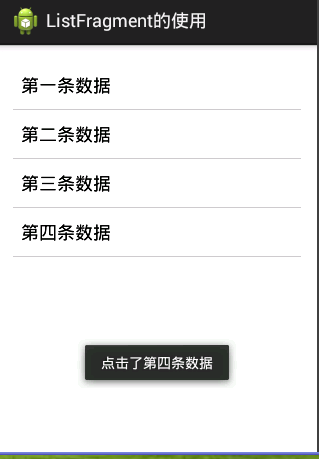
相关知识:
安卓开发_慕课网_Fragment实现Tab(App主界面)
安卓开发_浅谈Fragment之ListFragment的更多相关文章
- 安卓开发_浅谈Fragment之事务添加Fragment对象
我们都知道给一个activity动态添加fragment的时候 有下面几种添加方式 看一下布局文件 <LinearLayout xmlns:android="http://schema ...
- 安卓开发_浅谈ListView(SimpleAdapter数组适配器)
安卓开发_浅谈ListView(ArrayAdapter数组适配器) 学习使用ListView组件和SimapleAdapter适配器实现一个带图标的ListView列表 总共3部分 一.MainAc ...
- 安卓开发_浅谈Android动画(四)
Property动画 概念:属性动画,即通过改变对象属性的动画. 特点:属性动画真正改变了一个UI控件,包括其事件触发焦点的位置 一.重要的动画类及属性值: 1. ValueAnimator 基本属 ...
- 安卓开发_浅谈ListView(自定义适配器)
ListView作为一个实际开发中使用率非常高的视图,一般的系统自带的适配器都无法满足开发中的需求,这时候就需要开发人员来自定义适配器使得ListView能够有一个不错的显示效果 有这样一个Demo ...
- 安卓开发_浅谈Action Bar
一.Action Bar 导航栏.是3.0之后出现的. 所以注意使用的时候清单文件要设置下 android:minSdkVersion="11"(至少11) 但如果使用v4包,则不 ...
- 安卓开发_浅谈OptionsMenus(选项菜单)
Android平台下所提供的菜单大体上可分为三类:选项菜单.上下文菜单和子菜单. 当Activity在前台运行时,如果用户按下手机上的Menu键,此时就会在屏幕低端弹出相应的选项菜单.但这个功能需要开 ...
- 安卓开发_浅谈Notification(通知栏)
Notification通知栏是显示在手机状态的消息,代表一种全局效果的通知 快速创建一个Notification的步骤简单可以分为以下四步: 第一步:通过getSystemService()方法得到 ...
- 安卓开发_浅谈ListView之分页列表
前言: 在开发的过程中,有时候我们需要从网络解析一些数据,比如最近的一些新闻,我们需要把这些数据用ListView显示出来. 因为是解析一个网络数据源,这样将会一下子将所有的数据解析出来,当数据源数据 ...
- 安卓开发_浅谈AsyncTask
现在就来学习一下AsyncTask. 一.先介绍一下AsyncTask: 在开发Android移动客户端的时候往往要使用多线程来进行操作,我们通常会将耗时的操作放在单独的线程执行,避免其占用主线程而给 ...
随机推荐
- B - Red and Black 问题思考
红黑地板问题 There is a rectangular room, covered with square tiles. Each tile is colored either red or bl ...
- EasyUI 获取展开表中行数据
var index = $('#dg').datagrid('getRowIndex', row); //为destory_user.php传递参数id var ids = $("#dg&q ...
- 调用 Https WebService 使用程序自动生成代理类
1 商家提供的WebService接口: https://ws.nciic.org.cn/nciic_ws/services/NciicServices?wsdl 2 在浏览器里打开这个地址,会显示 ...
- 看看一个老程序员如何手写SpringMVC!
人见人爱的Spring已然不仅仅只是一个框架了.如今,Spring已然成为了一个生态.但深入了解Spring的却寥寥无几.这里,我带大家一起来看看,我是如何手写Spring的.我将结合对Spring十 ...
- linux中一些简便的命令之tr
tr是个简单字符处理命令,主要有以下几个用法: 1.替换字符: echo "hello,world" | tr 'a-z' 'A-Z' 执行结果:HELLO,WORLD 注释:这里 ...
- MySQL百万级、千万级数据多表关联SQL语句调优
本文不涉及复杂的底层数据结构,通过explain解释SQL,并根据可能出现的情况,来做具体的优化,使百万级.千万级数据表关联查询第一页结果能在2秒内完成(真实业务告警系统优化结果).希望读者能够理解S ...
- listview监听组件内容变化
package com.meizu.ui.gifts; import android.app.Activity; import android.content.Context; import andr ...
- 从零开始学 Web 之 移动Web(九)微金所案例
大家好,这里是「 从零开始学 Web 系列教程 」,并在下列地址同步更新...... github:https://github.com/Daotin/Web 微信公众号:Web前端之巅 博客园:ht ...
- Hadoop2源码分析-YARN RPC 示例介绍
1.概述 之前在<Hadoop2源码分析-RPC探索实战>一文当中介绍了Hadoop的RPC机制,今天给大家分享关于YARN的RPC的机制.下面是今天的分享目录: YARN的RPC介绍 Y ...
- Spring的第三天AOP之xml版
Spring的第三天AOP之xml版 ssm框架 spring AOP介绍 AOP(Aspect Oriented Programming),面向切面编程.它出来的目的并不是去取代oop,而是对它的 ...