
Yii2 JWT
Yii2 JWT
这个扩展为Yii framework 2.0提供了JWT集成(需要PHP 5.6+)。它包括基本的HTTP身份验证支持。
目录
安装
Package is available on Packagist,
you can install it using Composer.
composer require sizeg/yii2-jwt
依赖关系
- PHP 5.6+
- OpenSSL Extension
- lcobucci/jwt 3.3
基本用法
将 jwt 组件添加到配置文件中,
'components' => [

    'jwt' => [

      'class' => \sizeg\jwt\Jwt::class,

      'key'   => 'secret',

    ],

],
按如下方式配置 authenticator 行为。
namespace app\controllers;

class ExampleController extends \yii\rest\Controller

{

    /**

     * @inheritdoc

     */

    public function behaviors()

    {

        $behaviors = parent::behaviors();

        $behaviors['authenticator'] = [

            'class' => \sizeg\jwt\JwtHttpBearerAuth::class,

        ];

        return $behaviors;

    }

}
也可以将其与 CompositeAuth 参考文献 一起用于文档
创建
有些方法被标记为已弃用,并很快将从lcobucci/jwt 4.x回传内容以创建升级路径。
只需使用构建器创建一个新的JWT/JWS令牌:
$time = time();

$token = Yii::$app->jwt->getBuilder()

            ->issuedBy('http://example.com') // Configures the issuer (iss claim)

            ->permittedFor('http://example.org') // Configures the audience (aud claim)

            ->identifiedBy('4f1g23a12aa', true) // Configures the id (jti claim), replicating as a header item

            ->issuedAt($time) // Configures the time that the token was issue (iat claim)

            ->canOnlyBeUsedAfter($time + 60) // Configures the time that the token can be used (nbf claim)

            ->expiresAt($time + 3600) // Configures the expiration time of the token (exp claim)

            ->withClaim('uid', 1) // Configures a new claim, called "uid"

            ->getToken(); // Retrieves the generated token

$token->getHeaders(); // Retrieves the token headers

$token->getClaims(); // Retrieves the token claims

echo $token->getHeader('jti'); // will print "4f1g23a12aa"

echo $token->getClaim('iss'); // will print "http://example.com"

echo $token->getClaim('uid'); // will print "1"

echo $token; // The string representation of the object is a JWT string (pretty easy, right?)
从字符串分析
使用解析器从JWT字符串创建一个新的令牌(以前面的令牌为例):
$token = Yii::$app->jwt->getParser()->parse((string) $token); // Parses from a string

$token->getHeaders(); // Retrieves the token header

$token->getClaims(); // Retrieves the token claims

echo $token->getHeader('jti'); // will print "4f1g23a12aa"

echo $token->getClaim('iss'); // will print "http://example.com"

echo $token->getClaim('uid'); // will print "1"
验证
我们可以很容易地验证令牌是否有效(以前面的令牌为例):
$data = Yii::$app->jwt->getValidationData(); // It will use the current time to validate (iat, nbf and exp)

$data->setIssuer('http://example.com');

$data->setAudience('http://example.org');

$data->setId('4f1g23a12aa');

var_dump($token->validate($data)); // false, because we created a token that cannot be used before of `time() + 60`

$data->setCurrentTime(time() + 61); // changing the validation time to future

var_dump($token->validate($data)); // true, because validation information is equals to data contained on the token

$data->setCurrentTime(time() + 4000); // changing the validation time to future

var_dump($token->validate($data)); // false, because token is expired since current time is greater than exp
我们还可以使用$leeway参数来处理时钟偏差(见下面的注释)。
如果token的声明时间无效,但与验证时间之间的差异小于$leeway,
那么令牌仍然被认为是有效的
'components' => [

    'jwt' => [

        'class' => \sizeg\jwt\Jwt:class,

        'key'   => 'secret',

        'jwtValidationData' => [

            'class' => \sizeg\jwt\JwtValidationData::class,

             // configure leeway

            'leeway' => 20,

        ],

    ],

],
$dataWithLeeway = Yii::$app->jwt->getValidationData();

$dataWithLeeway->setIssuer('http://example.com');

$dataWithLeeway->setAudience('http://example.org');

$dataWithLeeway->setId('4f1g23a12aa');

var_dump($token->validate($dataWithLeeway)); // false, because token can't be used before now() + 60, not within leeway

$dataWithLeeway->setCurrentTime($time + 61); // changing the validation time to future

var_dump($token->validate($dataWithLeeway)); // true, because current time plus leeway is between "nbf" and "exp" claims

$dataWithLeeway->setCurrentTime($time + 3610); // changing the validation time to future but within leeway

var_dump($token->validate($dataWithLeeway)); // true, because current time - 20 seconds leeway is less than exp

$dataWithLeeway->setCurrentTime($time + 4000); // changing the validation time to future outside of leeway

var_dump($token->validate($dataWithLeeway)); // false, because token is expired since current time is greater than exp
重要提示
- 您必须配置'
ValidationData,通知所有要验证令牌的声明。 - 如果
ValidationData包含未在令牌中使用的声明,或者令牌具有未在ValidationData中配置的声明,则Token::validate()将忽略这些声明。 exp,nbf和iat声明默认在ValidationData::__construct()中使用当前 UNIX 时间 (time()).ValidationData的可选$leeway参数将导致我们在验证基于时间的声明时使用该长度的秒数,
假装我们在未来的“发出时间”(iat) 和“不在之前”(nbf)索赔,假装我们在过去的更远
对于“过期时间”(exp)索赔。这允许在发出服务器的时钟与时钟的时间不同的情况下
验证服务器,如RFC 7519第4.1节所述。
令牌签名
我们可以使用签名来验证令牌在生成后是否未被修改。此扩展实现了Hmac、RSA和ECDSA签名(使用256、384和512)。
重要提示
不允许发送到解析器的字符串指示要使用的签名算法,否则您的应用程序将易受严重的JWT安全漏洞的攻击。
下面的示例是安全的,因为Signer中的选项是硬编码的,不受恶意用户的影响。
Hmac
Hmac signatures are really simple to be used:
$jwt = Yii::$app->jwt;

$signer = $jwt->getSigner('HS256');

$key = $jwt->getKey();

$time = time();

$token = $jwt->getBuilder()

            ->issuedBy('http://example.com') // Configures the issuer (iss claim)

            ->permittedFor('http://example.org') // Configures the audience (aud claim)

            ->identifiedBy('4f1g23a12aa', true) // Configures the id (jti claim), replicating as a header item

            ->issuedAt($time) // Configures the time that the token was issue (iat claim)

            ->canOnlyBeUsedAfter($time + 60) // Configures the time that the token can be used (nbf claim)

            ->expiresAt($time + 3600) // Configures the expiration time of the token (exp claim)

            ->withClaim('uid', 1) // Configures a new claim, called "uid"

            ->getToken($signer, $key); // Retrieves the generated token

var_dump($token->verify($signer, 'testing 1')); // false, because the key is different

var_dump($token->verify($signer, 'testing')); // true, because the key is the same
RSA 和 ECDSA
RSA和ECDSA签名基于公钥和私钥,因此您必须使用私钥生成并使用公钥验证:
$jwt = Yii::$app->jwt;

$signer = $jwt->getSigner('RS256'); // you can use 'ES256' if you're using ECDSA keys

$privateKey = $jwt->getKey('file://{path to your private key}');

$time = time();

$token = $jwt->getBuilder()

            ->issuedBy('http://example.com') // Configures the issuer (iss claim)

            ->permittedFor('http://example.org') // Configures the audience (aud claim)

            ->identifiedBy('4f1g23a12aa', true) // Configures the id (jti claim), replicating as a header item

            ->issuedAt($time) // Configures the time that the token was issue (iat claim)

            ->canOnlyBeUsedAfter($time + 60) // Configures the time that the token can be used (nbf claim)

            ->expiresAt($time + 3600) // Configures the expiration time of the token (exp claim)

            ->withClaim('uid', 1) // Configures a new claim, called "uid"

            ->getToken($signer, $privateKey); // Retrieves the generated token

$publicKey = $jwt->getKey('file://{path to your public key}');

var_dump($token->verify($signer, $publicKey)); // true when the public key was generated by the private one =)
很重要的一点是,如果您使用的是RSA密钥,则不应该调用ECDSA签名者(反之亦然),否则sign()和verify()将引发异常!
Yii2基本模板示例
基本方案
- 客户端发送凭据。例如,登录+密码
- 后端验证它们
- 如果凭据是有效的客户端接收令牌
- 未来请求的客户端存储令牌
分步使用示例
创建Yii2应用程序
在本例中,我们将使用基本模板,但您也可以使用高级模板。
composer create-project --prefer-dist --stability=dev yiisoft/yii2-app-basic yii2-jwt-test
安装组件
composer require sizeg/yii2-jwt
在config/web.php中添加
components部分$config = [
'components' => [
// other default components here..
'jwt' => [
'class' => \sizeg\jwt\Jwt::class,
'key' => 'secret',
// You have to configure ValidationData informing all claims you want to validate the token.
'jwtValidationData' => \app\components\JwtValidationData::class,
],
],
];
创建JwtValidationData类。在这里,您必须配置ValidationData来通知您要验证令牌的所有声明。
<?php

namespace app\components;

class JwtValidationData extends \sizeg\jwt\JwtValidationData

{

    /**

     * @inheritdoc

     */

    public function init()

    {

        $this->validationData->setIssuer('http://example.com');

        $this->validationData->setAudience('http://example.org');

        $this->validationData->setId('4f1g23a12aa');

        parent::init();

    }

}
修改方法
app\models\User::findIdentityByAccessToken()/**
* {@inheritdoc}
* @param \Lcobucci\JWT\Token $token
*/
public static function findIdentityByAccessToken($token, $type = null)
{
foreach (self::$users as $user) {
if ($user['id'] === (string) $token->getClaim('uid')) {
return new static($user);
}
} return null;
}
新建控制器
<?php

namespace app\controllers;

use sizeg\jwt\Jwt;

use sizeg\jwt\JwtHttpBearerAuth;

use Yii;

use yii\rest\Controller;

class RestController extends Controller

{

    /**

     * @inheritdoc

     */

    public function behaviors()

    {

        $behaviors = parent::behaviors();

        $behaviors['authenticator'] = [

            'class' => JwtHttpBearerAuth::class,

            'optional' => [

                'login',

            ],

        ];

        return $behaviors;

    }

    /**

     * @return \yii\web\Response

     */

    public function actionLogin()

    {

        $request = Yii::$app->getRequest();

        $jwt = Yii::$app->jwt;

        $time = time();

        $token = $jwt->getBuilder()

            ->issuedBy($request->getHostInfo())

            ->permittedFor(isset($_SERVER['HTTP_ORIGIN']) ? $_SERVER['HTTP_ORIGIN'] : '')

            ->identifiedBy(Yii::$app->security->generateRandomString(10), true) //生成随机的盐值

            ->issuedAt($time)// 设置生成token的时间

            ->expiresAt($time + 3600)//设置token过期时间

            ->withClaim('uid', 100)//配置一个名为uid的新声明

            ->getToken($jwt->getSigner('HS256'), $jwt->getKey());

        // Previous implementation

        /*

        $token = $jwt->getBuilder()

            ->setIssuer('http://example.com')// Configures the issuer (iss claim)

            ->setAudience('http://example.org')// Configures the audience (aud claim)

            ->setId('4f1g23a12aa', true)// Configures the id (jti claim), replicating as a header item

            ->setIssuedAt(time())// Configures the time that the token was issue (iat claim)

            ->setExpiration(time() + 3600)// Configures the expiration time of the token (exp claim)

            ->set('uid', 100)// Configures a new claim, called "uid"

            ->sign($signer, $jwt->key)// creates a signature using [[Jwt::$key]]

            ->getToken(); // Retrieves the generated token

        // 示例

        $jwt = Yii::$app->jwt;

        $signer = $jwt->getSigner('HS256');

        $key = $jwt->getKey();

        $time = time();

        // Adoption for lcobucci/jwt ^4.0 version

        $token = $jwt->getBuilder()

            ->issuedBy('http://example.com')// Configures the issuer (iss claim)

            ->permittedFor('http://example.org')// Configures the audience (aud claim)

            ->identifiedBy('4f1g23a12aa', true)// Configures the id (jti claim), replicating as a header item

            ->issuedAt($time)// Configures the time that the token was issue (iat claim)

            ->expiresAt($time + 3600)// Configures the expiration time of the token (exp claim)

            ->withClaim('uid', 100)// Configures a new claim, called "uid"

            ->getToken($signer, $key); // Retrieves the generated token

            */

        return $this->asJson([

            'token' => (string)$token,

        ]);

    }

    /**

     * @return \yii\web\Response

     */

    public function actionData()

    {

        return $this->asJson([

            'success' => true,

        ]);

    }

}
发送简单的登录请求以获取令牌。这里我们不发送任何凭证来简化示例。正如我们在
authenticator行为操作login中将authenticator跳过该操作的身份验证检查指定为可选。

首先,我们尝试向rest/data发送请求,但不带令牌,并且获取错误
Unauthorized
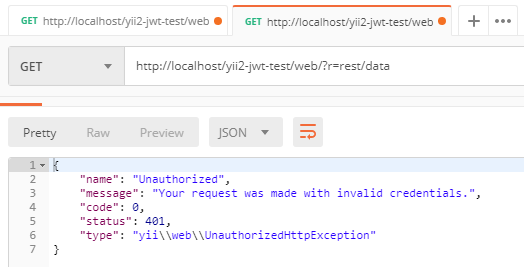
然后我们重试请求,但已经用令牌添加了
Authorization

Yii2 JWT的更多相关文章
- 看图理解JWT如何用于单点登录
单点登录是我比较喜欢的一个技术解决方案,一方面他能够提高产品使用的便利性,另一方面他分离了各个应用都需要的登录服务,对性能以及工作量都有好处.自从上次研究过JWT如何应用于会话管理,加之以前的项目中也 ...
- Yii2的深入学习--行为Behavior
我们先来看下行为在 Yii2 中的使用,如下内容摘自 Yii2中文文档 行为是 [[yii\base\Behavior]] 或其子类的实例.行为,也称为 mixins,可以无须改变类继承关系即可增强一 ...
- 网站实现微信登录之回调函数中登录逻辑的处理--基于yii2开发的描述
上一篇文章网站实现微信登录之嵌入二维码中描述了如何在自己的登录页面内嵌入登录二维码,今天的这篇文章主要是描述下在扫码成功之后微信重定向回网站后登录逻辑的处理,其实也就是验证身份信息,授权用户登录的逻辑 ...
- 网站实现微信登录之嵌入二维码——基于yii2开发的描述
之前写了一篇yii2获取登录前的页面url地址的文章,然后发现自己对于网站实现微信扫码登录功能的实现不是很熟悉,所以,我会写2-3篇的文章来描述下一个站点如何实现微信扫码登录的功能,来复习下微信扫码登 ...
- yii2获取登录前的页面url地址--电脑和微信浏览器上的实现以及yii2相关源码的学习
对于一个有登录限制(权限限制)的网站,用户输入身份验证信息以后,验证成功后跳转到登录前的页面是一项很人性化的功能.那么获取登录前的页面地址就很关键,今天在做一个yii2项目的登录调试时发现了一些很有意 ...
- 记一次nginx部署yii2项目时502 bad gateway错误的排查
周六闲来无事,就试着安装和部署下yii2,安装过程没什么问题,但部署到nginx上时遇到了502 bad gatewary问题,折腾了半天才搞定.这个问题是我以前在部署yii2时没有遇到过的,因此记在 ...
- JWT实现token-based会话管理
上文<3种web会话管理的方式>介绍了3种会话管理的方式,其中token-based的方式有必要从实现层面了解一下.本文主要介绍这方面的内容.上文提到token-based的实现目前有一个 ...
- 用JWT来保护我们的ASP.NET Core Web API
在上一篇博客中,自己动手写了一个Middleware来处理API的授权验证,现在就采用另外一种方式来处理这个授权验证的问题,毕竟现在也 有不少开源的东西可以用,今天用的是JWT. 什么是JWT呢?JW ...
- yii2的权限管理系统RBAC简单介绍
这里有几个概念 权限: 指用户是否可以执行哪些操作,如:编辑.发布.查看回帖 角色 比如:VIP用户组, 高级会员组,中级会员组,初级会员组 VIP用户组:发帖.回帖.删帖.浏览权限 高级会员组:发帖 ...
随机推荐
- [20200223]关于latch and mutext的优化.txt
[20200223]关于latch and mutext的优化.txt --//前一段时间一直在测试使用DBMS_SHARED_POOL.MARKHOT标识热对象以及sql语句的优化.--//有别人问 ...
- sql数据库语言练习,增删改查
数据库创建 DROP DATABASE IF EXISTS `sql_invoicing`; CREATE DATABASE `sql_invoicing`; USE `sql_invoicing`; ...
- 「Flink」事件时间与水印
我们先来以滚动时间窗口为例,来看一下窗口的几个时间参数与Flink流处理系统时间特性的关系. 获取窗口开始时间Flink源代码 获取窗口的开始时间为以下代码: org.apache.flink.str ...
- MFC/QT 学习笔记(二)——MFC入门
MFC以C++形式封装了Windows API //实践 编写MFC需要的头文件#include <afxwin.h> 程序执行流程: 实例化应用程序对象(有且只有一个) 执行程序入口函数 ...
- Elasticsearch编程操作
1.创建工程导入依赖 <dependency> <groupId>org.elasticsearch</groupId> <artifactId>ela ...
- nodejs编程优化
如何编写优化的 JavaScript 对象属性的顺序:始终以相同的顺序实例化对象属性,以便共享的隐藏类和随后优化的代码可以共享之. 动态属性:在实例化之后向对象添加属性将强制执行隐藏的类更改,并降 ...
- 由于找不到opencv_world320d.dll,无法继续执行代码。解决方案
将 opencv 安装路径 目录\opencv\build\x64\vc14\bin 中 3 个后缀是.dll 的应用程序扩展复制到 C:\Windows\System32 中 完美解决!
- NoSQLBooster如何MongoDB的部分文档从一个集合拷贝到另外一个集合中
假设MongoDB数据库中存有collection_A和collection_B两个集合,如下图所示: (一)先从集合collection_A中拷贝选择的文档 打开collection_A,看到目前有 ...
- honeywell1900扫描枪的使用说明
霍尼韦尔1900扫描枪驱动是honeywell1900扫描枪的USB驱动,就是扫描枪usb转com,如果你的系统是32位的,就直接运行Install_x86.bat,如果是64位的,就运行Instal ...
- Lucene使用IKAnalyzer分词
1.分析器 所有分析器最终继承的类都是Analyzer 1.1 默认标准分析器:StandardAnalyzer 在我们创建索引的时候,我们使用到了Index ...