
python-爬免费ip并验证其可行性
前言
最近在重新温习python基础-正则,感觉正则很强大,不过有点枯燥,想着,就去应用正则,找点有趣的事玩玩
00xx01---代理IP
有好多免费的ip,不过一个一个保存太难了,也不可能,还是用我们的python爬取吧

00xx02---正则提取ip
 import requests

 import re

 #防反爬

 headers={"User-Agent": "Mozilla/5.0 (Windows NT 10.0; WOW64) AppleWebKit/537.36 (KHTML, like Gecko) Chrome/75.0.3770.100 Safari/537.36" }

 url = "https://www.xicidaili.com/nn/1"

 response = requests.get(url,headers=headers)

     # print(response.text)

 html = response.text

 #print(html)

 #re.S忽略换行的干扰

 ips = re.findall("<td>(\d+\.\d+\.\d+\.\d+)</td>",html,re.S)

 ports = re.findall(("<td>(\d+)</td>"),html,re.S)

 print(ips)

 print(ports)

00xx03---拼接IP和端口
 import requests

 import re

 #防反爬

 headers={"User-Agent": "Mozilla/5.0 (Windows NT 10.0; WOW64) AppleWebKit/537.36 (KHTML, like Gecko) Chrome/75.0.3770.100 Safari/537.36" }

 url = "https://www.xicidaili.com/nn/1"

 response = requests.get(url,headers=headers)

     # print(response.text)

 html = response.text

 # print(html)

 #re.S忽略换行的干扰

 ips = re.findall("<td>(\d+\.\d+\.\d+\.\d+)</td>",html,re.S)

 ports = re.findall(("<td>(\d+)</td>"),html,re.S)

 #print(ips)

 #print(ports)

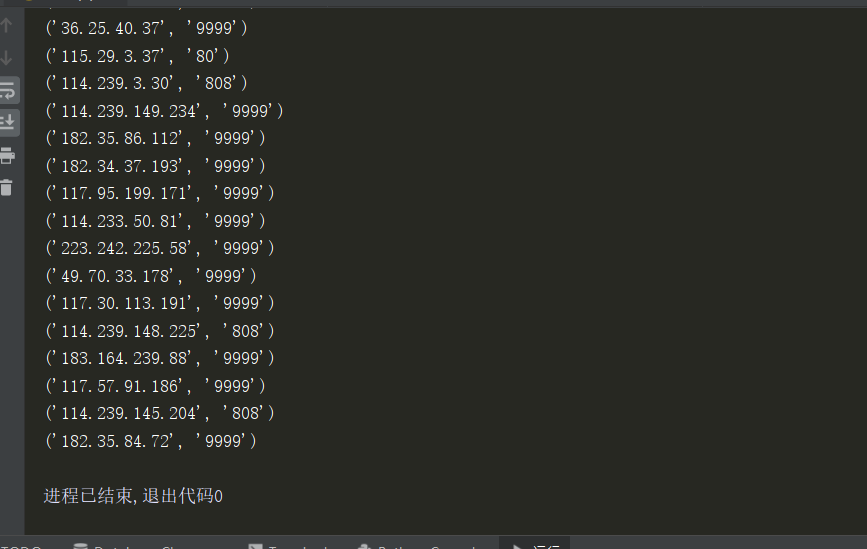
 for ip in zip(ips,ports ):  #提取拼接ip和端口

     print(ip)
00xx03---验证IP可行性
思路:带着ip和端口去访问一个网站,百度就可以
 import requests

 import re

 headers={"User-Agent": "Mozilla/5.0 (Windows NT 10.0; WOW64) AppleWebKit/537.36 (KHTML, like Gecko) Chrome/75.0.3770.100 Safari/537.36" }

 for i in range(1,1000):

     #网址

     url = "https://www.xicidaili.com/nn/{}".format(i)

     response = requests.get(url,headers=headers)

     # print(response.text)

     html = response.text

     #re.S忽略换行的干扰

     ips = re.findall("<td>(\d+\.\d+\.\d+\.\d+)</td>",html,re.S)

     ports = re.findall(("<td>(\d+)</td>"),html,re.S)

     # print(ips)

     # print(ports)

     for ip in zip(ips,ports ):  #提取拼接ip和端口

         proxies = {

             "http":"http://" + ip[0] + ":" + ip[1],

             "https":"http://" + ip[0] + ":" + ip[1]

         }

         try:

             res = requests.get("http://www.baidu.com",proxies=proxies,timeout = 3)  #访问网站等待3s没有反应,自动断开

             print(ip,"能使用")

             with open("ip.text",mode="a+") as f:

                 f.write(":".join(ip))  #写入ip.text文本

                 f.write("\n") #换行

         except Exception as e:   #捕捉错误异常

             print(ip,"不能使用")

00xx04---写入文本
 import requests

 import re

 #防反爬

 headers={"User-Agent": "Mozilla/5.0 (Windows NT 10.0; WOW64) AppleWebKit/537.36 (KHTML, like Gecko) Chrome/75.0.3770.100 Safari/537.36" }

 url = "https://www.xicidaili.com/nn/1"

 response = requests.get(url,headers=headers)

     # print(response.text)

 html = response.text

 # print(html)

 #re.S忽略换行的干扰

 ips = re.findall("<td>(\d+\.\d+\.\d+\.\d+)</td>",html,re.S)

 ports = re.findall(("<td>(\d+)</td>"),html,re.S)

 #print(ips)

 #print(ports)

 for ip in zip(ips,ports ):  #提取拼接ip和端口

     print(ip)

     proxies = {

             "http":"http://" + ip[0] + ":" + ip[1],

             "https":"http://" + ip[0] + ":" + ip[1]

         }

     try:

         res = requests.get("http://www.baidu.com",proxies=proxies,timeout = 3)  #访问网站等待3s没有反应,自动断开

         print(ip,"能使用")

         with open("ip.text",mode="a+") as f:

             f.write(":".join(ip))  #写入ip.text文本

             f.write("\n") #换行

     except Exception as e:   #捕捉错误异常

         print(ip,"不能使用")

爬了一页,才几个能用,有3000多页,不可能手动的
00xx05---批量爬
 #!/usr/bin/env python3

 # coding:utf-8

 # 2019/11/18 22:38

 #lanxing

 import requests

 import re

 #防反爬

 headers={"User-Agent": "Mozilla/5.0 (Windows NT 10.0; WOW64) AppleWebKit/537.36 (KHTML, like Gecko) Chrome/75.0.3770.100 Safari/537.36" }

 for i in range(1,3000):  #爬3000个网页

     #网站

     url = "https://www.xicidaili.com/nn/{}".format(i)

     response = requests.get(url,headers=headers)

         # print(response.text)

     html = response.text

     # print(html)

     #re.S忽略换行的干扰

     ips = re.findall("<td>(\d+\.\d+\.\d+\.\d+)</td>",html,re.S)

     ports = re.findall(("<td>(\d+)</td>"),html,re.S)

     #print(ips)

     #print(ports)

     for ip in zip(ips,ports ):  #提取拼接ip和端口

         print(ip)

         proxies = {

                 "http":"http://" + ip[0] + ":" + ip[1],

                 "https":"http://" + ip[0] + ":" + ip[1]

             }

         try:

             res = requests.get("http://www.baidu.com",proxies=proxies,timeout = 3)  #访问网站等待3s没有反应,自动断开

             print(ip,"能使用")

             with open("ip.text",mode="a+") as f:

                 f.write(":".join(ip))  #写入ip.text文本

                 f.write("\n") #换行

         except Exception as e:   #捕捉错误异常

             print(ip,"不能使用")
00xx06---最后
哈哈,感觉爬的速度太慢了,毕竟是单线程,如果要快速爬,可以试试用多线程爬取,
以后再补充完善代码吧
python-爬免费ip并验证其可行性的更多相关文章
- [python]爬代理ip v2.0(未完待续)
爬代理ip 所有的代码都放到了我的github上面, HTTP代理常识 HTTP代理按匿名度可分为透明代理.匿名代理和高度匿名代理. 特别感谢:勤奋的小孩 在评论中指出我文章中的错误. REMOTE_ ...
- python爬取ip地址
ip查询,异步get请求 分析接口,请求接口响应json 发现可以data中获取 result.json()['data'][0]['location'] # _*_ coding : utf-8 _ ...
- python爬取免费优质IP归属地查询接口
python爬取免费优质IP归属地查询接口 具体不表,我今天要做的工作就是: 需要将数据库中大量ip查询出起归属地 刚开始感觉好简单啊,毕竟只需要从百度找个免费接口然后来个python脚本跑一晚上就o ...
- 爬取西刺网的免费IP
在写爬虫时,经常需要切换IP,所以很有必要自已在数据维护库中维护一个IP池,这样,就可以在需用的时候随机切换IP,我的方法是爬取西刺网的免费IP,存入数据库中,然后在scrapy 工程中加入tools ...
- 无忧代理免费ip爬取(端口js加密)
起因 为了训练爬虫技能(其实主要还是js技能-),翻了可能有反爬的网站挨个摧残,现在轮到这个网站了:http://www.data5u.com/free/index.shtml 解密过程 打开网站,在 ...
- 第二篇 - python爬取免费代理
代理的作用参考https://wenda.so.com/q/1361531401066511?src=140 免费代理很多,但也有很多不可用,所以我们可以用程序对其进行筛选.以能否访问百度为例. 1. ...
- 爬取快代理的免费IP并测试
各大免费IP的网站的反爬手段往往是封掉在一定时间内访问过于频繁的IP,因此在爬取的时候需要设定一定的时间间隔,不过说实话,免费代理很多时候基本都不能用,可能一千个下来只有十几个可以用,而且几分钟之后估 ...
- python 单例模式获取IP代理
python 单例模式获取IP代理 tags:python python单例模式 python获取ip代理 引言:最近在学习python,先说一下我学Python得原因,一个是因为它足够好用,完成同样 ...
- Python获取免费的可用代理
Python获取免费的可用代理 在使用爬虫多次爬取同一站点时,常常会被站点的ip反爬虫机制给禁掉,这时就能够通过使用代理来解决.眼下网上有非常多提供最新免费代理列表的站点.这些列表里非常多的代理主机是 ...
随机推荐
- pytorch,cuda8,torch.cuda.is_available return flase (ubuntu14)
因为ubuntu 系统是14.0的,安装pytorch1.0的时候,本身已经安装好了cuda8,在验证gpu的时候,torch.cuda.is_available()返回false 安装命令是: co ...
- 2019-8-31-C#-如何写出一个不能被其他程序集继承的抽象类
title author date CreateTime categories C# 如何写出一个不能被其他程序集继承的抽象类 lindexi 2019-08-31 16:55:58 +0800 20 ...
- SQL SERVER 2008R2 执行大脚本文件时,提示“内存不足”的解决办法
我把一个数据库的架构及数据都已脚本的方式拷贝下来,再去新建一个数据库想把脚本执行一下,但提示如下错误: 问题描述: 当客户服务器不允许直接备份时,往往通过导出数据库脚本的方式来部署-还原数据库, 但是 ...
- 关于用Linux桌面版当工作系统这件事
Linux稳定性好,Linux软件开放--不过等到决定把Linux当作日常工作用系统时,就一言难尽了-- 我日常工作的需求有: 笔记本扩展屏幕 Golang开发 docker/kubernetes 输 ...
- redis随记
CONFIG REWRITE 将config文件 将服务器当前所使用的配置记录到 redis.conf 文件中.
- vue 挂载点 实例 模板
挂载点:vue实例 里面的el属性 对应的 id 所在的dom节点 模板:指的是挂载点内部的内容 模板可以写在挂载点内部 也可以写在属性里面 demo < ...
- node---处理post请求
//nodejs 处理post请求 // 异步 const http =require('http') const server=http.createServer((req,res)=>{ i ...
- hdu多校第四场 1003 (hdu6616) Divide the Stones 机智题
题意: 给你重量分别为1到n的n个石头,让你分成重量相等,数量也相等的k组,保证k是n的约数.问你能不能分配,如果能,输出具体的分配方案. 题解: 首先,如果1到n之和不能整除k,那么一定不能如题意分 ...
- Ubunto 无法连接ssh客服端
解决办法: (1)查看ip地址是否冲突 我在单位的虚拟机ip地址是192.168.14.85,与其它机器冲突了.改成了192.168.14.83 (2)关闭Ubuntu14.04的防火墙 root ...
- VS2010-MFC(状态栏的使用详解)
转自:http://www.jizhuomi.com/software/219.html 上一节讲了工具栏的创建.停靠与使用,本节来讲解状态栏的知识. 状态栏简介 状态栏相信大家在很多窗口中都能见到, ...