
iOS界面动画特效
1、TableView的headView背景图片拉伸
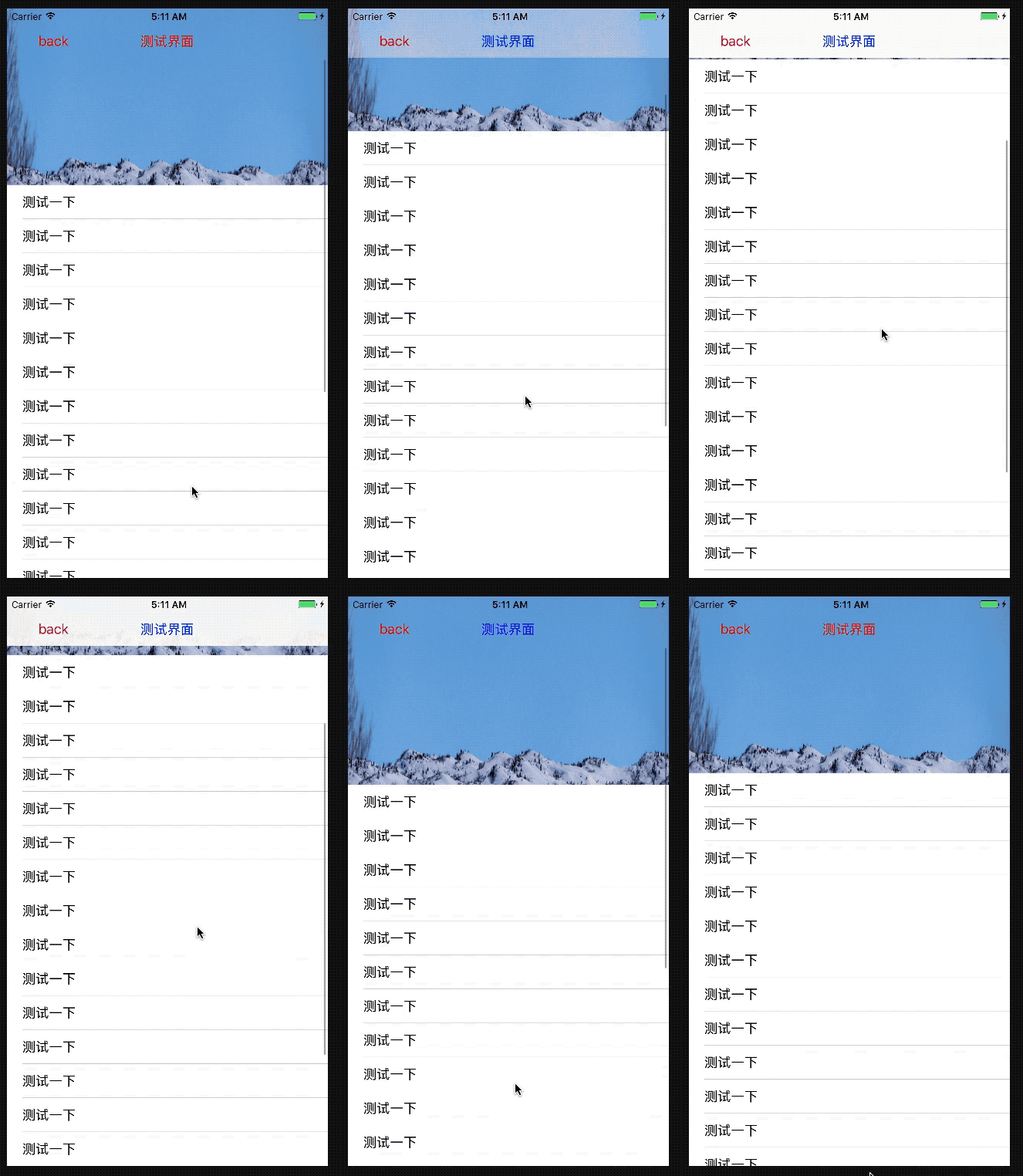
- (void)viewDidLoad {

    [super viewDidLoad];

    // Do any additional setup after loading the view.

    _bgImage =[[UIImageView alloc] initWithFrame:CGRectMake(, , CScreenWidth, CScreenHeight)];

    _bgImage.image = [UIImage imageNamed:@"pic4"];

    orginYframe = _bgImage.frame;

    [self.view addSubview:_bgImage];

    _headView = [[UIView alloc] initWithFrame:CGRectMake(, , CScreenWidth, )];

    _headView.backgroundColor = [[UIColor whiteColor] colorWithAlphaComponent:];

    _titleLBel = [[UILabel alloc] init];

    _titleLBel.frame =CGRectMake(, , CScreenWidth, );

    _titleLBel.text = @"测试界面";

    _titleLBel.textColor = [UIColor greenColor];

    _titleLBel.textAlignment = NSTextAlignmentCenter;

    [_headView addSubview:_titleLBel];

    UIButton *btn = [UIButton buttonWithType:UIButtonTypeCustom];

    [btn addTarget:self action:@selector(addDataClick) forControlEvents:UIControlEventTouchUpInside];

    [btn setTitle:@"back" forState:UIControlStateNormal];

    [btn setTitleColor:[UIColor redColor] forState:UIControlStateNormal];

    btn.frame = CGRectMake(, , , );

    [_headView addSubview:btn];

    [self.view addSubview:_headView];

    _tableView = [[UITableView alloc] initWithFrame:CGRectMake(, , CScreenWidth, CScreenHeight-)];

    UIView *headViewT = [[UIView alloc] initWithFrame:CGRectMake(, , CScreenWidth, )];

    headViewT.backgroundColor = [UIColor clearColor];

    _tableView.tableHeaderView = headViewT;

    _tableView.delegate =self;

    _tableView.dataSource = self;

    _tableView.backgroundColor = [UIColor clearColor];

    [self.view addSubview:_tableView];

}

- (NSInteger)tableView:(UITableView *)tableView numberOfRowsInSection:(NSInteger)section

{

    return ;

}

- (UITableViewCell *)tableView:(UITableView *)tableView cellForRowAtIndexPath:(NSIndexPath *)indexPath

{

    UITableViewCell *cell = [[UITableViewCell alloc] initWithStyle:UITableViewCellStyleDefault reuseIdentifier:@"cell"];

    cell.textLabel.text =@"测试一下";

    return cell;

}

- (void)scrollViewDidScroll:(UIScrollView *)scrollView

{

    CGFloat offSetY = scrollView.contentOffset.y;

    NSLog(@"===%f",offSetY);

    if (offSetY < )

    {

        _titleLBel.textColor = [UIColor blueColor];

        _headView.backgroundColor = [[UIColor whiteColor] colorWithAlphaComponent:offSetY/];

    }

    else

    {

        _titleLBel.textColor = [UIColor redColor];

        _headView.backgroundColor = [UIColor whiteColor];

    }

    if (offSetY > )

    {

        _bgImage.frame = ({

            CGRect frame = _bgImage.frame;

            frame.origin.y = orginYframe.origin.y - offSetY;

            frame;

        });

    }

    else

    {

        _bgImage.frame = ({

            CGRect frame = _bgImage.frame;

            frame.size.width =orginYframe.size.width -offSetY;

            frame.size.height = orginYframe.size.height *frame.size.width/ orginYframe.size.width;

            frame.origin.x = -(frame.size.width - orginYframe.size.width)/;

            NSLog(@"----%@",NSStringFromCGRect(frame));

            frame;

        });

    }

    if (offSetY ==)

    {

        _titleLBel.textColor = [UIColor redColor];

    }

}
iOS界面动画特效的更多相关文章
- Android的Activity切换动画特效库SwitchLayout,视图切换动画库,媲美IOS
由于看了IOS上面很多开发者开发的APP的视图界面切换动画体验非常好,这些都是IOS自带的,但是Android的Activity等视图切换动画并没有提供原生的,所以特此写了一个可以媲美IOS视图切换动 ...
- (NO.00004)iOS实现打砖块游戏(二):实现游戏主界面动画
大熊猫猪·侯佩原创或翻译作品.欢迎转载,转载请注明出处. 如果觉得写的不好请告诉我,如果觉得不错请多多支持点赞.谢谢! hopy ;) 一个内容不错的游戏也要一个好的包装.玩家进入游戏时第一眼看到的是 ...
- Bodymovin:Bodymovin和Lottie:把AE动画转换成HTML5/Android/iOS原生动画
转自:https://www.cnblogs.com/zamhown/p/6688369.html 大杀器Bodymovin和Lottie:把AE动画转换成HTML5/Android/iOS原生动画 ...
- 大杀器Bodymovin和Lottie:把AE动画转换成HTML5/Android/iOS原生动画
前段时间听部门老大说,Airbnb出了个移动端的动画库Lottie,可以和一个名叫Bodymovin的AE插件结合起来,把在AE上做好的动画导出为json文件,然后以Android/iOS原生动画的形 ...
- iOS界面开发
[转载] iOS界面开发 发布于:2014-07-29 11:49阅读数:13399 iOS 8 和 OS X 10.10 中一个被强调了多次的主题就是大一统,Apple 希望通过 Hand-off ...
- 仿Material UI框架的动画特效
Material UI是一款功能非常强大,界面却十分清新简洁的CSS框架,Material UI利用了Google的Material Design 全新设计语言,并且让每一个UI组件都变得非常独立,因 ...
- 【IOS界面布局】横竖屏切换和控件自适应(推荐)
[IOS界面布局]横竖屏切换和控件自适应(推荐) 分类: [MAC/IOS下开发]2013-11-06 15:14 8798人阅读 评论(0) 收藏 举报 横竖屏切换 自适应 第一种:通过人为的办法改 ...
- 超炫HTML5 SVG聊天框拖拽弹性摇摆动画特效
这是一款很有创意的HTML5 SVG聊天框拖拽弹性摇摆动画特效. 用户能够用鼠标点击或用手滑动聊天框上的指定区域,该区域会以很有弹性的弹簧效果拉开聊天用户列表.点击一个用户头像后.又以同样的弹性特效切 ...
- ios 学习动画的套路 (一)
你也肯定喜欢炫酷的动画! 在APP中,动画就是一个点睛之笔!可以给用户增加一些独特的体验感,估计也有许多的和我一样的,看着那些觉得不错的动画,也就只能流口水的孩子,毕竟~不知道从哪里下手去写!会连续的 ...
随机推荐
- HashMap底层实现原理及面试问题
①HashMap的工作原理 HashMap基于hashing原理,我们通过put()和get()方法储存和获取对象.当我们将键值对传递给put()方法时,它调用键对象的hashCode()方法来计算h ...
- 将excel表格或csv转换为Shapefile文件
读取csv转为shp 构造读取csv函数 def read_csv(fp): ret = [] with open(fp, 'rb') as f: for line in f: ret.append( ...
- <mysql>mysql基础学习
1.Join语法 JOIN 按照功能大致分为如下三类: INNER JOIN(内连接,或等值连接):取得两个表中存在连接匹配关系的记录. LEFT JOIN(左连接):取得左表(table1)完全记录 ...
- 【POJ】1611 The Suspects
题目链接:http://poj.org/problem?id=1611 题意:有学生感染了SARS.一个学生可以加入很多小组.n个学生m个小组,每个小组有k个组内成员,后跟着k个成员的组内编号.让你求 ...
- websocket接口测试
1.先在jmeter的插件管理器安装webSocket的插件,WebSocket 常规选项解释如下: ip:测试服务器域名 Streaming Connection:请求之后是否保持连接,勾选之后在同 ...
- jdk1.8新特性学习
package com.xll.code.jdk1_8study; import com.xll.code.jdk1_8study.pojo.User; import org.junit.jupite ...
- dev设置子窗体的初始位置,grid控件表头的属性设置
当在父窗体上弹出子窗体时,一般设置子窗体的初始位置是居中, //在需要展示子窗体的父窗体上写这段,注意必须设置在show方法之前Form2 f2 = new Form2(); f2.MdiParent ...
- cacti ERROR: FILE NOT FOUND
Cacti 版本: 0.8a 在安装好 cacti之后,进入Settings -> Paths, 而且里面的路径在系统中都存在的,在这里显示ERROR: FILE NOT FOUND 参考1的博 ...
- node---处理get请求
const http=require('http') const querystring=require('querystring') const server = http.createServer ...
- CSS W3C统一验证工具
CssStats 是一个在线的 CSS 代码分析工具 网址是: http://www.cssstats.com/ 如果你想要更全面的,这个神奇,你值得拥有: W3C 统一验证工具: http://v ...