
android开发基础(ViewModel)
今天学习了ViewModel,其是Jetpack的一个类,它可以将界面中的数据独立出来,这样不会造成页面上信息的丢失。
我跟着视频做了一个简单的实例:
首先创建项目的时候它和以往的项目会有些不一样,因为需要使用Jetpack库,所以需要勾选上Use legacy android.support libraries。

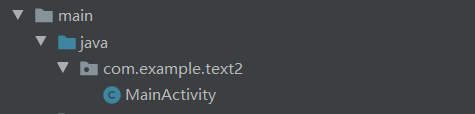
我们需要再com....这个文件夹下新建一个Jjava class.来表示实物类。

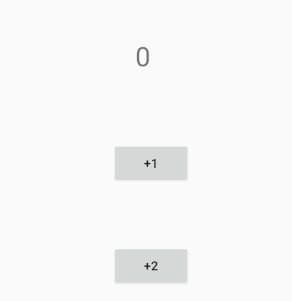
我的例子就是实现按+1按钮或着+2按钮,再Textview 上显示i相应的数值。
MainActivity:
package com.example.viewmodeltext;

import android.arch.lifecycle.ViewModel;

import android.arch.lifecycle.ViewModelProviders;

import android.support.v7.app.AppCompatActivity;

import android.os.Bundle;

import android.view.View;

import android.widget.Button;

import android.widget.TextView;

public class MainActivity extends AppCompatActivity {

MyViewModel myViewModel;

TextView textView;

Button button1,button2;

    @Override

    protected void onCreate(Bundle savedInstanceState) {

        super.onCreate(savedInstanceState);

        setContentView(R.layout.activity_main);

        myViewModel = ViewModelProviders.of(this).get(MyViewModel.class);//获取对象

        textView = findViewById(R.id.textView);

        textView.setText(String.valueOf(myViewModel.number));

        button1 = findViewById(R.id.button);

        button2 = findViewById(R.id.button2);

        button1.setOnClickListener(new View.OnClickListener() {

            @Override

            public void onClick(View v) {

                myViewModel.number+=1;

                textView.setText(String.valueOf(myViewModel.number));

            }

        });

        button2.setOnClickListener(new View.OnClickListener() {

            @Override

            public void onClick(View v) {

                myViewModel.number+=2;

                textView.setText(String.valueOf(myViewModel.number));

            }

        });

    }

}
新建的类(MyViewModel):
package com.example.viewmodeltext;

import android.arch.lifecycle.ViewModel;

public class MyViewModel extends ViewModel {

    public int number = 0;

}
activity_main.xml:
<?xml version="1.0" encoding="utf-8"?>

<android.support.constraint.ConstraintLayout xmlns:android="http://schemas.android.com/apk/res/android"

    xmlns:app="http://schemas.android.com/apk/res-auto"

    xmlns:tools="http://schemas.android.com/tools"

    android:layout_width="match_parent"

    android:layout_height="match_parent"

    tools:context=".MainActivity">

    <TextView

        android:id="@+id/textView"

        android:layout_width="wrap_content"

        android:layout_height="wrap_content"

        android:text="@string/textview"

        android:textSize="30sp"

        app:layout_constraintBottom_toBottomOf="parent"

        app:layout_constraintEnd_toEndOf="parent"

        app:layout_constraintHorizontal_bias="0.475"

        app:layout_constraintStart_toStartOf="parent"

        app:layout_constraintTop_toTopOf="parent"

        app:layout_constraintVertical_bias="0.144" />

    <Button

        android:id="@+id/button"

        android:layout_width="wrap_content"

        android:layout_height="wrap_content"

        android:text="@string/button1"

        app:layout_constraintBottom_toBottomOf="parent"

        app:layout_constraintEnd_toEndOf="parent"

        app:layout_constraintHorizontal_bias="0.498"

        app:layout_constraintStart_toStartOf="parent"

        app:layout_constraintTop_toTopOf="parent"

        app:layout_constraintVertical_bias="0.355" />

    <Button

        android:id="@+id/button2"

        android:layout_width="wrap_content"

        android:layout_height="wrap_content"

        android:text="@string/button2"

        app:layout_constraintBottom_toBottomOf="parent"

        app:layout_constraintEnd_toEndOf="parent"

        app:layout_constraintHorizontal_bias="0.498"

        app:layout_constraintStart_toStartOf="parent"

        app:layout_constraintTop_toTopOf="parent"

        app:layout_constraintVertical_bias="0.562" />

</android.support.constraint.ConstraintLayout>
android开发基础(ViewModel)的更多相关文章
- 20145213 《Java程序设计》实验四 Android开发基础
20145213 <Java程序设计>实验四 Android开发基础 说在前面的话 不同以往实验,对于这次实验具体内容我是比较茫然的.因为点我,打开实验四的链接居然能飘出一股熟悉的味道,这 ...
- 20145206实验四《Android开发基础》
20145206 实验四<Android开发基础> 实验内容 ·安装Android Studio ·运行安卓AVD模拟器 ·使用安卓运行出虚拟手机并显示HelloWorld以及自己的学号 ...
- 实验四 Android开发基础
实验四 Android开发基础 实验内容 1.安装Android Studio 2.运行安卓AVD模拟器 3.使用安卓运行出虚拟手机并显示HelloWorld以及自己的学号 (一)SDK的安装 (二) ...
- 20145337实验四Android开发基础
20145337实验四Android开发基础 实验内容 基于Android Studio开发简单的Android应用并部署测试; 了解Android组件.布局管理器的使用: 掌握Android中事件处 ...
- 20145225《Java程序设计》 实验四 Android开发基础
20145225<Java程序设计> 实验四 Android开发基础 实验报告 实验内容 安装Android Studio 运行安卓AVD模拟器 使用安卓运行出虚拟手机并显示HelloWo ...
- 20145208 实验四 Android开发基础
20145208 实验四 Android开发基础 安装Android Studio 安装的具体步骤在老师的链接中已经很详细了,在此就不做赘述了. 在此提出我觉得安装的时候需要注意的两个地方 一是安装地 ...
- 20145215实验四 Android开发基础
20145215实验四 Android开发基础 实验内容 基于Android Studio开发简单的Android应用并部署测试; 了解Android组件.布局管理器的使用: 掌握Android中事件 ...
- 20165223 实验四 Android开发基础
实验四 Android开发基础 目录 一.实验报告封面 二.具体实验内容 (一)Android Stuidio的安装测试 (二)Activity测试 (三)UI测试 (四)布局测试 (五)教材代码测试 ...
- 20155324 《Java程序设计》实验四 Android开发基础
20155324 <Java程序设计>实验四 Android开发基础 实验内容 1.基于Android Studio开发简单的Android应用并部署测试; 2.了解Android.组件. ...
- 2017-2018-2 20165237 实验四《Android开发基础》实验报告
2017-2018-2 20165237 实验四<Android开发基础>实验报告 实验报告表头: No.1 实验要求: Android程序设计-1 实验要求: 参考<Java和An ...
随机推荐
- Python学习笔记9——异常处理
处理异常 如果执行到程序中某处抛出了异常,程序就会被终止并退出.你可能会问,那有没有什么办法可以不终止程序,让其照样运行下去呢?答案当然是肯定的,这也就是我们所说的异常处理,通常使用 try 和 ex ...
- HDU1069 Monkey and Banana(dp)
链接:http://acm.hdu.edu.cn/showproblem.php?pid=1069 题意:给定n种类型的长方体,每个类型长方体无数个,要求长方体叠放在一起,且上面的长方体接触面积要小于 ...
- linux做免密登录,成功分发公钥后登录主机依旧需要输入密码的问题解决
问题描述 在主机A上用ssh-keygen生成密钥对后,用ssh-copy-id命令将公钥成功copy到主机B上后,测试从A免密登录B,但是依旧需要输入主机B的密码后才能登录. 出现此错误的原因 如果 ...
- [termux Linux] termux不用ssh远程控制shell
前言 今天想在手机上测试python代码(termux),但是手机操作确实太麻烦了,所以就想试试用ssh来用电脑操作,但是网上说似乎不能用ip链接ssh 但是配置密钥文件有很麻烦.所以,我想了一个歪招 ...
- Array,String,Set,Map
热爱前端的17号诶 积跬步以致千里 积怠惰以致深渊 博客园 首页 新随笔 联系 管理 随笔 - 58 文章 - 2 评论 - 65 最新数组方法(包括es6) for...of 是 ES6 新引入 ...
- 关于BaiduPSC-Go的一些bug的更正
首先说下操作步骤 下载是在GutHub,这个不赘述,网上很多资料 下载之后配置环境变量,在path的后面加上一个分号,然后加上你下载的目录,目录名最好为英文 然后通过命令行CMD工具,输入BaiduP ...
- LED Decorative Light Manufacturer Introduction: LED Metal Table Light
Nowadays, when many people choose the desk light, they are worried that it will not be used for a lo ...
- Digital filter
https://ww2.mathworks.cn/help/signal/examples/practical-introduction-to-digital-filter-design.html D ...
- 每天进步一点点------Allegro 手工布线时控制面板各选项说明
在进行手工布线过程中,最重要的就是对控制面板中的各个选项进行设置,因此首先介绍控制面板中各个选项的含义. 手工布线的命令为Route->connect,执行命令后,右侧控制面板如图8.14所示. ...
- 每天进步一点点------下载Microblaze程序到Flash
第一步 生成下载文件(bit文件) 选择之前的工作目录,打开SDK.点击Program FPGA图标. 将bootloop项改为Hello_World.elf.点击Program.此时可以不用连接下载 ...