
gRPC用法
什么是 gRPC?
A high performance, open-source universal RPC framework
RPC : Remote Procedure Call
在gRPC中,客户端应用程序可以直接在其他计算机上的服务器应用程序上调用方法,就好像它是本地对象一样,这使您更轻松地创建分布式应用程序和服务。 与许多RPC系统一样,gRPC围绕定义服务的思想,指定可通过其参数和返回类型远程调用的方法。 在服务器端,服务器实现此接口并运行gRPC服务器以处理客户端调用。 在客户端,客户端具有一个存根(在某些语言中仅称为客户端),提供与服务器相同的方法。
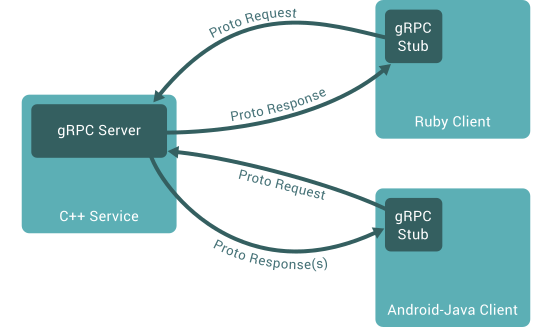
如何工作?
在默认情况下 gRPC 使用 protocol bufers 进行序列化结构化数据(serializing structured data),当然也可以使用其他数据格式,比如JSON。建议将proto3与gRPC一起使用
工作步骤:(默认使用protobuf的情况下)
- 在
helloworld.proto文件中定义gRPC服务,将RPC方法参数和返回类型指定为protobuf消息,像下面这样:
// The greeter service definition.

service Greeter {

  // Sends a greeting

  rpc SayHello (HelloRequest) returns (HelloReply) {}

}

// The request message containing the user's name.

message HelloRequest {

  string name = 1;

}

// The response message containing the greetings

message HelloReply {

  string message = 1;

}
- 生成代码,
gRPC使用protoc工具以及gRPC的插件来生成代码
安装和使用
首先先安装protobuf的protoc(见前置技能链接)以及对应语言的支持
对于不同的语言,需要为protoc安装对应的gRPC插件
c++
$ # 克隆仓库,-c选项是添加代理,可以不用

$ git -c http.proxy=socks5://192.168.0.103:1080 clone -b $(curl -L https://grpc.io/release) https://github.com/grpc/grpc

$ cd grpc

$ git -c http.proxy=socks5://192.168.0.103:1080 submodule update --init

$ mkdir build && cd build

$ cmake ..

$ make -j4

$ sudo make install
仓库目录grpc/examples/cpp/helloworld下有示例源码
仓库目录grpc/examples/protos下有.proto文件,包括helloworld.proto
生成代码的命令是:
$ protoc -I . --grpc_out=. --plugin=protoc-gen-grpc=`which grpc_cpp_plugin` helloworld.proto
go
$ export https_proxy=socks5://127.0.0.1:1080  # 这个是我自己代理

$ go get -u google.golang.org/grpc
然后应可以在$GOPATH/src/google.golang.org/grpc/examples/helloworld目录找到示例
生成代码的命令$ protoc -I. ./helloworld.proto --go_out=plugins=grpc:.
将在当前目录生成helloworld.pb.go文件
使用:
// server 端

package main

import (

	"context"

	"log"

	"net"

	"google.golang.org/grpc"

	pb "google.golang.org/grpc/examples/helloworld/helloworld"

)

const (

	port = ":50051"

)

// server is used to implement helloworld.GreeterServer.

type server struct {

	pb.UnimplementedGreeterServer

}

// SayHello implements helloworld.GreeterServer

func (s *server) SayHello(ctx context.Context, in *pb.HelloRequest) (*pb.HelloReply, error) {

	log.Printf("Received: %v", in.GetName())

	return &pb.HelloReply{Message: "Hello " + in.GetName()}, nil

}

func main() {

	lis, err := net.Listen("tcp", port)

	if err != nil {

		log.Fatalf("failed to listen: %v", err)

	}

	s := grpc.NewServer()

	pb.RegisterGreeterServer(s, &server{})

	if err := s.Serve(lis); err != nil {

		log.Fatalf("failed to serve: %v", err)

	}

}

// client 端

package main

import (

	"context"

	"log"

	"os"

	"time"

	"google.golang.org/grpc"

	pb "google.golang.org/grpc/examples/helloworld/helloworld"

)

const (

	address     = "localhost:50051"

	defaultName = "world"

)

func main() {

	// Set up a connection to the server.

	conn, err := grpc.Dial(address, grpc.WithInsecure(), grpc.WithBlock())

	if err != nil {

		log.Fatalf("did not connect: %v", err)

	}

	defer conn.Close()

	c := pb.NewGreeterClient(conn)

	// Contact the server and print out its response.

	name := defaultName

	if len(os.Args) > 1 {

		name = os.Args[1]

	}

	ctx, cancel := context.WithTimeout(context.Background(), time.Second)

	defer cancel()

	r, err := c.SayHello(ctx, &pb.HelloRequest{Name: name})

	if err != nil {

		log.Fatalf("could not greet: %v", err)

	}

	log.Printf("Greeting: %s", r.GetMessage())

}
gRPC用法的更多相关文章
- Java 开发 gRPC 服务和客户端
新建一个普通的Maven项目: 配置pom文件,导入gRPC的依赖和插件 pom 中增加外部依赖 <dependency> <groupId>io.grpc</g ...
- grpc介绍
grpc入门(一) 一.什么是grpc grpc是谷歌开源的一款高性能的rpc框架 (https://grpc.io),可以使用protocol buffers作为IDL(Interface Defi ...
- 入门干货之Grpc的.Net实现-MagicOnion
此文章简单残暴,学习成本较低,你可以跟着我一起撸代码,一起吐槽,一起砸键盘.以下操作均为 core2.0 环境. 0x01.Grpc 1.介绍 Google主导开发的RPC框架,使用HTTP/2协议 ...
- google的grpc在golang中的使用
GRPC是google开源的一个高性能.跨语言的RPC框架,基于HTTP2协议,基于protobuf 3.x,基于Netty 4.x. 前面写过一篇golang标准库的rpc包的用法,这篇文章接着讲一 ...
- gRPC源码分析(c++)
首先需要按照grpc官网上说的办法从github上下载源码,编译,然后跑一跑对应的测试代码.我分析的代码版本为v1.20.0. 在cpp的helloworld例子中,client端,第一个函数是创建c ...
- protobuffer、gRPC、restful gRPC的相互转化
转自:https://studygolang.com/articles/12510 文档 grpc中文文档 grpc-gateway,restful和grpc转换库 protobuf 官网 proto ...
- gRPC初探——概念介绍以及如何构建一个简单的gRPC服务
目录 引言 1. gRPC简介 2. 使用Protocol Buffers进行服务定义 2.1 定义消息 2.2 定义服务接口 3.构建简单的gRPC服务 3.1 编写proto文件,定义消息和接口 ...
- 带入gRPC:gRPC Deadlines
带入gRPC:gRPC Deadlines 原文地址:带入gRPC:gRPC Deadlines项目地址:https://github.com/EDDYCJY/go... 前言 在前面的章节中,已经介 ...
- Gonet2 游戏server框架解析之gRPC提高(5)
上一篇blog是关于gRPC框架的基本使用,假设说gRPC仅仅是远程发几个參数,那和一个普通的http请求也没多大区别了. 所以今天我就来学习一下gRPC高级一点的用法. 流! 流能够依据用法,分为单 ...
随机推荐
- Web自动化测试项目搭建目录
Web自动化测试项目搭建(一) 需求与设计 Web自动化测试项目(二)BasePage实现 Web自动化测试项目(三)用例的组织与运行 Web自动化测试项目(四)测试报告 Web自动化测试项目(五)测 ...
- Spring整合Spring-data-jpa项目所遇到的坑
1.异常信息: 错误原因:缺少spring-aop包 解决: <dependency> <groupId>org.springframework</groupId> ...
- layui+springmvc实现文件异步上传
一.单文件上传 前端代码 <div class="layui-upload"> <div class="layui-upload-list"& ...
- Distance dependent Chinese Restaurant Processes
Here is a note of Distance dependent Chinese Restaurant Processes 文章链接http://pan.baidu.com/s/1dEk7ZA ...
- 解决docker容器无网络、无法连接互联网----长期更新
众所周知,docker有三种默认的网络模式,分别是: bridge host none 然后需要注意的就是内核转发这个,一定不要忘了!配置方法如下 echo -e "net.ipv4.ip_ ...
- 西门子PLC在自动浇灌系统中的应用
西门子PLC在自动浇灌系统中的应用(鸿控整理) 2020-02-07 22:50:48 1 自动浇灌系统简介 系统采用自行研制的湿度传感器监测土壤的湿度情况,当土壤湿度低于所要求的值后,自动开启水泵电 ...
- SSH(三)
在Spring中引用属性文件: 优点: 1.防止随意更改jdbc的连接 2.给不懂代码的人使用 步骤: 1.数据库连接信息写在属性文件中 ...
- 八使用Shell函数
在Shell脚本中,将一些需要重复使用的操作,定义为公共的语句块,即可称为函数 使用函数的好处? 使脚本代码更简洁,增强易读性 提高Shell脚本的执行效率 函数定义方法 基本格式1 function ...
- sockaddr与sockaddr_in的关系
WIN7+VS2013 sockaddr // // Structure used to store most addresses. // typedef struct sockaddr { #if ...
- 基于 H5与WebGL 的科幻风机 3D 展示
前言 许多世纪以来,风力机同水力机械一样,作为动力源替代人力.畜力,对生产力的发展发挥过重要作用.近代机电动力的广泛应用以及二十世纪50年代中东油田的发现,使风机发电机的发展缓慢下来. 70年代初期, ...