
vue之循环遍历v-for
1.背景
2.遍历数组


<!DOCTYPE html>

<html lang="en">

<head>

  <meta charset="UTF-8">

  <title>Title</title>

  <!-- 开发环境版本,包含了有帮助的命令行警告 -->

  <script src="https://cdn.jsdelivr.net/npm/vue/dist/vue.js"></script>

  <!--<script src="./js/vue.js"></script>-->

</head>

<body>

<div id="app">

  <h3>{{title}}</h3>

  <h4>1.遍历数组</h4>

  <h4>订单列表如下(不取下标)</h4>

  <ul>

    <li v-for="item in orderList">

      {{item.orderName}}---- {{item.price}}---- {{item.num}}

    </li>

  </ul>

  <h4>合计:{{allPrice}}</h4>

  <h4>订单列表如下(取下标)</h4>

  <ul>

    <li v-for="(item,index) in orderList">

      {{index+1}}. {{item.orderName}}---- {{item.price}}---- {{item.num}}

    </li>

  </ul>

  <h4>合计:{{allPrice}}</h4>

</div>

<script>

  const app = new Vue({

    el: '#app',

    data: {

      title: '循环遍历v-for简单使用',

      name: 'ldp',

      orderList: [

        {orderName: '方便面', price: 3, num: 6},

        {orderName: '鸡腿', price: 8, num: 1},

        {orderName: '手机', price: 39, num: 4},

        {orderName: '鱼', price: 12, num: 9}

      ]

    },

    computed: {

      allPrice: function () {

        // 高阶函数 all表示每次的结果,item表示循环出来的每个对称 , reduce 函数的第二个参数表示 all=0开始累加

        return this.orderList.reduce((all, item) => {

          return all + item.price * item.num

        }, 0)

      }

    }

  });

</script>

</body>

</html>
3.遍历对象
<!DOCTYPE html>

<html lang="en">

<head>

  <meta charset="UTF-8">

  <title>Title</title>

  <!-- 开发环境版本,包含了有帮助的命令行警告 -->

  <script src="https://cdn.jsdelivr.net/npm/vue/dist/vue.js"></script>

  <!--<script src="./js/vue.js"></script>-->

</head>

<body>

<div id="app">

  <h3>{{title}}</h3>

  <h4>遍历对象</h4>

  <ul>

    <li v-for="(value,key,index) in product"> {{value}}--- {{key}}--- {{index}}---</li>

  </ul>

</div>

<script>

  const app = new Vue({

    el: '#app',

    data: {

      title: '循环遍历v-for简单使用',

      name: 'ldp',

      product: {

        orderName: '方便面',

        price: 3,

        num: 6

      }

    }

  });

</script>

</body>

</html>
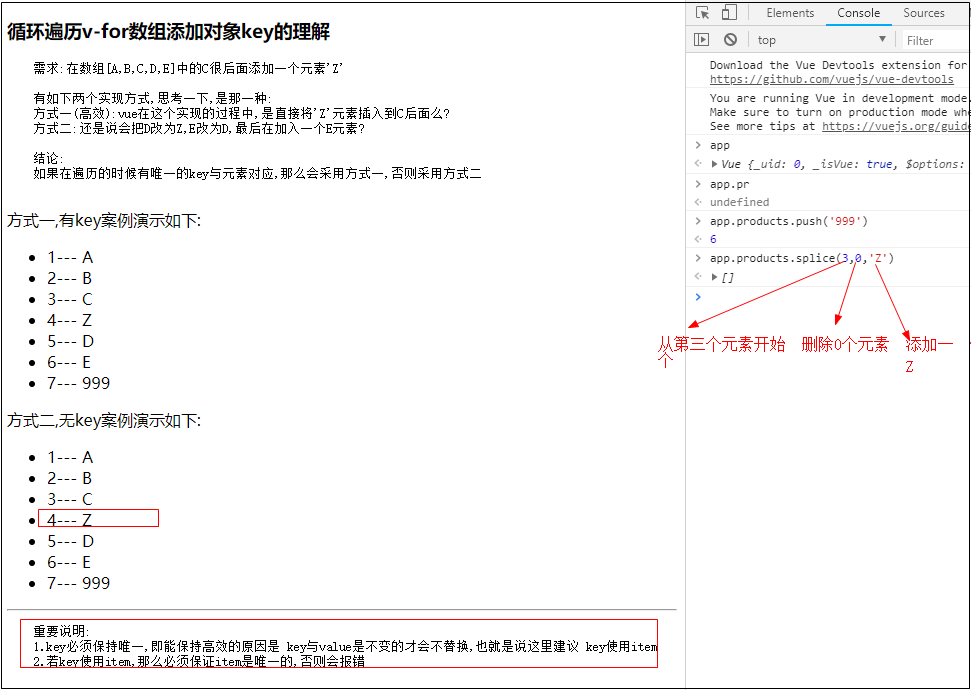
4.关于遍历中的key
5.数据数组变动中的方法
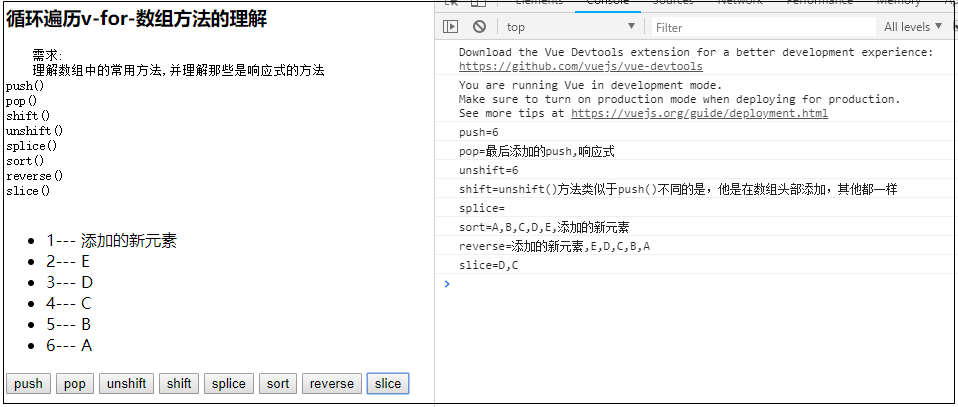
<!DOCTYPE html>

<html lang="en">

<head>

  <meta charset="UTF-8">

  <title>Title</title>

  <!-- 开发环境版本,包含了有帮助的命令行警告 -->

  <script src="https://cdn.jsdelivr.net/npm/vue/dist/vue.js"></script>

  <!--<script src="./js/vue.js"></script>-->

</head>

<body>

<div id="app">

  <h3>{{title}}</h3>

  <pre>

    需求:

    理解数组中的常用方法,并理解那些是响应式的方法

push()

pop()

shift()

unshift()

splice()

sort()

reverse()

slice()

  </pre>

  <ul>

    <li v-for="(item,index) in products"> {{index+1}}--- {{item}}</li>

  </ul>

  <button @click="push">push</button>

  <button @click="pop">pop</button>

  <button @click="unshift">unshift</button>

  <button @click="shift">shift</button>

  <button @click="splice">splice</button>

  <button @click="sort">sort</button>

  <button @click="reverse">reverse</button>

  <button @click="slice">slice</button>

</div>

<script>

  let app = new Vue({

    el: '#app',

    data: {

      title: '循环遍历v-for-数组方法的理解',

      name: 'ldp',

      products: ['A', 'B', 'C', 'D', 'E']

    },

    methods: {

      // 在数组最后添加元素,响应式的方法

      // push()方法在数组的尾部添加一个或者多个元素,并返回数组的新长度。注意的是,改变的是原数组的值,返回的是新数组的长度

      push() {

        let data = this.products.push("最后添加的push,响应式")

        console.log("push=" + data)

      },

      // pop()方法删除数组的最后一个元素,并返回它的删除值。也是改变原数组,返回的是删除的值。

      pop() {

        let data = this.products.pop()

        console.log("pop=" + data)

      },

      // unshift()方法类似于push()不同的是,他是在数组头部添加,其他都一样

      unshift() {

        let data = this.products.unshift("unshift()方法类似于push()不同的是,他是在数组头部添加,其他都一样")

        console.log("unshift=" + data)

      },

      // shift()方法则类比pop()方法。

      shift() {

        let data = this.products.shift()

        console.log("shift=" + data)

      },

      // Array.splice()方法,用来删除或插入元素,会修改原数组!

      // //第一个参数是截取的起始位置(包括),第二个参数是截取(删除)的个数,之后的参数就是添加在元数组的新值

      splice() {

        // 从第二个开发删除0个,添加一个新元素

        let data = this.products.splice(2, 0, '添加的新元素')

        console.log("splice=" + data)

      },

      // Array.sort()方法,返回排序后的数组。如果数组包含undefined,会被排到数组的尾部。如果不带参数的调用sort(),数组元素以字母表顺序排序。

      sort() {

        let data = this.products.sort()

        console.log("sort=" + data)

      },

      // 返回逆序数组(倒叙排列数组)[ Array..reverse() ]

      reverse() {

        let data = this.products.reverse()

        console.log("reverse=" + data)

      },

      // Array.slice()方法,返回指定数组的片段或者子数组。不会改变原数组

      // 第一个参数是截取开始的位置(包括),第二个参数是截取结束的位置(不包括)

      slice() {

        let data = this.products.slice(2, 4)

        console.log("slice=" + data)

      }

    }

  });

</script>

</body>

</html>
6.简易购物车练习
<!DOCTYPE html>

<html lang="en">

<head>

  <meta charset="UTF-8">

  <title>Title</title>

  <!-- 开发环境版本,包含了有帮助的命令行警告 -->

  <script src="https://cdn.jsdelivr.net/npm/vue/dist/vue.js"></script>

  <!--<script src="./js/vue.js"></script>-->

</head>

<style>

  table {

    border: 2px solid cadetblue;

    border-collapse: collapse;

    border-spacing: 0;

  }

  th, td {

    border: 2px solid cadetblue;

  }

</style>

<body>

<div id="app">

  <h3>{{title}}</h3>

  <pre>

    需求:

    做一个简易购物车

  </pre>

  <table>

    <thead>

    <tr>

      <th>序号</th>

      <th>品名</th>

      <th>零售价</th>

      <th>购买数量</th>

      <th>操作</th>

    </tr>

    </thead>

    <tbody>

    <tr v-for="(item,index) in products">

      <td>{{index+1}}</td>

      <td>{{item.orderName}}</td>

      <td>{{item.price}}</td>

      <td>

        <button @click="decrement(index)">-</button>

        {{item.num}}

        <button @click="increment(index)">+</button>

      </td>

      <td>

        <button @click="del(index)">删除</button>

      </td>

    </tr>

    </tbody>

  </table>

  总计:{{totalPrice}}

</div>

<script>

  let app = new Vue({

    el: '#app',

    data: {

      title: '循环遍历-购物车案例',

      name: 'ldp',

      products: [

        {orderName: '方便面', price: 3, num: 6},

        {orderName: '鸡腿', price: 8, num: 1},

        {orderName: '手机', price: 39, num: 4},

        {orderName: '鱼', price: 12, num: 9}

      ]

    },

    computed: {

      totalPrice() {

        // 高阶函数

        return this.products.reduce((total, item) => {

          return total + item.num * item.price

        }, 0)

      }

    },

    methods: {

      increment: function (index) {

        console.log("---执行加一")

        this.products[index].num++

      },

      decrement: function (index) {

        console.log("---执行减一")

        if (this.products[index].num > 1) {

          this.products[index].num--

        } else {

          console.log("---在减就没有了")

        }

      },

      del(index) {

        this.products.splice(index, 1)

      }

    }

  });

</script>

</body>

</html>
完美!
vue之循环遍历v-for的更多相关文章
- Vue之循环遍历Json数据,填充Table表格
简单记一次Vue循环遍历Json数据,然后填充到Table表格中,展示到前端的代码: async getData(id) { const res = await this.$store.api.new ...
- vue组件,vue补充和总结,JS循环遍历和加减运算、类型转换补充
目录 一.vue中的组件 1. 组件的概念 2. 组件分类 3. 组件的特点 4. 组件的定义 5. 组件化 (1)用法和注意 (2)数据组件化实例 6. 组件传参--父传子 (1)用法和注意 (2) ...
- 关于js中循环遍历中顺序执行ajax的问题(vue)
js里的循环,每次都是自顾自的走,它不等ajax执行好走完到success代码,就继续循环下一条数据了,这样数据就全乱了. 后来,想到试试ajax里async这个属性,async默认是true,即为异 ...
- php中的循环遍历 foreach list each
foreach语句遍历数组foreach语句用于循环遍历数组,每进行一次循环,当前数组元素的值就会被赋值给变量value(也可以是其它变量),数组指针会逐一的移动. 代码示例: foreach($ar ...
- php用压栈的方式,循环遍历无限级别的数组(非递归方法)
php用压栈的方式,循环遍历无限级别的数组(非递归方法) 好久不写非递归遍历无限级分类...瞎猫碰到死老鼠,发刚才写的1段代码,压栈的方式遍历php无限分类的数组... php压栈的方式遍历无限级别数 ...
- yii2通过foreach循环遍历在一个用户组中取出id去另一表里查寻信息并且带着信息合并原数组信息---案例
yii2通过foreach循环遍历在一个用户组中取出id去另一表里查寻信息并且带着信息合并元数组信息---案例 public function actionRandomLists(){ //查询到了所 ...
- HashMap循环遍历方式及其性能对比(zhuan)
http://www.trinea.cn/android/hashmap-loop-performance/ ********************************************* ...
- HashMap循环遍历方式及其性能对比
主要介绍HashMap的四种循环遍历方式,各种方式的性能测试对比,根据HashMap的源码实现分析性能结果,总结结论. 1. Map的四种遍历方式 下面只是简单介绍各种遍历示例(以HashMap为 ...
- Vue中循环的反人类设计
今天学习Vue到循环那里,表示真是不能理解Vue的反人类设计 具体看代码吧! <!DOCTYPE html> <html> <head> <meta char ...
- JavaScript 中的常用12种循环遍历(数组或对象)的方法
1.for 循环 let arr = [1,2,3]; for (let i=0; i<arr.length; i++){ console.log(i,arr[i]) } // 0 1 // 1 ...
随机推荐
- ssm框架使springmvc放行资源(java配置类)
在springmvc中,如果配置了拦截所有请求交给springmvc处理,会出现一些静态web资源加载不出来的情况,或者想放行指定web资源可以通过修改通过修改配置达到相应目的,这里使用覆写WebMv ...
- Spring之WebMvcConfigurationSupport
WebMvcConfigurationSupport是mvc的核心配置.开发spring,了解和掌握这个是必须的. 为了简约篇幅,本文把"WebMvcConfigurationSupport ...
- Golang基于Mysql分布式锁实现集群主备
背景 集群中如果需要主备,可以基于Redis.zk的分布式锁等实现,本文将介绍如何利用Mysql分布式锁进行实现. 原理 数据库中包含数据字段(此处为Master的主机名).版本号和上一次更新时间. ...
- Java面试知识点(六)hashmap深度理解
1.hashmap 的数据结构 要知道 hashmap 是什么,首先要搞清楚它的数据结构,在 java 编程语言中,最基本的结构就是两种,一个是数组,另外一个是模拟指针(引用),所有的数据结构都可以用 ...
- 嵌入式编程中使用qemu能够做什么?
嵌入式编程中使用qemu能够做什么? 背景 学习QEMU以后,为了拓展视野,才发现QEMU可以做这么多的事情. 原文链接(有删改):https://www.eet-china.com/mp/a5634 ...
- 使用Github Action来辅助项目管理
Github action 是一个Github官方提供的非常流行且速度集成 持续集成和持续交付(CI/CD)的工具.它允许你在GitHub仓库中自动化.定制和执行你的软件开发工作流.你可以发现.创建和 ...
- LaravelLumen 分组求和问题 where groupBy sum
在Laravel中使用分组求和,如果直接使用Laravel各数据库操作方法,应该会得出来如下代码式: DB::table('table_a') ->where('a','=',1) ->g ...
- TI AM62x工业核心板规格书(单/双/四核ARM Cortex-A53 + 单核ARM Cortex-M4F,主频1.4GHz)
1 核心板简介 创龙科技SOM-TL62x是一款基于TI Sitara系列AM62x单/双/四核ARM Cortex-A53 + 单核ARM Cortex-M4F异构多核处理器设计的高性能低功耗工业级 ...
- 缩小50%,Mini版T3/A40i核心板,让您的设备更小巧!
小尺寸核心板给用户带来何种价值? 创龙科技常收到用户对于小尺寸核心板的需求反馈,尤其在电力数据采集器.电力DTU.电力通讯管理机.运动控制器.工业HMI.工业网关等工业设备中. 小尺寸核心板3大优势将 ...
- Codeforces Round 894 (Div. 3) A-E cd 894 div3
A. Gift Carpet 每道题都是伸缩代码框有ac代码请不要漏掉 --------------------------题解----------------------------- 按先行便然后 ...