
[转帖]如何对minio进行性能测试和分析
https://developer.aliyun.com/article/1006775
环境详情
server(组成集群,ec为12:4)
| ip | hosts | 硬盘 |
| storage01 | 172.16.50.1 | 12*10T |
| storage02 | 172.16.50.2 | 12*10T |
| storage03 | 172.16.50.3 | 12*10T |
| storage04 | 172.16.50.4 | 12*10T |
client
| ip | host |
| headnode | 172.16.50.5 |
| node02 | 172.16.50.6 |
| node03 | 172.16.50.7 |
| node04 | 172.16.50.8 |
为什么选择speedtest和warp作为测试工具?
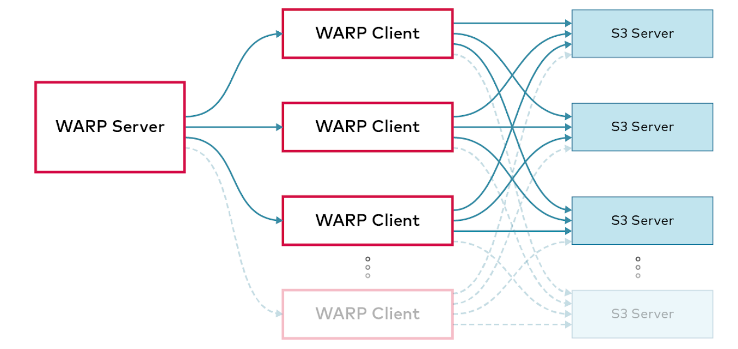
speedtest是一个易用的测试工具,它会先运行PUTS,然后运行GETS,通过增量的方式测试得到最大吞吐量。而warp则是一个完整的工具链,提供了很独立的测试项,能够测试GET;PUT;DELETE等都可以测试得到。同时通过cs的结构设计,更符合真实的使用场景,得到最贴近应用的性能结果,有利于性能分析。
warp结构如下图所示
环境详情
server(组成集群,ec为12:4)
| ip | hosts | 硬盘 |
| storage01 | 172.16.50.1 | 12*10T |
| storage02 | 172.16.50.2 | 12*10T |
| storage03 | 172.16.50.3 | 12*10T |
| storage04 | 172.16.50.4 | 12*10T |
client
| ip | host |
| headnode | 172.16.50.5 |
| node02 | 172.16.50.6 |
| node03 | 172.16.50.7 |
| node04 | 172.16.50.8 |
为什么选择speedtest和warp作为测试工具?
speedtest是一个易用的测试工具,它会先运行PUTS,然后运行GETS,通过增量的方式测试得到最大吞吐量。而warp则是一个完整的工具链,提供了很独立的测试项,能够测试GET;PUT;DELETE等都可以测试得到。同时通过cs的结构设计,更符合真实的使用场景,得到最贴近应用的性能结果,有利于性能分析。
warp结构如下图所示
开始测试
speedtest
- 开始前需要下载minio client
wget https://dl.min.io/client/mc/release/linux-amd64/mc

chmod +x mc

mv mc /usr/local/bin/
- 写入host到/etc/hosts
- 配置客户端
/usr/local/bin/mc alias set minio http://172.16.50.1:9000 <YOUR-ACCESS-KEY> <YOUR-SECRET-KEY>
- 开始测试,执行(以前叫speedtest,现在修改成support perf了)
/usr/local/bin/mc support perf minio/<bucket>
这里可以得到一个网络、硬盘和吞吐量的结果
NODE                    RX              TX

http://storage01:9000   1.8 GiB/s       2.0 GiB/s

http://storage02:9000   1.8 GiB/s       2.0 GiB/s

http://storage03:9000   2.7 GiB/s       2.5 GiB/s

http://storage04:9000   2.4 GiB/s       2.2 GiB/s

NetPerf:

NODE                    PATH    READ            WRITE

http://storage02:9000   /data1  192 MiB/s       235 MiB/s

http://storage02:9000   /data2  219 MiB/s       240 MiB/s

http://storage02:9000   /data3  186 MiB/s       262 MiB/s

http://storage02:9000   /data4  191 MiB/s       230 MiB/s

http://storage02:9000   /data5  179 MiB/s       221 MiB/s

http://storage02:9000   /data6  170 MiB/s       222 MiB/s

http://storage02:9000   /data7  200 MiB/s       219 MiB/s

http://storage02:9000   /data8  198 MiB/s       230 MiB/s

http://storage02:9000   /data9  166 MiB/s       207 MiB/s

http://storage02:9000   /data10 206 MiB/s       209 MiB/s

http://storage02:9000   /data11 198 MiB/s       213 MiB/s

http://storage02:9000   /data12 164 MiB/s       205 MiB/s

http://storage04:9000   /data1  172 MiB/s       259 MiB/s

http://storage04:9000   /data2  201 MiB/s       250 MiB/s

http://storage04:9000   /data3  218 MiB/s       256 MiB/s

http://storage04:9000   /data4  188 MiB/s       245 MiB/s

http://storage04:9000   /data5  157 MiB/s       197 MiB/s

http://storage04:9000   /data6  155 MiB/s       205 MiB/s

http://storage04:9000   /data7  154 MiB/s       210 MiB/s

http://storage04:9000   /data8  143 MiB/s       185 MiB/s

http://storage04:9000   /data9  181 MiB/s       207 MiB/s

http://storage04:9000   /data10 174 MiB/s       214 MiB/s

http://storage04:9000   /data11 173 MiB/s       218 MiB/s

http://storage04:9000   /data12 178 MiB/s       206 MiB/s

http://storage03:9000   /data1  194 MiB/s       337 MiB/s

http://storage03:9000   /data2  204 MiB/s       267 MiB/s

http://storage03:9000   /data3  212 MiB/s       261 MiB/s

http://storage03:9000   /data4  200 MiB/s       235 MiB/s

http://storage03:9000   /data5  168 MiB/s       216 MiB/s

http://storage03:9000   /data6  209 MiB/s       221 MiB/s

http://storage03:9000   /data7  179 MiB/s       222 MiB/s

http://storage03:9000   /data8  170 MiB/s       220 MiB/s

http://storage03:9000   /data9  144 MiB/s       186 MiB/s

http://storage03:9000   /data10 142 MiB/s       172 MiB/s

http://storage03:9000   /data11 149 MiB/s       171 MiB/s

http://storage03:9000   /data12 132 MiB/s       206 MiB/s

http://storage01:9000   /data1  99 MiB/s        119 MiB/s

http://storage01:9000   /data2  103 MiB/s       114 MiB/s

http://storage01:9000   /data3  104 MiB/s       114 MiB/s

http://storage01:9000   /data4  98 MiB/s        186 MiB/s

http://storage01:9000   /data5  186 MiB/s       261 MiB/s

http://storage01:9000   /data6  224 MiB/s       251 MiB/s

http://storage01:9000   /data7  188 MiB/s       240 MiB/s

http://storage01:9000   /data8  222 MiB/s       252 MiB/s

http://storage01:9000   /data9  185 MiB/s       247 MiB/s

http://storage01:9000   /data10 209 MiB/s       236 MiB/s

http://storage01:9000   /data11 191 MiB/s       224 MiB/s

http://storage01:9000   /data12 222 MiB/s       250 MiB/s

DrivePerf:

        THROUGHPUT      IOPS

PUT     1.3 GiB/s       21 objs/s

GET     4.2 GiB/s       67 objs/s

MinIO 2022-08-25T07:17:05Z, 4 servers, 48 drives, 64 MiB objects, 62 threads

ObjectPerf:
我们其实还可以按需做一些调整,做一些独立的测试。比如只需要测量object的读写速度,可以使用下述命令
mc support perf object minio
同理,我们也可以单独测量硬盘或者网络吞吐量,如下述命令
# driver

root@storage01:~# mc support perf object minio

        THROUGHPUT      IOPS

PUT     1.6 GiB/s       26 objs/s

GET     4.0 GiB/s       63 objs/s

MinIO 2022-08-25T07:17:05Z, 4 servers, 48 drives, 64 MiB objects, 27 threads

ObjectPerf:
# throughtput

root@storage01:~# mc support perf net minio

NODE                    RX              TX

http://storage01:9000   1.9 GiB/s       2.1 GiB/s

http://storage02:9000   2.4 GiB/s       2.2 GiB/s

http://storage03:9000   2.6 GiB/s       2.4 GiB/s

http://storage04:9000   2.1 GiB/s       2.3 GiB/s

NetPerf:
也可以选择在指定时间内测试指定大小的对象的读写速度
root@storage01:~# mc support perf object minio --duration 20s --size 128MiB

        THROUGHPUT      IOPS

PUT     2.3 GiB/s       18 objs/s

GET     3.8 GiB/s       30 objs/s

MinIO 2022-08-25T07:17:05Z, 4 servers, 48 drives, 128 MiB objects, 41 threads

ObjectPerf:
warp
在开始测试之前,需要在客户端上安装warp,GitHub - minio/warp: S3 benchmarking tool这里面有多个版本可供选择,建议使用二进制包,比较省事。
wget https://github.com/minio/warp/releases/download/v0.6.2/warp_0.6.2_Linux_x86_64.tar.gz

mkdir warp

tar zxf warp_0.6.2_Linux_x86_64.tar.gz -C warp

# 执行客户端

./warp client
执行后,默认开启7761端口,假如配置了防火墙还需要放行该端口才行,我这里没有配置,所以就不演示了
在所有客户端开启warp后,我们可以选择启动一台执行warp混合基准测试了
warp mixed --duration=3m --warp-client=headnode --warp-client=node0{2...3} --host=storage0{1...4}:9000 --access-key=minio --secret-key=miniodev

warp: Benchmark data written to "warp-remote-2022-09-03[172425]-Fj1O.csv.zst"

Mixed operations.

Operation: DELETE, 10%, Concurrency: 40, Ran 2m58s.

 * Throughput: 18.47 obj/s

Operation: GET, 45%, Concurrency: 40, Ran 2m58s.

 * Throughput: 831.05 MiB/s, 83.11 obj/s

Operation: PUT, 15%, Concurrency: 40, Ran 2m58s.

 * Throughput: 276.45 MiB/s, 27.65 obj/s

Operation: STAT, 30%, Concurrency: 40, Ran 2m58s.

 * Throughput: 55.30 obj/s

Cluster Total: 1106.95 MiB/s, 184.46 obj/s over 2m58s.
我们也可以单独对GET操作进行压力测试得到最大的写入吞吐量
接下来我们对DELETE操作进行测试
root@headnode:~# warp delete --duration=3m --warp-client=headnode --warp-client=node0{2...3} --host=storage0{1...4}:9000 --access-key=minio --secret-key=miniodev

warp: Benchmark data written to "warp-remote-2022-09-03[173528]-1d62.csv.zst"

----------------------------------------

Operation: PUT

* Average: 0.56 MiB/s, 576.46 obj/s

Throughput by host:

 * http://storage01:9000: Avg: 0.14 MiB/s, 144.36 obj/s

 * http://storage02:9000: Avg: 0.14 MiB/s, 143.90 obj/s

 * http://storage03:9000: Avg: 0.14 MiB/s, 143.78 obj/s

 * http://storage04:9000: Avg: 0.14 MiB/s, 144.32 obj/s

Throughput, split into 86 x 1s:

 * Fastest: 655.8KiB/s, 655.89 obj/s

 * 50% Median: 584.4KiB/s, 584.43 obj/s

 * Slowest: 438.5KiB/s, 438.49 obj/s

----------------------------------------

Operation: DELETE

* Average: 897.41 obj/s

Throughput by host:

 * http://storage01:9000: Avg: 225.39 obj/s

 * http://storage02:9000: Avg: 221.08 obj/s

 * http://storage03:9000: Avg: 220.70 obj/s

 * http://storage04:9000: Avg: 222.31 obj/s

Throughput, split into 41 x 1s:

 * Fastest: 998.26 obj/s

 * 50% Median: 890.61 obj/s

 * Slowest: 861.53 obj/s

warp: Cleanup done

对DELETE操作进行测试

root@headnode:~# warp stat --autoterm --duration=3m --warp-client=headnode --warp-client=node0{2...3} --host=storage0{1...4}:9000 --access-key=minio --secret-key=miniodev

warp: Benchmark data written to "warp-remote-2022-09-03[173008]-vsV9.csv.zst"

----------------------------------------

Operation: PUT

* Average: 0.56 MiB/s, 584.19 obj/s

Throughput by host:

 * http://storage01:9000: Avg: 0.14 MiB/s, 145.46 obj/s

 * http://storage02:9000: Avg: 0.14 MiB/s, 145.46 obj/s

 * http://storage03:9000: Avg: 0.14 MiB/s, 145.32 obj/s

 * http://storage04:9000: Avg: 0.14 MiB/s, 144.19 obj/s

Throughput, split into 33 x 1s:

 * Fastest: 609.4KiB/s, 624.07 obj/s

 * 50% Median: 585.7KiB/s, 599.81 obj/s

 * Slowest: 499.3KiB/s, 511.37 obj/s

----------------------------------------

Operation: STAT

* Average: 10262.16 obj/s

Throughput by host:

 * http://storage01:9000: Avg: 2549.94 obj/s

 * http://storage02:9000: Avg: 2566.62 obj/s

 * http://storage03:9000: Avg: 2572.47 obj/s

 * http://storage04:9000: Avg: 2572.58 obj/s

Throughput, split into 179 x 1s:

 * Fastest: 10622.95 obj/s

 * 50% Median: 10268.04 obj/s

 * Slowest: 9574.31 obj/s

warp: Cleanup done.

将文件切片分批上传性能测试

root@headnode:~# warp multipart --parts=500 --part.size=10MiB --warp-client=headnode --warp-client=node0{2...3} --host=storage0{1...4}:9000 --access-key=minio --secret-key=miniodev

warp: Benchmark data written to "warp-remote-2022-09-03[174331]-AWo5.csv.zst"

----------------------------------------

Operation: PUT

* Average: 559.26 MiB/s, 55.93 obj/s

Throughput by host:

 * http://storage01:9000: Avg: 137.98 MiB/s, 13.80 obj/s

 * http://storage02:9000: Avg: 140.59 MiB/s, 14.06 obj/s

 * http://storage03:9000: Avg: 138.60 MiB/s, 13.86 obj/s

 * http://storage04:9000: Avg: 141.93 MiB/s, 14.19 obj/s

Throughput, split into 16 x 1s:

 * Fastest: 616.2MiB/s, 61.62 obj/s

 * 50% Median: 562.9MiB/s, 56.29 obj/s

 * Slowest: 437.3MiB/s, 43.73 obj/s

----------------------------------------

Operation: GET

* Average: 1026.15 MiB/s, 102.62 obj/s

Throughput by host:

 * http://storage01:9000: Avg: 254.73 MiB/s, 25.47 obj/s

 * http://storage02:9000: Avg: 257.86 MiB/s, 25.79 obj/s

 * http://storage03:9000: Avg: 257.91 MiB/s, 25.79 obj/s

 * http://storage04:9000: Avg: 255.68 MiB/s, 25.57 obj/s

Throughput, split into 298 x 1s:

 * Fastest: 1133.4MiB/s, 113.34 obj/s

 * 50% Median: 1030.0MiB/s, 103.00 obj/s

 * Slowest: 876.0MiB/s, 87.60 obj/s

warp: Cleanup done.
好的,以上就是我做的一些测试和总结,希望对大家有帮助
[转帖]如何对minio进行性能测试和分析的更多相关文章
- LoadRunner性能测试结果分析
LoadRunner性能测试结果分析http://www.docin.com/p-793607435.html
- Greenplum 简单性能测试与分析
如今,多样的交易模式以及大众消费观念的改变使得数据库应用领域不断扩大,现代的大型分布式应用系统的数据膨胀也对数据库的海量数据处理能力和并行处理能力提出了更高的要求,如何在数据呈现海量扩张的同时提高处理 ...
- Apache ab性能测试结果分析
Apache ab性能测试结果分析 测试场景:模拟10个用户,对某页发起总共100次请求. 测试命令: ab -n 100 -c 10 地址 测试报告: Server Software: 被测服务器软 ...
- LoadRunner性能测试结果分析(转载)
性能测试的需求指标:本次测试的要求是验证在30分钟内完成2000次用户登录系统,然后进行考勤业务,最后退出,在业务操作过程中页面的响应时间不超过3秒,并且服务器的CPU使用率.内存使用率分别不超过75 ...
- Web项目性能测试结果分析
1.测试结果分析 LoadRunner性能测试结果分析是个复杂的过程,通常可以从结果摘要.并发数.平均事务响应时间.每秒点击数.业务成功率.系统资源.网页细分图.Web服务器资源.数据库服务器资源等几 ...
- PAAS平台的web应用性能测试与分析
引言 为什么我会写这一篇博客,因为最近很多京东云擎jae的用户反应一个问题就是他们部署在jae上面的应用访问很慢,有极少数应用甚至经常出现504超时现象,当然大家首先想到的是jae性能太差,这也是人之 ...
- 9.2专项测试-Android性能测试黑盒分析-1
1. 专项测试 业务测试:面向新需求 回归测试:面向已交付需求 专项测试:面向非功能需求的各类质量唯独特征 表现 用户维度 技术维度 崩溃 crash,弱网 检测崩溃1.某个页面,因为研发处理不合适, ...
- 基于web网站项目的性能测试结果分析
业务背景: 最近公司研发了一款对并发要求比较高的web项目,需要对其压力测试,模拟线上可能存在的问题,这个过程中遇到一些很多问题,这里重新梳理一下思路,希望能给遇到同样问题的小伙伴提供一个参考. 工具 ...
- Jmeter性能测试指标分析
一.Aggregate Report 是 JMeter 常用的一个 Listener,中文被翻译为"聚合报告 如果大家都是做Web应用的性能测试,例如访问百度请求为例,线程10,循环10次, ...
- 性能测试-性能分析思路以及CPU
1.性能分析思路 性能测试分析的思路:先分析硬件 .网络. 系统配置.应用程序 硬件: cpu.内存.磁盘.网络.io 4.常见问题处理4.1 常见问题及解决方法如果r经常大于4,且id经常少于40, ...
随机推荐
- 【程序员的福音】一款C#开源的GitHub加速神器
前言 作为一个程序员你是否会经常会遇到GitHub无法访问(如下无法访问图片),或者是访问和下载源码时十分缓慢就像乌龟爬行一般.之前有尝试过手动修改host文件来解决网站的访问问题,以及更换网络但还是 ...
- 昇腾CANN 7.0 黑科技:大模型推理部署技术解密
本文分享自华为云社区<昇腾CANN 7.0 黑科技:大模型推理部署技术解密>,作者:昇腾CANN. 近期,随着生成式AI.大模型进入公众视野,越来越多的人意识到抓住AI的爆发就是抓住未来智 ...
- 华为云数据库GaussDB(for openGauss):初次见面,认识一下
摘要:本文从总体架构.主打场景.关键技术特性等方面进行介绍GaussDB(for openGauss). 1.背景介绍 3月16日,在华为云主办的GaussDB(for openGauss)系列技术第 ...
- 华为云NFT云宝限量开抢,区块链技术为你的数字资产保驾护航
摘要:正是有这些底层的区块链技术支撑,才能让我们真正的"拥有"独属于自己的NFT数字资产. 本文分享自华为云社区<华为云独家NFT限量开抢,背后的这些技术你都知道吗?> ...
- ByteHouse:基于ClickHouse的实时数仓能力升级解读
更多技术交流.求职机会,欢迎关注字节跳动数据平台微信公众号,回复[1]进入官方交流群 ByteHouse是火山引擎上的一款云原生数据仓库,为用户带来极速分析体验,能够支撑实时数据分析和海量数据离 ...
- MySQL 数据库中的数据类型
整数类型 标准 SQL 中支持 INTEGER 和 SMALLINT 这两种类型,MySQL 数据库除了支持这两种类型以外,还扩展支持了 TINYINT.MEDIUMINT 和 BIGINT 整数类型 ...
- django读取数据库导出excel
路由 path(r'^export/xls/$', views.export_excel, name='export_excel'), 函数 import xlwt from django.http ...
- Hugging Face 入选 Time《时代周刊》2023 全球前 100 最具影响力的公司
喜报 Hugging Face 入选 Time<时代周刊>2023 全球前 100 最具影响力的公司 继续为梦想努力 继续为开源贡献 榜单链接: https://time.com/100c ...
- 【邀请有礼】全球视频云创新挑战赛邀请有礼:参与 100% 获得 “壕” 礼,更有机会获得 JBL 音箱、Cherry 机械键盘
活动背景: 2021 年首届全球视频云创新挑战赛报名火热进行中,这里奖金池高达四十万,有业界顶尖专家指导,有展示自我技能的广阔舞台,还有入职阿里的绿色招聘通道.如果你有一点点心动,那请不要错过这场挑战 ...
- C# 内存缓存工具类 MemoryCacheUtil
C# 内存缓存工具类 MemoryCacheUtil using System; using System.Collections.Concurrent; using System.Collectio ...