
[转帖]043、TiDB特性_缓存表和分区表
针对于优化器在索引存在时依然使⽤全表扫描的情况下,使⽤缓存表和分区表是提升查询性能的有效⼿段。
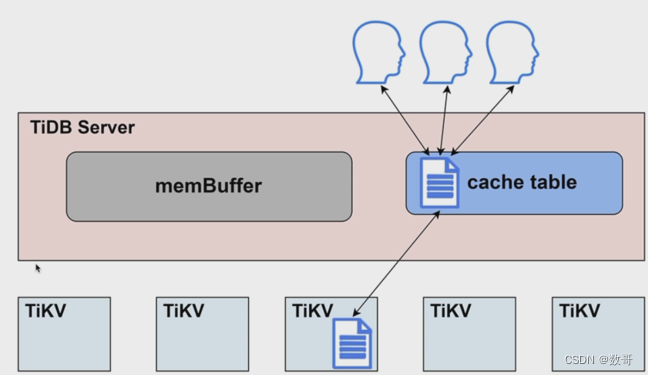
缓存表
- 缓存表是将表的内容完全缓存到 TiDB Server 的内存中
- 表的数据量不⼤,⼏乎不更改
- 读取很频繁
- 缓存控制: ALTER TABLE table_name CACHE|NOCACHE;
# 使用trace跟踪下

tidb> TRACE SELECT * FROM test.c1;

+-------------------------------------------+-----------------+---

---------+

| operation | startTS |

duration |

+-------------------------------------------+-----------------+---

---------+

| trace | 18:39:25.485266 |

501.582µs |

| ├─session.ExecuteStmt | 18:39:25.485270 |

432.208µs |

| │ ├─executor.Compile | 18:39:25.485281 |

132.616µs |

| │ └─session.runStmt | 18:39:25.485433 |

249.488µs |

| │ └─UnionScanExec.Open | 18:39:25.485572 |

72.776µs |

| │ ├─TableReaderExecutor.Open | 18:39:25.485575 |

13.24µs |

| │ ├─buildMemTableReader | 18:39:25.485605 |

3.283µs |

| │ └─memTableReader.getMemRows | 18:39:25.485615 |   # memTableReader.getMemRows 表示从缓存取数

20.558µs |

| ├─*executor.ProjectionExec.Next | 18:39:25.485712 |

12.911µs |

| │ └─*executor.UnionScanExec.Next | 18:39:25.485714 |

3.823µs |

| └─*executor.ProjectionExec.Next | 18:39:25.485733 |

8.943µs |

| └─*executor.UnionScanExec.Next | 18:39:25.485735 |

1.33µs |

+-------------------------------------------+-----------------+---

---------+

12 rows in set (0.00 sec)
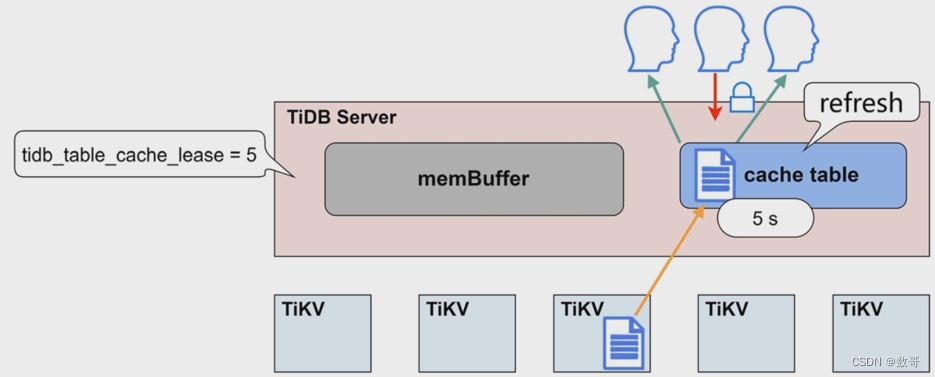
小表缓存-原理
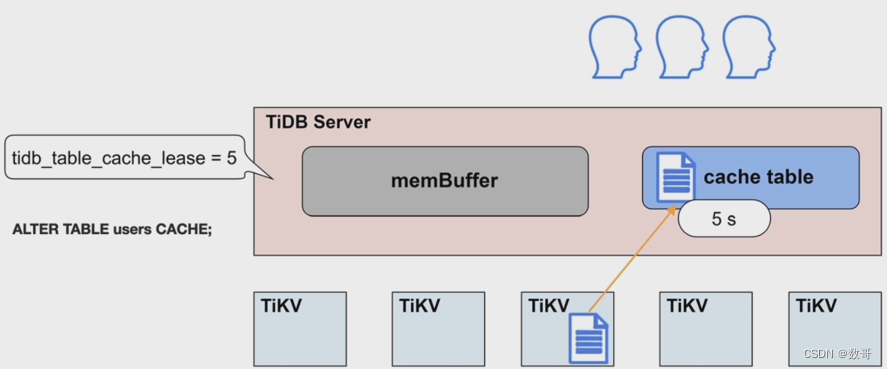
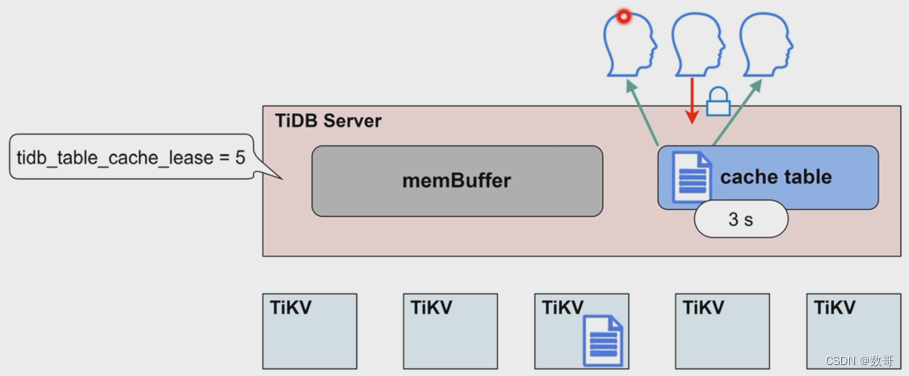
缓存租约
租约时间内,无法进行写操作
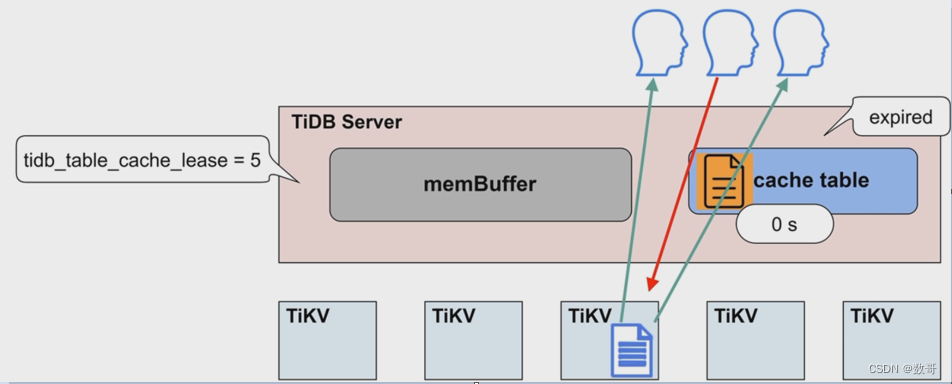
租约到期,数据过期
写操作不再被阻塞
读写直接到TiKV节点上执行
数据更新完毕,租约继续开启
应用场景
- 每张缓存表的大小限制为64MB
- 适用于查询频繁、数据量不大、修改极少的场景
- 在租约(tidb_table_cache_lease) 时间内,写操作会被阻塞
- 当租约到期(tidb_table_cache_lease)时,读性能会下降
- 不支持对缓存表直接做DDL操作,需要先关闭
- 对于表加载较慢或者极少修改的表,可以适当延长tidb_table_cache_lease保持读性能稳定
分区表
分区类型与适用场景
- range: 分区剪裁,节省IO开销
- Hash: 用于大规模写入的情况下将数据打散,平均地分配到各个分区里
Range分区表

create table t1(x int) partition by name(x) (

partition p0 values less than(5),

partition p1 values less than (10));

)
分区类型与适⽤场景
- Range
分区裁剪, 节省 I/O 开销
/* Range Partition t1 */

drop table if exists test.t1;

create table test.t1 (x int) partition by range (x) (

 partition p0 values less than (5),

 partition p1 values less than (10));

insert into test.t1 values (0),(1),(2),(3),(4),(5),(6),(7),(8),(9);

insert into test.t1 select * from test.t1;

insert into test.t1 select * from test.t1;

insert into test.t1 select * from test.t1;

insert into test.t1 select * from test.t1;

insert into test.t1 select * from test.t1;

insert into test.t1 select * from test.t1;

insert into test.t1 select * from test.t1;

insert into test.t1 select * from test.t1;

insert into test.t1 select * from test.t1;

insert into test.t1 select * from test.t1;

insert into test.t1 select * from test.t1;

insert into test.t1 select * from test.t1;

insert into test.t1 select * from test.t1;

insert into test.t1 select * from test.t1;

insert into test.t1 select * from test.t1;

insert into test.t1 select * from test.t1;

insert into test.t1 select * from test.t1;

insert into test.t1 select * from test.t1;

/* Check Partition Pruning */

explain select * from test.t1 where x between 1 and 4;
查看执行计划

mysql> explain select * from test.t1 where x between 1 and 4;

+-------------------------+-----------+-----------+------------------------+------------------------------------+

| id                      | estRows   | task      | access object          | operator info                      |

+-------------------------+-----------+-----------+------------------------+------------------------------------+

| TableReader_9           | 12288.00  | root      |                        | data:Selection_8                   |

| └─Selection_8           | 12288.00  | cop[tikv] |                        | ge(test.t1.x, 1), le(test.t1.x, 4) |

|   └─TableFullScan_7     | 491520.00 | cop[tikv] | table:t1, partition:p0 | keep order:false                   |

+-------------------------+-----------+-----------+------------------------+------------------------------------+

3 rows in set (0.03 sec)
- 1
- 2
- 3
- 4
- 5
- 6
- 7
- 8
- 9
- 10
/* Check regions */

show table test.t1 regions;

mysql> show table test.t1 regions;

+-----------+-----------+---------+-----------+-----------------+-------+------------+---------------+------------+----------------------+------------------+

| REGION_ID | START_KEY | END_KEY | LEADER_ID | LEADER_STORE_ID | PEERS | SCATTERING | WRITTEN_BYTES | READ_BYTES | APPROXIMATE_SIZE(MB) | APPROXIMATE_KEYS |

+-----------+-----------+---------+-----------+-----------------+-------+------------+---------------+------------+----------------------+------------------+

|      5019 | t_79_     | t_80_   |      5020 |            1001 | 5020  |          0 |             0 |          0 |                   67 |           877551 |

|      1002 | t_80_     |         |      1003 |            1001 | 1003  |          0 |             0 |          0 |                   24 |           421921 |

+-----------+-----------+---------+-----------+-----------------+-------+------------+---------------+------------+----------------------+------------------+

2 rows in set (0.02 sec)
- Hash
可以⽤于⼤规模写⼊的情况下将数据打散, 平均地分配到各个分区⾥
/* Hash Partition t1 */

drop table if exists test.t1;

CREATE TABLE test.t1 (x INT)

 PARTITION BY HASH(x)

 PARTITIONS 4;

insert into test.t1 values (0),(1),(2),(3),(4),(5),(6),(7),(8),(9);


insert into test.t1 select * from test.t1;


insert into test.t1 select * from test.t1;


insert into test.t1 select * from test.t1;


insert into test.t1 select * from test.t1;


insert into test.t1 select * from test.t1;


insert into test.t1 select * from test.t1;


insert into test.t1 select * from test.t1;


insert into test.t1 select * from test.t1;


insert into test.t1 select * from test.t1;


insert into test.t1 select * from test.t1;


insert into test.t1 select * from test.t1;


insert into test.t1 select * from test.t1;


insert into test.t1 select * from test.t1;


insert into test.t1 select * from test.t1;


insert into test.t1 select * from test.t1;


insert into test.t1 select * from test.t1;


insert into test.t1 select * from test.t1;


insert into test.t1 select * from test.t1;
查看分区的执行计划
- 默认是通过mod方式分配分区
/* Check Partition Distribution */

explain select  from test.t1 where x=0;


explain select  from test.t1 where x=1;


explain select  from test.t1 where x=2;


explain select  from test.t1 where x=3;


explain select  from test.t1 where x=4;


explain select  from test.t1 where x=5;


explain select  from test.t1 where x=6;


explain select  from test.t1 where x=7;


explain select  from test.t1 where x=8;


explain select  from test.t1 where x=9;


/* Negative /


explain select  from test.t1 where x between 7 and 9;


mysql> explain select * from test.t1 where x between 7 and 9;


+------------------------------+----------+-----------+------------------------+------------------------------------+


| id                           | estRows  | task      | access object          | operator info                      |


+------------------------------+----------+-----------+------------------------+------------------------------------+


| PartitionUnion_10            | 750.00   | root      |                        |                                    |


| ├─TableReader_13             | 250.00   | root      |                        | data:Selection_12                  |


| │ └─Selection_12             | 250.00   | cop[tikv] |                        | ge(test.t1.x, 7), le(test.t1.x, 9) |


| │   └─TableFullScan_11       | 10000.00 | cop[tikv] | table:t1, partition:p0 | keep order:false, stats:pseudo     |


| ├─TableReader_16             | 250.00   | root      |                        | data:Selection_15                  |


| │ └─Selection_15             | 250.00   | cop[tikv] |                        | ge(test.t1.x, 7), le(test.t1.x, 9) |


| │   └─TableFullScan_14       | 10000.00 | cop[tikv] | table:t1, partition:p1 | keep order:false, stats:pseudo     |


| └─TableReader_19             | 250.00   | root      |                        | data:Selection_18                  |


|   └─Selection_18             | 250.00   | cop[tikv] |                        | ge(test.t1.x, 7), le(test.t1.x, 9) |


|     └─TableFullScan_17       | 10000.00 | cop[tikv] | table:t1, partition:p3 | keep order:false, stats:pseudo     |


+------------------------------+----------+-----------+------------------------+------------------------------------+


10 rows in set (12.69 sec)
查看region分布情况
/* Check regions */

# 查看对应的region情况,在4个region上

mysql> show table test.t1 regions;

+-----------+-----------+---------+-----------+-----------------+-------+------------+---------------+------------+----------------------+------------------+

| REGION_ID | START_KEY | END_KEY | LEADER_ID | LEADER_STORE_ID | PEERS | SCATTERING | WRITTEN_BYTES | READ_BYTES | APPROXIMATE_SIZE(MB) | APPROXIMATE_KEYS |

+-----------+-----------+---------+-----------+-----------------+-------+------------+---------------+------------+----------------------+------------------+

|      9003 | t_84_     | t_85_   |      9004 |            1001 | 9004  |          0 |      18449249 |   14117466 |                   13 |           141205 |

|      9005 | t_85_     | t_86_   |      9006 |            1001 | 9006  |          0 |      18443067 |   14024508 |                   10 |            58475 |

|      9007 | t_86_     | t_87_   |      9008 |            1001 | 9008  |          0 |      12295360 |    8703102 |                    5 |            27228 |

|      1002 | t_87_     |         |      1003 |            1001 | 1003  |          0 |      12295959 |    9218671 |                    4 |            26666 |

+-----------+-----------+---------+-----------+-----------------+-------+------------+---------------+------------+----------------------+------------------+

4 rows in set (2 min 46.43 sec)
[转帖]043、TiDB特性_缓存表和分区表的更多相关文章
- (转载)详解网络传输中的三张表,MAC地址表、ARP缓存表以及路由表
郑重声明:原文转载于http://dengqi.blog.51cto.com/5685776/1223132 向好文章致敬!!! 一:MAC地址表详解 说到MAC地址表,就不得不说一下交换机的工作原理 ...
- Spring4.1新特性——Spring缓存框架增强(转)
目录 Spring4.1新特性——综述 Spring4.1新特性——Spring核心部分及其他 Spring4.1新特性——Spring缓存框架增强 Spring4.1新特性——异步调用和事件机制的异 ...
- ARP缓存表的构成ARP协议全面实战协议详解、攻击与防御
ARP缓存表的构成ARP协议全面实战协议详解.攻击与防御 1.4.3 ARP缓存表的构成 在局域网的任何一台主机中,都有一个ARP缓存表.该缓存表中保存中多个ARP条目.每个ARP条目都是由一个IP ...
- Oracle11g新特性导致空表不能导出问题
ORACLE 11G在用EXP导出时,发现空表(没有数据或者没有用过的表)不能导出了. 查了一下资料,说是Oracle 11G中有个新特性,当表无数据时,不分配segment,以节省空 ...
- 关于我们_ | 腕表时代watchtimes.com.cn
关于我们_ | 腕表时代watchtimes.com.cn 关于我们 腕表时代是北京兰会时光科技有限公司旗下运营的手表网站.腕表时代于2013年5月17日正式上线.秉承专业.生动.实用 ...
- 网络传输中的三张表,MAC地址表、ARP缓存表以及路由表
一:MAC地址表详解 说到MAC地址表,就不得不说一下交换机的工作原理了,因为交换机是根据MAC地址表转发数据帧的.在交换机中有一张记录着局域网主机MAC地址与交换机接口的对应关系的表,交换机就是根据 ...
- SQL基本查询_单表查询(实验二)
SQL基本查询_单表查询(实验二) 查询目标表结构及数据 emp empno ename job hiedate sal comn deptno 1007 马明 内勤 1992-6-12 4000 2 ...
- SQL基本查询_多表查询(实验三)
SQL基本查询_多表查询(实验三) 题目要求(一) 针对emp.dept两表完成如下查询,并验证查询结果的正确性 使用显式内连接查询所有员工的信息,显示其编号.姓名.薪水.入职日期及部门名称: 使用隐 ...
- SQL Server 表的管理_关于表的操作增删查改的操作的详解(案例代码)
SQL Server 表的管理_关于表的操作增删查改的操作的详解(案例代码) 概述: 表由行和列组成,每个表都必须有个表名. SQL CREATE TABLE 语法 CREATE TABLE tabl ...
- 缓存表 内存表(将表keep到内存)
缓存表 内存表(将表keep到内存) 一.引言: 有时候一些基础表需要非常的频繁访问,尤其是在一些循环中,对该表中的访问速度将变的非常重要.为了提高系统的处理性能,可以考虑将一些表及索引读取并 ...
随机推荐
- 6.elasticsearch中search template和alias
什么是search template 顾名思义,查询模版,就是提前设定好查询的DSL,再次查询时,只需要指定对应的模版,然后传入相应的参数就好.一是可以每次不用构建复杂的DSL,二是可以供开发直接使用 ...
- 手写spring的ioc的流程截图(笔记-1)
spring ioc是什么? IoC 容器是 Spring 的核心,也可以称为 Spring 容器.Spring 通过 IoC 容器来管理对象的实例化和初始化,以及对象从创建到销毁的整个生命周期. S ...
- 在ASP.NET Core微服务架构下使用RabbitMQ如何实现CQRS模式
前言 在现代软件开发中,微服务架构和CQRS模式都是备受关注的技术趋势.微服务架构通过将应用程序拆分为一系列小型.自治的服务,提供了更好的可伸缩性和灵活性.而CQRS模式则通过将读操作和写操作分离,优 ...
- $router.push跳转页面传参
$router.push传参与收参 //传参 <el-button type="text" @click="$router.push('/games/Match?i ...
- MySQL篇:bug2_ Navicate无法添加或更新子行-外键约束失败
问题产生原因 Mysql中如果表和表之间建立的外键约束,则无法删除表及修改表结构. 解决办法 解决方法是在Mysql中取消外键约束: SET FOREIGN_KEY_CHECKS=0; 再添加值, 然 ...
- 揭秘华为云GaussDB(for Redis)丨大key治理
本文分享自华为云社区<华为云GaussDB(for Redis)揭秘第31期:大key治理>,作者: 高斯Redis官方博客. 从DBA的视角看,大Key无疑是引起Redis线上问题的常见 ...
- 解析数仓lazyagg查询重写优化
摘要:本文对Lazy Agg查询重写优化和GaussDB(DWS)提供的Lazy Agg重写规则进行介绍. 本文分享自华为云社区<GaussDB(DWS) lazyagg查询重写优化解析[这次高 ...
- 带你读AI论文:基于Transformer的直线段检测
摘要:本文提出了一种基于Transformer的端到端的线段检测模型.采用多尺度的Encoder/Decoder算法,可以得到比较准确的线端点坐标.作者直接用预测的线段端点和Ground truth的 ...
- 不会使用Spring的配置文件,赶紧把这个甩给他
摘要:文章从Spring程序的快速使用.Bean标签的使用和其属性的具体使用,每个属性都用代码来解释,运行结果和案例也写的都很明白. 本文分享自华为云社区<怎样使用Spring的配置文件?带大家 ...
- SpringBoot java 一个接口,多个实现,客户定制化
产品定制化时,在不同的客户中会有不同的需求,这时候会产生,一个接口,多个实现 SpringBoot ,如果发现有多实现时,会报如下错误 Consider marking one of the bean ...