
POI读取公式的值
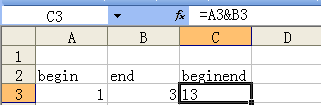
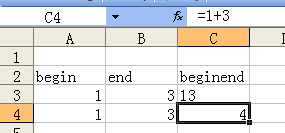
excel中的数据:
package poi;

import java.io.FileInputStream;

import java.io.IOException;

import java.io.InputStream;

import org.apache.poi.hssf.usermodel.HSSFWorkbook;

import org.apache.poi.ss.usermodel.Cell;

import org.apache.poi.ss.usermodel.CellValue;

import org.apache.poi.ss.usermodel.FormulaEvaluator;

import org.apache.poi.ss.usermodel.Row;

import org.apache.poi.ss.usermodel.Sheet;

public class TestReadFormula {

    private static FormulaEvaluator evaluator;

    public static void main(String[] args) throws IOException {

        InputStream is=new FileInputStream("ReadFormula.xls");

        HSSFWorkbook wb=new HSSFWorkbook(is);

        Sheet sheet=wb.getSheetAt(0);

        evaluator=wb.getCreationHelper().createFormulaEvaluator();

        for (int i = 1; i <4; i++) {

            Row  row=sheet.getRow(i);

            for (Cell cell : row) {

                System.out.println(getCellValue(cell));

            }

        }

        wb.close();

    }

    private static String getCellValue(Cell cell) {

        if (cell==null) {

            return "isNull";

        }

        System.out.println("rowIdx:"+cell.getRowIndex()+",colIdx:"+cell.getColumnIndex());

        String cellValue = null;

        switch (cell.getCellType()) {

        case Cell.CELL_TYPE_STRING:

            System.out.print("STRING :");

            cellValue=cell.getStringCellValue();

            break;

        case Cell.CELL_TYPE_NUMERIC:

            System.out.print("NUMERIC:");

            cellValue=String.valueOf(cell.getNumericCellValue());

            break;

        case Cell.CELL_TYPE_FORMULA:

            System.out.print("FORMULA:");

            cellValue=getCellValue(evaluator.evaluate(cell));

            break;

        default:

            System.out.println("Has Default.");

            break;

        }

        return cellValue;

    }

    private static String getCellValue(CellValue cell) {

        String cellValue = null;

        switch (cell.getCellType()) {

        case Cell.CELL_TYPE_STRING:

            System.out.print("String :");

            cellValue=cell.getStringValue();

            break;

        case Cell.CELL_TYPE_NUMERIC:

            System.out.print("NUMERIC:");

            cellValue=String.valueOf(cell.getNumberValue());

            break;

        case Cell.CELL_TYPE_FORMULA:

            System.out.print("FORMULA:");

            break;

        default:

            break;

        }

        return cellValue;

    }

}
Output:
rowIdx:1,colIdx:0

STRING :begin

rowIdx:1,colIdx:1

STRING :end

rowIdx:1,colIdx:2

FORMULA:String :beginend

rowIdx:2,colIdx:0

NUMERIC:1.0

rowIdx:2,colIdx:1

NUMERIC:3.0

rowIdx:2,colIdx:2

FORMULA:String :13

rowIdx:3,colIdx:0

NUMERIC:1.0

rowIdx:3,colIdx:1

NUMERIC:3.0

rowIdx:3,colIdx:2

FORMULA:NUMERIC:4.0
Formula Evaluation:
User API How-TO
The following code demonstrates how to use the FormulaEvaluator in the context of other POI excel reading code.
There are several ways in which you can use the FormulaEvalutator API.
Using FormulaEvaluator.evaluate(Cell cell)
This evaluates a given cell, and returns the new value, without affecting the cell
FileInputStream fis = new FileInputStream("c:/temp/test.xls");

Workbook wb = new HSSFWorkbook(fis); //or new XSSFWorkbook("c:/temp/test.xls")

Sheet sheet = wb.getSheetAt(0);

FormulaEvaluator evaluator = wb.getCreationHelper().createFormulaEvaluator();

// suppose your formula is in B3

CellReference cellReference = new CellReference("B3");

Row row = sheet.getRow(cellReference.getRow());

Cell cell = row.getCell(cellReference.getCol());

CellValue cellValue = evaluator.evaluate(cell);

switch (cellValue.getCellType()) {

    case Cell.CELL_TYPE_BOOLEAN:

        System.out.println(cellValue.getBooleanValue());

        break;

    case Cell.CELL_TYPE_NUMERIC:

        System.out.println(cellValue.getNumberValue());

        break;

    case Cell.CELL_TYPE_STRING:

        System.out.println(cellValue.getStringValue());

        break;

    case Cell.CELL_TYPE_BLANK:

        break;

    case Cell.CELL_TYPE_ERROR:

        break;

    // CELL_TYPE_FORMULA will never happen

    case Cell.CELL_TYPE_FORMULA:

        break;

}
Thus using the retrieved value (of type FormulaEvaluator.CellValue - a nested class) returned by FormulaEvaluator is similar to using a Cell object containing the value of the formula evaluation. CellValue is a simple value object and does not maintain reference to the original cell.
Using FormulaEvaluator.evaluateFormulaCell(Cell cell)
evaluateFormulaCell(Cell cell) will check to see if the supplied cell is a formula cell. If it isn't, then no changes will be made to it. If it is, then the formula is evaluated. The value for the formula is saved alongside it, to be displayed in excel. The formula remains in the cell, just with a new value
The return of the function is the type of the formula result, such as Cell.CELL_TYPE_BOOLEAN
FileInputStream fis = new FileInputStream("/somepath/test.xls");

Workbook wb = new HSSFWorkbook(fis); //or new XSSFWorkbook("/somepath/test.xls")

Sheet sheet = wb.getSheetAt(0);

FormulaEvaluator evaluator = wb.getCreationHelper().createFormulaEvaluator();

// suppose your formula is in B3

CellReference cellReference = new CellReference("B3");

Row row = sheet.getRow(cellReference.getRow());

Cell cell = row.getCell(cellReference.getCol());

if (cell!=null) {

    switch (evaluator.evaluateFormulaCell(cell)) {

        case Cell.CELL_TYPE_BOOLEAN:

            System.out.println(cell.getBooleanCellValue());

            break;

        case Cell.CELL_TYPE_NUMERIC:

            System.out.println(cell.getNumericCellValue());

            break;

        case Cell.CELL_TYPE_STRING:

            System.out.println(cell.getStringCellValue());

            break;

        case Cell.CELL_TYPE_BLANK:

            break;

        case Cell.CELL_TYPE_ERROR:

            System.out.println(cell.getErrorCellValue());

            break;

        // CELL_TYPE_FORMULA will never occur

        case Cell.CELL_TYPE_FORMULA:

            break;

    }

}
Using FormulaEvaluator.evaluateInCell(Cell cell)
evaluateInCell(Cell cell) will check to see if the supplied cell is a formula cell. If it isn't, then no changes will be made to it. If it is, then the formula is evaluated, and the new value saved into the cell, in place of the old formula.
FileInputStream fis = new FileInputStream("/somepath/test.xls");

Workbook wb = new HSSFWorkbook(fis); //or new XSSFWorkbook("/somepath/test.xls")

Sheet sheet = wb.getSheetAt(0);

FormulaEvaluator evaluator = wb.getCreationHelper().createFormulaEvaluator();

// suppose your formula is in B3

CellReference cellReference = new CellReference("B3");

Row row = sheet.getRow(cellReference.getRow());

Cell cell = row.getCell(cellReference.getCol());

if (cell!=null) {

    switch (evaluator.evaluateInCell(cell).getCellType()) {

        case Cell.CELL_TYPE_BOOLEAN:

            System.out.println(cell.getBooleanCellValue());

            break;

        case Cell.CELL_TYPE_NUMERIC:

            System.out.println(cell.getNumericCellValue());

            break;

        case Cell.CELL_TYPE_STRING:

            System.out.println(cell.getStringCellValue());

            break;

        case Cell.CELL_TYPE_BLANK:

            break;

        case Cell.CELL_TYPE_ERROR:

            System.out.println(cell.getErrorCellValue());

            break;

        // CELL_TYPE_FORMULA will never occur

        case Cell.CELL_TYPE_FORMULA:

            break;

    }

}
Re-calculating all formulas in a Workbook
FileInputStream fis = new FileInputStream("/somepath/test.xls");

Workbook wb = new HSSFWorkbook(fis); //or new XSSFWorkbook("/somepath/test.xls")

FormulaEvaluator evaluator = wb.getCreationHelper().createFormulaEvaluator();

for(int sheetNum = 0; sheetNum < wb.getNumberOfSheets(); sheetNum++) {

    Sheet sheet = wb.getSheetAt(sheetNum);

    for(Row r : sheet) {

        for(Cell c : r) {

            if(c.getCellType() == Cell.CELL_TYPE_FORMULA) {

                evaluator.evaluateFormulaCell(c);

            }

        }

    }

}
Alternately, if you know which of HSSF or XSSF you're working with, then you can call the static evaluateAllFormulaCells method on the appropriate HSSFFormulaEvaluator or XSSFFormulaEvaluator class.
http://poi.apache.org/spreadsheet/eval.html
POI读取公式的值的更多相关文章
- POI单元格添加公式以及读取公式结果的值
POI提供了为单元格添加条件样式的方法,但是我并没有找到获取单元格改变后样式的方法,获取到样式依旧是没有改变之前的. 比如为单元格添加条件样式用于监听单元格值是否被修改,如果单元格值被修改那么字体颜色 ...
- java用poi读取Excel表格中的数据
Java读写Excel的包是Apache POI(项目地址:http://poi.apache.org/),因此需要先获取POI的jar包,本实验使用的是POI 3.9稳定版.Apache POI 代 ...
- Java开发小技巧(六):使用Apache POI读取Excel
前言 在数据仓库中,ETL最基础的步骤就是从数据源抽取所需的数据,这里所说的数据源并非仅仅是指数据库,还包括excel.csv.xml等各种类型的数据接口文件,而这些文件中的数据不一定是结构化存储的, ...
- 使用poi读取excel数据示例
使用poi读取excel数据示例 分两种情况: 一种读取指定单元格的值 另一种是读取整行的值 依赖包: <dependency> <groupId>org.apache.poi ...
- NPOI 读取excel到DataTable 读取隐藏列 读取公式列
处理思路: 1.打开excel 用NPOI进行读取: 2.读取第一个Sheet: 读取过程中: a.先设置相应列 不隐藏 b.读取Cell时 先判断是否的包含公式 相应代码如下: public sta ...
- POI读取/写入Excel文件
import java.io.File; import java.io.FileInputStream; import java.io.FileOutputStream; import java.io ...
- jspsmart(保存文件)+poi(读取excel文件)操作excel文件
写在前面: 项目环境:jdk1.4+weblogic 需求:能上传excel2003+2007 由于项目不仅需要上传excel2003,还要上传excel2007,故我们抛弃了jxl(只能上传exce ...
- POI读取excel文件。
1) poi读取现成.xls文件,不需要自己建立.xls ====ReadExcel类==== package cust.com.excelToDataTest; import java.io.F ...
- poi读取Excel模板并修改模板内容与动态的增加行
有时候我们可能遇到相当复杂的excel,比如表头的合并等操作,一种简单的方式就是直接代码合并(浪费时间),另一种就是写好模板,动态的向模板中增加行和修改指定单元格数据. 1.一个简单的根据模板shee ...
随机推荐
- 我的Python成长之路---GitHub使用克隆GitHub(SSH key配置)
六.克隆GitHub仓库 1.创建仓库目录,目录位置没有要求,比如D:\learngit. 2.配置ssh(如果不配置会每次都输入用户名和密码) 使用TortoiseGit生成ssh-key:开始菜单 ...
- partial_sort_百度百科
partial_sort_百度百科 partial_sort
- [Unity 3D] Unity 3D 性能优化 (一)
听到过很多用Unity 3D开发游戏的程序员抱怨引擎效率太低,资源占用太高,包括我自己在以往项目的开发中也头疼过.最近终于有了空闲,可以仔细的研究一下该如何优化Unity 3D下的游戏性能.其实国外有 ...
- G-Sensor 校准标准
在桌面上水平平,自己的前表面. 此时Z轴应+值,和值至9.8大约,x.y轴应0值大约.它是平行于主体x轴,固定的左,提起右侧时,,x轴数值它应0开始增加.直到垂直时,+9.8大约. 为y轴.下面固定. ...
- ListView中加入Button后,Button的点击事件和ListView的点击事件冲突
1.在ItemView配置的xml文件里的根节点加入属性android:descendantFocusability="blocksDescendants" 2.在要加入事件的控件 ...
- PopupWindow 的showatlocation参数解释
showAtLocation(parent, gravity, x, y) 第一个参数指定PopupWindow的锚点view,即依附在哪个view上.第二个参数指定起始点第三个参数设置以起始点的右下 ...
- 新买一款打印机hp5525N
11900 RMB 彩色.激光.彩打. 让法国的工艺工程师给改成法语的了.
- [置顶] java的foreach循环
foreach语句是java5之后的新特征之一,在循环遍历数组.集合方面更加简洁. 使用foreach循环遍历数组和集合时,无需获得数组和集合的长度,无须根据索引来访问数组元素和集合元素,foreac ...
- VMware 11安装Mac OS X 10.10 及安装Mac Vmware Tools(超详细),以及动态调整虚拟机硬盘大小
先上一张效果图兴奋一下,博主穷屌丝一个,只能通过虚拟黑苹果体验下高富帅的生活,感觉超爽的,废话不多说的,直接上图了! 目录: 1.安装所需软件下载: 2.Mac OS X10.10 安装基本步骤: 3 ...
- JAVA_2Lesson
package test; public class abc { public static void main(String[] arg) { int[][] xx=new int[3][]; xx ...