
转场动画1-Push 动画
先上效果图: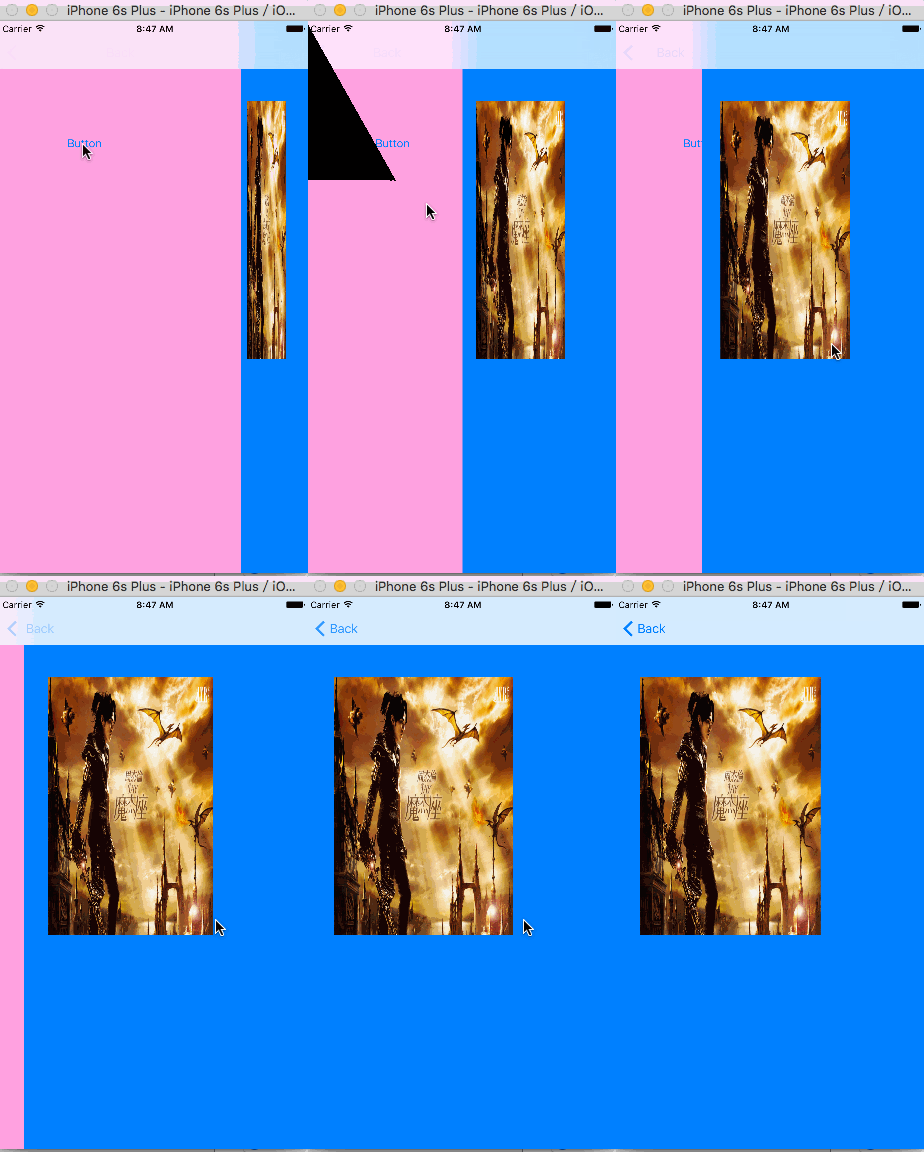
这篇文章完全是为造轮子制作:原作者是码农界的吴彦祖
作者视频下载地址
好的,我梳理一下思路:
理清思路
||转场动画可以理解为一个对象,在这个对象里封装了一个动画.具体的我们跟着代码走
!.实现协议的方法
在一个继承NSObject的类中遵守协议实现代理
 #import <Foundation/Foundation.h>

#import <UIKit/UIKit.h>

@interface PushTranstion : NSObject<UIViewControllerAnimatedTransitioning>

@property (nonatomic,strong)id transitationContext;

@end
在这里遵守一个协议,声明一个属性变量全局操作
方法实现
//  PushTranstion.m

//  专场动画

//

//  Created by MAc on 16/5/27.

//  Copyright © 2016年 MAc. All rights reserved.

//

#import "PushTranstion.h"

@implementation PushTranstion

//转场动画实现的时间  这里设置的长便于观察

- (NSTimeInterval)transitionDuration:(id<UIViewControllerContextTransitioning>)transitionContext{

    return 4.0;

}

//设置动画效果

- (void)animateTransition:(id<UIViewControllerContextTransitioning>)transitionContext {

      _transitationContext=transitionContext;

    UIViewController *fromViewController = [transitionContext  viewControllerForKey:UITransitionContextFromViewControllerKey];

    UIViewController * toViewController = [transitionContext viewControllerForKey:UITransitionContextToViewControllerKey];

    UIView * containerView = [transitionContext containerView];

    [containerView addSubview:fromViewController.view];

    [containerView addSubview:toViewController.view];

    /* 创建一个矩阵The identity transform: [1 0 0 0; 0 1 0 0; 0 0 1 0; 0 0 0 1]. */

    CATransform3D  transform = CATransform3DIdentity;

//设置影射效果,是转场显得更真实

    transform.m34 = - 1/1500.0;

    toViewController.view.layer.transform =transform;

    //设置锚点:(边长为1,锚点指的是(0.5,0.5))

    toViewController.view.layer.anchorPoint = CGPointMake(1.0, 0.5);

    //设置锚点之后,试图左移动了0.5个View.With,重写设置position(锚点在俯视图中的位置,)

    /* The position in the superlayer that the anchor point of the layer's

     * bounds rect is aligned to. Defaults to the zero point. Animatable. */

    toViewController.view.layer.position= CGPointMake(CGRectGetMaxX(fromViewController.view.frame), CGRectGetMidY(fromViewController.view.frame));

    CABasicAnimation * animation = [CABasicAnimation animationWithKeyPath:@"transform.rotation.y"];

    animation.duration = [self transitionDuration:transitionContext];

    //从pi/2开始旋转

    animation.fromValue = @(M_PI_2);

    animation.toValue=@(0);

    animation.delegate =self;

    [toViewController.view.layer addAnimation:animation forKey:@"rotateAnimation"];

}

//动画结束的时候通知上下文

- (void)animationDidStop:(CAAnimation *)anim finished:(BOOL)flag{

    if (flag) {

        //[_transitationContext finishInteractiveTransition];

       [_transitationContext completeTransition:YES];

    }

}

@end
转场对象设定好了,下面就去vc中实现转场动画
在这之前,要理解一件事.转场动画的两个界面是放在一个容器里面的,即前面提到的containerView中放着的两个view,一个fromView 一个toView
其实就是toView旋转铺在fromView上的操作 ,接着看vc中的代码
//

//  ViewController.m

//  专场动画

//

//  Created by MAc on 16/5/27.

//  Copyright © 2016年 MAc. All rights reserved.

//

#import "ViewController.h"

#include "PushTranstion.h"

//#import "PushTransitionTest.h"

@interface ViewController ()<UINavigationControllerDelegate>{

    //和手势搭配使用,单独使用会报不知名错

    UIPercentDrivenInteractiveTransition * interaction;

}

@end

@implementation ViewController

- (IBAction)push:(id)sender {

    // interaction = [[UIPercentDrivenInteractiveTransition alloc] init];

    [self performSegueWithIdentifier:@"PushToS" sender:nil];

}

- (void)viewDidLoad {

    [super viewDidLoad];

    // Do any additional setup after loading the view, typically from a nib.

}

-(void)viewDidAppear:(BOOL)animated{

    [super viewDidAppear:YES];

    self.navigationController.delegate = self;

}

- (void)viewWillDisappear:(BOOL)animated {

    [super viewWillDisappear:animated];

    self.navigationController.delegate = nil;

}

- (nullable id <UIViewControllerAnimatedTransitioning>)navigationController:(UINavigationController *)navigationController

                                            animationControllerForOperation:(UINavigationControllerOperation)operation

                                                         fromViewController:(UIViewController *)fromVC

                                                           toViewController:(UIViewController *)toVC

{

    if (operation == UINavigationControllerOperationPush) {

        return [[PushTranstion alloc] init];

    }

    return nil;

}

@end
这样,这个转场动画的效果就实现了,后面还有对吴彦祖的视频的分析讲解,不清楚的地方相互交流,欢迎留言!
转场动画1-Push 动画的更多相关文章
- ios基础动画、关键帧动画、动画组、转场动画等
概览 在iOS中随处都可以看到绚丽的动画效果,实现这些动画的过程并不复杂,今天将带大家一窥iOS动画全貌.在这里你可以看到iOS中如何使用图层精简非交互式绘图,如何通过核心动画创建基础动画.关键帧动画 ...
- iOS开发UI篇—核心动画(转场动画和组动画)
转自:http://www.cnblogs.com/wendingding/p/3801454.html iOS开发UI篇—核心动画(转场动画和组动画) 一.转场动画简单介绍 CAAnimation的 ...
- 关于push动画中尺寸问题
由于是在sb中写的VC, 所以在跳转动画时, 就会有一些问题. 这是sb中的约束: 当在push动画时, 在中间界面添加imageView时, 如图: imageView的尺寸是如上图所示, 并不是屏 ...
- iOS 自定义Tabbar实现push动画隐藏效果
http://wonderffee.github.io/blog/2013/08/07/hide-custom-tab-bar-with-animation-when-push/ 在之前的一篇文章(链 ...
- 【Flutter 实战】动画序列、共享动画、路由动画
老孟导读:此篇文章是 Flutter 动画系列文章第四篇,本文介绍动画序列.共享动画.路由动画. 动画序列 Flutter中组合动画使用Interval,Interval继承自Curve,用法如下: ...
- iOS开发UI篇—核心动画(UIView封装动画)
iOS开发UI篇—核心动画(UIView封装动画) 一.UIView动画(首尾) 1.简单说明 UIKit直接将动画集成到UIView类中,当内部的一些属性发生改变时,UIView将为这些改变提供动画 ...
- 核心动画基础动画(CABasicAnimation)关键帧动画
1.在iOS中核心动画分为几类: 基础动画(CABasicAnimation) 关键帧动画(CAKeyframeAnimation) 动画组(CAAnimationGroup) 转场动画(CATran ...
- 核心动画(UIView封装动画)
一.UIView动画(首尾) 1.简单说明 UIKit直接将动画集成到UIView类中,当内部的一些属性发生改变时,UIView将为这些改变提供动画支持 执行动画所需要的工作由UIView类自动完成, ...
- Objective-C 使用核心动画CAAnimation实现动画
先来看看效果吧 整个核心动画就不多做介绍了,随便一搜就能有很多很详细的解释,主要使用以下四种 CABasicAnimation //经典动画 CAKeyframeAnimation //关键帧动画 C ...
- Core Animation 动画的使用:关键帧动画、基础动画、动画组
首先让我们了解下什么是 Core Animation,Core Animation 为核心动画,他为图形渲染和动画提供了基础.使用核心动画,我们只需要设置起点.终点.关键帧等一些参数,剩下的工作核心动 ...
随机推荐
- 使用mod_cluster进行apache httpd server和jboss eap 6.1集群配置
本文简单介绍,使用mod_cluster进行apache httpd server和jboss eap 6.1集群配置.本配置在windows上测试通过,linux下应该是一样的.可能要稍作调整.后面 ...
- C# 连接 Mysql 中文乱码问题
网上有很多解决乱码的方法,什么 set names utf8 .什么在插入数据前进行编码,亲自试了都没有效果,在网上寻觅了很久,终于找到一种方法,并亲试成功: 首先要保证你的数据库是UTF8字符集 ...
- bootstrap注意事项(六)按钮
1.预定义样式 使用下面列出的类可以快速创建一个带有预定义样式的按钮 <!DOCTYPE HTML><html><head> <link rel=" ...
- win32 消息说明
WM_NULL = $0000; WM_CREATE = $0001; 应用程序创建一个窗口 WM_DESTROY = $0002; 一个窗口被销毁 WM_MOVE = $0003; 移动一个窗口 W ...
- 浅谈JavaScript中的内存管理
一门语言的内存存储方式是我们学习他必须要了解的,接下来让我浅谈一下自己对他的认识. 首先说,JavaScript中的变量包含两种两种类型: 1)值类型或基本类型:undefined.null.numb ...
- Java异常分类 转载
Java异常分类 http://blog.csdn.net/woshixuye/article/details/8230407 一.基本概念 看java的异常结构图 Throwable是所有异 ...
- poj1160
题目大意:在一个一维坐标轴上有v个(1<=v<=300)村庄,要建p(1<=p<=30)个邮局,每个村庄都到最近的邮局,要求最小的距离和. 四边形不等式,据说黑书上写得很高 ...
- 使用ajax异步提交表单
虽然这篇文章的标题是提交表单,但是主要的难点在于使用ajax提交文本域的内容, 在工作中的经常会需要ajax跨域的问题,通常的需求使用jsonp就可以得到解决,但是当前项目中有一个图片服务器,客户端需 ...
- jsp获取枚举的值
Struts2的Action传回页面一个list,页面迭代这个list,获取下拉框的值,获取过来是枚举类型. 在jsp页面获取枚举的常量值和枚举的值的例子如下: jsp页面: <td >状 ...
- Scala类型声明与定义、函数定义、流程控制、异常处理
Scala源代码被编译成Java字节码,所以它可以运行于JVM之上,并可以调用现有的Java类库. Scala的基础类型基本与javascript一致. Scala的数据类型全部相同于Java中,具有 ...