
Asp.Net--下载文件
实现方式1:
    protected void DownLoad_Click(object sender, EventArgs e)

    {

        //获取要下载的文件

        string filename = Server.MapPath("~/upload/计算机科学与技术.rar");

       FileInfo f = new FileInfo(filename);

        //设置文件头

        Response.ContentType = "application/zip";

        //对文件名进行编码处理,并设置保存时的默认文件名

        Response.AddHeader("Content-Disposition", "attachment;filename=" + HttpUtility.UrlEncode(f.Name, System.Text.Encoding.UTF8));

        //输出文件

        Response.TransmitFile(filename);

    }
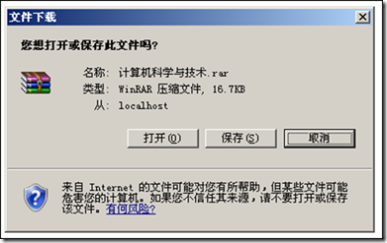
效果:
实现方式2:
    protected void DownLoad_Click(object sender, EventArgs e)

    {

        //获取要下载的文件

         string file = Server.MapPath("~/upload/DesignPattern.rar");

        FileInfo f = new FileInfo(file);

        //清空缓冲区内容

         Response.Clear();

        //设置文件头

         Response.AddHeader("Content-Disposition", "attachment;filename="+HttpUtility.UrlDecode(f.Name,System.Text.Encoding.UTF8));

        Response.AddHeader("Content-Length", f.Length.ToString());

        Response.AddHeader("Content-Transfer-Encoding", "binary");

        Response.ContentType = "application/zip";

        Response.ContentEncoding = System.Text.Encoding.GetEncoding("gb2312");

        Response.WriteFile(f.FullName);

        Response.End();

    }
下载中文名文件时存在问题.
效果: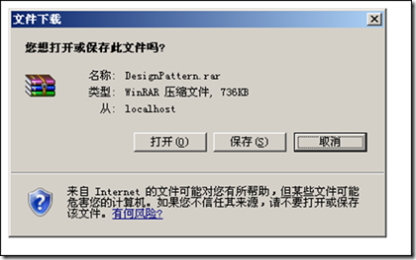
实现方式3:
    protected void DownLoad_Click(object sender, EventArgs e)

    {

        //获取要下载的文件,并将数据读入数组

         string filepath = Server.MapPath("~/upload/DesignPattern.rar");

        FileInfo fi = new FileInfo(filepath);

        FileStream fs = new FileStream(filepath, FileMode.Open);

        int filelength = (int)fs.Length;

        byte[] bt = new byte[filelength];

        fs.Read(bt, 0, filelength);

        fs.Close();

        //设置文件头及保存时的文件名

         Response.ContentType = "application/zip";

        Response.AddHeader("Content-Disposition","attachment;filename="+HttpUtility.UrlDecode(fi.Name,System.Text.Encoding.UTF8));

        Response.AddHeader("Content-Length", filelength.ToString());

        //输出文件

         Response.BinaryWrite(bt);

        Response.Flush();

        Response.End();

    }
下载中文名文件时存在问题.
效果: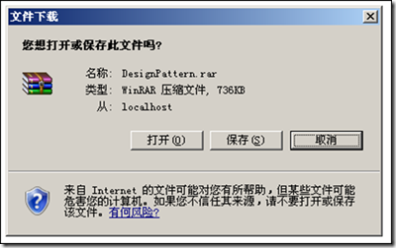
实现方式4:
    protected void DownLoad_Click(object sender, EventArgs e)

    {

        string filepath = Server.MapPath("~/upload/DesignPattern.rar");

        FileStream fs = new FileStream(filepath, FileMode.Open);

        int filelength = (int)fs.Length;

        byte[] b = new byte[filelength];

        fs.Read(b, 0, filelength);

        fs.Close();

        Response.ContentType = "application/zip";

        Response.AddHeader("Content-Disposition", "attachment;filename=1.rar");

        Response.AddHeader("Content-Length", filelength.ToString());

        Response.OutputStream.Write(b, 0, filelength);

        Response.OutputStream.Close();

        Response.Flush();

        Response.Close();

    }
实现方式5:
    protected void DownLoad_Click(object sender, EventArgs e)

    {

        //鑾峰彇瑕佷笅杞界殑鏂囦欢,骞跺皢鏁版嵁璇诲叆鏁扮粍

        string filepath = Server.MapPath("~/upload/aspnetmvc-stepbystep.rar");

        FileStream fs = new FileStream(filepath, FileMode.Open, FileAccess.Read, FileShare.Read);

        long filelength = fs.Length;

        int readsize = 102400;

        byte[] b = new byte[readsize];

        Response.ContentType = "application/octet-stream";

        Response.AddHeader("Content-Disposition", "attachment;filename=1.rar");

        Response.AddHeader("Content-Length", filelength.ToString());

        while (filelength > 0 && Response.IsClientConnected)

        {

            int receive = fs.Read(b, 0, readsize);

            Response.OutputStream.Write(b, 0, receive);

            Response.Flush();

            b = new byte[readsize];

            filelength = filelength - receive;

        }

        fs.Close();

        Response.OutputStream.Close();

        Response.Close();

    }
注意:
Response.AppendHeader("content-disposition", "attachment;filename=" + filename);//附件下载

Response.AppendHeader("content-disposition", "online;filename=" + filename);//在线打开
Asp.Net--下载文件的更多相关文章
- Asp.Net 下载文件的几种方式
asp.net下载文件几种方式 protected void Button1_Click(object sender, EventArgs e) { /* 微软为Response对象提供了一个新的方法 ...
- asp.net下载文件几种方式
测试时我以字符流的形式下载文件,可行,前几个仅作参考 protected void Button1_Click(object sender, EventArgs e) { /* 微软为Respo ...
- Asp.net下载文件
网站上的文件是临时文件, 浏览器下载完成, 网站需要将其删除. 下面的写法, 文件读写后没关闭, 经常删除失败. /// <summary> /// 下载服务器文件,参数一物理文件路径(含 ...
- asp.net 下载文件(图片、word、excel等)
string filePath = Server.MapPath("~/excel.xlsx"); if (File.Exists(filePath)) { FileStream ...
- ASP.NET 下载文件方式
protected void Button1_Click(object sender, EventArgs e) { /* 微软为Response对象提供了一个新的方法TransmitFile来解决使 ...
- asp.net 下载文件几种方式
protected void Button1_Click(object sender, EventArgs e) { /* 微软为Response对象提供了一个新的方法TransmitFile来解决使 ...
- ASP.NET 下载文件并继续执行JS解决方法
需求说明:当用户点击按钮时使当前按钮为不可用,并打开新页面,关闭新页面时,按钮变为可用.并且如果不关闭新页面,当前按钮过10秒钟自动变为可用. 包含3个页面: 一.按钮页 前台代码:当刷新后采用js进 ...
- asp.net下载文件方法
/// <summary> /// 下载 /// </summary> /// <param name="url"></param> ...
- asp.net下载文件的几种方法
最近做东西遇到了下载相关的问题.在这里总结一下自己处理的方法. 1.以字节流的形式向页面输出数据以下载Excel为例子. string path=Server.MapPath("文件路径&q ...
- 解决用ASP.NET下载文件时,文件名为乱码的问题
关键就一句: string strTemp = System.Web.HttpUtility.UrlEncode(strName, System.Text.Enc ...
随机推荐
- WDCP控制面板安装卸载
安装 安装源码 WDCP提供两种安装模式,一种是源码安装,一种是RPM包安装,众所周知,源码安装虽然安装时要比RPM包安装繁琐,但是使用上要节省内存.所以我这里主要介绍源码安装. 首先是下载安装源代码 ...
- memcache的使用
什么是memcache? Memcache是一个高性能的分布式的内存对象缓存系统,通过在内存里维护一个统一的巨大的hash表,它能够用来存储各种格式的数据,包括图像.视频.文件以及数据库检索的结果等. ...
- vsftpd 访问 权限控制
vsftpd 重启命令 service vsftpd start|restart|stop vsftpd 关于权限控制,有两个文件分别设置,都会起作用 /etc/vsftpd/user_list / ...
- Altium Design 中差分走线的设置
1.在原理图中,将要设置的差分对的网络名称的前缀取相同的名字,在前缀后面加后缀分别为_N 和_P,并且加上差分对指示.具体操作如下:2.在原理图界面下,单击 Place>>Directiv ...
- PHP curl 模拟登陆
一个比较好的类: $cookie_file=tempnam("C:/users","tmp");生成以以tmp为前缀的文件. <?php define ( ...
- LINQ TO SQL 常用语法
LINQ To SQL中IN的用法 IN: C# var result = from s1 in context.Customers where (new string[] { "UK& ...
- Lazy Foo:Game Loops
英文原文连接:http://lazyfoo.net/articles/article04/index.php 废话我也就不翻译了,贴个代码然后注释一下吧. 1.游戏住循环 接收信息,然后操作,最后渲染 ...
- Truncate Table 用法
TRUNCATE TABLE 删除表中的所有行,而不记录单个行删除操作. 语法 TRUNCATE TABLE name 参数 name 是要截断的表的名称或要删除其全部行的表的名称. 注释 TRUNC ...
- Highcharts教程2
参数配置(属性+事件) chart.events.addSeries:添加数列到图表中. chart.events.click:整个图表的绘图区上所发生的点击事件. chart.events.load ...
- lesson3.1:java公平锁和非公平锁及读写锁
关于这四种锁的各自情况,网上有很多文章做了介绍,本不想单独开章节介绍,本章只介绍这四种锁的一些源码特点及注意事项. demo 源码:https://github.com/mantuliu/javaAd ...