
vue省市区三级联动(高仿京东)
该栗子是我直接从公司的项目单独拉出来的(懒得重新写一次了),所以代码会有些冗余,下面直接看效果:
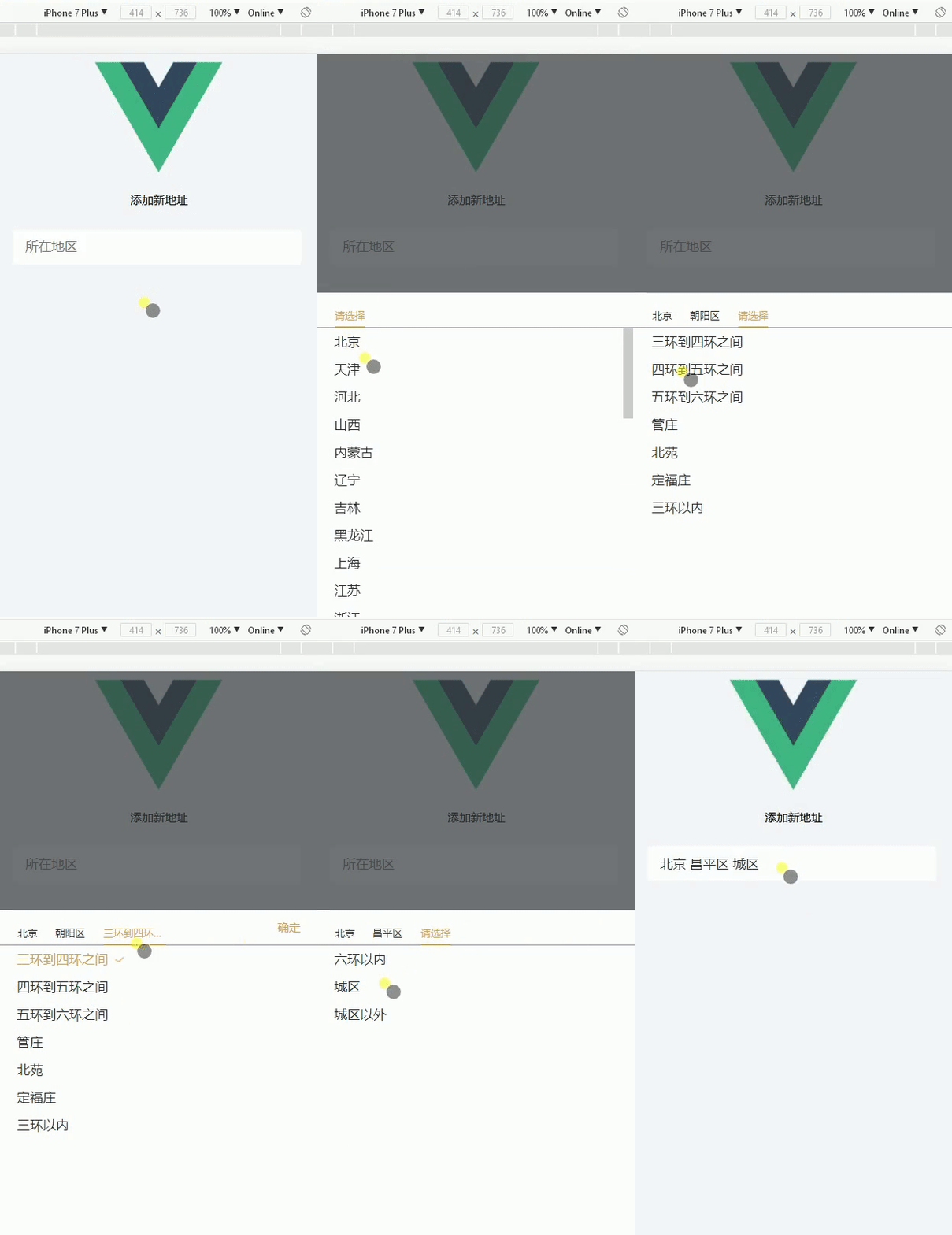
接着上代码:
html:
<template>

  <div>

    <div class="ysc-header">

        <p class="header-title">{{headerTxt}}</p>

    </div>

    <div class="addAddress" @click="choseAdd()">

        <input type="text" placeholder="所在地区" class="txtmangth" disabled="disabled" v-model="userAddress">

    </div>

    <!-- 收货地址三级联动选项 start-->

      <section class="address" :class="{toggHeight:istoggHeight}">

        <section class="title">

          <div class="area" @click="provinceSelected()" :class="[oneac ? 'accolor' : '']">{{Province?Province:'请选择'}}</div>

          <div class="area" @click="citySelected()" :class="[twoac ? 'accolor':'']" v-show="twoshow">{{City?City:'请选择'}}</div>

          <div class="area" @click="districtSelected()" :class="threeac ? 'accolor':''" v-show="threeshow">{{District?District:'请选择'}}</div>

          <div class="determine" v-show="showDeter" @click="determine()">确定</div>

        </section>

        <ul v-show="showProvince" class="proJuli">

          <li class="addList" v-for="(v,k) in info" @click="getProvinceId(v.id, v.name, k)" :key="v.id"  :class="{active : v.selected}"><span>{{v.name}}</span></li>

        </ul>

        <ul v-show="showCity" class="citJuli">

          <li class="addList" v-for="(v,k) in showCityList" @click="getCityId(v.id, v.name, k)"  :key="v.id"  :class="{active : v.selected}"><span>{{v.name}}</span></li>

        </ul>

        <ul v-show="showDistrict" class="disJuli">

          <li class="addList" v-for="(v,k) in showDistrictList" @click="getDistrictId(v.id, v.name, k)" :key="v.id" :class="{active : v.selected}"><span>{{v.name}}</span></li>

        </ul>

      </section>

    <!-- 收货地址三级联动选项 end-->

    <div class="layout" :class="{layoutBg:islayout}" @click="closeAdd()"></div>

  </div>

</template>
script:
<script>

import maps from '../../static/js/map.js'

export default {

  data () {

    return {

      islayout: false,

      istoggHeight: false,

      headerTxt: '添加新地址',

      isBc: false, // 用于控制保存按钮高亮

      toggle: false, // 用于切换默认地址

      showDeter: false,

      oneac: true,

      twoac: false,

      threeac: false,

      twoshow: false,

      threeshow: false,

      userAddress: '',

      oneliIndex: '', // 用于高亮子菜单

      twoliIndex: '',

      titleIndex: Number,

      showProvince: true, // 第一个li默认显示

      showCity: false, // 第二个li默认隐藏

      showDistrict: false, // 第三个li默认隐藏

      showCityList: [],

      showDistrictList: [],

      province: '',

      city: '',

      district: '',

      GetProvinceId: ,

      District: '',

      Province: '',

      City: '',

      // v-for循环判断是否为当前

      selected: true,

      info: maps.map // 三级联动城市列表

    }

  },

  mounted () {

    document.querySelector('body').style.backgroundColor = '#f5f7fa'

  },

  created () {

    if (this.$route.query.data !== undefined) { // 如果是点击编辑地址过来,则执行...当然了,不一定非要用路由传参的方式,你也可以用本地存储,反正能证明你是点击了编辑地址过来就好

      this.showDeter = true

      this.headerTxt = '编辑收货地址'

      let editDate = JSON.parse(this.$route.query.data)

      this.province = editDate.province

      this.city = editDate.city

      this.district = editDate.district

      address.getAddressData({}).then((res) => { // axios请求,目的获取新增地址时,保存的地址ID,用于高亮显示

        if (res.isSuccess === ) {

          // 初始化页面,如果是编辑地址的话,则

          this.twoshow = true // 控制第二个nav显示

          this.threeshow = true // 给第三个nav显示

          this.Province = editDate.areaDescription.split(' ')[]

          this.City = editDate.areaDescription.split(' ')[]

          this.District = editDate.areaDescription.split(' ')[]

          this.showCityList = this._filter(this.info, 'city', editDate.province) // editDate.province由后台获取的id

          this.showDistrictList = this._filter(this.showCityList, 'district', editDate.city) // editDate.city由后台获取的id

          // 高亮后台返回选中的地址,需要对应id

          this._newArr(this.info, editDate.province)

          this._newArr(this.showCityList, editDate.city)

          this._newArr(this.showDistrictList, editDate.district)

        }

      })

    } else {

    //   address.getAddressData({}).then((res) => {

    //     if (res.isSuccess === 1) {

    //       this.info = res.resData[0].regionalInformation

    //     }

    //   })

        console.log()

    }

  },

  methods: {

    choseAdd: function () { // 选择地址弹层,打开弹层

      this.islayout = true

      this.istoggHeight = true

      if (this.$route.query.data !== undefined) {

        this._gotoTop('.proJuli', )

      }

    },

    closeAdd: function () { // 关闭弹层

      this.istoggHeight = false

      this.islayout = false

    },

    determine () {

      this.istoggHeight = false

      this.islayout = false

      // this.showDeter = false

      this.userAddress = this.Province + ' ' + this.City + ' ' + this.District

    },

    _newArr (arr, selectid) {

      for (var i = ; i < arr.length; i++) {

        if (arr[i].id === selectid) {

          this.$set(arr[i], 'selected', true)

        } else if (selectid === -) {

          this.$set(arr[i], 'selected', false)

        }

      }

      return arr

    },

    _filter (add, name, code) { // 数组,对应数组内容,对应数组id

      let result = []

      for (let i = ; i < add.length; i++) {

        if (code === add[i].id) {

          // console.log(code, add[i].id)

          result = add[i][name]

        }

      }

      return result

    },

    _gotoTop (info, index) { // 滚动距离 --> 对应class,第几个index

      let proJuliBox = document.querySelector(info)

      let activeBox = document.getElementsByClassName('active')[index]

      let t = activeBox.offsetTop -  +  // 后面的数据,根据页面情况自己调整

      proJuliBox.scrollTo(, t)

    },

    getProvinceId: function (code, input, index) { // 点击第一个li

      // console.log('code', code, input, index)

      this.titleIndex = Number

      this.province = code

      this.Province = input // 获取选中的省份

      this.showProvince = false

      this.showCity = true

      this.showDistrict = false

      this.showCityList = this._filter(this.info, 'city', this.province)

      // 点击选择当前

      this.info.map(a => { a.selected = false })

      this.info[index].selected = true

      // console.log(this.info[index].name) // 点击的省份的名字

      this.oneac = false // 给第一个nav去掉高亮

      this.twoac = true // 给第二个nav添加高亮

      this.threeac = false // 去除第三个li的高亮

      this.twoshow = true // 控制第二个nav显示

      // this.City = false // 清除市级和区级nav选项

      // this.District = false // 清除市级和区级nav选项

      this.City = '' // 第二nav置空

      this.threeshow = false // 第三nav隐藏

      this.oneliIndex = index

      this._newArr(this.showCityList, -) // 清除市级高亮

      this.showDeter = false

    },

    provinceSelected: function () {

      // console.log('点击了第一个nav')

      // this.titleIndex = 1

      // 清除市级和区级列表

      // this.showCityList = true

      // this.showDistrictList = true

      // 清除市级和区级nav选项

      // this.City = false

      // this.District = false

      // 选项页面的切换

      this.showProvince = true

      this.showCity = false

      this.showDistrict = false

      this.oneac = true // 给第一个nav添加高亮

      this.twoac = false // 给第二个nav去除高亮

      this.threeac = false // 给第三个nav去掉高亮

    },

    getCityId: function (code, input, index) { // 点击第二个li

      // console.log('id', code, input, 'index', index)

      this.titleIndex = Number

      this.city = code

      this.City = input

      this.showProvince = false

      this.showCity = false

      this.showDistrict = true

      this.showDistrictList = this._filter(this.showCityList, 'district', this.city)

      // 选择当前添加active

      this.showCityList.map(a => { a.selected = false })

      this.showCityList[index].selected = true

      this.twoliIndex = index

      this.twoac = false // 给第二个nav去除高亮

      this.threeac = true // 给第三个nav添加高亮

      this.threeshow = true // 给第三个nav显示

      this.District = '' // 第三nav置空

      this._newArr(this.showDistrictList, -) // 清除区级高亮

      this.showDeter = false

    },

    citySelected: function () {

      // console.log('点击了第二个nav')

      this.titleIndex =

      this.showProvince = false

      this.showCity = true

      this.showDistrict = false

      this.oneac = false // 给第一个nav去掉高亮

      this.twoac = true // 给第二个nav添加高亮

      this.threeac = false // 给第三个nav去掉高亮

      if (this.$route.query.data !== undefined) {

        this.$nextTick(() => { // 让li标签回到顶部

          this._gotoTop('.citJuli', )

        })

      }

    },

    getDistrictId: function (code, input, index) {

      this.titleIndex = Number

      this.district = code

      this.District = input

      // 选择当前添加active

      this.showDistrictList.map(a => { a.selected = false })

      this.showDistrictList[index].selected = true

      // 选取市区选项之后关闭弹层

      this.oneac = false // 给第一个nav去掉高亮

      this.showDeter = true

    },

    districtSelected: function () { // 第三个选择

      // console.log('点击了第三个nav')

      this.showProvince = false

      this.showCity = false

      this.showDistrict = true

      this.oneac = false // 给第一个nav去掉高亮

      this.twoac = false // 给第二个nav去掉高亮

      this.threeac = true // 给第三个nav添加高亮

      if (this.$route.query.data !== undefined) {

        this.$nextTick(() => { // 让li标签回到顶部

          this._gotoTop('.disJuli', )

        })

      }

    }

  },

  beforeDestroy () {

    document.querySelector('body').style.backgroundColor = '#fff'

  }

}

</script>
style:
</script>

<style>

*{

  margin: ;

  padding: ;

}

.ysc-header{

  font-size: .28rem;

  text-align: center;

}

.addAddress input {

  height: .8rem;

  width: %;

  background: #fff;

  color: #262e31;

  font-size: .3rem;

  border: none;

  margin:  .3rem;

  padding:  .3rem;

}

/* 地址选择弹层 */

.ac{

  color: #!important;

  border-bottom: .02rem solid #fff!important;

}

.myAddress{

  width: %;

  background-color: white;

  border-top: 4px solid rgba(,,,);

  color:#;

}

.myAddress .cont{

  border-bottom: 1px solid rgba(,,,0.8);

}

.myAddress .cont span{

  display: inline-block;

  font-size: .28rem;

  color: #;

  line-height: .88rem;

  margin-left: .32rem;

}

.myAddress .cont section{

  float:left;

}

.myAddress .cont p{

  display: inline-block;

  font-size: .28rem;

  color: #;

  line-height: .88rem;

  margin-left: 1rem;

}

.myAddress .cont .pic2{

  float: right;

  width: .14rem;

  height: .24rem;

  margin: .32rem .32rem .32rem ;

}

.myAddress .cont p.text{

  margin-left: .72rem;

}

.address{

  position:absolute;

  bottom:;

  left:;

  z-index:;

  background:#fff;

  width:%;

  height: ;

  overflow: hidden;

  transition: height .5s;

}

.toggHeight{

  height: .7rem;

}

.layout{

  width:%;

  height:%;

  position:fixed;

  top:;

  left:;

  z-index:;

  opacity: ;

  transition: all .5s;

  background:rgb(, , );

  visibility: hidden;

}

.layoutBg{

  opacity: .;

  visibility: visible;

}

.area{

  float: left;

  display:inline-block;

  font-size:.24rem;

  height: .48rem;

  line-height:.48rem;

  margin-left:.42rem;

  color:#262e31;

  margin-top: .31rem;

  max-width: calc(% - %);overflow: hidden;text-overflow: ellipsis;white-space: nowrap;

}

.addList{

  margin-left: .4rem;

  font-size:.3rem;

  line-height:.67rem;

  color:#262e31;

}

.address ul{

  height: calc(% - .82rem);

  overflow:auto;

}

.address ul li{

  list-style: none;

}

.address .title .accolor{

  color: #d2a24e;

  border-bottom:.04rem solid #d2a24e;

}

.address ul .active{

  color:#d2a24e;

}

.address ul .active span::after{

  content: '';

  background-image: url(../assets/images/gou_img.png);

  width: .4rem;

  height: .2rem;

  background-repeat: no-repeat;

  background-size: .2rem .13rem;

  background-position: left .16rem center;

  display: inline-block;

}

.title{

  height: .82rem;

  border-bottom: .01rem solid #8a96a3;

}

.determine{

  display: inline-block;

  width: .75rem;

  text-align: center;

  float: right;

  height: .82rem;

  line-height: .82rem;

  margin-right: .3rem;

  color: #d2a24e;

  font-size: .28rem;

}

</style>
PS:那个地址的JS文件由于太大我就不贴出来了,大家可以去我的github那里下载完整的demo(觉得这个栗子还不错的话,记得给个star哦,么么哒),里面有---->https://github.com/yy-biboy/sanjiliandongDemo
开了一个公众号,喜欢的朋友可以关注一下哦《时间的信箱》
下载demo后执行以下命令即可运行
1、npm install
2、npm run dev
vue省市区三级联动(高仿京东)的更多相关文章
- vue省市区三级联动
仿照小米之家做的一个省市区三级联动,先上代码: HTML: <template> <section class="myAddress"> <secti ...
- vue仿京东省市区三级联动选择组件
工作中需要一个盒京东购物车地址选择相似的一个省市区三级联动选择组件,google查了下都是下拉框形式的,于是自己写了一个,希望对使用vue开发项目的朋友有帮助,显示效果如下:使用vue2.0开发 ht ...
- vue 引用省市区三级联动(element-ui Cascader)
npm 下载 npm install element-china-area-data -S main.js import {provinceAndCityData,regionData,provinc ...
- vue 引用省市区三级联动(插件)
vue 用省市区三级联动之傻瓜式教程(复制粘贴即用) npm 下载 npm install v-distpicker --save main.js //引入 省市区三级联动 import Distpi ...
- JS实现年月日三级联动+省市区三级联动+国家省市三级联动
开篇随笔:最近项目需要用到关于年月日三级联动以及省市区三级联动下拉选择的功能,于是乎网上搜了一些做法,觉得有一些只是给出了小的案例或者只有单纯的js还不完整,却很难找到详细的具体数据(baidu搜索都 ...
- 省市区三级联动 pickerView
效果图 概述 关于 省市区 三级联动的 pickerView,我想大多数的 iOS 开发者应该都遇到过这样的需求.在遇到这样的需求的时候,大多数人都会觉的这个很复杂,一时无从下手.其实真的没那么复杂. ...
- QQ JS省市区三级联动
如下图: 首先写一个静态的页面: <!DOCTYPE html> <html> <head> <title>QQ JS省市区三级联动</title ...
- 【转】纯JS省市区三级联动(行政区划代码更新至2015-9-30)
本文代码实现的功能是省市区三级联动下拉列表,纯Javascript,网上已有很多这方面的代码.但是作为一个新手,这是我的第一篇CSDN博客,发此文的目的主要是学习交流,希望看到的朋友发现有什么不对的地 ...
- 插件 原生js 省市区 三级联动 源码
<!DOCTYPE html> <html lang="en"> <head> <meta charset="UTF-8&quo ...
随机推荐
- stand up meeting 1/15/2016 && work of weekend 1/16/2016~1/17/2016
part 组员 工作 工作耗时/h 明日计划 工作耗时/h UI 冯晓云 组内对生词卡片又重新进行了讨论:准备最后的发布和整个开发的整理 ...
- I - Harmonic Number LightOJ - 1234 (分段打表+暴力)
题目给的时间限制是3s,所以可以直接暴力来做,注意n的取值范围是1e8,如果开一个1e8的数组会RE.分段打表,可以每100个数记录一次,然后对每次询问先找到它所在的区间,然后在暴力往后找.(学到了~ ...
- D - Free Candies UVA - 10118
题目链接:https://uva.onlinejudge.org/index.php?option=com_onlinejudge&Itemid=8&page=show_problem ...
- 使用jquery清空input 文本框中的内容
只需要将文本框的值置为空即可: function resetBtn(){ $("#name").val(""); }
- [YII2] 自带分页调整
在search Model的search()方法里有一个$dataProvider 属性 ,在这个属性数组里添加 'pagination' => ['pageSize' => 10,],设 ...
- 靠!安装了macOS Catalina(10.15.4)后,文件系统都乱套了
最近闲来无事,决定将我的两台apple电脑升级成最新的苹果系统(macOS Catalina),当然,由于以前升级过多次mac系统,所以毫不犹豫从app store下载了最新的macOS Cetali ...
- 实例讲解Springboot以Template方式整合Redis及序列化问题
1 简介 之前讲过如何通过Docker安装Redis,也讲了Springboot以Repository方式整合Redis,建议阅读后再看本文效果更佳: (1) Docker安装Redis并介绍漂亮的可 ...
- redis:String字符串类型(三)
字符串拼接(如果key不存在则创建):append name " applesnt" 获取字符串的长度:strlen name 127.0.0.1:6379> set nam ...
- python-Django与Apache整合wsgi模块
1.安装wsgi模块 yum search mod_wsgi yum install -y mod_wsgi 2.会在httpd下有配置文件 cd /etc/httpd/conf.d/wsgi.con ...
- MySQL事务与并发
很多程序员都学过MySQL,而且也会写SQL语句.但仅仅会写还远远不够,在面试中以及在工作中,还必须要会事务和并发. 一.事务 事务是满足 ACID 特性的操作,可以通过 Commit 提交事务, ...