
5.Nginx
1.Nginx 安装
(1) 安装gcc (yum install gcc)
备注:可以输入gcc -v 查询版本信息,看系统是否自带安装
(2) 安装pcre (yum install pcre-devel)
(3) 安装zlib (yum install zlib zlib-devel)
(4) 安装openssl (yum install openssh openssh-devel)
(5) 下载源码包,选择稳定版本(http://www.nginx.org/)
wget http://nginx.org/download/nginx-1.10.2.tar.gz
tar -zxvf nginx-1.10.2.tar.gz
(6) 进入nginx-1.10.2 目录之后执行./configure
也可以指定安装目录,增加参数--prefix=/usr/nginx
如果不指定路径,可以通过whereis nginx进行查询
默认安装在/usr/local/nginx
(7) ./configure --prefix=/usr/common/nginx --with-http_stub_status_module
(8) 继续执行make
(9) 继续执行make install
(10) 进入 /usr/common/nginx
2.Nginx 的基本运行
(1) 测试配置文件
安装路径下的/usr/common/nginx/sbin
执行./nginx -t
(2) 启动
安装路径下的/usr/common/nginx/sbin
执行./nginx
查看监控的端口在配置文件nginx.conf
#user  nobody;

worker_processes  1;

#error_log  logs/error.log;

#error_log  logs/error.log  notice;

#error_log  logs/error.log  info;

#pid        logs/nginx.pid;

events {

    worker_connections  1024;

}

http {

    include       mime.types;

    default_type  application/octet-stream;

    #log_format  main  '$remote_addr - $remote_user [$time_local] "$request" '

    #                  '$status $body_bytes_sent "$http_referer" '

    #                  '"$http_user_agent" "$http_x_forwarded_for"';

    #access_log  logs/access.log  main;

    sendfile        on;

    #tcp_nopush     on;

    #keepalive_timeout  0;

    keepalive_timeout  65;

    #gzip  on;

    server {

        listen       80;

        server_name  localhost;

        #charset koi8-r;

        #access_log  logs/host.access.log  main;

        location / {

            root   html;

            index  index.html index.htm;

        }

        #error_page  404              /404.html;

        # redirect server error pages to the static page /50x.html

        #

        error_page   500 502 503 504  /50x.html;

        location = /50x.html {

            root   html;

        }

        # proxy the PHP scripts to Apache listening on 127.0.0.1:80

        #

        #location ~ \.php$ {

        #    proxy_pass   http://127.0.0.1;

        #}

        # pass the PHP scripts to FastCGI server listening on 127.0.0.1:9000

        #

        #location ~ \.php$ {

        #    root           html;

        #    fastcgi_pass   127.0.0.1:9000;

        #    fastcgi_index  index.php;

        #    fastcgi_param  SCRIPT_FILENAME  /scripts$fastcgi_script_name;

        #    include        fastcgi_params;

        #}

        # deny access to .htaccess files, if Apache's document root

        # concurs with nginx's one

        #

        #location ~ /\.ht {

        #    deny  all;

        #}

    }

    # another virtual host using mix of IP-, name-, and port-based configuration

    #

    #server {

    #    listen       8000;

    #    listen       somename:8080;

    #    server_name  somename  alias  another.alias;

    #    location / {

    #        root   html;

    #        index  index.html index.htm;

    #    }

    #}

    # HTTPS server

    #

    #server {

    #    listen       443 ssl;

    #    server_name  localhost;

    #    ssl_certificate      cert.pem;

    #    ssl_certificate_key  cert.key;

    #    ssl_session_cache    shared:SSL:1m;

    #    ssl_session_timeout  5m;

    #    ssl_ciphers  HIGH:!aNULL:!MD5;

    #    ssl_prefer_server_ciphers  on;

    #    location / {

    #        root   html;

    #        index  index.html index.htm;

    #    }

    #}

}
(3) 停止
安装路径下的/usr/common/nginx/sbin
执行./nginx -s quit 或./nginx -s stop
(4) 重启
安装路径下的/usr/common/nginx/sbin
执行./nginx -s reload
(5) 查看进程
ps -ef | grep nginx
(6) 关闭防火墙
service iptabels stop
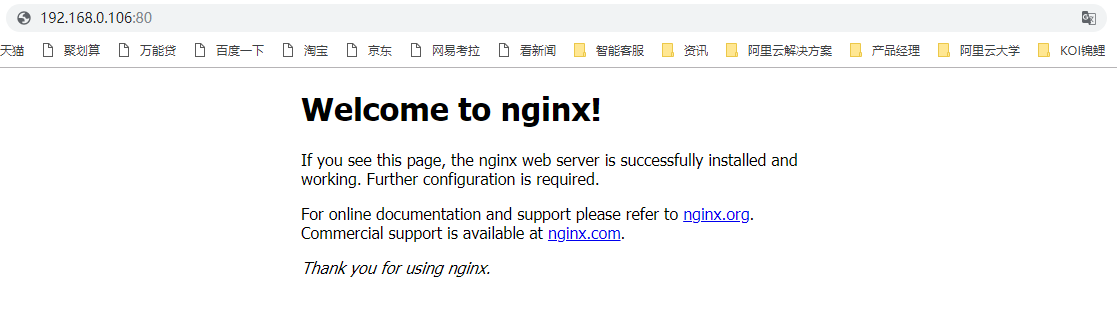
3. 测试
5.Nginx的更多相关文章
- accept_mutex与性能的关系 (nginx)
注:运行环境CentOS 6+ 背景 在对启动了20个worker的nginx进行压力测试的时候发现:如果把配置文件中event配置块中的accept_mutex开关打开(1.11.3版 ...
- nginx配置反向代理或跳转出现400问题处理记录
午休完上班后,同事说测试站点访问接口出现400 Bad Request Request Header Or Cookie Too Large提示,心想还好是测试服务器出现问题,影响不大,不过也赶紧上 ...
- 【大型网站技术实践】初级篇:借助Nginx搭建反向代理服务器
一.反向代理:Web服务器的“经纪人” 1.1 反向代理初印象 反向代理(Reverse Proxy)方式是指以代理服务器来接受internet上的连接请求,然后将请求转发给内部网络上的服务器,并将从 ...
- Docker笔记一:基于Docker容器构建并运行 nginx + php + mysql ( mariadb ) 服务环境
首先为什么要自己编写Dockerfile来构建 nginx.php.mariadb这三个镜像呢?一是希望更深入了解Dockerfile的使用,也就能初步了解docker镜像是如何被构建的:二是希望将来 ...
- nginx+php的使用
原文来自:windows下配置nginx+php环境 按照他的步骤走,亲测可用! 但是这里他后面说的根目录可能有些人有点懵. 其实在设置的时候就设置了: 网站根目录就是www这个目录,如果没创建请自行 ...
- nginx的使用
1.nginx的下载 解压后文件目录: 2.nginx的常用命令 nginx -s stop 强制关闭 nginx -s quit 安全关闭 nginx -s reload 改变配置文件的时候,重 ...
- nginx+iis+redis+Task.MainForm构建分布式架构 之 (redis存储分布式共享的session及共享session运作流程)
本次要分享的是利用windows+nginx+iis+redis+Task.MainForm组建分布式架构,上一篇分享文章制作是在windows上使用的nginx,一般正式发布的时候是在linux来配 ...
- windows+nginx+iis+redis+Task.MainForm构建分布式架构 之 (nginx+iis构建服务集群)
本次要分享的是利用windows+nginx+iis+redis+Task.MainForm组建分布式架构,由标题就能看出此内容不是一篇分享文章能说完的,所以我打算分几篇分享文章来讲解,一步一步实现分 ...
- nginx源码分析之模块初始化
在nginx启动过程中,模块的初始化是整个启动过程中的重要部分,而且了解了模块初始化的过程对应后面具体分析各个模块会有事半功倍的效果.在我看来,分析源码来了解模块的初始化是最直接不过的了,所以下面主要 ...
- Nginx如何处理一个请求
看了下nginx的官方文档,其中nginx如何处理一个请求讲解的很好,现在贴出来分享下.Nginx首先选定由哪一个虚拟主机来处理请求.让我们从一个简单的配置(其中全部3个虚拟主机都在端口*:80上监听 ...
随机推荐
- 2000G电脑大型单机游戏合集
激活码 游戏名称(ctrl+F查找) 下载链接005875 艾迪芬奇的记忆 游戏下载链接http://pan.baidu.com/s/1t2PYRAj546_1AcOB-khJZg554158 暗影: ...
- 用for循环创建对象
以下代码Demo: public class TestDemo { public static void main(String[] args) { //以创建5个student为例 int coun ...
- LVS、Tomcat、Nginx、PHP优化项
一.LVS 性能调优的方法最佳实践1.最小化安装编译系统内核2.优化持久服务超时时间: 1)显示超时时间 #ipvsadm -Ln --timeout #Timeout (tcp t ...
- Fluent_Python_Part2数据结构,03-dict-set,字典和集合
字典和集合 dict和set都基于hash table实现 1. 大纲: 常见的字典方法 如何处理查找不到的键 标准库中dict类型的变种 set和fronzenset类型 Hash table的工作 ...
- vs的一些操作技巧:在写代码时自动换行的设置
有时在写代码的时候,一行代码太长了,想换行,直接按回车键的话又会报错,怎么办?其实可以这样设置vs,就可以达到自动换行的效果啦.
- python3下pygame显示中文的设置
1.先看代码: import pygame from pygame.locals import * def main(): pygame.init() screen = pygame.display. ...
- Maven与Nexus
开始在使用Maven时,总是会听到nexus这个词,一会儿maven,一会儿nexus,当时很是困惑,nexus是什么呢,为什么它总是和maven一起被提到呢? 我们一步一步来了解吧. 一.了解Mav ...
- 2.4G芯片
一 南京中科微: Si24R1GFSK无线收发芯片 Si24R1专为低功耗无线通信应用场合设计.工作频率为2400MHz-2525MHz,共有126个1MHz带宽的信道:典型应用:有源RFID. ...
- Update(Stage4):sparksql:第5节 SparkSQL_出租车利用率分析案例
目录: 1. 业务2. 流程分析3. 数据读取5. 数据清洗6. 行政区信息 6.1. 需求介绍 6.2. 工具介绍 6.3. 具体实现7. 会话统计 导读 本项目是 SparkSQL 阶段的练习项目 ...
- 洛谷 T2691 桶哥的问题——送桶
嗯... 题目链接:https://www.luogu.org/problem/T2691 这道题有一点贪心的思想吧...并且思路与题目是倒着来的(貌似这种思路已经很常见的... 先举个栗子: 引出思 ...