
Part 10 AngularJS sort rows by table header
Here is what we want to do
1. The data should be sorted when the table column header is clicked
2.
The user should be able to sort in both the directions - ascending and
descending. Clicking on the column for the first time should sort the
data in ascending order. Clicking on the same column again should sort
in descending order.
3. An icon should be displayed next to the column showing the sort column and direction
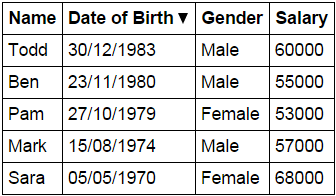
Script.js : The controller function in the script does the following
- Sets up the model
- sortColumn and reverseSort properties
are attached to the $scope object. These 2 properties are used to
control the column by which the data should be sorted and the sort
direction. - sortColumn is set to name and reverseSort is
set to false. This will ensure that when the form is initially loaded,
the table data will be sorted by name column in ascending order. - Depending on the column header the user has clicked, sortData() function sets the sortColumn and reverseSort property values.
- Based on the sort column and the sort direction, getSortClass()
function returns the CSS class name to return. The CSS class controls
the sort icon that will be displayed next to the sort column.
 var app = angular

        .module("myModule", [])

        .controller("myController", function ($scope) {

            var employees = [

                {

                    name: "Ben", dateOfBirth: new Date("November 23, 1980"),

                    gender: "Male", salary: 55000

                },

                {

                    name: "Sara", dateOfBirth: new Date("May 05, 1970"),

                    gender: "Female", salary: 68000

                },

                {

                    name: "Mark", dateOfBirth: new Date("August 15, 1974"),

                    gender: "Male", salary: 57000

                },

                {

                    name: "Pam", dateOfBirth: new Date("October 27, 1979"),

                    gender: "Female", salary: 53000

                },

                {

                    name: "Todd", dateOfBirth: new Date("December 30, 1983"),

                    gender: "Male", salary: 60000

                }

            ];

            $scope.employees = employees;

            $scope.sortColumn = "name";

            $scope.reverseSort = false;

            $scope.sortData = function (column) {

                $scope.reverseSort = ($scope.sortColumn == column) ?

                    !$scope.reverseSort : false;

                $scope.sortColumn = column;

            }

            $scope.getSortClass = function (column) {

                if ($scope.sortColumn == column) {

                    return $scope.reverseSort

                      ? 'arrow-down'

                      : 'arrow-up';

                }

                return '';

            }

        });
HtmlPage1.html : sortData() function is called when any table header is clicked, passing the name of the column by which the data should be sorted. The div element's, ng-class directive calls getSortClass() function, which returns the CSS class to be applied. The CSS displays the UP or DOWN arrow depending on the sort direction. Finally, with the orderBy filter sortColumn and reverseSort properties of the $scope object are used to control the column by which the data should be sorted and the sort direction.
 <!DOCTYPE html>

<html xmlns="http://www.w3.org/1999/xhtml">

<head>

    <title></title>

    <script src="Scripts/angular.min.js"></script>

    <script src="Scripts/Script.js"></script>

    <link href="Styles.css" rel="stylesheet" />

</head>

<body ng-app="myModule">

    <div ng-controller="myController">

        <table>

            <thead>

                <tr>

                    <th ng-click="sortData('name')">

                        Name <div ng-class="getSortClass('name')"></div>

                    </th>

                    <th ng-click="sortData('dateOfBirth')">

                        Date of Birth <div ng-class="getSortClass('dateOfBirth')"></div>

                    </th>

                    <th ng-click="sortData('gender')">

                        Gender <div ng-class="getSortClass('gender')"></div>

                    </th>

                    <th ng-click="sortData('salary')">

                        Salary <div ng-class="getSortClass('salary')"></div>

                    </th>

                </tr>

            </thead>

            <tbody>

                <tr ng-repeat="employee in employees | orderBy:sortColumn:reverseSort">

                    <td> {{ employee.name }} </td>

                    <td> {{ employee.dateOfBirth | date:"dd/MM/yyyy" }} </td>

                    <td> {{ employee.gender }} </td>

                    <td> {{ employee.salary  }} </td>

                </tr>

            </tbody>

        </table>

    </div>

</body>

</html>
Styles.css : CSS styles to make the form look pretty.
 body {

    font-family: Arial;

}

table {

    border-collapse: collapse;

}

td {

    border: 1px solid black;

    padding: 5px;

}

th {

    border: 1px solid black;

    padding: 5px;

    text-align: left;

    /*cursor property displays hand symbol

        when hovered over the th element*/

    cursor: pointer;

}

/*This class displays the UP arrow*/

.arrow-up {

     width:;

     height:;

     border-left: 5px solid transparent;

     border-right: 5px solid transparent;

     border-bottom: 10px solid black;

     display:inline-block;

}

/*This class displays the DOWN arrow*/

.arrow-down {

     width:;

     height:;

     border-left: 5px solid transparent;

     border-right: 5px solid transparent;

     border-top: 10px solid black;

     display:inline-block;

}
Part 10 AngularJS sort rows by table header的更多相关文章
- Clone table header and set as the first element, and replace header's th with td
Clone table header and replace header's th with td var tableHeaderRow = '#tableId tbody tr:nth-child ...
- 在SSRS的每一页重复显示table header
现在在做一个关于SSRS报表展示的项目,但是我困顿在如何在table的每一页让table header重复显示.因为我在table属性中勾选了"Report header columns o ...
- Kettle 排序记录的使用(Sort rows)
排序行的步骤根据您指定的字段和它们是否应该按升序或降序排序当行数超过指定的排序大小(默认为100万行)时候,kettle必须使用临时文件排序行.步骤名称:名称在整个转换中应该是唯一的排序目录:默认当前 ...
- Creating HTML table with vertically oriented text as table header 表头文字方向
AS an old question, this is more like info or reminder about vertical margin or padding in % that ta ...
- Ubuntu 14.10 下sort,uniq,cut,wc命令详解
sort sort 命令对 File 参数指定的文件中的行排序,并将结果写到标准输出.如果 File 参数指定多个文件,那么 sort 命令将这些文件连接起来,并当作一个文件进行排序. sort语法 ...
- jQuery复制table header到表格的最下面
为了让table具有更好的可读性,我们可以将表格的header信息克隆一份到表格的底部,这种特效通过JQuery就很容易实现: 1 2 3 4 5 var $tfoot = $(''); $($('t ...
- 10.27 sort
排序命令sort选项与参数:-f :忽略大小写的差异,例如 A 与 a 视为编码相同:-b :忽略最前面的空白字符部分:-M :以月份的名字来排序,例如 JAN, DEC 等等的排序方法:-n :使用 ...
- 夺命雷公狗—angularjs—10—angularjs里面的内置函数
我们没学一门语言或者框架,几乎里面都有各自的语法和内置函数,当然,强悍的angularjs也不例外,他的方法其实常用的没多少,因为很多都可以用源生jis几乎都能完成一大部分.. <!doctyp ...
- angularjs 文件下载 并 从response header中获取文件名
最近在做一个下载文件的功能,后台接口给的是二进制流的方式,那么前端要把二进制流下载下来. 这个过程使用$http的get请求,使用Blob接收,倒是没有难度,主要是遇到了,后台的文件名拿不到 的问题. ...
随机推荐
- ThreadPool for Delphi
http://sourceforge.net/projects/threadpoolpas/ http://hivelocity.dl.sourceforge.net/project/threadpo ...
- CHM文件无法查看内容解决办法
http://www.cnblogs.com/skey_chen/archive/2011/05/24/2055538.html 从网上下载了一份CHM格式的文档,打开时左侧菜单出来了,但右边显示如下 ...
- HRESULT 0x80131515 解决方法
http://254698001.blog.51cto.com/2521548/1339696 很多朋友在加载DLL是发生这样的错误:HRESULT: 0x80131515. 解决方法是,在DLL文件 ...
- PHP中关于超链接的拼接问题
<?php$link = " http://www.baidu.com";echo '<a href='.$link.'> 百度 </a>';?> ...
- 【java开发系列】— JDOM创建、改动、删除、读取XML文件
有非常多中操作XML文件的方法,这里介绍一下JDOM的用法和技巧. JDOM下载地址 创建XML文档 XML文件是一种典型的树形文件,每一个文档元素都是一个document元素的子节点. 而每一个子元 ...
- MySql服务器的启动和关闭
转自:http://zqding.iteye.com/blog/1562095 在windows下: 启动: .cd c:\mysql\bin .mysqld --console 关闭: .cd c: ...
- js模板引擎介绍搜集
js模板引擎越来越多的得到应用,如今已经出现了几十种js模板引擎,国内各大互联网公司也都开发了自己的js模板引擎(淘宝的kissy template,腾讯的artTemplate,百度的baiduTe ...
- 剑指 offer set 5 二进制中 1 的个数
总结 1. 负数右移会保持其符号. 比如 0x80000000 右移, 其对应的绝对值也是 0X80000000, 其右移一位并保持符号, 得到 0XC0000000. 符号位保持, 使得负数永远都无 ...
- oc-23-static
#import <Foundation/Foundation.h> #import "Person.h" int main(int argc, const char * ...
- 线性表 及Java实现 顺序表、链表、栈、队列
数据结构与算法是程序设计的两大基础,大型的IT企业面试时也会出数据结构和算法的题目, 它可以说明你是否有良好的逻辑思维,如果你具备良好的逻辑思维,即使技术存在某些缺陷,面试公司也会认为你很有培养价值, ...