
Unity3D Log 收集机制
最近做项目的时候发现,需要有一个完整的log机制。这样不仅方便调试而且方便观察。
一、需求
目前我认为一个完善的log机制应该是这样的。
一、双击定位
二、生命周期是全局的
三、输出包括consloe 和 log 日志,并且这些log的打印是可配置的。
四、未完待续,如果你有更好的想法,请留言。
二、代码实现
不废话,直接上代码
using UnityEngine;

using System;

using System.Text;

using System.IO;

using System.Collections;

namespace LogUtil {

    public class LogManager : MonoBehaviour

    {

        //public

        static string LogPath = Application.persistentDataPath + "/";

        //public

        static string LogFilePath = string.Format("{0}{1}", LogPath, "info");

        //public

        static int infoCount = 0;

        //public

        static string LogWaringFilePath = string.Format("{0}{1}", LogPath, "waring");

        //public

        static int waringCount = 0;

        //public

        static string LogErrorFilePath = string.Format("{0}{1}", LogPath, "error");

        //public

        static int errorCount = 0;

        //public

        static string LogExceptionFilePath = string.Format("{0}{1}", LogPath, "exception");

        //public

        static int exceptionCount = 0;

        static LogManager _instance = null;

        //创建第一个实例或引用任何静态成员之前,将自动调用静态构造函数

        static LogManager()

        {

            GameObject tmp = new GameObject("LogManager");

            DontDestroyOnLoad(tmp);

            _instance = tmp.AddComponent<LogManager>();

            //Debug.Log("LogManager");

        }

		//配置是否生成Log日志

        public static bool IsRegister = true;

		//配置是否控制台打印

        public static bool IsLog = true;

        void Awake()

        {

            //register callback

            if (IsRegister) Application.RegisterLogCallbackThreaded(OutPutLog);

        }

        public static void Log(object message)

        {

            if (IsLog) Debug.Log(message);

        }

        public static void LogError(object message)

        {

            if (IsLog) Debug.LogError(message);

        }

        public static void LogWarning(object message)

        {

            if (IsLog) Debug.LogWarning(message);

        }

        public static void LogException(Exception message)

        {

            if (IsLog) Debug.LogException(message);

        }

        public static void LogException(string message)

        {

            if (IsLog) Debug.LogException(new Exception(message));

        }

        FileStream logStream = new FileStream(string.Format("{0}.log", LogFilePath), FileMode.Create);

        FileStream warningStream = new FileStream(string.Format("{0}.log", LogWaringFilePath), FileMode.Create);

        FileStream errorStream = new FileStream(string.Format("{0}.log", LogErrorFilePath), FileMode.Create);

        FileStream exceptionStream = new FileStream(string.Format("{0}.log", LogExceptionFilePath), FileMode.Create);

        public void OutPutLog(string condition, string stackTrace, LogType type)

        {

            string curTime = DateTime.Now.ToString();

            string hint = string.Format("{0} [{1}] {2}\n{3}\n", curTime, type.ToString(), condition, stackTrace);

            byte[] buffer = Encoding.UTF8.GetBytes(hint);

            switch (type)

            {

                case LogType.Error:

                    if (errorStream != null)

                    {

                        errorStream.Write(buffer, 0, buffer.Length);

                        if (errorStream.Length > 1024 * 1024)

                        {

                            errorStream.Close();

                            File.Move(string.Format("{0}.log", LogErrorFilePath), string.Format("{0}_{1}.log", LogErrorFilePath, waringCount++));

                            errorStream = new FileStream(string.Format("{0}.log", LogErrorFilePath), FileMode.Create);

                        }

                    }

                    break;

                case LogType.Exception:

                    if (exceptionStream != null)

                    {

                        exceptionStream.Write(buffer, 0, buffer.Length);

                        if (exceptionStream.Length > 1024 * 1024)

                        {

                            exceptionStream.Close();

                            File.Move(string.Format("{0}.log", LogExceptionFilePath), string.Format("{0}_{1}.log", LogExceptionFilePath, waringCount++));

                            exceptionStream = new FileStream(string.Format("{0}.log", LogExceptionFilePath), FileMode.Create);

                        }

                    }

                    break;

                case LogType.Log:

                    if (logStream != null)

                    {

                        logStream.Write(buffer, 0, buffer.Length);

                        if (logStream.Length > 1024 * 1024)

                        {

                            logStream.Close();

                            File.Move(string.Format("{0}.log", LogFilePath), string.Format("{0}_{1}.log", LogFilePath, infoCount++));

                            logStream = new FileStream(string.Format("{0}.log", LogFilePath), FileMode.Create);

                        }

                    }

                    break;

                case LogType.Warning:

                    if (warningStream != null)

                    {

                        warningStream.Write(buffer, 0, buffer.Length);

                        if (warningStream.Length > 1024 * 1024)

                        {

                            warningStream.Close();

                            File.Move(string.Format("{0}.log", LogWaringFilePath), string.Format("{0}_{1}.log", LogWaringFilePath, waringCount++));

                            warningStream = new FileStream(string.Format("{0}.log", LogWaringFilePath), FileMode.Create);

                        }

                    }

                    break;

                default:

                    break;

            }

        }

    }

}
三、完善
上述的代码基本实现了2,3的需求功能,但是1的双击定位问题却带来了。
我们可以封装成一个dll,然后就解决了这个问题。
参考链接如下 注意引用UnityEngine这个链接即可
http://www.cnblogs.com/errorx/archive/2011/03/29/1999170.html
http://game.ceeger.com/Manual/UsingDLL.html
file:///C:/Unity3D/Editor/Data/Documentation/html/en/Manual/UsingDLL.html
我把那个类库建在自己的工程目录下,按F6 生成dll

放入自己的工程就可以了。原来的cs文件记得删除哟!

四、资料
我把dll与源码共享出来,如果有更好的修改方式,你也可以完善。
http://yunpan.cn/Q7dukcFjA3tAv 访问密码 ed22
2014-9-7 日 更新
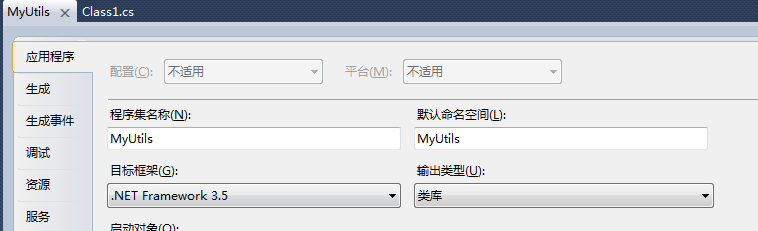
如果你在导入和使用dll编译的时候发现了错误

估计是因为你.net框架过高,把你的类库的level 降到3.5即可
Unity3D Log 收集机制的更多相关文章
- 探索 OpenStack 之(17):计量模块 Ceilometer 中的数据收集机制
本文将阐述 Ceilometer 中的数据收集机制.Ceilometer 使用三种机制来收集数据: Notifications:Ceilometer 接收 OpenStack 其它服务发出的 noti ...
- LOG收集系统(一):原日志至收集
Date: 20140207Auth: Jin 设置一个LOG收集系统1. 收集原生(不解析,不压缩)的业务日志和WEB日志(NGINX,PHP)2. 提供给开发,测试直接阅读和下载 需求分析原生日志 ...
- RTP 记录 log 该机制
我们 RCV 在这里,经常跑concurrent request RTP: Receiving Transaction Processor, 它主要是用来处理 RCV_TRANSACTIONS_INT ...
- android log写入机制
这几天和华为的leader面试了下.感觉不错.关键是小女.不容易.是技术面啊.我说的不容易不是面试不容易,是说在华为写代码的小女不容易.哥走南闯北这么多年,女人代码写的好真不多. 其实在任何时候,只要 ...
- Cocos2d-x之Log输出机制
| 版权声明:本文为博主原创文章,未经博主允许不得转载. 在cocos2d-x中,我们使用log这个函数进行输出,log可以输出很多参数,它的使用方式就和使用c语言中的printf的使用方式差不多 ...
- JAVA分代收集机制详解
Java堆中是JVM管理的最大一块内存空间.主要存放对象实例. 在JAVA中堆被分为两块区域:新生代(young).老年代(old). 堆大小=新生代+老年代:(新生代占堆空间的1/3.老年代占堆空间 ...
- Kafka内核理解:消息的收集/消费机制
原文:https://www.cnblogs.com/daochong/p/6425762.html 一.Kafka数据收集机制 Kafka集群中由producer负责数据的产生,并发送到对应的Top ...
- [Kafka] - Kafka内核理解:消息的收集/消费机制
一.Kafka数据收集机制 Kafka集群中由producer负责数据的产生,并发送到对应的Topic:Producer通过push的方式将数据发送到对应Topic的分区 Producer发送到Top ...
- kubernets轻量 contain log 日志收集技巧
首先这里要收集的日志是容器的日志,而不是集群状态的日志 要完成的三个点,收集,监控,报警,收集是基础,监控和报警可以基于收集的日志来作,这篇主要实现收集 不想看字的可以直接看代码,一共没几行,尽量用调 ...
随机推荐
- 标识映射(Identify Map)
通过在Map中保存每个已加载过的对象,确保每个对象只加载一次. 当要访问对象时,首先检查标识映射,看需要的对象是否已经存在其中. 使用Identify来确保不重复加载相同的数据,不仅有助于保证正确性( ...
- 7款震撼人心的HTML5文字特效
1.CSS3五彩文字特效 文字带阴影效果 这是一款非常具有卡通形象的CSS3五彩文字特效,虽然没有迷人的动画效果,但是五彩缤纷的文字展现在屏幕上也是非常酷的,再加上每一个文字都有不同角度的阴影效果,加 ...
- Http和Socket连接区别
相信不少初学手机联网开发的朋友都想知道Http与Socket连接究竟有什么区别,希望通过自己的浅显理解能对初学者有所帮助. 1.TCP连接 要想明白Socket连接,先要明白TCP连接.手机能够使用联 ...
- Allegro设置十字大光标
使用大十字光标,在摆放元器件时,容易对齐.在allegro中,可以通过设置实现大十字光标,其具体方法如下: 1.选择Setup->User Perferences,即可出现如下图所示界面: 2. ...
- FPGA统计摄像头输出-基于MD9T112
FPGA HDL源程序 FPGA统计摄像头的输出像素,窗口尺寸等等 //---------------------------------------------------------------- ...
- 三角函数计算,Cordic 算法入门
[-] 三角函数计算Cordic 算法入门 从二分查找法说起 减少乘法运算 消除乘法运算 三角函数计算,Cordic 算法入门 三角函数的计算是个复杂的主题,有计算机之前,人们通常通过查找三角函数表来 ...
- jquery的change 事件
jquery的change 事件 . <script src="jquery.min.js" type="text/javascript">< ...
- 过滤字段中HTML标签
代码中只是过滤了一部分标签,例如span这些还是没有过滤,如果有更好办法的,可以帮忙补充 create FUNCTION [dbo].[CleanHTML] (@HTMLText VARCHAR(MA ...
- Android app version code and name
android:versionCode和android:versionName 区别 Android的版本可以在androidmainfest.xml中定义, 主要有android:version ...
- Java IO流详尽解析
流的概念和作用 学习Java IO,不得不提到的就是JavaIO流. 流是一组有顺序的,有起点和终点的字节集合,是对数据传输的总称或抽象.即数据在两设备间的传输称为流,流的本质是数据传输,根据数据传输 ...