
Intel® RealSense™ SDK Architecture
Editorial Note
This article is for our sponsors at CodeProject. These articles are intended to provide you with information on products and services that we consider useful and of value to developers
Introduction
The Intel® RealSense™ SDK is architecturally different from its predecessor, the Intel® Perceptual Computing SDK. If you’re a developer who used the Intel Perceptual Computing SDK for app development, you’ll quickly see that the new SDK provides an enhanced programming model for accessing the modalities through several of the popular application development frameworks. In this article, we highlight some of the key changes that you can expect to see in the Intel RealSense SDK.
Table of Contents
Architecture Overview
The SDK Core, I/O module, and the algorithm modules constitute the foundation of the SDK stack. The SDK Core helps manage application pipeline execution and I/O modules (camera). The algorithm modules constitute the middleware for hand tracking, gesture recognition, face detection, voice detection, and other modalities. The algorithms expose interfaces for application development through app development frameworks—C++, C#, Unity* software, Java*, Processing*, etc. Intel RealSense SDK applications sit on top of this stack (Figure 1).
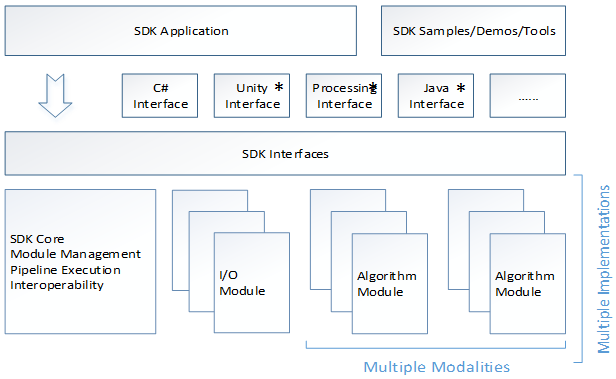
For app developers familiar with the Intel Perceptual Computing SDK, this improvement will be very obvious. The earlier SDK’s interfaces could only be used with the Unity and Java frameworks (Figure 2).

Most of the SDK functionality was available to the C++/C# developers, which resulted in undue disadvantage to Unity and other application development frameworks. The Intel RealSense SDK addresses this limitation by providing uniform access to the core and middleware capabilities through the specially designed interfaces for each framework. In Figure 3, you can see how the .dll support across all frameworks has been completely redesigned. C++/C# interface is now available through a PInvoke interface compared to the C++/CLI C# wrapper in the Intel Perceptual Computing SDK. On the Unity side, the PXCUPipeline-based interface in the former SDK is replaced by a PInvoke-based C# interface. For Java and Processing frameworks, the PXCUPipeline-based interface is replaced by a completely redesigned JNI wrapper.

Simplified Class Hierarchy

The structure of interfaces in the Intel Perceptual Computing SDK was extremely hierarchical. Performing simple tasks required a long sequence of initialization, configuration, and data retrieval operations. This hierarchical structure is now flatter in the Intel RealSense SDK, allowing for easier access to its modalities and capabilities.
As shown in Figure 4 above, PXC[M]SenseManager replaces the UtilPipeline class of the SDK core. SenseManager is responsible for the organization and management of the execution pipeline. All of the camera devices and streams are managed by the PXC[M]CaptureManager, which replaces the UtilCapture interface in the Intel Perceptual Computing SDK. Note that the PXC[M]Capture interface also allows for simplified depth access. While developers needed to access two separate streams for depth and vertices data in Intel Perceptual Computing SDK, the depth data access mechanism in the Intel RealSense SDK allows developers to access depth and vertices data in the same stream. The PXC[M]Face3D manages the face tracking module replacing the PXC[M]Face interface, and the PXC[M]HandAnalysis performs gesture and hand tracking, replacing the PXC[M]Gesture interface.
Please refer to the next section - API migration guide for more information regarding the capabilities of these modules.
API Migration Guide
In addition to the overall SDK stack that has been redesigned, you will also find that more than 50% of the Intel Perceptual Computing SDK APIs are different in the Intel RealSense SDK. Most of these changes stem from the fact that there is a 3D element to the Intel RealSense SDK that enhances the way some of the existing modalities like hand and face tracking behave. Let’s see some of these enhancements below.
Face Tracking module
In terms of capability, the face tracking module now gives 78 landmark points with pose detection values in 2D and 3D compared to the Intel Perceptual Computing SDK where a maximum of 7 landmark points were available. The introduction of depth adds to the robustness of the data obtained. In addition to this, the Intel Perceptual Computing SDK required a separate configuration for face detection, landmark detection, and face recognition making the entire process of facial analysis very cumbersome. All of these aspects have led to a redesign of the face analysis module and associated APIs. The PXC[M]FaceAnalysis module is now replaced with the PXC[M]Face3D module, which provides a flat structure. The module now just needs to be configured once before obtaining the face detection, landmark detection, pose detection, and face recognition values (see Figure 5).

Hand Tracking Module
The hand tracking module has been significantly enhanced in the Intel RealSense SDK. Compared to the 7 point hand data and 10 standard gestures, the Intel RealSense SDK now provides 22 data points, finger identification, left and right hand identification with orientation and rotation parameters for 3D interaction and a set of standard gestures. The PXC[M]Gesture interface in the Intel Perceptual Computing SDK is now replaced by the PXC[M]HandAnalysis interface for easier hand data access.

Table 1 below summarizes most of the major improvements made to the Intel RealSense SDK. Developers are encouraged to read the SDK Reference manual accompanying the Beta SDK download for more detailed information on each of the APIs within these interfaces.
Table 1. Comparison of Intel® Perceptual Computing SDK and Intel® RealSense™ SDK

Summary
The Intel RealSense SDK provides many advantages over the previous generation Intel Perceptual Computing SDK. Most of the existing modalities like the face and hand tracking algorithms have been enhanced while making improvements to the API access mechanism for most of the supported app development frameworks. The consistency in API access together with the improved middleware creates a very compelling platform for app developers to explore the world of computing using our senses!
Additional Resources
Intel® RealSense™ Technology – Overview: https://software.intel.com/en-us/articles/realsense-overview User Experience Guidelines: https://software.intel.com/en-us/articles/realsense-ux-design-guidelines
Intel, the Intel logo, and Intel RealSense are trademarks of Intel Corporation in the U.S. and/or other countries. Copyright © 2014 Intel Corporation. All rights reserved. *Other names and brands may be claimed as the property of others.
Intel® Developer Zone offers tools and how-to information for cross-platform app development, platform and technology information, code samples, and peer expertise to help developers innovate and succeed. Join our communities for the Internet of Things, Android*, Intel® RealSense™ Technology and Windows* to download tools, access dev kits, share ideas with like-minded developers, and participate in hackathons, contests, roadshows, and local events.
Intel® RealSense™ SDK Architecture的更多相关文章
- Intel RealSense SDK 简翻
:first-child{margin-top:0!important}img.plugin{box-shadow:0 1px 3px rgba(0,0,0,.1);border-radius:3px ...
- 【转】Intel RealSense(实感技术)概览
Intel RealSense(实感技术)概览 1 Reply 版权声明:本文系本站作者自己翻译整理,欢迎转载,但转载请以超链接形式注明文章来源(planckscale.info).作者信息和本声明, ...
- Intel Media SDK H264 encoder GOP setting
1 I帧,P帧,B帧,IDR帧,NAL单元 I frame:帧内编码帧,又称intra picture,I 帧通常是每个 GOP(MPEG 所使用的一种视频压缩技术)的第一个帧,经过适度地压缩,做为随 ...
- 看京东如何把Intel RealSense技术用在物流上
提起Intel RealSense 3D 深度摄像头,总是离不开无人机.机器人等前沿硬件产品,比如 CES 2016 上让人眼前一亮的自动避障无人机Yuneec “台风 H”,Segway.Nineb ...
- ubuntu下安装intel realsense驱动
在安装之前一定要确保系统是ubuntu 14.04.3 64位! 由于一开始安装的是32位系统,导致在升级内核版本到4.4时各种问题,最终靠重装系统解决. 因为intel给出的测试代码均是在64位14 ...
- (转)Integrating Intel® Media SDK with FFmpeg for mux/demuxing and audio encode/decode usages 1
Download Article and Source Code Download Integrating Intel® Media SDK with FFmpeg for mux/demuxing ...
- 利用 Intel Realsense做SLAM开发(一)
最近手里拿到一台Realsense D435,就是这个: https://click.intel.com/intelr-realsensetm-depth-camera-d435.html 所以准备拿 ...
- Getting Started with the Intel Media SDK
By Gael Hofemeier on March 19, 2015 Follow Gael on Twitter: @GaelHof Media SDK Developer’s Guide Med ...
- Intel® Media SDK Media Samples Linux 学习笔记(转)
最近折腾intel media sdk,主要硬件平台是在HD4600的核显上进行测试,intel media sdk是intel提供的一种基于核显的硬件编解码的解决方案,之前已经有使用ffmpeg进行 ...
随机推荐
- Java中hashcode,equals和==
hashcode方法返回该对象的哈希码值. hashCode()方法可以用来来提高Map里面的搜索效率的,Map会根据不同的hashCode()来放在不同的位置,Map在搜索一个对象的时候先通过has ...
- HDU 5301 Buildings 建公寓(逻辑,水)
题意:有一个包含n*m个格子的矩阵,其中有一个格子已经被染黑,现在要拿一些矩形来填充矩阵,不能填充到黑格子,但是每一个填充进去的矩形都必须至少有一条边紧贴在矩阵的边缘(4条边)的.用于填充的矩形其中最 ...
- cgroup的测试数据
[root@xxxx /cgroup/memory/rule3021]#cat memory.limit_in_bytes503316480 480M [root@xxxx /cgroup/mem ...
- POJ 1811 Prime Test
题意:对于一个大整数,判断是否质数,如果不是质数输出最小质因子. 解法:判断质数使用Miller-Rabin测试,分解质因子使用Pollard-Rho,Miller-Rabin测试用的红书模板,将测试 ...
- Oracle数据库导出
一. pl/SQL方式 1.打开plsql,找到工具栏,导出表
- Thrift框架使用C++的一个demo
Thrift编译器会根据选择的目标语言为server产生服务接口代码,为client产生stubs,参数可以是基本类型和结构体. 代码框架用的Thrift,为了了解结构,学习写了一个thrift的De ...
- zoj3822-Domination (概率dp)
题意: 给你n*m的棋盘,每天选择的一个空的方格放一个棋子,求使棋盘的每行每列都至少有一个棋子的天数期望. 分析: 先想状态,要使每行每列都至少一个,考虑前i行j列,能放得就是i行j列里面的或第i+1 ...
- 在PC上测试移动端网站和模拟手机浏览器的5大方法
在PC上测试移动端网站和模拟手机浏览器的5大方法 来源:互联网 作者:佚名 时间:03-19 10:14:54 [大 中 小] 最近公司要开发网站的移动版,让我准备准备知 ...
- Asp.Net中的获取Web.config中设置的参数!(前后台的代码示例)
一.Web.config中设置代码 <appSettings> <add key="deleted" value="1" ...
- 马上着手开发Mac应用程序
你是否想要开发 Mac 应用程序却又不知道从哪里入手?本路线图提供了 Mac 应用程序开发的绝佳起点,即使你已经是一个 iOS 开发专家,本路线图对你依然适用.Apple让开发应用程序和提交应用程序到 ...