
【SpringCloud】第十二篇: 断路器监控(Hystrix Turbine)
前言:
必需学会SpringBoot基础知识
简介:
spring cloud 为开发人员提供了快速构建分布式系统的一些工具,包括配置管理、服务发现、断路器、路由、微代理、事件总线、全局锁、决策竞选、分布式会话等等。它运行环境简单,可以在开发人员的电脑上跑。
工具:
JDK8
apache-maven-3.5.2
IntelliJ IDEA 2017.3 x64
一、Hystrix Turbine简介
看单个的Hystrix Dashboard的数据并没有什么多大的价值,要想看这个系统的Hystrix Dashboard数据就需要用到Hystrix Turbine。Hystrix Turbine将每个服务Hystrix Dashboard数据进行了整合。Hystrix Turbine的使用非常简单,只需要引入相应的依赖和加上注解和配置就可以了。
二、准备工作
本文使用的工程为上一篇文章的工程,在此基础上进行改造。需要添加两个服务项目, 本章节共需要四个项目, 3 and 4 是追加的
- eureka-server-hystrix-dashboard
- eureka-client-hystrix-dashboard
- eureka-client-hystrix-dashboard2 (仿照 2 改造*yml,需要修改名称加载顺序)
- eureka-client-hystrix-turbine
三、创建 eureka-client-hystrix-turbine
引入相应的依赖:
<?xml version="1.0" encoding="UTF-8"?>

<project xmlns="http://maven.apache.org/POM/4.0.0" xmlns:xsi="http://www.w3.org/2001/XMLSchema-instance"

         xsi:schemaLocation="http://maven.apache.org/POM/4.0.0 http://maven.apache.org/xsd/maven-4.0.0.xsd">

    <modelVersion>4.0.0</modelVersion>

    <groupId>com.lwc</groupId>

    <artifactId>eureka-client-hystrix-turbine</artifactId>

    <version>0.0.1-SNAPSHOT</version>

    <packaging>jar</packaging>

    <name>eureka-client-hystrix-turbine</name>

    <description>Demo project for Spring Boot</description>

    <parent>

        <groupId>org.springframework.boot</groupId>

        <artifactId>spring-boot-starter-parent</artifactId>

        <version>1.5.10.RELEASE</version>

        <relativePath/> <!-- lookup parent from repository -->

    </parent>

    <properties>

        <project.build.sourceEncoding>UTF-8</project.build.sourceEncoding>

        <project.reporting.outputEncoding>UTF-8</project.reporting.outputEncoding>

        <java.version>1.8</java.version>

        <spring-cloud.version>Edgware.SR2</spring-cloud.version>

    </properties>

    <dependencies>

        <dependency>

            <groupId>org.springframework.cloud</groupId>

            <artifactId>spring-cloud-starter-turbine</artifactId>

        </dependency>

        <dependency>

            <groupId>org.springframework.cloud</groupId>

            <artifactId>spring-cloud-netflix-turbine</artifactId>

        </dependency>

        <dependency>

            <groupId>org.springframework.boot</groupId>

            <artifactId>spring-boot-starter-actuator</artifactId>

        </dependency>

        <dependency>

            <groupId>org.springframework.boot</groupId>

            <artifactId>spring-boot-starter-test</artifactId>

            <scope>test</scope>

        </dependency>

    </dependencies>

    <dependencyManagement>

        <dependencies>

            <dependency>

                <groupId>org.springframework.cloud</groupId>

                <artifactId>spring-cloud-dependencies</artifactId>

                <version>${spring-cloud.version}</version>

                <type>pom</type>

                <scope>import</scope>

            </dependency>

        </dependencies>

    </dependencyManagement>

    <build>

        <plugins>

            <plugin>

                <groupId>org.springframework.boot</groupId>

                <artifactId>spring-boot-maven-plugin</artifactId>

            </plugin>

        </plugins>

    </build>

    <repositories>

        <repository>

            <id>spring-milestones</id>

            <name>Spring Milestones</name>

            <url>https://repo.spring.io/milestone</url>

            <snapshots>

                <enabled>false</enabled>

            </snapshots>

        </repository>

    </repositories>

</project>
配置文件application.yml:
spring:

  application.name: eureka-client-hystrix-turbine

server:

  port: 8769

security.basic.enabled: false

turbine:

  aggregator:

    clusterConfig: default

  appConfig: eureka-client-hystrix-dashboard,eureka-client-hystrix-dashboard2

  clusterNameExpression: new String("default")

eureka:

  client:

    service-url:

      defaultZone: http://localhost:8761/eureka/
配置文件, 具体我也是看百度在修改. 其实也无什么, 看API也有!
四、Turbine演示
依次开启工程:
- eureka-server-hystrix-dashboard
- eureka-client-hystrix-dashboard
- eureka-client-hystrix-dashboard2
- eureka-client-hystrix-turbine
打开浏览器输入: http://localhost:8761/ 查看注册中心界面如下:
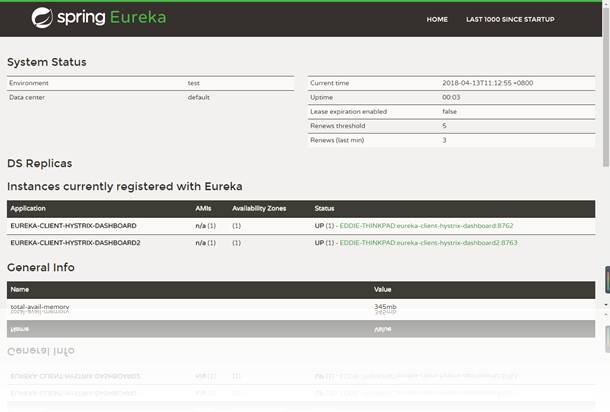
打开浏览器输入:http://localhost:8769/turbine.stream,界面如下:
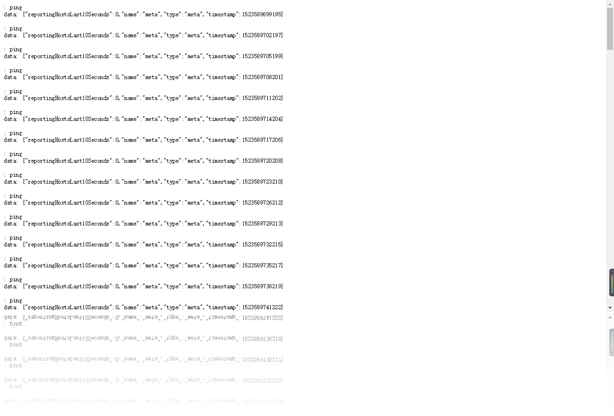
请求 (如果不依次, 你可能会感觉出问题, 因为WEB无数据)
http://localhost:8762/eureka/client?name=eddie
http://localhost:8763/eureka/client?name=eddie
打开:http://localhost:8763/hystrix,输入监控流http://localhost:8769/turbine.stream
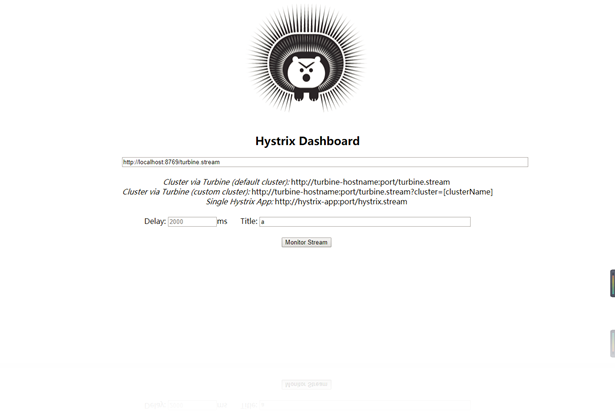
点击monitor stream 进入页面:
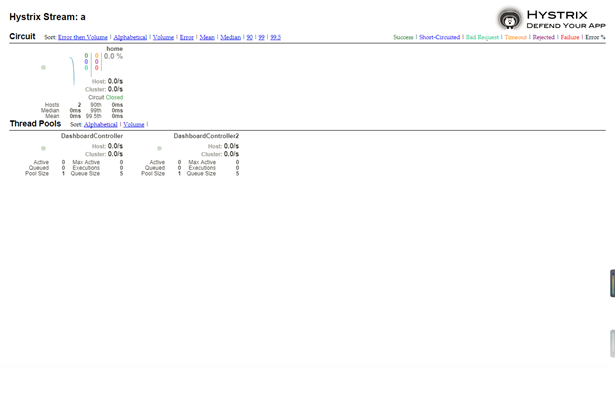
可以看到这个页面聚合了2个service的hystrix dashbord数据。
提醒: 如果WEB UI 没有数据, 建议你把全部服务重启在试试!
五、源码下载:
标签 12-1
https://github.com/eddie-code/SpringCloudDemo
【SpringCloud】第十二篇: 断路器监控(Hystrix Turbine)的更多相关文章
- 史上最简单的SpringCloud教程 | 第十二篇: 断路器监控(Hystrix Dashboard)(Finchley版本)
转载请标明出处: 原文首发于:https://www.fangzhipeng.com/springcloud/2018/08/30/sc-f12-dash/ 本文出自方志朋的博客 在我的第四篇文章断路 ...
- 史上最简单的SpringCloud教程 | 第十二篇: 断路器监控(Hystrix Dashboard)
转载请标明出处: 首发于:https://www.fangzhipeng.com/springcloud/2017/07/12/sc12-hystix-dashbd/ 本文出自方志朋的博客 最新Fin ...
- SpringCloud教程 | 第十二篇: 断路器监控(Hystrix Dashboard)
版权声明:本文为博主原创文章,欢迎转载,转载请注明作者.原文超链接 ,博主地址:http://blog.csdn.net/forezp. http://blog.csdn.net/forezp/art ...
- 【SpringCloud】第十一篇: 断路器监控(Hystrix Dashboard)
前言: 必需学会SpringBoot基础知识 简介: spring cloud 为开发人员提供了快速构建分布式系统的一些工具,包括配置管理.服务发现.断路器.路由.微代理.事件总线.全局锁.决策竞选. ...
- 跟我学SpringCloud | 第十二篇:Spring Cloud Gateway初探
SpringCloud系列教程 | 第十二篇:Spring Cloud Gateway初探 Springboot: 2.1.6.RELEASE SpringCloud: Greenwich.SR1 如 ...
- SpringCloud教程 | 第四篇:断路器(Hystrix)
在微服务架构中,根据业务来拆分成一个个的服务,服务与服务之间可以相互调用(RPC),在Spring Cloud可以用RestTemplate+Ribbon和Feign来调用.为了保证其高可用,单个服务 ...
- 史上最简单的SpringCloud教程 | 第四篇:断路器(Hystrix)
在微服务架构中,根据业务来拆分成一个个的服务,服务与服务之间可以相互调用(RPC),在Spring Cloud可以用RestTemplate+Ribbon和Feign来调用.为了保证其高可用,单个服务 ...
- 【SpringCloud】第四篇:断路器(Hystrix)
前言: 必需学会SpringBoot基础知识 简介: spring cloud 为开发人员提供了快速构建分布式系统的一些工具,包括配置管理.服务发现.断路器.路由.微代理.事件总线.全局锁.决策竞选. ...
- SpringCloud教程 | 第四篇:断路器(Hystrix)(Finchley版本)
在微服务架构中,根据业务来拆分成一个个的服务,服务与服务之间可以相互调用(RPC),在Spring Cloud可以用RestTemplate+Ribbon和Feign来调用.为了保证其高可用,单个服务 ...
随机推荐
- Linux Notes | Linux常用命令行笔记
[ show all running processes ] (1) ps -aux | less 'ps' means: Process Status The -a option tells ps ...
- ASP.NET如何批量保存动态生成的文本框?
对于OA系统,表单签核功能必不可少.而根据公司的情况,表单自然又五花八门,所以就要求能够让用户自己建立表单并设定表单的流程.填写内容等等.我之前写过一篇文章[地址:pivot的用法(SQL SERVE ...
- css z-index之object flash层级问题
<object type="application/x-shockwave-flash" data="flash文件路径" style="z-i ...
- 前端css小米导航栏设置及盒子定位居中问题
1.小米最上部导航栏设置 <!DOCTYPE html> <html lang="en"> <head> <meta charset=&q ...
- ueditor getshell漏洞重现及分析
0x00 概述 8月21日,网上爆出ueditor .net版本getshell漏洞,由于只校验ContentType而没校验文件后缀导致getshell. 0x01 漏洞重现 Payload: &l ...
- mysql使用Sql获取13位时间戳
SELECT REPLACE(unix_timestamp(current_timestamp(3)),'.','');
- python爬虫练习 -- 签名器+GUI界面(Tkinter)
效果图: 实现步骤如下: 实现原理:其实就是套了一层GUI的壳,主要还是爬虫抓取某个网站返回的数据,然后利用python自带的GUI工具包Tkinter来实现gui界面: 1.爬虫分析: 目标站点:h ...
- Python 用hashlib。md5加密算法
廖雪峰的官方网站学习MD5加密,网址:“http://www.liaoxuefeng.com/wiki/001374738125095c955c1e6d8bb493182103fac9270762a0 ...
- [译文]程序员能力矩阵 Programmer Competency Matrix
注意:每个层次的知识都是渐增的,位于层次n,也蕴涵了你需了解所有低于层次n的知识. 计算机科学 Computer Science 2n (Level 0) n2 (Level 1) n (Leve ...
- Redis的特性以及优势(附官网)
NoSQL:一类新出现的数据库(not only sql) 泛指非关系型的数据库 不支持SQL语法 存储结构跟传统关系型数据库中的那种关系表完全不同,nosql中存储的数据都是KV形式 NoSQL的世 ...