
【SpringCloud】第十一篇: 断路器监控(Hystrix Dashboard)
前言:
必需学会SpringBoot基础知识
简介:
spring cloud 为开发人员提供了快速构建分布式系统的一些工具,包括配置管理、服务发现、断路器、路由、微代理、事件总线、全局锁、决策竞选、分布式会话等等。它运行环境简单,可以在开发人员的电脑上跑。
工具:
JDK8
apache-maven-3.5.2
IntelliJ IDEA 2017.3 x64
在之前第四篇已经介绍过 Hystrix , 本篇会详细少少介绍该组件
一、Hystrix Dashboard简介
在微服务架构中为例保证程序的可用性,防止程序出错导致网络阻塞,出现了断路器模型。断路器的状况反应了一个程序的可用性和健壮性,它是一个重要指标。Hystrix Dashboard是作为断路器状态的一个组件,提供了数据监控和友好的图形化界面。
二、准备工作
本文的的工程章节,来源于第一篇的文章,在它的基础上进行仿照新建项目。
三、新建项目
(1) eureka-server-hystrix-dashboard
不贴代码, 完全一样!!!!
(2) eureka-client-hystrix-dashboard
在pom的工程文件引入相应的依赖:
<?xml version="1.0" encoding="UTF-8"?>

<project xmlns="http://maven.apache.org/POM/4.0.0" xmlns:xsi="http://www.w3.org/2001/XMLSchema-instance"

         xsi:schemaLocation="http://maven.apache.org/POM/4.0.0 http://maven.apache.org/xsd/maven-4.0.0.xsd">

    <modelVersion>4.0.0</modelVersion>

    <groupId>com.lwc</groupId>

    <artifactId>eureka-client-hystrix-dashboard</artifactId>

    <version>0.0.1-SNAPSHOT</version>

    <packaging>jar</packaging>

    <name>eureka-client-hystrix-dashboard</name>

    <description>Demo project for Spring Boot</description>

    <parent>

        <groupId>org.springframework.boot</groupId>

        <artifactId>spring-boot-starter-parent</artifactId>

        <version>1.5.10.RELEASE</version>

        <relativePath/> <!-- lookup parent from repository -->

    </parent>

    <properties>

        <project.build.sourceEncoding>UTF-8</project.build.sourceEncoding>

        <project.reporting.outputEncoding>UTF-8</project.reporting.outputEncoding>

        <java.version>1.8</java.version>

        <spring-cloud.version>Edgware.SR2</spring-cloud.version>

    </properties>

    <dependencies>

        <dependency>

            <groupId>org.springframework.boot</groupId>

            <artifactId>spring-boot-starter-web</artifactId>

        </dependency>

        <dependency>

            <groupId>org.springframework.cloud</groupId>

            <artifactId>spring-cloud-starter-netflix-eureka-server</artifactId>

        </dependency>

        <dependency>

            <groupId>org.springframework.boot</groupId>

            <artifactId>spring-boot-starter-test</artifactId>

            <scope>test</scope>

        </dependency>

        <dependency>

            <groupId>org.projectlombok</groupId>

            <artifactId>lombok</artifactId>

        </dependency>

        <dependency>

            <groupId>org.springframework.cloud</groupId>

            <artifactId>spring-cloud-starter-hystrix</artifactId>

        </dependency>

        <dependency>

            <groupId>org.springframework.boot</groupId>

            <artifactId>spring-boot-starter-actuator</artifactId>

        </dependency>

        <dependency>

            <groupId>org.springframework.cloud</groupId>

            <artifactId>spring-cloud-starter-hystrix-dashboard</artifactId>

        </dependency>

    </dependencies>

    <dependencyManagement>

        <dependencies>

            <dependency>

                <groupId>org.springframework.cloud</groupId>

                <artifactId>spring-cloud-dependencies</artifactId>

                <version>${spring-cloud.version}</version>

                <type>pom</type>

                <scope>import</scope>

            </dependency>

        </dependencies>

    </dependencyManagement>

    <build>

        <plugins>

            <plugin>

                <groupId>org.springframework.boot</groupId>

                <artifactId>spring-boot-maven-plugin</artifactId>

            </plugin>

        </plugins>

    </build>

    <repositories>

        <repository>

            <id>spring-milestones</id>

            <name>Spring Milestones</name>

            <url>https://repo.spring.io/milestone</url>

            <snapshots>

                <enabled>false</enabled>

            </snapshots>

        </repository>

    </repositories>

</project>
在程序的入口ServiceHiApplication类,加上@EnableHystrix注解开启断路器,这个是必须的,并且需要在程序中声明断路点HystrixCommand;加上@EnableHystrixDashboard注解,开启HystrixDashboard
package com.lwc;

import com.netflix.hystrix.contrib.metrics.eventstream.HystrixMetricsStreamServlet;

import org.springframework.boot.SpringApplication;

import org.springframework.boot.autoconfigure.SpringBootApplication;

import org.springframework.boot.web.servlet.ServletRegistrationBean;

import org.springframework.cloud.client.circuitbreaker.EnableCircuitBreaker;

import org.springframework.cloud.netflix.eureka.EnableEurekaClient;

import org.springframework.cloud.netflix.hystrix.EnableHystrix;

import org.springframework.cloud.netflix.hystrix.dashboard.EnableHystrixDashboard;

import org.springframework.context.annotation.Bean;

/**

 * @author Eddie

 */

@EnableCircuitBreaker

@EnableHystrix

@EnableHystrixDashboard

@EnableEurekaClient

@SpringBootApplication

public class EurekaClientHystrixDashboardApplication {

    public static void main(String[] args) {

        SpringApplication.run(EurekaClientHystrixDashboardApplication.class, args);

    }

}
运行程序: 依次开启eureka-server-hystrix-dashboard 和 eureka-client-hystrix-dashboard
四、Hystrix Dashboard图形展示
打开http://localhost:8762/hystrix.stream,可以看到一些具体的数据:
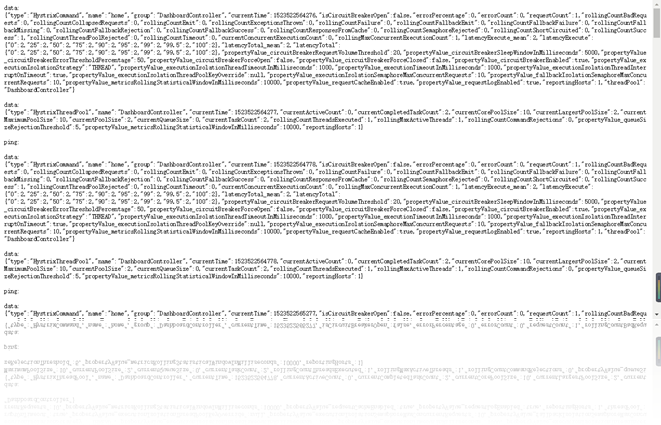
打开locahost:8762/hystrix 可以看见以下界面:
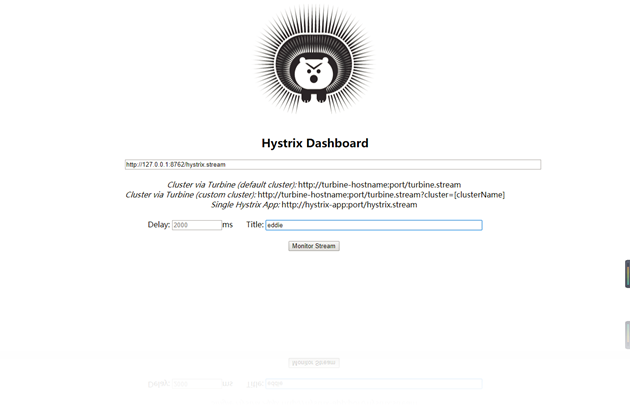
在界面依次输入:locahost:8762/hystrix.stream 、2000 、eddie;点确定。
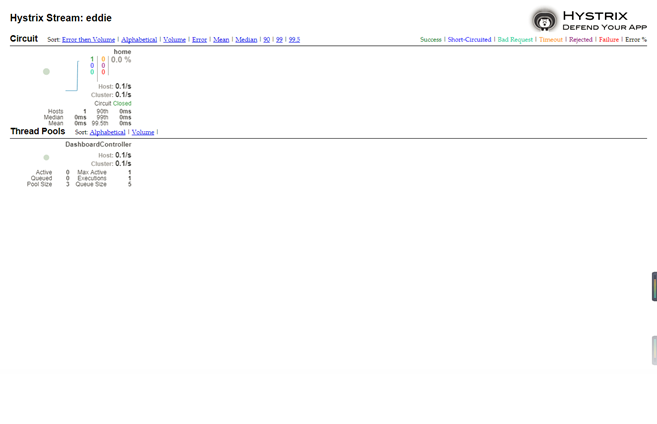
在另一个窗口输入: http://localhost:8762/eureka/client?name=eddie
重新刷新hystrix.stream网页,你会看到良好的图形化界面:
五、踩坑汇总
(1) WebUI 提示: Unable to connect to Command Metric Stream.
排除方法有几种: 1, 没有加三个依赖 2, 没有加注解 3,springboot版本 (我做这个demo时候是第3种)
如果是第3种: 可以尝试解决 1, 仿照本篇的pom.xml里面的做 2, 添加servlet 如下:
@Bean

public ServletRegistrationBean getServlet(){

    HystrixMetricsStreamServlet streamServlet = new HystrixMetricsStreamServlet();

    ServletRegistrationBean registrationBean = new ServletRegistrationBean(streamServlet);

    registrationBean.setLoadOnStartup(1);

    registrationBean.addUrlMappings("/hystrix.stream");

    registrationBean.setName("HystrixMetricsStreamServlet");

    return registrationBean;

}
六、源码下载
标签 11-1
https://github.com/eddie-code/SpringCloudDemo
【SpringCloud】第十一篇: 断路器监控(Hystrix Dashboard)的更多相关文章
- 史上最简单的SpringCloud教程 | 第十二篇: 断路器监控(Hystrix Dashboard)(Finchley版本)
转载请标明出处: 原文首发于:https://www.fangzhipeng.com/springcloud/2018/08/30/sc-f12-dash/ 本文出自方志朋的博客 在我的第四篇文章断路 ...
- 史上最简单的SpringCloud教程 | 第十二篇: 断路器监控(Hystrix Dashboard)
转载请标明出处: 首发于:https://www.fangzhipeng.com/springcloud/2017/07/12/sc12-hystix-dashbd/ 本文出自方志朋的博客 最新Fin ...
- SpringCloud教程 | 第十二篇: 断路器监控(Hystrix Dashboard)
版权声明:本文为博主原创文章,欢迎转载,转载请注明作者.原文超链接 ,博主地址:http://blog.csdn.net/forezp. http://blog.csdn.net/forezp/art ...
- Spring Cloud(五)断路器监控(Hystrix Dashboard)
在上两篇文章中讲了,服务提供者 Eureka + 服务消费者 Feign,服务提供者 Eureka + 服务消费者(rest + Ribbon),本篇文章结合,上两篇文章中代码进行修改加入 断路器监控 ...
- 服务容错保护断路器Hystrix之三:断路器监控(Hystrix Dashboard)-单体监控
turbine:英 [ˈtɜ:baɪn] 美 [ˈtɜ:rbaɪn] n.汽轮机;涡轮机;透平机 一.Hystrix Dashboard简介 在微服务架构中为了保证程序的可用性,防止程序出错导致网络阻 ...
- 【SpringCloud】第十二篇: 断路器监控(Hystrix Turbine)
前言: 必需学会SpringBoot基础知识 简介: spring cloud 为开发人员提供了快速构建分布式系统的一些工具,包括配置管理.服务发现.断路器.路由.微代理.事件总线.全局锁.决策竞选. ...
- SpringCloud 教程 (五) 断路器监控(Hystrix Dashboard)
一.Hystrix Dashboard简介 在微服务架构中为例保证程序的可用性,防止程序出错导致网络阻塞,出现了断路器模型.断路器的状况反应了一个程序的可用性和健壮性,它是一个重要指标.Hystrix ...
- 服务容错保护断路器Hystrix之四:断路器监控(Hystrix Dashboard)-turbine集群监控
turbine 英[ˈtɜ:baɪn] n. 汽轮机; 涡轮机; 透平机; OK,上文我们看了一个监控单体应用的例子,在实际应用中,我们要监控的应用往往是一个集群,这个时候我们就得采取Turbine集 ...
- Spring Cloud项目之断路器集群监控Hystrix Dashboard
微服务(Microservices Architecture)是一种架构风格,一个大型复杂软件应用由一个或多个微服务组成.系统中的各个微服务可被独立部署,各个微服务之间是松耦合的.每个微服务仅关注于完 ...
随机推荐
- Android性能测试之Monkey使用
内容中包含 base64string 图片造成字符过多,拒绝显示
- UVA - 11987 Almost Union-Find(带删除的并查集)
I hope you know the beautiful Union-Find structure. In this problem, you’re to implement something s ...
- .Net Core应用程序发布时不同方式的差别
.Net Core的文档更新的真是快..每次看的时候都觉得之前是不是梦游看的...每次发布应用程序的时候都要翻看下文档..至少rid是死活记不住.还是留个RID的索引吧..还有发布的索引 ,这样就好复 ...
- 结构体 内存对齐 keil & STM32
直接 上图 不废话: 第二张图: 把16位 类型的数据 换成 数组 ,这样 达到 节约内存和 方便处理 缓冲区数据
- Linux文本处理
作为一名 Linux 研发人员,几乎每天都要面对文本处理场景. 因此 掌握文本处理套路 并 熟练运用文本处理命令 ,对于 提升工作效率 意义重大. 本文以一个实战例子抛砖引玉,介绍如何运用 grep ...
- Oracle 使用RMAN进行备份
备份理论和基本语法 备份概念 执行备份或还原草的数据库称为目标.在一些环境下,有许多数据库,因此有许多RMAN目标.应一次连接每个数据库.目标的每个备份都有一些属性: 打开或关闭 完整或部分 完整或增 ...
- 【2016 ICPC亚洲区域赛北京站 E】What a Ridiculous Election(BFS预处理)
Description In country Light Tower, a presidential election is going on. There are two candidates, ...
- ionic 环境搭建
1.安装nodejs (8.4.0) 下载地址 https://nodejs.org/zh-cn/ 2.Java jdk 版本号 jdk1.8.0_121 3.安装 cordova npm ins ...
- Angularjs中的超时处理
关键代码: // 定义一个定时器, 设置5s为请求超时时间 var timer = $timeout(function () { console.log('登录超时!'); // 模拟提示信息 },5 ...
- [译]C语言实现一个简易的Hash table(6)
上一章中,我们实现了Hash表中的插入.搜索和删除接口,我们在初始化hash表时固定了大小为53,为了方便扩展,本章将介绍如何修改hash表的大小. 设置Hash表大小 现在,我们的hash表是固定大 ...