
【Python】实现将Excel编写的用例上传到testlink指定用例集
此功能已优化: https://github.com/HeBinz/TestCase2Testlink
背景
百科上说TestLink 是基于web的测试用例管理系统,主要功能是测试用例的创建、管理和执行,并且还提供了一些简单的统计功能。其他的信息可以参照他们的官网http://www.testlink.org/。
楼主所在的项目,需求、提测、测试等等都是使用的是gitlab的一个个issue加标签管理的,用例的维护在开始的时候也是用的它。后来我们的直接上级职位发生了变更,新leader建议我们使用testlink。
试用了一段时间之后,发现一个非常令人诟病的地方--用例导入只支持xml格式,而且它本身的用例编写也不太方便。
这也是我写这个用例导入小工具的初衷。
思路
开始时博主想的是,把Excel编写的用例(Excel应该是所有测试人员编写用例的首选吧)转换为xml格式导入,后来发现更好的办法-封装Python testlink API。
写得比较仓促,还有很多可以改进的地方,先用起来,后续优化。
具体实现
环境依赖
| 环境依赖 | 安装方法 |
|---|---|
| Python3 | 略 |
| xlrd库 | pip install xlrd |
| testlink库 | pip install TestLink-API-Python-client |
目录结构
目录结构如下,testCase目录用于存放测试用例,upload_excel_data.py用于用例转换上传,logger_better.py用于记录日志,。
D:\PROJECT\UPLOAD_DATA2TESTLIN

│  logger_better.py

│  upload_excel_data.py

│

└─testCase

        testCase_Example.xlsx
使用方法
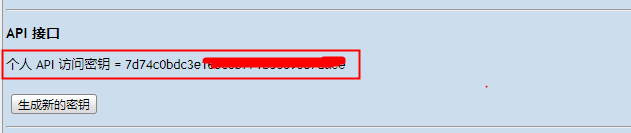
登陆testlink后点击上方个人账号进入个人中心,新页面点击 '生成新的秘钥',使用该key替换掉upload_excel_data.py文件中的key值;

使用get_projects_info函数获取项目所在project_id,替换掉upload_excel_data.py中的project_id
使用鼠标选中想要上传用例的用例集,点击右键获取父节点ID,替换掉upload_excel_data.py中的father_id
upload内容
#! /usr/bin/python

# coding:utf-8

"""

@author:Bingo.he

@file: upload_excel_data.py

@time: 2018/05/03

"""

import collections

import testlink

import xlrd

import os

from logger_better import Log

logger = Log(os.path.basename(__file__))

count_success = 0

count_fail = 0

def get_projects_info():

    project_ids = []

    projects = tlc.getProjects()

    for project in projects:

        project_ids.append({project['name']: project['id']})

    return project_ids

def get_projects_id():

    project_ids = []

    projects = tlc.getProjects()

    for project in projects:

        project_ids.append(project['id'])

    return project_ids

def get_suites(suite_id):

    """

    获取用例集

    :return:

    """

    try:

        suites = tlc.getTestSuiteByID(suite_id)

        return suites

    except testlink.testlinkerrors.TLResponseError as e:

        # traceback.print_exc()

        logger.warning(str(e).split('\n')[1])

        logger.warning(str(e).split('\n')[0])

        return

def readExcel(file_path):

    """

    读取用例数据

    :return:

    """

    case_list = []

    try:

        book = xlrd.open_workbook(file_path)  # 打开excel

    except Exception as error:

        logger.error('路径不在或者excel不正确 : ' + str(error))

        return error

    else:

        sheet = book.sheet_by_index(0)  # 取第一个sheet页

        rows = sheet.nrows  # 取这个sheet页的所有行数

        for i in range(rows):

            if i != 0:

                case_list.append(sheet.row_values(i))  # 把每一条测试用例添加到case_list中

    return case_list

def check_excel_data(func):

    """

    参数有效性校验

    :param func:

    :return:

    """

    def _check(*args, **kw):

        global count_fail

        global count_success

        # 校验项目ID及测试集ID的有效性

        if not args[0] in get_projects_id():

            logger.error('project_id is not auth')

            return

        if not get_suites(args[1]):

            logger.error('father_id is not auth')

            return

        # 检测测试数据的有效性

        for k, v in kw.items():

            if v == "" and k not in ['summary', 'importance']:

                logger.warning("TestCase '{title}' Parameter '{k}' is null".format(title=kw['title'], k=k))

        try:

            func(args[0], args[1], kw)

            count_success += 1

        except Exception as e:

            logger.error(e)

            count_fail += 1

    return _check

def format_info(source_data):

    """

    转换Excel中文关键字

    :param source_data:

    :return:

    """

    switcher = {

        "低": 1,

        "中": 2,

        "高": 3,

        "自动化": 2,

        "手工": 1

    }

    return switcher.get(source_data, "Param not defind")

@check_excel_data

def create_testcase(test_project_id, suits_id, data):

    """

    :param test_project_id:

    :param suits_id:

    :param data:

    :return:

    """

    # 设置优先级默认值及摘要默认值

    if data['importance'] not in [1, 2, 3]:

        data['importance'] = 3

    if data["summary"] == "":

        data["summary"] = "无"

    # 初始化测试步骤及预期结果

    for i in range(0, len(data["step"])):

        tlc.appendStep(data["step"][i][0], data["step"][i][1], data["automation"])

    tlc.createTestCase(data["title"], suits_id, test_project_id, data["authorlogin"], data["summary"],

                       preconditions=data["preconditions"], importance=data['importance'], executiontype=2)

def excute_creat_testcase(test_project_id, test_father_id, test_file_name):

    # 对project_id father_id 做有效性判断

    if test_project_id not in get_projects_id():

        logger.error('project_id is not auth')

        return

    if not get_suites(test_father_id):

        logger.error('father_id is not auth')

        return

    # 获取用例

    test_cases = readExcel(os.path.join('testCase', test_file_name))

    if not isinstance(test_cases, collections.Iterable):

        return

    # 格式化用例数据

    for test_case in test_cases:

        testCase_data = {

            "title": test_case[0],

            "preconditions": test_case[1],

            "step": list(zip(test_case[2].split('\n'), test_case[3].split('\n'))),  # 以换行符作为测试步骤的分界

            "automation": format_info(test_case[4]),  # 1  手工, 2 自动

            "authorlogin": test_case[5],

            "importance": format_info(test_case[6]),

            "summary": test_case[7]

        }

        create_testcase(test_project_id, test_father_id, **testCase_data)

    logger.info("本次操作共提交 {} 条数据,成功导入 {} 条,失败 {} 条".format(count_success + count_fail, count_success, count_fail))

if __name__ == "__main__":

    url = "http://localhost/testlink/lib/api/xmlrpc/v1/xmlrpc.php"  # 替换为testlink对应URL

    key = "3aca080de61e3e24b5be209a23fa0652"  # 这个key是错误的key,登陆testlink后点击上方个人账号进入个人中心,新页面点击 '生成新的秘钥'获取

    file_name = "testCase_Example.xlsx"

    project_id = "2354879"  # 可以通过 print(get_projects_info())获取

    father_id = "2054879"  # 鼠标选中想要上传用例的用例集,点击右键获取父节点ID

    tlc = testlink.TestlinkAPIClient(url, key)

    # print("项目信息: ", get_projects_info())

    excute_creat_testcase(project_id, father_id, file_name)
logger内容
#! /usr/bin/python

# coding:utf-8

"""

@author:Bingo.he

@file: logger_better.py

@time: 2018/02/12

"""

import logging

import time

import os

cur_path = os.path.dirname(os.path.realpath(__file__))

log_path = os.path.join(cur_path, 'logs')

if not os.path.exists(log_path):  os.mkdir(log_path)

class Log():

    def __init__(self, logger, logname='{}.log'.format(time.strftime('%Y-%m-%d'))):

        self.logname = os.path.join(log_path, logname)

        self.logger = logging.getLogger(logger)

        self.logger.setLevel(logging.DEBUG)

        self.formatter = logging.Formatter('[%(asctime)s]-[%(name)s]-%(levelname)s: %(message)s')

    def __console(self, level, message):

        fh = logging.FileHandler(self.logname, 'a', encoding='utf-8')

        fh.setLevel(logging.DEBUG)

        fh.setFormatter(self.formatter)

        self.logger.addHandler(fh)

        ch = logging.StreamHandler()

        ch.setLevel(logging.DEBUG)

        ch.setFormatter(self.formatter)

        self.logger.addHandler(ch)

        if level == 'info':

            self.logger.info(message)

        elif level == 'debug':

            self.logger.debug(message)

        elif level == 'warning':

            self.logger.warning(message)

        elif level == 'error':

            self.logger.error(message)

        self.logger.removeHandler(ch)

        self.logger.removeHandler(fh)

        fh.close()

    def debug(self, message):

        self.__console('debug', message)

    def info(self, message):

        self.__console('info', message)

    def warning(self, message):

        self.__console('warning', message)

    def error(self, message):

        self.__console('error', message)

if __name__ == "__main__":

    log = Log(os.path.basename(__file__))

    log.info("---测试开始----")

    log.info("操作步骤1,2,3")

    log.warning("----测试结束----")
其他:
- 用例步骤分隔符:当前使用换行符分隔,可修改excute_creat_testcase函数中testCase_data的step参数
- Excel中作者信息必须与提供的key值对应
测试用例格式

在此感谢该API的作者。
Python testlink API Github项目地址
【Python】实现将Excel编写的用例上传到testlink指定用例集的更多相关文章
- 利用windows系统ftp命令编写的BAT文件上传[转]
利用windows系统ftp命令编写的BAT文件上传[转] 利用windows系统ftp命令编写的BAT文件上传[转] 在开发中往往需要将本地的程序上传到服务器,而且用惯了linux命令的人来说.在w ...
- Python + Selenium + AutoIt 模拟键盘实现另存为、上传、下载操作详解
前言 在web页面中,可以使用selenium的定位方式来识别元素,从而来实现页面中的自动化,但对于页面中弹出的文件选择框,selenium就实现不了了,所以就需引用AutoIt工具来实现. Auto ...
- 用NODEJS处理EXCEL文件导入导出,文件上传
參考文章 http://librajt.github.io/2013/08/04/handle-excel-file-with-nodejs/ 对照了 ExcelJS ,https://github. ...
- python实现批量远程执行命令及批量上传下载文件
#!/usr/bin/env python # -*- coding: utf- -*- # @Time : // : # @Author : xuxuedong # @Site : # @File ...
- Word,Excel,pdf,txt等文件上传并提取内容
近期项目需求:1.要用到各种文件上传,下载. 2.并对文件进行搜索. 3.仅仅要文件里包括有搜索的内容,所有显示出来. 今天正好有时间整理一下,方便以后阅读,及对须要用到的朋友提供微薄之力.首先在实现 ...
- python paramiko模拟ssh登录,实现sftp上传或者下载文件
Python Paramiko模块的安装与使用详解 paramiko是短链接,不是持续链接,只能执行你设定的shell命令,可以加分号执行两次命令. http://www.111cn.net/phpe ...
- 基于hi-nginx的web开发(python篇)——表单处理和文件上传
hi-nginx会自动处理表单,所以,在hi.py框架里,要做的就是直接使用这些数据. 表单数据一般用GET和POST方法提交.hi-nginx会把这些数据解析出来,放在form成员变量里.对pyth ...
- JSP中文件的上传于下载演示样例
一.文件上传的原理 1.文件上传的前提: a.form表单的method必须是post b.form表单的enctype必须是multipart/form-da ...
- python使用ftplib模块实现FTP文件的上传下载
python已经默认安装了ftplib模块,用其中的FTP类可以实现FTP文件的上传下载 FTP文件上传下载 # coding:utf8 from ftplib import FTP def uplo ...
随机推荐
- npm安装出错的时候,如何使用国内的镜像!--解决办法
在前端开发领域,Node已经很普遍了,使用Node就会使用到一些包.所以常用的 npm 就会经常使用得到,但是在使用 npm 安装一些包的过程中,会发现安装的速度会很慢,而且很多时候直接安装不了. 百 ...
- nginx跟tp5无法加载控制器
二. 另外502 bad gateway错误,可能是有PHP中的php-fpm.conf里 “ listen fastcgi_pass /tmp/php-cgi.sock ”跟nginx的conf文 ...
- spring boot实战(第一篇)第一个案例
版权声明:本文为博主原创文章,未经博主允许不得转载. 目录(?)[+] spring boot实战(第一篇)第一个案例 前言 写在前面的话 一直想将spring boot相关内容写成一个系列的 ...
- python tensorflow keras
pip install tensorflow pip install keras pip install theano http://www.open-open.com/lib/view/open14 ...
- OSX: 下载Flash Player的脚本
http://blog.csdn.net/cneducation/article/details/54742983
- 如何在window的location使用target
在页面中window的location跳转时,指定页面在框架中跳转 1. 如果你要让最顶层的框架跳转,就是整个页面,相当于用traget指向顶层 window.top.location = & ...
- 转!!mysql 字段 is not null 和 字段 !=null
今天在查询数据时,查到包含一条某个时间startTime(该字段默认为null ) 为null的记录,想把它过滤,加了 startTime != null 的条件,结果记录都没了,应该用条件 is ...
- 运行mlflow命令报错 The 'nose' distribution was not found and is required by nose-exclude
安装好mlflow之后命令行运行: mlflow 得到报错: 解决: sudo pip3 install nose
- android(十五) FTP的两种工作模式
(一)PORT(主动)方式的连接过程是:客户端向服务器的FTP端口(默认是21)发送连接请求,服务器接受连接,建立一条命令链 当需要传送数据时,客户端在命令链路上用 PORT命令告诉服务器:“我打开了 ...
- 【Python】Python 读取csv的某行或某列数据
Python 读取csv的某行 转载 2016年08月30日 21:01:44 标签: python / csv / 数据 站长用Python写了一个可以提取csv任一列的代码,欢迎使用.Gith ...