
2018-2019-1 20165226《信息安全系统设计基础》 pwd命令的实现
2018-2019-1 20165226《信息安全系统设计基础》 pwd命令的实现
一、学习pwd
查看pwd
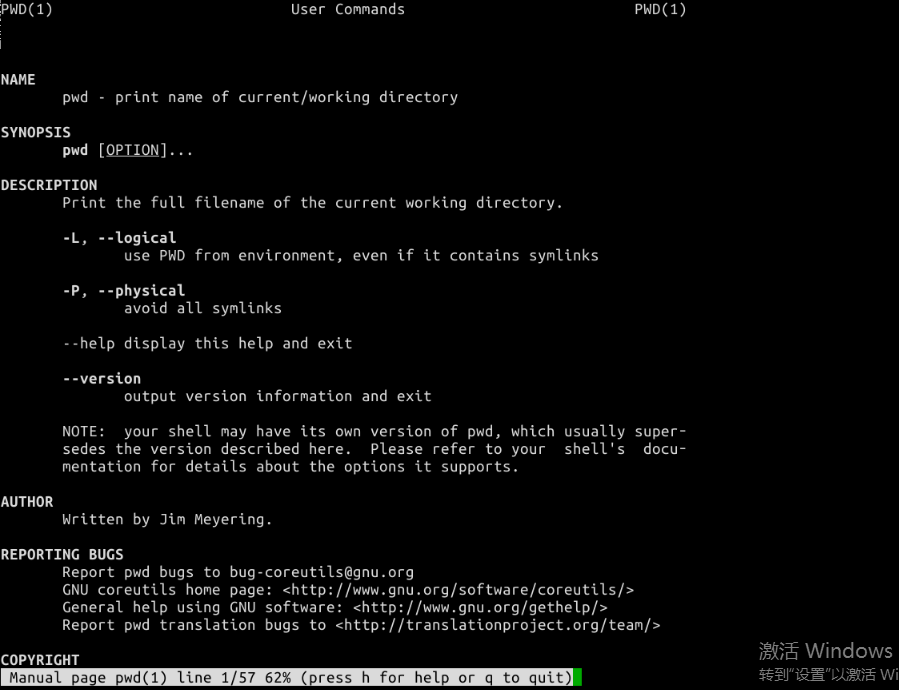
得知一个嫩过去文件路径的函数——
getcwd

i节点值
通过
ls -i -a查看.、..目录对应的值
- stat结构体
struct stat {
mode_t st_mode; //文件对应的模式,文件,目录等
ino_t st_ino; //inode节点号
dev_t st_dev; //设备号码
dev_t st_rdev; //特殊设备号码
nlink_t st_nlink; //文件的连接数
uid_t st_uid; //文件所有者
gid_t st_gid; //文件所有者对应的组
off_t st_size; //普通文件,对应的文件字节数
time_t st_atime; //文件最后被访问的时间
time_t st_mtime; //文件内容最后被修改的时间
time_t st_ctime; //文件状态改变时间
blksize_t st_blksize; //文件内容对应的块大小
blkcnt_t st_blocks; //文件内容对应的块数量
};
由此可知通过
ino_t返回i-Node值
二、编写代码
- 思路1
(1)得到"."的i节点号,称其为n(使用stat)
(2)chdir ..(使用chdir)
(3)找到inode号为n的节点,得到其文件名。重复上述操作直到当前目录“.”的inode值等于".."的inode值
- 代码1
#include <stdio.h>

#include <sys/types.h>

#include <sys/stat.h>

#include <dirent.h>

ino_t get_inode(char *);

void printpathto(ino_t);

void inum_to_name(ino_t ,char *,int);

int main()

{

	printpathto(get_inode("."));

	printf("\n");

	return 0;

}

ino_t get_inode(char * filename)

{

	struct stat buffer;

	if(lstat(filename,&buffer) == -1)

	{

		perror("can't stat");

		exit(1);

	}

	return buffer.st_ino;

}

void printpathto(ino_t ino)

{

	ino_t ino_parent = get_inode("..");

	if(ino_parent == ino)

		return;

	else

	{

		struct stat s;

		char buffer[255];

		chdir("..");

		inum_to_name(ino,buffer,255);

		printpathto(ino_parent);

		printf("/%s",buffer);

	}

}

void inum_to_name(ino_t ino,char * buffer,int buffer_length)

{

	DIR * dir;

	struct dirent * direntp;

	struct stat stat_buffer;

	dir = opendir(".");

	if(dir == NULL)

	{

		perror("can't open dir .");

		exit(1);

	}

	while((direntp = readdir(dir)) != NULL)

	{

		lstat(direntp->d_name,&stat_buffer);

		if(stat_buffer.st_ino == ino)

		{

			strncpy(buffer,direntp->d_name,buffer_length);

			buffer[buffer_length-1] = '\0';

			closedir(dir);

			return;

		}

	}

}
- 代码2(使用getcwd)
#include <stdio.h>

#include <stdlib.h>

#include <unistd.h>

int main(){

    char *filepath=NULL;

    filepath=getcwd(NULL,0);

    puts(filepath);

    free(filepath);

    return 0;

}
- 测试结果

2018-2019-1 20165226《信息安全系统设计基础》 pwd命令的实现的更多相关文章
- 2017-2018-1 20155201 《信息安全系统设计基础》 pwd命令的实现
2017-2018-1 20155201 <信息安全系统设计基础> pwd命令的实现 一.对pwd命令的学习 在终端中输入man pwd查看手册中对pwd这一命令的解释: 以绝对路径的方式 ...
- 2017-2018-3 20155337《信息安全系统设计基础》 pwd指令学习
2017-2018-3 20155337<信息安全系统设计基础> pwd指令学习 任务要求 学习pwd指令 研究pwd实现需要的系统调用(man -k:grep),写出伪代码 实现mypw ...
- 2018-2019-1 20165212 《信息安全系统设计基础》第八周学习总结(pwd)
2018-2019-1 20165212 <信息安全系统设计基础>第八周学习总结 一.知识点总结 1.三种并发方式 构造并发程序的方法有三种: 进程 线程 I/O多路复用 进程:用内核来调 ...
- 20135328信息安全系统设计基础第一周学习总结(Linux应用)
学习计时:共xxx小时 读书: 代码: 作业: 博客: 一.学习目标 1. 能够独立安装Linux操作系统 2. 能够熟练使用Linux系统的基本命令 3. 熟练使用Linux中用户管理命令/ ...
- 20155326 2017-2018-1 《信息安全系统设计基础》课下加分项mypwd实现
20155326 2017-2018-1 <信息安全系统设计基础>课下加分项mypwd实现 pwd命令能做什么 在虚拟机中输入pwd查看其返回的是什么 通过上图得知pwd命令用来显示目录. ...
- 2017-2018-1 20155210 《信息安全系统设计基础》 实现mypwd
2017-2018-1 20155210 <信息安全系统设计基础> 实现mypwd 作业要求: 1.学习pwd命令 2.研究pwd实现需要的系统调用(man -k; grep),写出伪代码 ...
- 2017-2018-1 20155214 《信息安全系统设计基础》 第9周课下测试-mypwd
2017-2018-1 20155214 <信息安全系统设计基础> 第9周课下测试-mypwd(深入版) 题目要求: 1 学习pwd命令 2 研究pwd实现需要的系统调用(man -k; ...
- 2017-2018-1 20155216 《信息安全系统设计基础》 实现mypwd
2017-2018-1 20155216 <信息安全系统设计基础> 实现mypwd 作业要求: 1.学习pwd命令 2.研究pwd实现需要的系统调用(man -k; grep),写出伪代码 ...
- 2017-2018-1 20155226 《信息安全系统设计基础》课下实践——实现mypwd
2017-2018-1 20155226 <信息安全系统设计基础>课下实践--实现mypwd 1 学习pwd命令 输入pwd命令 发现他是给出当前文件夹的绝对路径. 于是 man 1 pw ...
随机推荐
- 【分页问题】elasticsearch 深分页问题以及解决方法
本文主要参考: 1.https://www.elastic.co/guide/en/elasticsearch/reference/current/search-request-scroll.html ...
- MyBatis基本工作原理
Application是程序员开发的Java代码,蓝色为MyBatis框架. API是MyBatis提供的增删改查等功能接口. 老式SQL写法我们在Dao中写SQL: SELECT * FROM us ...
- Android -- service的开启方式, start开启和绑定开启服务,调用服务的的方法, aidl调用远程服务
1. 概述 bindService() 绑定服务 可以得到服务的代理人对象,间接调用服务里面的方法. 绑定服务: 间接调用服务里面的方法. 如果调用者activity被销毁了, ...
- 安装lua 环境
lua下载地址:https://www.lua.org/download.html curl -R -O http://www.lua.org/ftp/lua-5.3.5.tar.gz tar zxf ...
- Android Eclipse keystore.jks文件生成,根据keystore密钥获取SHA1安全码 ,apk打包
keystore.jks文件生成,打包APK 选中项目右键-> Android Tools->Export Signed Application Package ,如图: 之后 点击Nex ...
- python 编程中的一个关于图片的库 imageio (读取照片RGB内容,转换照片格式)
最近在看机器学习方面的东西,经常遇到需要把某个类型的照片中 RGB 内容读取出来, 在python中照片显示用matplotlib就可以做到,但是导入不同格式的照片,保持出不同格式的照片numpy, ...
- LSTM长短期记忆网络
Long Short Term Memory networks : http://colah.github.io/posts/2015-08-Understanding-LSTMs/
- [QT_OPENCV] qt下opencv配置以及首个opencv工程
使用环境 : window版本 : win7 x64 QT : 5.8 32bit MinGW530 OpenCv : 3.2 opencv在qt下的环境配置: 在百度上百度了许多关于opencv环境 ...
- UITableView-(单元格的自定义方法)
//contentView //行内容 -(UITableViewCell *)tableView:(UITableView *)tableView cellForRowAtIndexPath:(NS ...
- BZOJ2938: [Poi2000]病毒(AC自动机)
2938: [Poi2000]病毒 Time Limit: 1 Sec Memory Limit: 128 MBSubmit: 1678 Solved: 849[Submit][Status][D ...