
wp8.1 创建动态磁贴应用
目前Windows Phone 8.1所支持磁贴像素大小有71x71、150x150和310x150,分为大中小三种模式,对于桌面磁贴微软提供的诸多模板http://msdn.microsoft.com/zh-cn/library/windows/apps/hh761491.aspx,模板功能比较简单,就是图像和文字的结合,如果要实现复杂的磁贴组合,比较天气预报那样的磁贴,那就要微软RenderTargetBitmap类事先生成图像,再更新到磁贴。
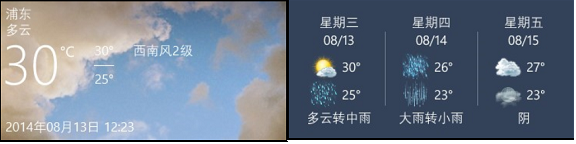
我们写一个静态方法。在使用RenderTargetBitmap类的同时,建议去看一下微软的关于此类的用法,参数中的element元素也有所限制。
1.一些视频无法生成图像。
2.自定义一些第三方插件无法生成图像。
4.元素必须要在屏幕元素的视觉树中,比如动态创建一个元素,那么就无法生成该元素的图像,出现空白。建议预先将元素写在xaml中并设置opacity为0即可。
 public static async System.Threading.Tasks.Task RenderImage(Windows.UI.Xaml.UIElement element, string filename)

 {

     Windows.UI.Xaml.Media.Imaging.RenderTargetBitmap renderTargetBitmap = new Windows.UI.Xaml.Media.Imaging.RenderTargetBitmap();

     await renderTargetBitmap.RenderAsync(element, (int)element.DesiredSize.Width, (int)element.DesiredSize.Height);

     Windows.Storage.Streams.IBuffer pixelBuffer = await renderTargetBitmap.GetPixelsAsync();

     var width = renderTargetBitmap.PixelWidth;

     var height = renderTargetBitmap.PixelHeight;

     Windows.Storage.StorageFile storageFile = await Windows.Storage.ApplicationData.Current.LocalFolder.CreateFileAsync(filename, Windows.Storage.CreationCollisionOption.ReplaceExisting);

     using (var stream = await storageFile.OpenAsync(Windows.Storage.FileAccessMode.ReadWrite))

     {

         var encoder = await Windows.Graphics.Imaging.BitmapEncoder.CreateAsync(Windows.Graphics.Imaging.BitmapEncoder.JpegEncoderId, stream);

         encoder.SetPixelData(Windows.Graphics.Imaging.BitmapPixelFormat.Bgra8, Windows.Graphics.Imaging.BitmapAlphaMode.Ignore,

             (uint)width, (uint)height, , , pixelBuffer.ToArray());

         await encoder.FlushAsync();

     }

 }
那么在xaml我们可以这样做。
 <Grid Opacity="0">

     <Grid x:Name="Tile310x150f" Width="310" Height="150">

         <!--内容-->

     </Grid>

     <Grid x:Name="Tile310x150b" Width="310" Height="150">

         <!--内容-->

     </Grid>

 </Grid>
现在我们在后台来刷新图像。
 public async Task RefreshImage()

 {

     Grid render310x150f = this.ViewControl.FindName("Tile310x150f") as Grid;

     await Common.Common.RenderImage(render310x150f, "Tile310x150f.jpg");

     Grid render310x150b = this.ViewControl.FindName("Tile310x150b") as Grid;

     await Common.Common.RenderImage(render310x150b, "Tile310x150b.jpg");

 }
然后pin到桌面。这里提醒一点,RefreshImage要在RequestCreateAsync前执行完成,因为当启用磁贴pin时,页面会跳转到桌面,否则会发生截图空白。
 public async void PinTile(string tileId)

 {

     Uri uri = new Uri("ms-appdata:///local/Tile71x71f.jpg");

     Windows.UI.StartScreen.SecondaryTile tile = new Windows.UI.StartScreen.SecondaryTile(tileId, "", "/MainPage.xaml", uri, Windows.UI.StartScreen.TileSize.Default);

     tile.VisualElements.Wide310x150Logo = uri;

     tile.DisplayName = " ";

     await RefreshImage();

     this.isPin = await tile.RequestCreateAsync();

     this.PinVisible = Visibility.Collapsed;

     this.UnpinVisible = Visibility.Visible;

     this.UpdateTile();

 }
接下来是update tile的方法,这里的GetTemplateContent就是为了获取微软磁贴预制的模板,update其实是即时信息展示,并不是刻意为了磁贴动态的效果。
 public void UpdateTile()

 {

     if (isPin)

     {

         var updator = Windows.UI.Notifications.TileUpdateManager.CreateTileUpdaterForSecondaryTile(this.tileId);

         updator.Clear();

         updator.EnableNotificationQueue(true);

         var tile310x150f = Windows.UI.Notifications.TileUpdateManager.GetTemplateContent(Windows.UI.Notifications.TileTemplateType.TileWide310x150Image);

         var tile310x150b = Windows.UI.Notifications.TileUpdateManager.GetTemplateContent(Windows.UI.Notifications.TileTemplateType.TileWide310x150Image);

         var imageElement = tile310x150f.GetElementsByTagName("image")[];

         imageElement.Attributes.GetNamedItem("src").NodeValue = "ms-appdata:///local/Tile310x150f.jpg";

         var notification = new Windows.UI.Notifications.TileNotification(tile310x150f);

         updator.Update(notification);

         imageElement = tile310x150b.GetElementsByTagName("image")[];

         imageElement.Attributes.GetNamedItem("src").NodeValue = "ms-appdata:///local/Tile310x150b.jpg";

         notification = new Windows.UI.Notifications.TileNotification(tile310x150b);

         updator.Update(notification);

     }

 }
wp8.1 创建动态磁贴应用的更多相关文章
- WP8.1 Study18:动态磁贴
一.前言 动态磁贴在WindowsPhone8.1和Windows8.1都是其特色,有人喜欢有人讨厌,不过我觉得还是挺好的,可以让使用者很快知道App内的内容和吸引使用者打开App.下面来学习下怎样添 ...
- 【Win10 UWP】后台任务与动态磁贴
动态磁贴(Live Tile)是WP系统的大亮点之一,一直以来受到广大用户的喜爱.这一讲主要研究如何在UWP应用里通过后台任务添加和使用动态磁贴功能. 从WP7到Win8,再到Win10 UWP,磁贴 ...
- GifShot - 创建动态 GIF 的 JavaScript 库
GifShot 是一个可以创建流媒体,视频或图像的 GIF 动画的 JavaScript 库.该库的客户端特性使其非常便携,易于集成到几乎任何网站.利用最先进的浏览器 API ,包括 WebRTC , ...
- Unity3D 创建动态的立方体图系统
Unity3D 创建动态的立方体图系统 这一篇主要是利用上一篇的Shader,通过脚本来完成一个动态的立方体图变化系统. 准备工作如下: 创建一个新的场景.一个球体.提供给场景一个平行光,准备2个立方 ...
- Ribbon2: 创建动态的Ribbon库
Sam Radakovitz曾在Excel团队博客中发表过一篇文章,介绍了如何创建动态的Ribbon库,即如何通过RibbonX和VBA放置动态的图形图像到功能区库中,在该文中,作者创建了两个库:一个 ...
- Win8.1应用开发之动态磁贴
using demo02.Common; using System; using System.Collections.Generic; using System.IO; using System.L ...
- 【ASP.NET Web API教程】2.3.5 用Knockout.js创建动态UI
原文:[ASP.NET Web API教程]2.3.5 用Knockout.js创建动态UI 注:本文是[ASP.NET Web API系列教程]的一部分,如果您是第一次看本博客文章,请先看前面的内容 ...
- springmvc 项目完整示例02 项目创建-eclipse创建动态web项目 配置文件 junit单元测试
包结构 所需要的jar包直接拷贝到lib目录下 然后选定 build path 之后开始写项目代码 配置文件 ApplicationContext.xml <?xml version=" ...
- 使用Eclipse创建动态的web工程
使用Eclipse创建动态的web工程 作者:尹正杰 版权声明:原创作品,谢绝转载!否则将追究法律责任. 一.修改工作区的编码 1>.点击Window选择Preferences 2>.将默 ...
随机推荐
- 根据插件Swipe,结合jQuery封装成的新的jQuery插件
swipe支持电脑上的自动滑动,也支持手机端的滑动效果.但是每次调用只能支持一个效果或者说一个页面出现n个这样的效果,我们就得调用n次这个插件. 我使用swipe+jQuery使得swip变得方便使用 ...
- android中一个评分的控件
RatingBar android中一个评分的控件 如何使用 Android Studio下: dependencies { compile 'com.hedgehog.ratingbar:app:1 ...
- uva-11044-水题
#include <iostream> #include<memory.h> #include<stdio.h> using namespace std; int ...
- Vue项目中将table组件导出Excel表格以及打印页面内容
体验更优排版请移步原文:http://blog.kwin.wang/programming/vue-table-export-excel-and-print.html 页面中显示的table表格,经常 ...
- BURG For Ubuntu 14.04 Trusty
sudo add-apt-repository ppa:n-muench/burg sudo apt-get updatesudo apt-get install burg burg-themes D ...
- nginx tcp负载均衡配置
1. nginx从1.9.0后引入模块ngx_stream_core_module,模块是没有编译的,需要用到编译需添加--with-stream配置参数 2. 在 nginx.conf 文件中, 与 ...
- MyBatis ehcache二级缓存
ehcache二级缓存的开启步骤: 1.导入jar 2.在映射文件中指定用的哪个缓存 3.加一个配置文件,这个配置文件在ehcache jar包中就有 使增删改对二级缓存不刷新: 对一级缓存没有用的, ...
- kubernetes 示例 hello world
本文所说的Hello world是一个web留言板应用,并且是基于PHP+Redis的两层分布式架构的web应用,前端PHP web网站通过访问后端Redis数据库完成用户留言的查询和添加功能,具备读 ...
- socket & pipe note
[socket & pipe note] 1.socket类型 2.大小端 3.socketpair 如何创建全双工管道? 直接的办法当然是pipe两次,创建两组管道,但是有没有更简单的呢? ...
- rabbitmq的简单介绍一
该博客的主要讲解了以下几种rabbitmq的用法1.实现简单的生产者发送消息给消费者2.实现序列持久化3.实现消息持久化4.实现消息公平分发5.实现广播6.实现组播7.实现细分组播 先来看下rabbi ...