
【4】【MOOC】Python游戏开发入门-北京理工大学【第三部分-游戏开发之机制(色彩与绘图)】
Pygame色彩与绘图机制
1.Pygame色彩机制
色彩表达
pygame.Color
Color类用于表达色彩,使用RGB或RGBA色彩模式,A可选
Color类可以用色彩名字、RGBA值、HTML色彩格式等方式定义
Color(name) 例如:Color("grey")
Color(r,g,b,a) 例如:Color(190, 190, 190, 255)
Color(rgbvalue) 例如:Color("#BEBEBEFF")
---------------------------------------------------------------------------------------------------
RGB色彩模式
·红绿蓝三个通道颜色组合
·覆盖视力所能感知的所有颜色
·RGB取值范围0-255
RGBA色彩模式
·RGB色彩模式之外增加了第四维度:alpha通道
·alpha通道表示不透明度,取值0-255,默认255
·alpha通道值越大,不透明度越高,255表示不透明
pygame.Color类
pygame.Color.r 获得Color类的红色值r
pygame.Color.g 获得Color类的绿色值g
pygame.Color.b 获得Color类的蓝色值b
pygame.Color.normalize 将RGBA各通道值归一到0-1之间
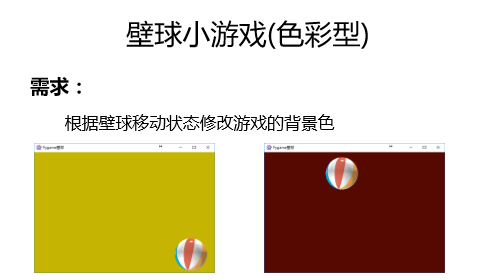
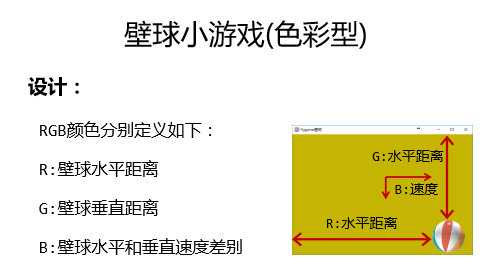
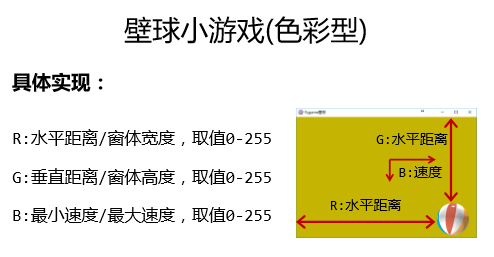
壁球小游戏(色彩型)源代码:
 import pygame, sys

 pygame.init()

 icon = pygame.image.load("PYG03-flower.png")

 pygame.display.set_icon(icon)

 size = width, height = 600, 400

 speed = [1, 1]

 BLACK = 0, 0, 0

 screen = pygame.display.set_mode(size, pygame.RESIZABLE)

 pygame.display.set_caption("Pygame壁球")

 ball = pygame.image.load("PYG02-ball.gif")

 ballrect = ball.get_rect()

 fps = 300

 fclock = pygame.time.Clock()

 still = False

 bgcolor = pygame.Color("black")

 def RGBChannel(a):

     return 0 if a < 0 else (255 if a > 255 else int(a))

 while True:

     for event in pygame.event.get():

         if event.type == pygame.QUIT:

             sys.exit()

         elif event.type == pygame.KEYDOWN:

             if event.key == pygame.K_LEFT:

                 speed[0] = speed[0] if speed[0] == 0 else (abs(speed[0]) - 1) * int(speed[0] / abs(speed[0]))

             elif event.key == pygame.K_RIGHT:

                 speed[0] = speed[0] + 1 if speed[0] > 0 else speed[0] - 1

             elif event.key == pygame.K_UP:

                 speed[1] = speed[1] + 1 if speed[1] > 0 else speed[1] - 1

             elif event.key == pygame.K_DOWN:

                 speed[1] = speed[1] if speed[1] == 0 else (abs(speed[1]) - 1) * int(speed[1] / abs(speed[1]))

             elif event.key == pygame.K_ESCAPE:

                 sys.exit()

         elif event.type == pygame.VIDEORESIZE:

             size = width, height = event.size[0], event.size[1]

             screen = pygame.display.set_mode(size, pygame.RESIZABLE)

         elif event.type == pygame.MOUSEBUTTONDOWN:

             if event.button == 1:

                 still = True

         elif event.type == pygame.MOUSEBUTTONUP:

             still = False

             if event.button == 1:

                 ballrect = ballrect.move(event.pos[0] - ballrect.left, event.pos[1] - ballrect.top)

         elif event.type == pygame.MOUSEMOTION:

             if event.buttons[0] == 1:

                 ballrect = ballrect.move(event.pos[0] - ballrect.left, event.pos[1] - ballrect.top)

     if pygame.display.get_active() and not still:

         ballrect = ballrect.move(speed[0], speed[1])

     if ballrect.left < 0 or ballrect.right > width:

         speed[0] = - speed[0]

         if ballrect.right > width and ballrect.right + speed[0] > ballrect.right:

             speed[0] = - speed[0]

     if ballrect.top < 0 or ballrect.bottom > height:

         speed[1] = - speed[1]

         if ballrect.bottom > height and ballrect.bottom + speed[1] > ballrect.bottom:

             speed[1] = - speed[1]

     bgcolor.r = RGBChannel(ballrect.left * 255 / width)

     bgcolor.g = RGBChannel(ballrect.top * 255 / height)

     bgcolor.b = RGBChannel(min(speed[0], speed[1]) * 255 / max(speed[0], speed[1], 1))

     screen.fill(bgcolor)

     screen.blit(ball, ballrect)

     pygame.display.update()

     fclock.tick(fps)
壁球小游戏(色彩型)
========================================================
2.Pygame图形绘制机制
图形绘制
pygame.draw
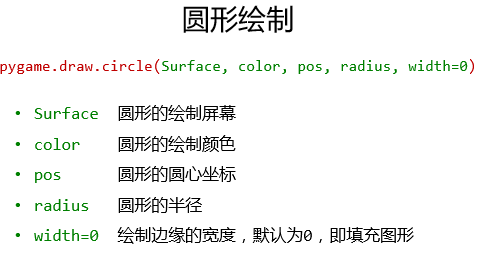
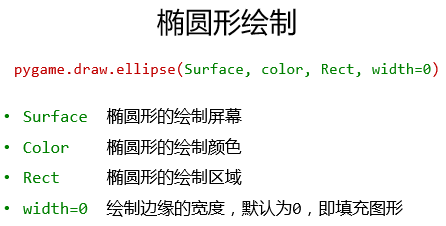
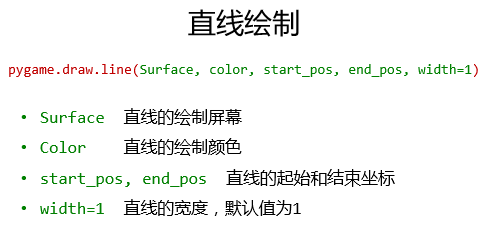
向屏幕上绘制一些简单的图形,如直线、圆形、椭圆等任何一个圆形绘制后,会返回一个矩形Rect类表示该形状。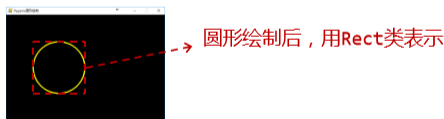
Rect类
pygame.Rect
表达一个矩形区域的类,用于存储坐标和长度信息
Pygame利用Rect类来操作图形/图像等元素
四个参数:left,top,width,height





图像绘制练习源代码:
 import pygame, sys

 from math import pi

 pygame.init()

 screen = pygame.display.set_mode((600, 400))

 pygame.display.set_caption("Pygame图形绘制")

 GOLD = 255, 251, 0

 RED = pygame.Color('red')

 WHITE = 255, 255, 255

 GREEN = pygame.Color('green')

 # r1rect = pygame.draw.rect(screen, GOLD, (100,100,200,100), 5)

 # r2rect = pygame.draw.rect(screen, RED, (210,210,200,100), 0)

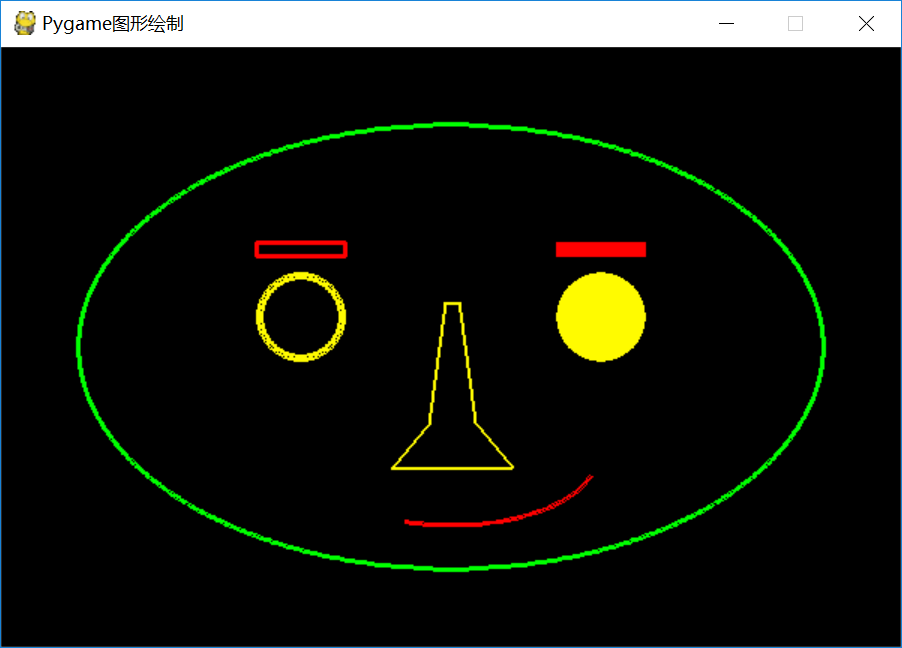
 e1rect = pygame.draw.ellipse(screen, GREEN, (50, 50, 500, 300), 3)

 c1rect = pygame.draw.circle(screen, GOLD, (200, 180), 30, 5)

 c2rect = pygame.draw.circle(screen, GOLD, (400, 180), 30)

 r1rect = pygame.draw.rect(screen, RED, (170, 130, 60, 10), 3)

 r2rect = pygame.draw.rect(screen, RED, (370, 130, 60, 10))

 plist = [(295, 170), (285, 250), (260, 280), (340, 280), (315, 250), (305, 170)]

 l1rect = pygame.draw.lines(screen, GOLD, True, plist, 2)

 a1rect = pygame.draw.arc(screen, RED, (200, 220, 200, 100), 1.4 * pi, 1.9 * pi, 3)

 while True:

     for event in pygame.event.get():

         if event.type == pygame.QUIT:

             sys.exit()

     pygame.display.update()
Pygame图形绘制
结果显示:
========================================================
3.Pygame文字绘制机制
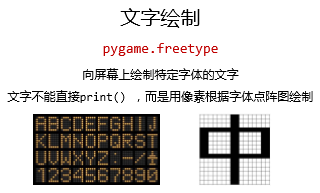

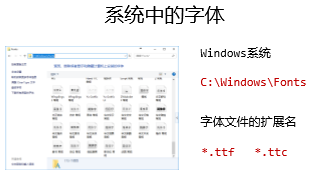
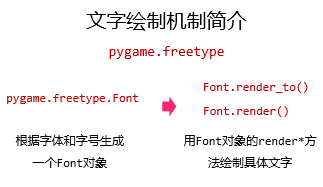
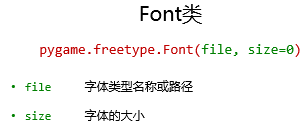

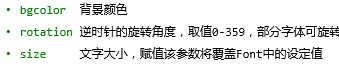
Rect返回一个Rect对象
练习,打印文字:世界和平
源代码:
 import pygame, sys

 import pygame.freetype

 pygame.init()

 screen = pygame.display.set_mode((600, 400))

 pygame.display.set_caption("Pygame文字绘制")

 GOLD = 255, 251, 0

 f1 = pygame.freetype.Font("C://Windows//Fonts//msyh.ttc", 36)

 f1rect = f1.render_to(screen, (200, 160), "世界和平", fgcolor=GOLD, size=50)

 while True:

     for event in pygame.event.get():

         if event.type == pygame.QUIT:

             sys.exit()

     pygame.display.update()
Pygame文字绘制
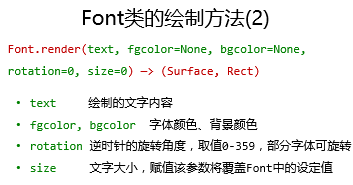
返回一个元组,包含Surface对象和Rect对象
========================================================
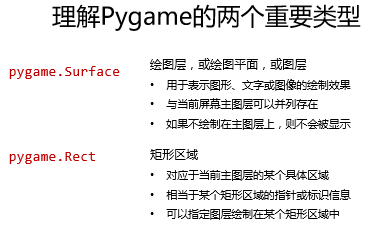
4.Pygame绘图机制原理精髓


========================================================
5.壁球小游戏(文字型)
需求:
把壁球改为一段文字,可以进行移动
从需求到实现的关键要素:
·文字移动:文字的移动绘制及刷新
使用.render_to()方法:
 # 使用.render_to()方法:

 import pygame, sys

 import pygame.freetype

 pygame.init()

 size = width, height = 600, 400

 speed = [1, 1]

 GOLD = 255, 251, 0

 BLACK = 0, 0, 0

 pos = [230, 160]

 screen = pygame.display.set_mode(size)

 pygame.display.set_caption("Pygame文字绘制")

 f1 = pygame.freetype.Font("C://Windows//Fonts//msyh.ttc", 36)

 f1rect = f1.render_to(screen, pos, "世界和平", fgcolor=GOLD, size=50)

 fps = 300

 fclock = pygame.time.Clock()

 while True:

     for event in pygame.event.get():

         if event.type == pygame.QUIT:

             sys.exit()

     if pos[0] < 0 or pos[0] + f1rect.width > width:

         speed[0] = - speed[0]

     if pos[1] < 0 or pos[1] + f1rect.height > height:

         speed[1] = - speed[1]

     pos[0] = pos[0] + speed[0]

     pos[1] = pos[1] + speed[1]

     screen.fill(BLACK)

     f1rect = f1.render_to(screen, pos, "世界和平", fgcolor=GOLD, size=50)

     pygame.display.update()

     fclock.tick(fps)
壁球小游戏(文字型)
使用.render()方法:
 # 使用.render()方法:

 import pygame, sys

 import pygame.freetype

 pygame.init()

 size = width, height = 600, 400

 speed = [1, 1]

 GOLD = 255, 251, 0

 BLACK = 0, 0, 0

 pos = [230, 160]

 screen = pygame.display.set_mode(size)

 pygame.display.set_caption("Pygame文字绘制")

 f1 = pygame.freetype.Font("C://Windows//Fonts//msyh.ttc", 36)

 f1surf, f1rect = f1.render("世界和平", fgcolor=GOLD, size=50)

 fps = 300

 fclock = pygame.time.Clock()

 while True:

     for event in pygame.event.get():

         if event.type == pygame.QUIT:

             sys.exit()

     if pos[0] < 0 or pos[0] + f1rect.width > width:

         speed[0] = - speed[0]

     if pos[1] < 0 or pos[1] + f1rect.height > height:

         speed[1] = - speed[1]

     pos[0] = pos[0] + speed[0]

     pos[1] = pos[1] + speed[1]

     screen.fill(BLACK)

     f1surf, f1rect = f1.render("世界和平", fgcolor=GOLD, size=50)

     screen.blit(f1surf, (pos[0], pos[1]))

     pygame.display.update()

     fclock.tick(fps)
壁球小游戏(文字型)
【4】【MOOC】Python游戏开发入门-北京理工大学【第三部分-游戏开发之机制(色彩与绘图)】的更多相关文章
- 【1】【MOOC】Python游戏开发入门-北京理工大学【第二部分-游戏开发之框架】
学习地址链接:http://www.icourse163.org/course/0809BIT021E-1001873001?utm_campaign=share&utm_medium=and ...
- 【3】【MOOC】Python游戏开发入门-北京理工大学【第三部分-游戏开发之机制(事件处理机制)】
学习地址链接:http://www.icourse163.org/course/0809BIT021E-1001873001?utm_campaign=share&utm_medium=and ...
- 【2】【MOOC】Python游戏开发入门-北京理工大学【第三部分-游戏开发之机制(屏幕绘制机制)】
学习地址链接:http://www.icourse163.org/course/0809BIT021E-1001873001?utm_campaign=share&utm_medium=and ...
- [币严区块链]以太坊(ETH)Dapp开发入门教程之宠物商店领养游戏
阅读本文前,你应该对以太坊.智能合约有所了解,如果你还不了解,建议你先看以太坊是什么 除此之外,你最好还了解一些HTML及JavaScript知识. 本文通过实例教大家来开发去中心化应用,应用效果如图 ...
- python爬虫从入门到放弃(三)之 Urllib库的基本使用
官方文档地址:https://docs.python.org/3/library/urllib.html 什么是Urllib Urllib是python内置的HTTP请求库包括以下模块urllib.r ...
- #Python编程从入门到实践#第三章笔记
列表简介 1.什么是列表 列表:由一系列按也顶顺序排列的元素组成.元素之间可以没有任何关系. 列表:用方括号[]表示,并用逗号分隔其中元素.名称一般为复数 2.访问元素 (1)列表是有序集合 ...
- Cassandra开发入门文档第三部分(非规范化关系结构、批处理)
非规范化关系结构 第二部分我们讲了复合主键,这可以灵活的解决主从关系,也即是一对多关系,那么多对多关系呢?多对多关系的数据模型应该回答两个问题: 我跟着谁? 谁跟着我? -- 建表,我们发现这里有个不 ...
- 前端开发入门到进阶第三集【sublime 的package control ——install package报错】
参考:https://www.cnblogs.com/ae6623/p/5338049.html,解决2帮我解决问题. 解决Sublime包管理package control 报错 There are ...
- 前端开发入门到进阶第三集【js高度计算公式】
<!DOCTYPE HTML PUBLIC "-//W3C//DTD HTML 4.01//EN" "http://www.w3.org/TR/html4/stri ...
随机推荐
- iOS开源项目周报0223
由OpenDigg 出品的iOS开源项目周报第九期来啦.我们的iOS开源周报集合了OpenDigg一周来新收录的优质的iOS开源项目,方便iOS开发人员便捷的找到自己需要的项目工具等.panelkit ...
- Python——爬虫学习1
爬虫了解一下 网络爬虫(Web crawler),是一种按照一定的规则,自动地抓取万维网信息的程序或者脚本. Python的安装 本篇教程采用Python3 来写,所以你需要给你的电脑装上Python ...
- jQuery基础---常规选择器
内容摘要: 1.简单选择器 2.进阶选择器 3.高级选择器 发文不易,转载请注明出处! jQuery 最核心的组成部分就是:选择器引擎.它继承了 CSS 的语法,可以对 DOM 元素的标签名.属性名. ...
- jQuery事件篇---高级事件
内容提纲: 1.模拟操作 2.命名空间 3.事件委托 4.on.off 和 one 发文不易,转载请注明出处! 一.模拟操作 在事件触发的时候,有时我们需要一些模拟用户行为的操作.例如:当网页加载完毕 ...
- Java处理emoji
1.问题产生情况 我遇到这个问题是做微信开发的时候有些有用的头像用了微信的emoji表情,然而我的mysql数据库用的编码是utf8_general_ci,就是utf-8编码,结果也就报错误了. 2. ...
- log4j2配置文件
项目里面经常用到日志,Java开发一般用log4j.slf4j这些框架,看着配置文件有点懵.这几天看公司代码的时候,也有用到log4j,感觉要复杂一点.在本地打log,也有打到hive里面存的.看了一 ...
- String拾遗
简介: String作为日常最常用的类,还是有必要对其中的细节做一些了解的,这篇就结合源码来看看这个常用的类. 一. 总述 类图如下: 从图中可以看到String是实现了 java.io.Serial ...
- Visual studio 2013打开报异常"Exception has been thrown by the target of an invocation"
最近遇到一个问题,打开VS2013和SQL Server2014都会出报错,错误信息如下: 以前都是好好的,重启了机子也不行,能打开两个VS,再打开第三个VS还是会报错,百度无果,还是在google上 ...
- thinkphp I() 方法
I() 方法用于获取前台提交的表单的value值. <form id="complai_form" method="post" action=" ...
- HTML中的图片
在一开始时,Web仅有文本,那真的是很无趣.幸运的是,没过多久网页上就能嵌入图片和其他有趣的内容了.虽然还有许多其他类型的多媒体,但是从地位比较低的<img>元素开始是符合逻辑的,它常常被 ...