
微服务架构之spring cloud zipkin
Spring Cloud Zipkin是微服务的链路跟踪组件,帮助详细了解一次request&response的总计时,及每个微服务的消耗时间、微服务名称、异常信息等等过程信息。
(一) 版本说明
a) Spring boot 2.0.6.RELEASE
b) Spring cloud Finchley.SR2
c) Java version 1.8
(二) 服务端项目设置
1. Pom文件
<dependency>

<groupId>org.springframework.cloud</groupId>

<artifactId>spring-cloud-starter-zipkin</artifactId>

<version>2.0.2.RELEASE</version>

</dependency>

<dependency>

<groupId>io.zipkin.java</groupId>

<artifactId>zipkin-server</artifactId>

<version>2.11.12</version>

<exclusions>

<exclusion>

<groupId>org.apache.logging.log4j</groupId>

<artifactId>log4j-slf4j-impl</artifactId>

</exclusion>

</exclusions>

</dependency>

<dependency>

<groupId>io.zipkin.java</groupId>

<artifactId>zipkin-autoconfigure-ui</artifactId>

<version>2.11.12</version>

</dependency>
2. application.yml配置文件
server:

port: 1601

eureka:

instance:

hostname: 192.168.1.78

prefer-ip-address: true

ip-address: 192.168.1.129

lease-renewal-interval-in-seconds: 10

lease-expiration-duration-in-seconds: 30

client:

service-url:

defaultZone: http://${eureka.instance.hostname}:1001/eureka/,http://${eureka.instance.hostname}:1002/eureka/,http://${eureka.instance.hostname}:1003/eureka/

management:

metrics:

web:

server:

auto-time-requests: false

endpoints:

web:

base-path: "/actuator"

exposure:

include: "*"

endpoint:

health:

show-details: ALWAYS

spring:

application:

name: monitorservice
3. 主要参数说明
a) spring.application.name 项目名称
b) server.port 运行端口号
c) eureka.server.enable-self-preservation 是否启用自我保护功能,该功能默认是启用,但为了快速的响应服务的上下线,一般在开发环境把自我保护功能禁用
d) client.client.service-url.defaultZone 服务注册中心地址,这里是交叉设置3个服务自理实例
e) client.instance.lease-renewal-interval-in-seconds 发送心跳的频率
f) client.instance.lease-expiration-duration-in-seconds 失效间隔,这个主要是判断客户端还活着,一般设置为client.instance.lease-renewal-interval-in-seconds的3倍。
g) 其它参数说明可以参考官方说明,需要说明的是spring cloud 每次版本迭代都有配置参数的变更,最好是参考相对应的版本参数说明
(三) 客户端项目设置
1. Pom文件
<dependency>

<groupId>org.springframework.cloud</groupId>

<artifactId>spring-cloud-starter-zipkin</artifactId>

<version>2.0.2.RELEASE</version>

</dependency>
2. application.yml配置文件
spring:

application:

name: callbackservice

zipkin:

base-url: http://192.168.1.129:1601

sleuth:

sampler:

percentage: 1.0
3. 主要参数说明
a) spring.application.name 项目名称
b) spring.zipkin.base-url zipkin服务器地址
c) spring.zipkin.sleuth.sampler.percentage 采集率,取值为 0.1~1.0,如果测试环境可以设置为1.0,全部采集
(四) 项目运行
1. 运行服务端程序,由于我们注册到了治理中心,可以看到如下所示

点击链接可以看到zipkin的看板如下,由于还没有客户端进来,所以是空的。
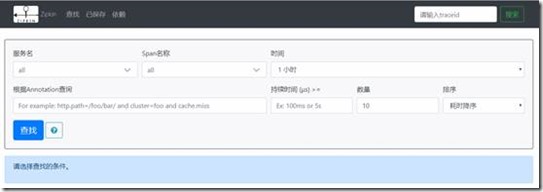
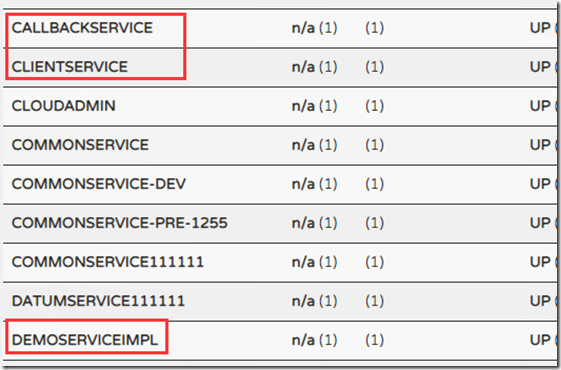
2. 客户端项目运行,运行clientservice、callbackservice、demoserviceimpl 3个项目,前两个是项目调用后一个项目提供的服务,方便查看跟踪效果。
3. 查看效果
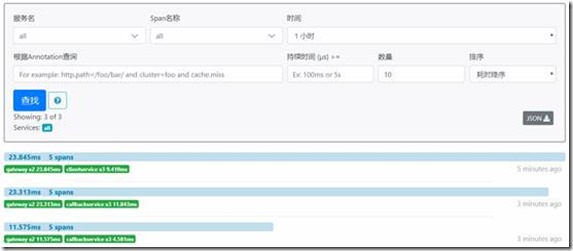
a) 在PostMan多访问几次clien或者callback项目,然后再观察zipkin看板,如下所示,显示每次request的列表
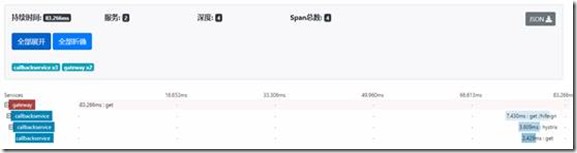
b) 点击其中一个条,查看详细信息,可以查看该查询的消耗时间、经过的服务数、服务深度 等等。
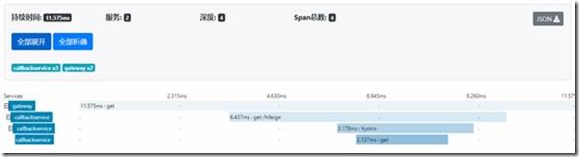
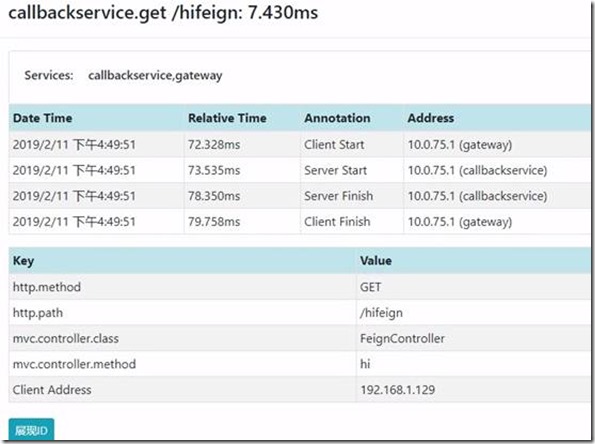
c) 点击每次服务链中的某次服务,可以查查某次服务调用的具体信息如下所示
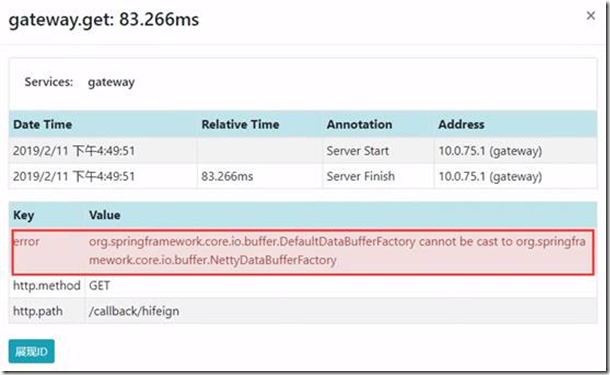
d) 如果调用失败,点击对应的服务,查看失败详情,以辅助解决问题。
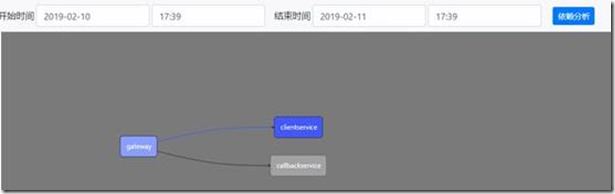
e) 查询依赖可以看到每次调用依赖关系图
这样spring cloud zipkin链路跟踪就介绍完了,如果在开发中遇到问题,也可以留言共同探讨共同进步。
微服务架构之spring cloud zipkin的更多相关文章
- 微服务架构-选择Spring Cloud,放弃Dubbo
Spring Cloud 在国内中小型公司能用起来吗?从 2016 年初一直到现在,我们在这条路上已经走了一年多. 在使用 Spring Cloud 之前,我们对微服务实践是没有太多的体会和经验的.从 ...
- 微服务架构集大成者—Spring Cloud (转载)
软件是有生命的,你做出来的架构决定了这个软件它这一生是坎坷还是幸福. 本文不是讲解如何使用Spring Cloud的教程,而是探讨Spring Cloud是什么,以及它诞生的背景和意义. 1 背景 2 ...
- 微服务架构之spring cloud 介绍
在当前的软件开发行业中,尤其是互联网,微服务是非常炽热的一个词语,市面上已经有一些成型的微服务框架来帮助开发者简化开发工作量,但spring cloud 绝对占有一席之地,不管你是否为java开发,大 ...
- 微服务架构之spring cloud eureka
Spring Cloud Eureka是spring cloud的核心组件,负责服务治理功能,起到中心枢纽作用,其它组件都依赖eureka来获取服务,然后再根据项目需求实现自己的业务,eureka在整 ...
- 微服务架构之spring cloud turbine
在前面介绍了spring cloud hystrix及其hystrix dashboard,但都是对单个项目的监控,对于一个为项目而言,必定有很多微服务,一个一个去看非常的不方便,如果有一个能集中熔断 ...
- 微服务架构之spring cloud gateway
Spring Cloud Gateway是spring cloud中起着非常重要的作用,是终端调用服务的入口,同时也是项目中每个服务对外暴露的统一口径,我们可以在网关中实现路径映射.权限验证.负载均衡 ...
- 微服务架构之spring cloud hystrix&hystrix dashboard
在前面介绍spring cloud feign中我们已经使用过hystrix,只是没有介绍,spring cloud hystrix在spring cloud中起到保护微服务的作用,不会让发生的异常无 ...
- 微服务架构之spring cloud feign
在spring cloud ribbon中我们用RestTemplate实现了服务调用,可以看到我们还是需要配置服务名称,调用的方法 等等,其实spring cloud提供了更优雅的服务调用方式,就是 ...
- 微服务架构之spring cloud ribbon
现在负载均衡是通用的解决分压的技术方案,实现方式一般分为服务端或者客户端,服务端大部分是使用中间件实现,spring cloud ribbon 是一个客户端负载均衡组件.跟spring cloud e ...
随机推荐
- 小M的作物 最小割最大流
题目描述 小M在MC里开辟了两块巨大的耕地A和B(你可以认为容量是无穷),现在,小P有n中作物的种子,每种作物的种子有1个(就是可以种一棵作物)(用1...n编号). 现在,第i种作物种植在A中种植可 ...
- datetime之 utcnow 和now的用法
from datetime import datetime print(datetime.now()) 本地时间 print(datetime.utcnow()) 国际时间
- python实现数据库增删改查
column_dic = {"id": 0, "name": 1, "age": 2, "phone": 3, &quo ...
- 开源项目-Aiguille
项目地址: https://github.com/wwkai555/Aiguille 这个项目主要使用Android L新特性 - 最新的widget以及一些值得推荐和使用的开源库比如butt ...
- mono for android 第四课--提示框(转)
其实在VS中开发安卓代码和C#还是有一些相似性,刚开始我也不知道怎么弹出提示框,于是就百度了下,再加上个人的小聪明得到一下结果 builder.setTitle表示提示框的标题. setMessage ...
- 16个最佳响应式HTML5框架分享
HTML5框架可以快速构建响应式网站,它们帮助程序员减少编码工作,减少冗余的代码.如今有很多免费的HTML5框架可供使用,由于它们有着响应式设计.跨浏览器兼容.相对轻量级等特点,这些框架在开发中都十分 ...
- Linux 命令 su 和 sudo 比较
su : 可以用来切换到任何用户,但是要求输入目标用户的密码 比如:su - su - root (等价 su -) su - user su root 与 su - root 的区别在于,后者不切换 ...
- Linux网络编程--多线程实现echo服务器与客户端“一对多”功能,是网络编程的“Hello World!”
在linux平台下,用多线程实现echo服务器与客户端“一对多”(即是一台服务器可以响应多个客户端的请求).本人写了个demo,和大家一起分享,有不足的地方,请多多指教,我是壮壮熊. 编译时,在后面加 ...
- select2和bootstrap模态框一起使用导致select2的input获取不到焦点问题
select2和bootstrap模态框一起使用导致select2的input获取不到焦点问题 解决办法: 把页面中的 tabindex="-1" 删掉, 或者值改为1 代码片 ...
- 基于 Annotation 的 Spring AOP 权限验证方法的实现
1. 配置 applicationContext 在 Spring 中支持 AOP 的配置非常的简单,只需要在 Spring 配置文件 applicationContext.xml 中添加: < ...