
微服务架构之spring cloud turbine
在前面介绍了spring cloud hystrix及其hystrix dashboard,但都是对单个项目的监控,对于一个为项目而言,必定有很多微服务,一个一个去看非常的不方便,如果有一个能集中熔断器监控的地方就完美了,spring cloud turbine 就实现了这样的功能,这篇文章就来介绍spring cloud turbine。
(一) 版本说明
a) Spring boot 2.0.6.RELEASE
b) Spring cloud Finchley.SR2
c) Java version 1.8
d) spring-cloud-starter-netflix-hystrix 2.0.2.RELEASE
e) spring-cloud-starter-netflix-hystrix-dashboard 2.0.2.RELEASE
f) spring-cloud-starter-netflix-turbine 2.0.2.RELEASE
(二) 项目配置
1. 项目设置
a) POM设置
<dependency>

<groupId>org.springframework.cloud</groupId>

<artifactId>spring-cloud-starter-netflix-hystrix</artifactId>

</dependency>

<dependency>

<groupId>org.springframework.cloud</groupId>

<artifactId>spring-cloud-starter-netflix-hystrix-dashboard</artifactId>

</dependency>

<dependency>

<groupId>org.springframework.cloud</groupId>

<artifactId>spring-cloud-starter-netflix-turbine</artifactId>

</dependency>
b) application.yml配置文件
eureka:

datacenter: ctm

environment: dev

instance:

hostname: 192.168.1.78

prefer-ip-address: true

ip-address: 192.168.1.129

lease-renewal-interval-in-seconds: 10

lease-expiration-duration-in-seconds: 30

instance-id: ${eureka.instance.ip-address}:${server.port}

client:

service-url:

defaultZone: http://${eureka.instance.hostname}:1001/eureka/,http://${eureka.instance.hostname}:1002/eureka/,http://${eureka.instance.hostname}:1003/eureka/

fetch-registry: true

register-with-eureka: true

healthcheck:

enabled: true

turbine:

aggregator:

cluster-config: default

app-config: clientservice,callbackservice

cluster-name-expression: new String("default")
c) 主要参数说明
i. eureka.instance.prefer-ip-address 使用IP显示注册信息
ii. eureka.instance.ip-address 实例IP地址,
iii. eureka.instance.instance-id 自定义实例id,服务之间调用就是使用该配置,多个实例必须保证唯一性
iv. eureka.client.service-url.defaultZone 注册中心地址
v. turbine.app-config 设置要聚集的服务名称,这里是指注册的服务名字
2. 项目运行
a) 运行要监控的服务
i. 为了演示聚集的效果,这里运行了2个服务者实例后,会在服务中心看到如下效果

b) 运行
i. 运行turbine项目,如下图所示

c) 在浏览器中输入消费者地址服务地址,即可看到如下效果
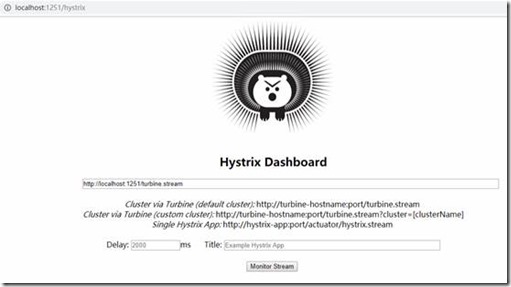
在看板地址中输入http://localhost:1251/turbine.stream,然后点击Monitor Stream 按钮,即可看到熔断器监控,如果没有数据显示,可以用任何客户端调用几次API,即可看到聚合后的效果。
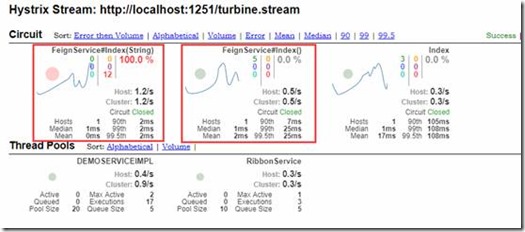
这样spring cloud turbine就介绍完了,如果在开发中遇到问题,也可以留言共同探讨共同进步。
微服务架构之spring cloud turbine的更多相关文章
- 微服务架构-选择Spring Cloud,放弃Dubbo
Spring Cloud 在国内中小型公司能用起来吗?从 2016 年初一直到现在,我们在这条路上已经走了一年多. 在使用 Spring Cloud 之前,我们对微服务实践是没有太多的体会和经验的.从 ...
- 微服务架构集大成者—Spring Cloud (转载)
软件是有生命的,你做出来的架构决定了这个软件它这一生是坎坷还是幸福. 本文不是讲解如何使用Spring Cloud的教程,而是探讨Spring Cloud是什么,以及它诞生的背景和意义. 1 背景 2 ...
- 微服务架构之spring cloud 介绍
在当前的软件开发行业中,尤其是互联网,微服务是非常炽热的一个词语,市面上已经有一些成型的微服务框架来帮助开发者简化开发工作量,但spring cloud 绝对占有一席之地,不管你是否为java开发,大 ...
- 微服务架构之spring cloud eureka
Spring Cloud Eureka是spring cloud的核心组件,负责服务治理功能,起到中心枢纽作用,其它组件都依赖eureka来获取服务,然后再根据项目需求实现自己的业务,eureka在整 ...
- 微服务架构之spring cloud zipkin
Spring Cloud Zipkin是微服务的链路跟踪组件,帮助详细了解一次request&response的总计时,及每个微服务的消耗时间.微服务名称.异常信息等等过程信息. (一) 版本 ...
- 微服务架构之spring cloud gateway
Spring Cloud Gateway是spring cloud中起着非常重要的作用,是终端调用服务的入口,同时也是项目中每个服务对外暴露的统一口径,我们可以在网关中实现路径映射.权限验证.负载均衡 ...
- 微服务架构之spring cloud hystrix&hystrix dashboard
在前面介绍spring cloud feign中我们已经使用过hystrix,只是没有介绍,spring cloud hystrix在spring cloud中起到保护微服务的作用,不会让发生的异常无 ...
- 微服务架构之spring cloud feign
在spring cloud ribbon中我们用RestTemplate实现了服务调用,可以看到我们还是需要配置服务名称,调用的方法 等等,其实spring cloud提供了更优雅的服务调用方式,就是 ...
- 微服务架构之spring cloud ribbon
现在负载均衡是通用的解决分压的技术方案,实现方式一般分为服务端或者客户端,服务端大部分是使用中间件实现,spring cloud ribbon 是一个客户端负载均衡组件.跟spring cloud e ...
随机推荐
- linux如何安装和启动mongdb
1.下载安装包 下载地址: https://www.mongodb.com/dr/fastdl.mongodb.org/linux/mongodb-linux-x86_64-4.0.9.tgz/dow ...
- Python基础部分的疑惑解析(1)
Python介绍: 是一种全能的语言,虽然执行效率低,但是开发效率高 现在也存在多种版本,IPYTHON,JPYTHON,但最重要的是CPYTHON,其他都是作用于各种语言的粘合剂版本,执行效率低,C ...
- Python爬虫学习:Python内置的爬虫模块urllib库
urllib库 urllib库是Python中一个最基本的网络请求的库.它可以模拟浏览器的行为发送请求(都是这样),从而获取返回的数据 urllib.request 在Python3的urllib库当 ...
- List的定制排序 包括使用lambda表达式来实现的方法
1.先实现Comparator的接口 重写compare方法 根据比较大小来返回数值: 比如:(Integer o1 - Integer o2); return 1 表示o1>o2; re ...
- web操作文件的上传到服务器 并可下载 并且读取出来
1.文件的上传-servlet实现文件上传---核心API—DiskFileItemFactory 一.文件上传概述 l 实现web开发中的文件上传功能,需完成如下二步操作: • 在web页面 ...
- android studio ndk 开发入门
ndk 开发没什么神秘的ndk 说白了就是一个交叉编译的工具链,用它来生成各个CPU架构下的静态或动态链接库,linux 下就是 .a 和 .so 文件.原理就是 java 通过 JNI 和 C.C+ ...
- 【转】Emgu CV on C# (五) —— Emgu CV on 局部自适应阈值二值化
局部自适应阈值二值化 相对全局阈值二值化,自然就有局部自适应阈值二值化,本文利用Emgu CV实现局部自适应阈值二值化算法,并通过调节block大小,实现图像的边缘检测. 一.理论概述(转载自< ...
- 6.042 Mathematics for Computer Science
课程信息 6.042 Mathematics for Computer Science
- java调用C++代码
一.在要使用到C++代码的类文件中声明一个native方法,例如: public class TestNative{ public native void test(); } 二.javac编译此ja ...
- IOS项目之弹出动画三
前面写了弹出动画两个,今天做商城时又用到了,看着这个用着蛮普遍的,所以记了下来 // // mallMoreView.h // XQB // // Created by City--Online on ...