
V-rep学习笔记:转动关节2
Torque or force mode: in this mode, the joint is simulated by the dynamics module, if and only if it is dynamically enabled. When dynamically enabled, a joint can be free or controlled in Force/torque, in velocity or in position.
The differentiation comes from the fact that a joint that operates in force/torque mode will be handled by the physics engine. And the physics engine will perform by default 10 times more calculation steps than the simulation loop: the simulation loop runs at 20Hz (in simulation time), while the physics engine runs at 200Hz (also in simulation time). That default behaviour can entirely be configured if required。If the joint is not in force/torque mode: if the joint is not in force/torque mode, then you can directly (and instantaneously) set its position via the simSetJointPosition API function.
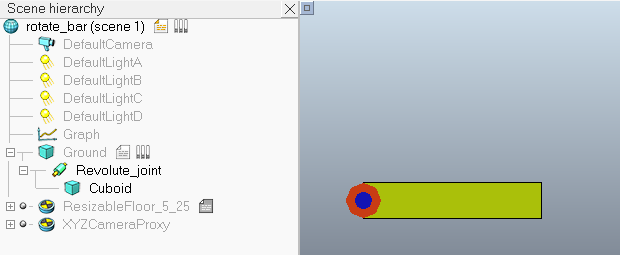
建立如下图所示的旋转模型:
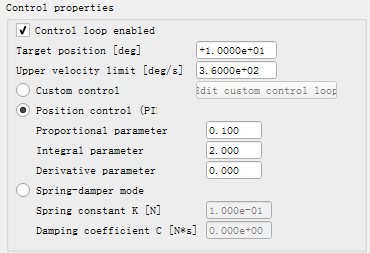
在转动关节的Joint Dynamic Properties对话框中勾选Control loop enable选项可以进行关节的位置控制(默认使用内置的PID控制器)。Target position为设定的目标位置(角度),Upper velocity limit为关节运动过程中允许的最大角速度,如果超过这个角速度则被限制为该值。
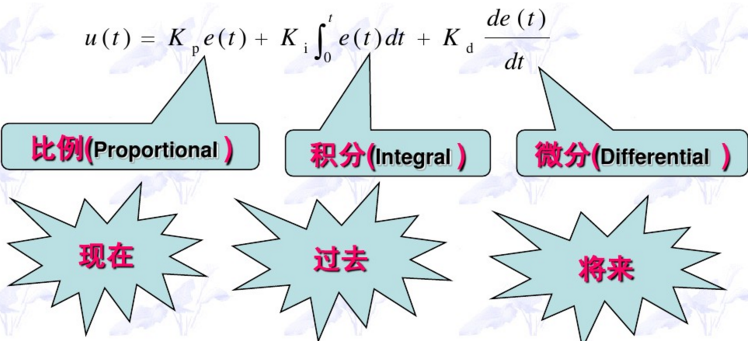
PID控制器将比例、积分、微分通过线性组合构成控制量,动态方程为:
PID控制器的离散化表达式为:
$$u(k)=K_pe(k)+K_iTe(k)+\frac{K_d}{T}[e(k)-e(k-1)]$$
式中,T为采样周期,k为采样序号,Kp为比例系数,Ki为积分系数,Kd为微分系数
比例控制能提高系统的动态响应速度,迅速反应误差,从而减小误差,但比例控制不能消除稳态误差。$K_p$的加大,会引起系统的不稳定;积分控制的作用是消除稳态误差,因为系统只要存在误差,积分作用就不断地积累,输出控制量,直到偏差为零,积分作用才会停止。但积分作用太强会使系统超调加大,甚至使系统出现振荡。微分作用可以在产生误差之前一发现有产生误差的趋势就开始调节,提前进行控制,所以及时性更好,可以最大限度地减少动态误差。但微分作用只能作为比例和积分控制的一种补充,不能起主导作用,微分作用太强也会使系统出现不稳定,微分作用只能在P和I调好后再由小往大调,一点一点试着加上去。
下面设10°为期望位置,PID参数设为0.1, 2, 0,仿真1s关节角度曲线如下图所示:
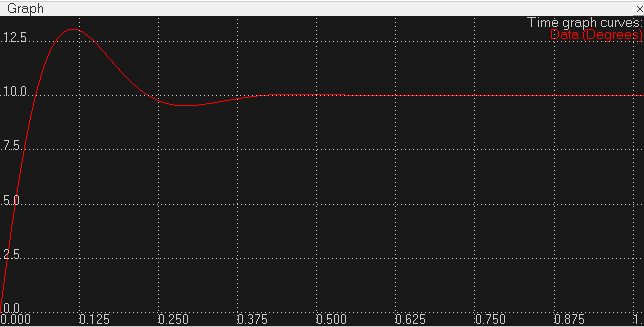
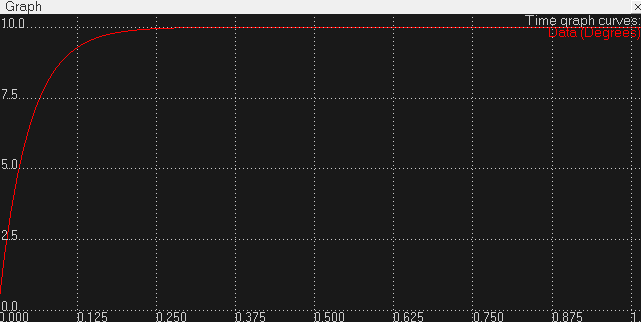
可以试着改变参数看看不同的效果,下图是使用默认参数0.1,0,0,即只使用比例控制的结果。可以看出增大积分项确实会引起超调
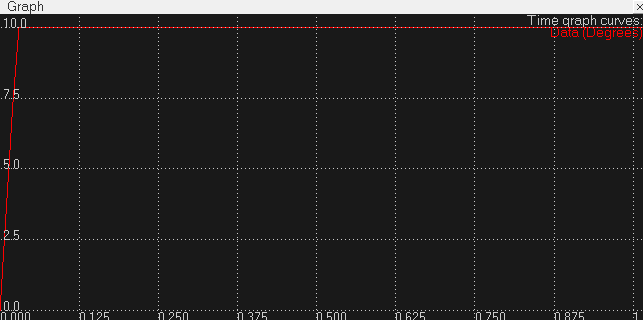
将比例系数设为1后结果如下图,可以看出到达目标位置的时间比Kp=0.1时要快很多,可以看出增大比例系数可以加快响应速度。
如果勾选Custom control选项,关节就会按照joint control callback script中用户编写的控制规律进行控制。This allows the user to write very specific joint controllers, that will be executed at each physics engine simulation step.
callback script脚本通常用于一些底层控制,VREP中分为3种:
- the contact callback script: the contact callback script lets you handle in a customized way each dynamic contact generated by the physics engine when two respondable objects collide.
- joint control callback scripts: a joint control callback script lets you write customized low-level controllers for joints that are dynamically enabled.
- the general callback script: each scene can have a general callback script that will be in charge of handling multi-purpose callback calls.
这些脚本有如下特点:
- a callback script always runs non-threaded.
- a callback script might be called more than once for each simulation step.
- a callback script handles low-level control items that the user wishes to customize. They should execute as quickly as possible, to avoid slowing down a simulation (this is particularly true for the contact callback script).
Joint control callback scripts, which are simulation scripts, can be enabled via the joint dynamics properties dialog. When enabled for a given joint (that must be dynamically enabled), then the physics engine will call the callback script with appropriate arguments, allowing the user to customize the control loop of the related joint in order to write low-level control algorithms for specific joints. The joint control callback script might be called quite often, normally 10 times per simulation step for a given joint (remember that the physics engine time step, by default, is 10 times smaller that the simulation time step). For that reason, keep things simple, in order to avoid slowing down the simulation. Following represents a simple PID joint control callback script:
打开关节控制脚本,默认进行PID控制,我们可以根据需要进行修改。代码中pidCumulativeErrorForIntegralParam变量用于存储积分项的累加值,如果是第一次调用控制脚本(init值为true)则将其初始化为0;dynStepSize与上面公式中的采样周期T意义相同;用于计算控制量的误差errorValue=targetPos-currentPos,那么与PID参数相乘后得到的控制量ctrl为位置量,如果要控制速度来使关节达到目标位置,则应施加的速度控制量为:velocityToApply=ctrl/dynStepSize
-- This example script performs a PID control

-- Be very careful when calling V-REP API functions from here:

-- 1. This routine gets called often, so it might slow down simulation (this is called at each dynamic simulation step, by default 10x more often than a child script)

-- 2. Some API functions are not meant to be called from here

-- Following data is handed over from V-REP:

init,revolute,cyclic,jointHandle,passCnt,totalPasses,currentPos,targetPos,errorValue,effort,dynStepSize,lowLimit,highLimit,targetVel,maxForceTorque,velUpperLimit=...

-- init: true when this callback is called for the first time (if the joint is dynamically reset during the simulation, this might be true more often)

-- revolute: true if the joint is revolute

-- cyclic: true if the joint is revolute and cyclic (i.e. no lower/upper limits)

-- passCnt: the current dynamics calculation pass. 0-9 by default. See next item for details.

-- totalPasses: the number of dynamics calculation passes for each "regular" simulation pass. 10 by default (i.e. 10*5ms=50ms which is the default simulation time step)

-- currentPos: the current position of the joint

-- targetPos: the desired position of the joint

-- errorValue: targetPos-currentPos (with revolute cyclic joints we take the shortest cyclic distance)

-- effort: the last force or torque that acted on this joint along/around its axis. With Bullet, torques from joint limits are not taken into account

-- dynStepSize: the step size used for the dynamics calculations (by default 5ms)

-- lowLimit: the joint lower limit

-- highLimit: the joint upper limit

-- targetVel: the joint target velocity (as set in the user interface)

-- maxForceTorque: the joint maximum force/torque (as set in the user interface)

-- velUpperLimit: the joint velocity upper limit (as set in the user interface)

-- The control happens here:

-- 1. PID parameter def:

if not PID_P then

    PID_P=0.1

    PID_I=

    PID_D=

end

-- 2. Clear some values when the dynamic joint calls this the first time (this can happen several times, if the joint is reset dynamically):

if init then

    pidCumulativeErrorForIntegralParam=

end

-- 3. Proportional part:

ctrl=errorValue*PID_P

-- 4. Integral part:

if PID_I~= then

    pidCumulativeErrorForIntegralParam=pidCumulativeErrorForIntegralParam+errorValue*dynStepSize

else

    pidCumulativeErrorForIntegralParam=

end

ctrl=ctrl+pidCumulativeErrorForIntegralParam*PID_I

-- 5. Derivative part:

if not init then

    ctrl=ctrl+(errorValue-pidLastErrorForDerivativeParam)*PID_D/dynStepSize

end

pidLastErrorForDerivativeParam=errorValue

-- 6. Calculate the velocity needed to reach the position in one dynamic time step:

velocityToApply=ctrl/dynStepSize

if (velocityToApply>velUpperLimit) then

    velocityToApply=velUpperLimit

end

if (velocityToApply<-velUpperLimit) then

    velocityToApply=-velUpperLimit

end

forceOrTorqueToApply=maxForceTorque

-- Following data must be returned to V-REP:

return forceOrTorqueToApply,velocityToApply

-- forceOrTorqueToApply: the maximum force/torque that the joint will be able to exert

-- velocityToApply: the velocity to apply to the joint.
注意Lua函数可以接受可变数目的参数,在函数参数列表中使用三点(...)表示函数有可变的参数。
V-rep学习笔记:转动关节2的更多相关文章
- R语言与机器学习学习笔记
人工神经网络(ANN),简称神经网络,是一种模仿生物神经网络的结构和功能的数学模型或计算模型.神经网络由大量的人工神经元联结进行计算.大多数情况下人工神经网络能在外界信息的基础上改变内部结构,是一种自 ...
- 蒟蒻的长链剖分学习笔记(例题:HOTEL加强版、重建计划)
长链剖分学习笔记 说到树的链剖,大多数人都会首先想到重链剖分.的确,目前重链剖分在OI中有更加多样化的应用,但它大多时候是替代不了长链剖分的. 重链剖分是把size最大的儿子当成重儿子,顾名思义长链剖 ...
- KD-Tree 学习笔记
这是一篇又长又烂的学习笔记,请做好及时退出的准备. KD-Tree 的复杂度大概是 \(O(n^{1-\frac{1}{k}})\) \(k\) 是维度 由于网上找不到靠谱的证明,咕了. 会证明之后再 ...
- 「学习笔记」FFT 快速傅里叶变换
目录 「学习笔记」FFT 快速傅里叶变换 啥是 FFT 呀?它可以干什么? 必备芝士 点值表示 复数 傅立叶正变换 傅里叶逆变换 FFT 的代码实现 还会有的 NTT 和三模数 NTT... 「学习笔 ...
- CF1147F Zigzag Game & 稳定婚姻问题学习笔记
CF1147F Zigzag Game 这题太神仙了,不得不记录一下. 我网络流做不动了,DS做不动了,DP做不动了,特别自闭.于是博弈论之神(就是随手切3500博弈的那种) \(\color{bla ...
- DirectX Graphics Infrastructure(DXGI):最佳范例 学习笔记
今天要学习的这篇文章写的算是比较早的了,大概在DX11时代就写好了,当时龙书11版看得很潦草,并没有注意这篇文章,现在看12,觉得是跳不过去的一篇文章,地址如下: https://msdn.micro ...
- Sass学习笔记之入门篇
Sass又名SCSS,是CSS预处理器之一,,它能用来清晰地.结构化地描述文件样式,有着比普通 CSS 更加强大的功能. Sass 能够提供更简洁.更优雅的语法,同时提供多种功能来创建可维护和管理的样 ...
- react-native学习笔记--史上最详细Windows版本搭建安装React Native环境配置
参考:http://www.lcode.org/react-native/ React native中文网:http://reactnative.cn/docs/0.23/android-setup. ...
- swift学习笔记5——其它部分(自动引用计数、错误处理、泛型...)
之前学习swift时的个人笔记,根据github:the-swift-programming-language-in-chinese学习.总结,将重要的内容提取,加以理解后整理为学习笔记,方便以后查询 ...
- Oracle学习笔记三 SQL命令
SQL简介 SQL 支持下列类别的命令: 1.数据定义语言(DDL) 2.数据操纵语言(DML) 3.事务控制语言(TCL) 4.数据控制语言(DCL)
随机推荐
- 《剑指offer》-链表的第一个公共节点
题目描述 输入两个链表,找出它们的第一个公共结点. 这题目是指针相关的题目.初步要判断出来,有公共节点的两个指针,应当是链表后半部分相同.这样的话,当遇到第一个相同节点(不是node的val相同,而是 ...
- POJ 1703 Find them, Catch them (并查集)
题意:有N名来自两个帮派的坏蛋,已知一些坏蛋两两不属于同一帮派,求判断给定两个坏蛋是否属于同一帮派. 思路: 解法一: 编号划分 定义并查集为:并查集里的元素i-x表示i属于帮派x,同一个并查集的元素 ...
- AndrodStudio报错: Cannot launch AVD in emulator.
Cannot launch AVD in emulator.Output:Hax is enabledHax ram_size 0x60000000HAX is working and emulato ...
- Windows10下安装Maven以及Eclipse安装Maven插件 + 创建Maven项目
在官网下载Maven http://maven.apache.org/download.cgi 下载下来后加压缩,将apache-maven-3.5.4文件夹复制到想要存放它的位置,我放在了 ...
- 不一样的go语言创世
在这之前,我是一名Java程序员,但最近我却已经好几个月没写Java代码了,因为我已经敲了好几个月的go,这是我连续最长的一段时间在写go.陆陆续续地算下来,也有快一年多的时间在与go打交道.期间 ...
- nodejs那些事儿
http://www.nodeclass.com/ https://cnodejs.org/ 当前版本,v6.11.2 安装node时,牵扯features的选择,在不了解的情况下,我选择了第1个.网 ...
- css 背景透明色, 文字不透明。
[原]CSS实现背景透明,文字不透明,兼容所有浏览器 background-color: rgba(0,0,0,0.5); filter:Alpha(opacity=50);
- u3d 创建元件 预制件 U3d creates component prefabricated parts
u3d 创建元件 预制件 U3d creates component prefabricated parts 作者:韩梦飞沙 Author:han_meng_fei_sha 邮箱:313134555@ ...
- 28BYJ-48步进电机
28BYJ-48步进电机:1.步进电机是一种将电脉冲转化为角位移的执行机构. 2.通俗一点讲:当步进驱动器接收到 一个脉冲信号,它就驱动步进电机按设定的方向转动一个固定的角度(及步进角). 3.通过控 ...
- [HackerRank]Choosing White Balls
[HackerRank]Choosing White Balls 题目大意: 有\(n(n\le30)\)个球排成一行,每个球的颜色为黑或白. 执行\(k\)次操作,第\(i\)次操作形式如下: 从\ ...