
ftp服务器搭建(离线安装vsftpd),配置
1.下载vsftp:http://rpmfind.net/linux/rpm2html/search.php?query=vsftpd(x86-64)

2.检查是否已经安装了vsftp
 rpm -qa | grep vsftpd
 如果没有提示则说明没有安装
 如果提示版本号则说明已经安装
3.安装vsftpd-3.0.2-22.el7.x86_64.rpm
离线安装

rpm -ivh vsftpd-3.0.2-22.el7.x86_64.rpm

在线安装

yum install -y vsftp
安装过程可能会报错:
[root@yjy-pt01 vsftpd]# rpm -ivh vsftpd-3.0.2-22.el7.x86_64.rpm
warning: vsftpd-3.0.2-22.el7.x86_64.rpm: Header V3 RSA/SHA256 Signature, key ID f4a80eb5: NOKEY
error: Failed dependencies:
libc.so.6(GLIBC_2.14)(64bit) is needed by vsftpd-3.0.2-22.el7.x86_64
libc.so.6(GLIBC_2.15)(64bit) is needed by vsftpd-3.0.2-22.el7.x86_64
解决:安装相关依赖
rpm -ivh libcap-2.16-5.5.el6.x86_64.rpm
rpm -ivh libcap-devel-2.16-5.5.el6.x86_64.rpm
4.检查是否安装成功
[root@yjy-pt03 local]# rpm -qa | grep vsftpd

vsftpd-2.2.2-24.el6.x86_64                            //出现版本号,说明安装成功
5.配置,这里只说能让你的ftp跑起来的配置,详细原理可以点击查看这里
5.0 开启vsftpd的两个端口 20,21
开启

# iptables -I INPUT -i eth0 -p tcp --dport 20 -j ACCEPT

# iptables  -I OUTPUT -o eth0 -p tcp --sport 20 -j ACCEPT

保存

# /etc/rc.d/init.d/iptables save

重启防火墙

# service iptables restart
5.1 创建两个系统用户
1.因为vsftpd默认的宿主用户是root,不符合安全性要求,所以将新建立的vsftpd服务的宿主用户的shell改为“ /sbin/nologin意思是禁止登录系统 ”:
useradd vsftpd -s /sbin/nologin //系统用户 vsftpd 主要是提供一个默认宿主
2.建立vsftpd虚拟宿主用户:
useradd virtusers -s /sbin/nologin //系统用户 virtusers 本文主要讲虚拟用户登录,这相当于我们的虚拟用户组
此次主要介绍虚拟用户,顾名思义虚拟用户在系统中是不纯在的,它们集体寄托于方才创建的“virtusers”用户,那么这个用户就相当于一个虚拟用户组了,因为这个用户的权限将影响到后续讲到的虚拟用户。
5.2 配置vsftpd的主要配置文件vsftpd.conf
1.养成备份的好习惯
cp /etc/vsftpd/vsftpd.conf /etc/vsftpd/vsftpd.backup.conf
2.vim /etc/vsftpd/vsftpd.conf
#默认的根目录为
#local_root=/var/ftp
#设置为NO代表不允许匿名

anonymous_enable=NO

#设定本地用户可以访问,主要是虚拟宿主用户,如果设为NO那么所欲虚拟用户将无法访问。

local_enable=YES

#可以进行写的操作

write_enable=YES

#设定上传文件的权限掩码

local_umask=022

#禁止匿名用户上传

anon_upload_enable=NO

#禁止匿名用户建立目录

anon_mkdir_write_enable=NO

# 设定开启目录标语功能

dirmessage_enable=YES

# 设定开启日志记录功能

xferlog_enable=YES

#设定端口20进行数据连接

connect_from_port_20=YES

#设定禁止上传文件更改宿主

chown_uploads=NO

#设定vsftpd服务日志保存路劲。注意:改文件默认不纯在,需手动touch,且由于这里更改了vsftpd服务的宿主用户为手动建立的vsftpd,则必

须注意给予该用户对日志的读取权限否则服务启动失败。

xferlog_file=/var/log/vsftpd.log      //这个文件在后面步骤中会提及

#设定日志使用标准的记录格式

xferlog_std_format=YES

#设定空闲链接超时时间,这里使用默认/秒。

#idle_session_timeout=600

#设定最大连接传输时间,这里使用默认,将具体数值留给每个用户具体制定,默认120/秒

data_connection_timeout=3600

#设定支撑vsftpd服务的宿主用户为手动建立的vsftpd用户。注意:一旦更改宿主用户,需一起与该服务相关的读写文件的读写赋权问题.

nopriv_user=vsftpd

#设定支持异步传输的功能

#async_abor_enable=YES

#设置vsftpd的登陆标语

ftpd_banner=hello 欢迎登陆


#是否将所有用户限制在主目录,YES为启用 NO禁用.(该项默认值是NO,即在安装vsftpd后不做配置的话,ftp用户是可以向上切换到要目录之外的)
chroot_local_user=NO //如果设置成YE会导致你用java代码创建文件夹时失败,因为他被限制在了宿主目录

#禁止用户登出自己的ftp主目录

chroot_list_enable=NO

#禁止用户登陆ftp后使用ls -R 命令。该命令会对服务器性能造成巨大开销,如果该项运行当多个用户使用该命令会对服务器造成威胁。

ls_recurse_enable=NO

#设定vsftpd服务工作在standalone模式下。所谓standalone模式就是该服务拥有自己的守护进程,在ps -A可以看出vsftpd的守护进程名。如果

不想工作在standalone模式下,可以选择SuperDaemon模式,注释掉即可,在该模式下vsftpd将没有自己的守护进程,而是由超级守护进程Xinetd全权代理,>与此同时,vsftpd服务的许多功能,将得不到实现。

listen=YES

#设定userlist_file中的用户将不能使用ftp

userlist_enable=YES

#设定pam服务下的vsftpd验证配置文件名。因此,PAM验证将参考/etc/pam.d/下的vsftpd文件配置。

pam_service_name=vsftpd

#设定支持TCPwrappers

tcp_wrappers=YES

#################################################以下是关于虚拟用户支持的重要配置项目,默认.conf配置文件中是不包含这些项目的,需手动添加。

#启用虚拟用户功能

guest_enable=YES

#指定虚拟的宿主用户

guest_username=virtusers    //virtusers就是我们上面创建的系统用户,作为我们的虚拟用户组使用
#设定虚拟用户的权限符合他们的宿主用户
virtual_use_local_privs=YES

#设定虚拟用户个人vsftp的配置文件存放路劲。这个被指定的目录里,将被存放每个虚拟用户个性的配置文件,注意的地方是:配置文件名必须 和虚拟用户名相同。
user_config_dir=/etc/vsftpd/vconf           //这是个目录,是为每一个虚拟用户配置单独的权限使用,这里我们主要配置每个用户的单独根目录

#开启每个虚拟用户有独立的根目录
chroot_local_user=YES

#禁止反向域名解析,若是没有添加这个参数可能会出现用户登陆较慢,或则客户链接不上ftp的现象
reverse_lookup_enable=NO
5.3.建立vsftpd的日志文件,并更改属主为vsftpd的服务宿主用户
//上线配置文件中配置的日志目录
touch /var/log/vsftpd.log

chown vsftpd.vsftpd /var/log/vsftpd.log
5.4 配置虚拟用户
1.建立虚拟用户配置文件的存放路径 【这个路径就是上面配置文件末尾配置的路径】
mkdir /etc/vsftpd/vconf/
2.)建立一个虚拟用户名单文件,用来记录虚拟用户的账号和密码,格式为:一行用户名,一行密码。不要有空格
vim /opt/vsftp/passwd
test

123456

test1

654321
3.生成虚拟用户数据文件
db_load -T -t hash -f /opt/vsftp/passwd /opt/vsftp/passwd.db
需要注意的是,以后对虚拟用户的增删操作完之后需要再次执行上述命令,使其生成新的数据文件。
5.5设置PAM验证文件,并制定虚拟用户数据库文件进行读取
1.操作前记得备份的好习惯
cp /etc/pam.d/vsftpd /etc/pam.d/vsftpd.backup
2.查看我已经配置的文件:cat /etc/pam.d/vsftpd 红色部分为新增,可以看到目录就是我们配置的用户名密码
#%PAM-1.0

#####32位系统配置

#auth    sufficient      /lib/security/pam_userdb.so     db=/etc/vsftpd/xnpasswd

#account sufficient      /lib/security/pam_userdb.so     db=/etc/vsftpd/xnpasswd

#####64位系统配置

auth    sufficient      /lib64/security/pam_userdb.so     db=/opt/vsftp/passwd

account sufficient      /lib64/security/pam_userdb.so     db=/opt/vsftp/passwd

#以上两条是手动添加的,内容是对虚拟用户的安全和帐户权限进行验证。

#这里的auth是指对用户的用户名口令进行验证。

#这里的accout是指对用户的帐户有哪些权限哪些限制进行验证。

auth       required     pam_listfile.so item=user sense=deny file=/etc/vsftpd/ftpusers onerr=succeed

auth       required     pam_shells.so

auth       include      system-auth

account    include      system-auth

session    include      system-auth

session    required     pam_loginuid.so
5.6 为每一个虚拟账户配置专属配置文件
1.我是直接copy的主配置文件然后改的,内容如下
vim /etc/vsftpd/vconf/test //注意文件名 test与passwd中用户名要保持一致
# Example config file /etc/vsftpd/vsftpd.conf

#

# The default compiled in settings are fairly paranoid. This sample file

# loosens things up a bit, to make the ftp daemon more usable.

# Please see vsftpd.conf.5 for all compiled in defaults.

#

# READ THIS: This example file is NOT an exhaustive list of vsftpd options.

# Please read the vsftpd.conf.5 manual page to get a full idea of vsftpd's

# capabilities.

#

# Allow anonymous FTP? (Beware - allowed by default if you comment this out).

local_root=/opt/vsftpd/file  //这里是我配置的test用户的根目录

anonymous_enable=NO

#

# Uncomment this to allow local users to log in.

local_enable=YES

#

# Uncomment this to enable any form of FTP write command.

write_enable=YES

#

# Default umask for local users is 077. You may wish to change this to 022,

# if your users expect that (022 is used by most other ftpd's)

local_umask=022

#

# Uncomment this to allow the anonymous FTP user to upload files. This only

# has an effect if the above global write enable is activated. Also, you will

# obviously need to create a directory writable by the FTP user.

anon_upload_enable=NO

#

# Uncomment this if you want the anonymous FTP user to be able to create

# new directories.

anon_mkdir_write_enable=NO

#anno_other_writer_enable=YES

#

# Activate directory messages - messages given to remote users when they

# go into a certain directory.

#dirmessage_enable=YES

#

# The target log file can be vsftpd_log_file or xferlog_file.

# This depends on setting xferlog_std_format parameter

#xferlog_enable=YES

#

# Make sure PORT transfer connections originate from port 20 (ftp-data).

#connect_from_port_20=YES

#

# If you want, you can arrange for uploaded anonymous files to be owned by

# a different user. Note! Using "root" for uploaded files is not

# recommended!

#chown_uploads=NO

#chown_username=whoever

#

# The name of log file when xferlog_enable=YES and xferlog_std_format=YES

# WARNING - changing this filename affects /etc/logrotate.d/vsftpd.log

#xferlog_file=/var/log/vsftpd.log

#

# Switches between logging into vsftpd_log_file and xferlog_file files.

# NO writes to vsftpd_log_file, YES to xferlog_file

#xferlog_std_format=YES

#

# You may change the default value for timing out an idle session.

#idle_session_timeout=600

#

# You may change the default value for timing out a data connection.

#data_connection_timeout=120

#

# It is recommended that you define on your system a unique user which the

# ftp server can use as a totally isolated and unprivileged user.

#nopriv_user=vsftpd

#

# Enable this and the server will recognise asynchronous ABOR requests. Not

# recommended for security (the code is non-trivial). Not enabling it,

# however, may confuse older FTP clients.

async_abor_enable=YES

#

# By default the server will pretend to allow ASCII mode but in fact ignore

# the request. Turn on the below options to have the server actually do ASCII

# mangling on files when in ASCII mode.

# Beware that on some FTP servers, ASCII support allows a denial of service

# attack (DoS) via the command "SIZE /big/file" in ASCII mode. vsftpd

# predicted this attack and has always been safe, reporting the size of the

# raw file.

# ASCII mangling is a horrible feature of the protocol.

#ascii_upload_enable=YES

#ascii_download_enable=YES

#

# You may fully customise the login banner string:

#ftpd_banner=Welcome to blah FTP service.

#

# You may specify a file of disallowed anonymous e-mail addresses. Apparently

# useful for combatting certain DoS attacks.

#deny_email_enable=YES

# (default follows)

#banned_email_file=/etc/vsftpd/banned_emails

#

# You may specify an explicit list of local users to chroot() to their home

# directory. If chroot_local_user is YES, then this list becomes a list of

# users to NOT chroot().

#chroot_local_user=NO

#chroot_list_enable=NO

# (default follows)

#chroot_list_file=/etc/vsftpd/chroot_list

#

# You may activate the "-R" option to the builtin ls. This is disabled by

# default to avoid remote users being able to cause excessive I/O on large

# sites. However, some broken FTP clients such as "ncftp" and "mirror" assume

# the presence of the "-R" option, so there is a strong case for enabling it.

#ls_recurse_enable=YES

#

# When "listen" directive is enabled, vsftpd runs in standalone mode and

# listens on IPv4 sockets. This directive cannot be used in conjunction

# with the listen_ipv6 directive.

#listen=YES

#

# This directive enables listening on IPv6 sockets. To listen on IPv4 and IPv6

# sockets, you must run two copies of vsftpd with two configuration files.

# Make sure, that one of the listen options is commented !!

#listen_ipv6=YES

#pam_service_name=vsftpd

#userlist_enable=YES

#tcp_wrappers=YES

#guest_enable=YES

#guest_username=virtusers

#virtual_use_local_privs=YES

#reverse_lookup_enable=NO
2.建立虚拟用户的仓库目录并更改相应属主/组且赋予相应权限
mkdir -p /opt/vsftpd/file //这就是5.6中local_root=/opt/vsftpd/file 配置的根目录
chown virtusers:virtusers /opt/vsftpd/file

chmod 755 /opt/vsftpd/file
3.随便建立个文件方便后续检测是否安装成功:
touch /opt/vsftpd/file/abc
5.7重启
service vsftpd restart
其他命令
#开启
service vsftpd start

#停止

service vsftpd stop

#重启

service vsftpd restart
6.测试
打开文件夹输入地址

会提示你登录,或则右击登录

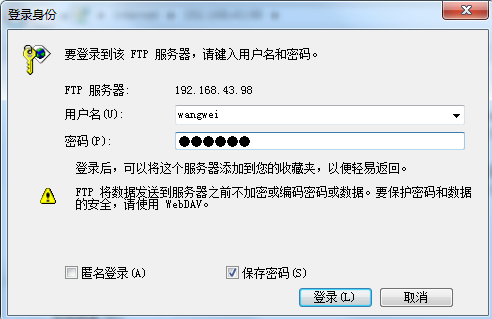
就可以看到你的文件夹了
7.附送:
gitHub源码:https://github.com/UncleWW/Shop
ftp服务器搭建(离线安装vsftpd),配置的更多相关文章
- Linux CentOS 6.5 下 vsftpd ftp服务器搭建
Linux CentOS 6.5 下 vsftpd ftp服务器搭建 by:授客 QQ:1033553122 操作系统环境:CentOS 6.5-x86_64 下载地址:http://www.ce ...
- centos7 配置ftp服务器搭建(匿名访问,以及本地登录)
大家好,今天来给大家分享一个基于centos 7的ftp服务器搭建 实现功能:匿名访问,本地登录 查看系统版本: [root@localhost ~]# cat /etc/redhat-release ...
- centos 7.3 服务器环境搭建——MySQL 安装和配置
centos 7.3 服务器环境搭建——MySQL 安装和配置服务器信息如下:服务器:阿里云系统 centos 7.3 (阿里云该版本最新系统)mysql版本:5.7.18 (当前时间最新版本)连接服 ...
- 记一次ftp服务器搭建走过的坑
记一次ftp服务器搭建走过的坑 1.安装 ①下载 wget https://security.appspot.com/downloads/vsftpd-3.0.3.tar.gz #要FQ ②解压 ta ...
- FTP-Linux中ftp服务器搭建
一.FTP工作原理 (1)FTP使用端口 [root@localhost ~]# cat /etc/services | grep ftp ftp-data 20/tcp #数据链路:端口20 ftp ...
- ftp服务器搭建(windows)+实现ftp图片上传对接
ftp服务器搭建(windows): vsftpd简介: vsftpd是“very secure FTP daemon”的缩写,是一个完全免费的.开放源代码的ftp服务器软件. 下载地址: http: ...
- linux环境:FTP服务器搭建
转载及参考至:https://www.linuxprobe.com/chapter-11.html https://www.cnblogs.com/lxwphp/p/8916664.html 感谢原作 ...
- Linux中ftp服务器搭建
一.FTP工作原理 (1)FTP使用端口 [root@localhost ~]# cat /etc/services | grep ftp ftp-data 20/tcp #数据链路:端口20 ftp ...
- SUSE下FTP服务器搭建
FTP(File Transfer Protocol),是TCP/IP网络上两台计算机传送文件的协议,是在TCP/IP网络和Internet上最早使用的协议之一,属于网络协议组的应 用层.FTP客户机 ...
随机推荐
- 远程图片转化为base64
远程图片转化为base64 <?php /* * * 第一种方法 * 远程图片转化为base64,只支持http(推荐使用) * */ public static function imgUrl ...
- Mac配置java运行环境的步骤
官网下载地址:jdk1.8版本的 http://www.oracle.com/technetwork/java/javase/downloads/jdk8-downloads-2133151.htm ...
- 05: greenlet:轻量级的并发编程
网络编程其他篇 1.1 greenlet简介 1.greenlet原理 & 使用 1. greenle间切换 1)一个 “greenlet” 是一个很小的独立微线程,可以把它想像成一个堆栈帧, ...
- [C++ Primer Plus] 第2章、开始学习c++
一.程序清单2.1(代码和书略不一样) #include<iostream> using namespace std;//使用std这个命名空间,才能正确找到cin和cout,如果不使用命 ...
- 动态规划之140 Word Break2
这是一题不太明显的动态规划,主要考察的应该是深度优先搜索. static LinkedList<String> list = new LinkedList<String>(); ...
- Duilib嵌入CEF出现窗口显示不正常
参考资料:https://www.aliyun.com/zixun/wenji/1247250.html 转载:https://www.cnblogs.com/gongxijun/p/4857977. ...
- 使用SimpleDateFormat时的日期和时间模式
日期和时间模式 日期和时间格式由日期和时间模式 字符串指定.在日期和时间模式字符串中,未加引号的字母 ‘A’ 到’Z’ 和’a’ 到’z’ 被解释为模式字母,用来表示日期或时间字符串元素.文本可以使用 ...
- topcoder srm 540 div1
problem1 link 设第一个数字为$x$,那么第2到第$n$个数字都可以表示成$a+bx$的形式,其中$b=1$或者$b=-1$.然后可以求出关于$x$的一些范围,求交集即可. problem ...
- Python3 tkinter基础 Frame bind 敲击键盘事件 将按键打印到console中
Python : 3.7.0 OS : Ubuntu 18.04.1 LTS IDE : PyCharm 2018.2.4 Conda ...
- Redis常用操作大全和Python操作Redis
简单使用 utils.py import redis POOL=redis.ConnectionPool(host='127.0.0.1',port=6379) view.py 第一种方式 (通用方式 ...