
springboot学习之授权Spring Security
SpringSecurity核心功能:认证、授权、攻击防护(防止伪造身份)
涉及的依赖如下:
<dependency>
    <groupId>org.springframework.boot</groupId>
    <artifactId>spring-boot-starter-security</artifactId>
</dependency>
<dependency>

    <groupId>org.springframework.boot</groupId>

    <artifactId>spring-boot-starter-security</artifactId>

</dependency>
新建一个项目,添加如上依赖【添加依赖之后默认开始授权验证】,在控制器controller中测试,指定url,比如
@Controller

public class UserController {

    @RequestMapping(value="/hello")

    @ResponseBody

    public String hello(){return "=======Welcome to HelloWorld==============";}

}
如上,原本启动项目后,在地址栏中输入http://localhost:8080/hello应该显示返回的内容
然而此次加了安全验证后,不管url中访问的地址是什么,hello还是hello111,均返回login页面,如下
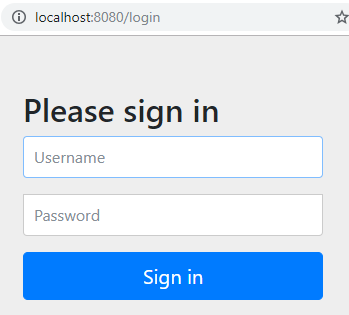
此时系统都没有连DB,用户名和密码是什么?
控制台中有消息,比如Using generated security password: 76dade1c-f190-44f8-915c-7a6b6917fb9a【每次随机生成的密码】
将用户名 user 和 密码 76dade1c-f190-44f8-915c-7a6b6917fb9a 填入上面对话框中,点击按钮Sign in

若之前访问的页面是控制器中配置的页面http://localhost:8080/hello
则此时能成功显示

若之前访问的页面是其他的,控制器中未配置的,则重定向后返回页面不存在。
当前自己的项目中,总不能用系统生成的密码进行登录获得权限,那不要被别人笑死。
进阶阶段:
我简单创建了一张表,希望该表的人输入匹配的用户名和密码后,方能登录。
CREATE TABLE `admin_user`(

`id` int(4) NOT NULL AUTO_INCREMENT,

`username` VARCHAR(100),

`password` VARCHAR(100),

`role` VARCHAR(100),

`realname` VARCHAR(100),

`mobile` VARCHAR(2000),

`state` BIT default 0,

`info` VARCHAR(200),

PRIMARY KEY (`id`)

)ENGINE=InnoDB AUTO_INCREMENT=300;
塞了几条数据进去,然后我希望用户在页面上进行登录,那我必须还要创建一个User对象,所谓登录就是传入username和password匹配的场景,只要匹配,就登录成功,跳转到之前的url
public class User {

    private int id;

    private String name;

    private String password; 省略 getter and setter}
public interface UserService {

    User login(String name, String password);

}
@Service

public class UserServiceImpl implements UserService {

    @Autowired

    private JdbcTemplate jdbcTemplate;

    @Override

    public User login(String name, String password) {

        String sql ="select * from admin_user where username =? and password = ?";

        User user =jdbcTemplate.queryForObject(sql,new UserRowMapper(),name,password);

        return user;

    }

}
public class UserRowMapper implements RowMapper<User> {

    @Override

    public User mapRow(ResultSet resultSet, int i) throws SQLException {

        //此处要使用表中的字段,不能使用属性

        int id =resultSet.getInt("id");

        String username = resultSet.getString("username");

        String password = resultSet.getString("password");

        //String role = resultSet.getString("role");

        User user = new User();

        user.setId(id);

        user.setName(username);

        user.setPassword(password);

        return user;

    }

}
登录的方法啪啪啪很快就写好了,我要怎么让系统知道,所有的请求,要先进行登录呢,登录的URL是什么?
先看看别人的代码,貌似是实现了UserDetailsService 接口,而点进去发现该接口就一个方法
package org.springframework.security.core.userdetails;

public interface UserDetailsService {

    UserDetails loadUserByUsername(String var1) throws UsernameNotFoundException;

}
通过一个String类型的变量val1,获取用户的详细信息。。。怎么跟我想的不太一样?
再点进去发现UserDetails 也是一个接口
package org.springframework.security.core.userdetails;

import java.io.Serializable;

import java.util.Collection;

import org.springframework.security.core.GrantedAuthority;

public interface UserDetails extends Serializable {

    Collection<? extends GrantedAuthority> getAuthorities();

    String getPassword();

    String getUsername();

    boolean isAccountNonExpired();

    boolean isAccountNonLocked();

    boolean isCredentialsNonExpired();

    boolean isEnabled();

}
一个集合,收集权限,结合做过的项目,有的权限是超级管理员,有的权限是普通管理员,又或者有的删,有新增,有更新等等权限;两个返回String的方法;
还有判断账户是否过期,被锁,验证是否过期,是否开启了。。。
看来光看别人的代码,还是丈二和尚摸不着头脑呢,去看看官方文档吧
https://spring.io/projects/spring-security
https://spring.io/guides/topicals/spring-security-architecture
英文原文我就不粘贴了,翻译过来,大意就是:
应用程序权限归结于两个独立的问题:
1. 你是谁
2. 你有什么样的权限
一般叫法是权限控制 或者 授权
下面开始讲框架中的源码,通过看源码可以了解设计的思路
1. 授权策略中主要的接口是AuthenticationManager,并且只有一个方法
public interface AuthenticationManager {

  Authentication authenticate(Authentication authentication)

    throws AuthenticationException;

}
验证管理员在方法authenticate()可以做三件事
a. 输入的信息是有效的当事人,验证通过,返回Authentication
b. 输入的信息是无效的当事人,验证不通过,返回AuthenticationException
c. 无法判断的时候,返回一个null
看到这儿,就觉得我想通过查询 用户名 = 输入的用户名 且 密码 =输入密码的想法真是异想天开了。
Filter Chains,过滤链,默认对所有的范文url进行过滤,意味着打开这个网站的任何链接,都弹出授权页面
而如果像如下的例子,则可以在foo下的下url不进行授权验证,说白了,不登录,这个url下也可以访问。 想想日常使用场景,比如总要有个注册页面吧,不能全面链接都要求登录。不注册如何登录呢?
@Configuration

@Order(SecurityProperties.BASIC_AUTH_ORDER - 10)

public class ApplicationConfigurerAdapter extends WebSecurityConfigurerAdapter {

  @Override

  protected void configure(HttpSecurity http) throws Exception {

    http.antMatcher("/foo/**")

     ...;

  }

}
用户登录了之后,要怎么查看个人信息,传入@AuthenticationPrincipal,当事人对象Principal principal
@RequestMapping("/foo")

public String foo(@AuthenticationPrincipal User user) {

  ... // do stuff with user

}
@RequestMapping("/foo")

public String foo(Principal principal) {

  Authentication authentication = (Authentication) principal;

  User = (User) authentication.getPrincipal();

  ... // do stuff with user

}
使用规则介绍完了,花了两天把授权一个可用的项目的代码整理出来,贴上github路径
https://github.com/JasmineQian/buglist
其中用的是springboot 2.1.2 Realease 版本,和以前的版本稍微有一点区别,比如必须对密码加密校验,So存进去的密码处,必须加密之后存入数据库
<parent>
    <groupId>org.springframework.boot</groupId>
    <artifactId>spring-boot-starter-parent</artifactId>
    <version>2.1.2.RELEASE</version>
    <relativePath/> <!-- lookup parent from repository -->
</parent>

程序中验证的用户名和密码

自己建一张表,叫做qa_user,添加如下数据
2 admin $2a$10$A4EZrzoXqj4mVyXiw/fsp.mJ.Ne5aVAMWrMK0mAb2zY7lJ/H6Jryi admin ROLE_USER,ROLE_ADMIN
springboot学习之授权Spring Security的更多相关文章
- 十二、SpringBoot 优雅的集成Spring Security
前言 至于什么是Spring security ,主要两个作用,用户认证和授权.即我们常说的,用户只有登录了才能进行其他操作,没有登录的话就重定向到登录界面.有的用户有权限执行某一操作,而有的用户不能 ...
- SpringBoot安全篇Ⅵ --- 整合Spring Security
知识储备: 关于SpringSecurity的详细学习可以查看SpringSecurity的官方文档. Spring Security概览 应用程序的两个主要区域是"认证"和&qu ...
- Spring 学习十四 Spring security安全
Spring security: 我用过的安全机制: oauth2, filter, secured方法保护 9.2 保护web请求: 9.2.1 代理Servlet过滤器: Delegat ...
- Spring Security学习笔记-自定义Spring Security过滤链
Spring Security使用一系列过滤器处理用户请求,下面是spring-security.xml配置文件. <?xml version="1.0" encoding= ...
- Spring学习日志之Spring Security配置
依赖引入 <dependency> <groupId>org.springframework.security</groupId> <artifactId&g ...
- SpringBoot学习笔记(2) Spring Boot的一些配置
外部配置 Spring Boot允许使用properties文件.yaml文件或者命令行参数作为外部配置 使用@Value注解,可以直接将属性值注入到你的beans中,并通过Spring的Enviro ...
- springboot学习章节代码-Spring MVC基础
1.项目搭建. <?xml version="1.0" encoding="UTF-8"?> <project xmlns="htt ...
- springboot学习章节代码-spring高级话题
1.Spring Aware(获取Spring容器的服务) hi, i am guodaxia! test.txt package com.zhen.highlights_spring4.ch3.aw ...
- SpringBoot学习笔记:Spring Data Jpa的使用
更多请关注公众号 Spring Data Jpa 简介 JPA JPA(Java Persistence API)意即Java持久化API,是Sun官方在JDK5.0后提出的Java持久化规范(JSR ...
随机推荐
- 前端框架VUE----组件的创建
vue的核心基础就是组件的使用,玩好了组件才能将前面学的基础更好的运用起来.组件的使用更使我们的项目解耦合.更加符合vue的设计思想MVVM. 那接下来就跟我看一下如何在一个Vue实例中使用组件吧! ...
- MediaCodec在Android视频硬解码组件的应用
https://yq.aliyun.com/articles/632892 云栖社区> 博客列表> 正文 MediaCodec在Android视频硬解码组件的应用 cheenc 201 ...
- camera理论基础和工作原理(转)
源: camera理论基础和工作原理
- Cent Linux启动tomcat慢的问题
Tomcat7的session id的生成主要通过java.security.SecureRandom生成随机数来实现,随机数算法使用的是”SHA1PRNG”. 是因为一个JDK一个bug,在这个bu ...
- jsoi2018 R1R2
Jsoi2018 R1: D1:T1:签到题,状压dp,(思考:讲题人说可以卡一卡空间,怎么做?) T2:50pts:贪心,因为无重复 100pts:线段树合并? T3:25pts 树形dp D1:T ...
- 搭建ssm框架
我现在在着手搭建一个项目ssm+angularsJs的框架 以下是目录结构 将所有的依赖全部引入到父工程中,然后在子工程中需要的时候,再引入,父工程只是用来引入依赖 <!-- 集中定义依赖版本号 ...
- 基于SSL的MySQL主从
master 端 配置CA和证书 [root@baseos-1_192.168.31.140 ~]# cd /etc/pki/CA/ #生成根证书的私钥 [root@baseos-1_192.168. ...
- Python生成目录树代码
用Python实现类似Windows下的tree命令,获取目录树结构. import os import os.path BRANCH = '├─' LAST_BRANCH = '└─' TAB = ...
- ubuntu 容器安装ping ifconfig ip命令
进入容器测试ifconfig ping 没有-------->>很尴尬 apt-get install net-tools ### ifconfig apt-get install ...
- 谷歌zxing 二维码生成工具
一.加入maven依赖 <!-- 谷歌zxing 二维码 --> <dependency> <groupId>com.google.zxing</groupI ...