
使用MyBatis Generator 1.3.7自动生成代码
MyBatis Generator是一款mybatis自动代码生成工具,可以通过配置后自动生成文件。
MyBatis Generator有几种方法可以生成代码,下面是其中一种。
一、官网下载 MyBatis Generator
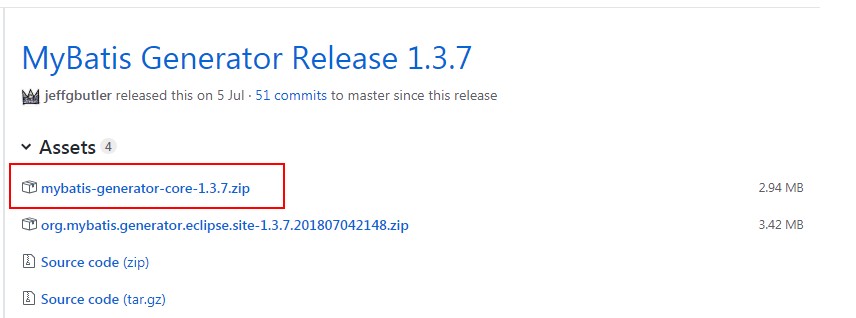
1、下载地址:https://github.com/mybatis/generator/releases
目前最新版本是1.3.7。
在命令行下自动创建代码只需要下载mybatis-generator-core-1.3.7.zip即可。
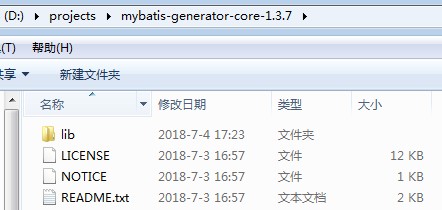
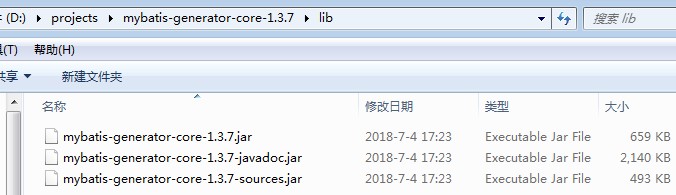
2、压缩包解压后,主要是lib目录,进去只有三个jar文件
二、创建配置文件等
1、在lib目录里面创建配置文件generatorConfig.xml,指定数据库连接信息、生成模型和映射文件等信息:
<?xml version="1.0" encoding="UTF-8"?>

<!DOCTYPE generatorConfiguration

  PUBLIC "-//mybatis.org//DTD MyBatis Generator Configuration 1.0//EN"

  "http://mybatis.org/dtd/mybatis-generator-config_1_0.dtd">

<generatorConfiguration>

  <!--MySQL连接驱动-->

  <classPathEntry location="mysql-connector-java-5.1.37.jar" />

  <!--数据库链接URL,用户名、密码 -->

  <context id="MySQL" targetRuntime="MyBatis3">

    <commentGenerator>

            <property name="suppressDate" value="true"/>

            <!-- 是否去除自动生成的注释 true:是 : false:否 -->

            <property name="suppressAllComments" value="true"/>

    </commentGenerator>

    <jdbcConnection driverClass="com.mysql.jdbc.Driver"

        connectionURL="jdbc:mysql://127.0.0.1/test"

        userId="root"

        password="">

    </jdbcConnection>

    <!--是否启用java.math.BigDecimal-->

    <javaTypeResolver >

      <property name="forceBigDecimals" value="false" />

    </javaTypeResolver>

    <!-- 生成模型的包名和位置-->

    <javaModelGenerator targetPackage="test.model" targetProject="src">

      <property name="enableSubPackages" value="true" />

      <property name="trimStrings" value="true" />

    </javaModelGenerator>

    <!-- 生成映射文件的包名和位置-->

    <sqlMapGenerator targetPackage="test.xml"  targetProject="src">

      <property name="enableSubPackages" value="true" />

    </sqlMapGenerator>

    <!-- 生成DAO的包名和位置-->

    <javaClientGenerator type="XMLMAPPER" targetPackage="test.dao"  targetProject="src">

      <property name="enableSubPackages" value="true" />

    </javaClientGenerator>

    <!-- 要生成的表 tableName是数据库中的表名或视图名 domainObjectName是实体类名-->

    <table tableName="user" domainObjectName="User" enableCountByExample="false" enableUpdateByExample="false" enableDeleteByExample="false" enableSelectByExample="false" selectByExampleQueryId="false">

    </table>

  </context>

</generatorConfiguration>
2、因为的是mysql,所以在lib目录里面还需要放入mysql驱动包,如mysql-connector-java-5.1.37.jar
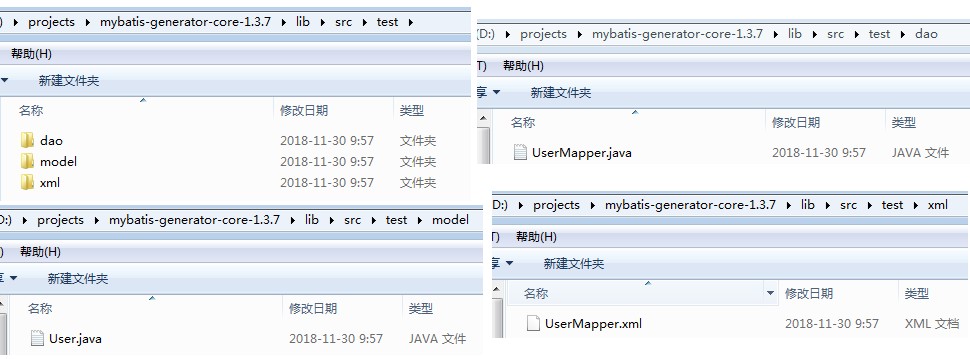
3、配置文件指定输出目录为src(targetProject="src"),所以需要在lib目录手动创建src目录,最终文件如下:

三、命令行下生成代码
1、在cmd命令行定位到D:\projects\mybatis-generator-core-1.3.7\lib
2、输入命令java -jar mybatis-generator-core-1.3.7.jar -configfile generatorConfig.xml -overwrite
正常情况下会提示操作成功。

3、查看src目录,已经生成3个子目录,并且相应文件也在里面
4、UserMapper.xml
<?xml version="1.0" encoding="UTF-8"?>

<!DOCTYPE mapper PUBLIC "-//mybatis.org//DTD Mapper 3.0//EN" "http://mybatis.org/dtd/mybatis-3-mapper.dtd">

<mapper namespace="test.dao.UserMapper">

  <resultMap id="BaseResultMap" type="test.model.User">

    <id column="Id" jdbcType="INTEGER" property="id" />

    <result column="Name" jdbcType="VARCHAR" property="name" />

    <result column="Sex" jdbcType="VARCHAR" property="sex" />

    <result column="Age" jdbcType="TINYINT" property="age" />

  </resultMap>

  <sql id="Base_Column_List">

    Id, Name, Sex, Age

  </sql>

  <select id="selectByPrimaryKey" parameterType="java.lang.Integer" resultMap="BaseResultMap">

    select

    <include refid="Base_Column_List" />

    from user

    where Id = #{id,jdbcType=INTEGER}

  </select>

  <delete id="deleteByPrimaryKey" parameterType="java.lang.Integer">

    delete from user

    where Id = #{id,jdbcType=INTEGER}

  </delete>

  <insert id="insert" parameterType="test.model.User">

    insert into user (Id, Name, Sex,

      Age)

    values (#{id,jdbcType=INTEGER}, #{name,jdbcType=VARCHAR}, #{sex,jdbcType=VARCHAR},

      #{age,jdbcType=TINYINT})

  </insert>

  <insert id="insertSelective" parameterType="test.model.User">

    insert into user

    <trim prefix="(" suffix=")" suffixOverrides=",">

      <if test="id != null">

        Id,

      </if>

      <if test="name != null">

        Name,

      </if>

      <if test="sex != null">

        Sex,

      </if>

      <if test="age != null">

        Age,

      </if>

    </trim>

    <trim prefix="values (" suffix=")" suffixOverrides=",">

      <if test="id != null">

        #{id,jdbcType=INTEGER},

      </if>

      <if test="name != null">

        #{name,jdbcType=VARCHAR},

      </if>

      <if test="sex != null">

        #{sex,jdbcType=VARCHAR},

      </if>

      <if test="age != null">

        #{age,jdbcType=TINYINT},

      </if>

    </trim>

  </insert>

  <update id="updateByPrimaryKeySelective" parameterType="test.model.User">

    update user

    <set>

      <if test="name != null">

        Name = #{name,jdbcType=VARCHAR},

      </if>

      <if test="sex != null">

        Sex = #{sex,jdbcType=VARCHAR},

      </if>

      <if test="age != null">

        Age = #{age,jdbcType=TINYINT},

      </if>

    </set>

    where Id = #{id,jdbcType=INTEGER}

  </update>

  <update id="updateByPrimaryKey" parameterType="test.model.User">

    update user

    set Name = #{name,jdbcType=VARCHAR},

      Sex = #{sex,jdbcType=VARCHAR},

      Age = #{age,jdbcType=TINYINT}

    where Id = #{id,jdbcType=INTEGER}

  </update>

</mapper>
5、User.java
package test.model;

public class User {

    private Integer id;

    private String name;

    private String sex;

    private Byte age;

    public Integer getId() {

        return id;

    }

    public void setId(Integer id) {

        this.id = id;

    }

    public String getName() {

        return name;

    }

    public void setName(String name) {

        this.name = name == null ? null : name.trim();

    }

    public String getSex() {

        return sex;

    }

    public void setSex(String sex) {

        this.sex = sex == null ? null : sex.trim();

    }

    public Byte getAge() {

        return age;

    }

    public void setAge(Byte age) {

        this.age = age;

    }

}
6、UserMapper.java
package test.dao;

import test.model.User;

public interface UserMapper {

    int deleteByPrimaryKey(Integer id);

    int insert(User record);

    int insertSelective(User record);

    User selectByPrimaryKey(Integer id);

    int updateByPrimaryKeySelective(User record);

    int updateByPrimaryKey(User record);

}
使用MyBatis Generator 1.3.7自动生成代码的更多相关文章
- MyBatis Generator作为maven插件自动生成增删改查代码及配置文件例子
什么是MyBatis Generator MyBatis Generator (MBG) 是一个Mybatis的代码生成器,可以自动生成一些简单的CRUD(插入,查询,更新,删除)操作代码,model ...
- SpringBoot与Mybatis整合(包含generate自动生成代码工具,数据库表一对一,一对多,关联关系中间表的查询)
链接:https://blog.csdn.net/YonJarLuo/article/details/81187239 自动生成工具只是生成很单纯的表,复杂的一对多,多对多的情况则是在建表的时候就建立 ...
- mybatis generator maven插件自动生成代码
如果你正为无聊Dao代码的编写感到苦恼,如果你正为怕一个单词拼错导致Dao操作失败而感到苦恼,那么就可以考虑一些Mybatis generator这个差价,它会帮我们自动生成代码,类似于Hiberna ...
- MyBatis使用Generator自动生成代码
MyBatis中,可以使用Generator自动生成代码,包括DAO层. MODEL层 .MAPPING SQL映射文件. 第一步: 配置好自动生成代码所需的XML配置文件,例如(generator. ...
- mybatis 自动生成代码(mybatis generator)
pom.xml 文件配置 引入 mybatis generator <properties> <mysql.connector.version>5.1.44</mysql ...
- SpringBoot 添加mybatis generator 自动生成代码插件
自动生成数据层代码,提高开发效率 1.pom添加插件,并指定配置文件路径 <!-- mybatis generator 自动生成代码插件 --> <plugin> <gr ...
- springboot学习随笔(四):Springboot整合mybatis(含generator自动生成代码)
这章我们将通过springboot整合mybatis来操作数据库 以下内容分为两部分,一部分主要介绍generator自动生成代码,生成model.dao层接口.dao接口对应的sql配置文件 第一部 ...
- Mybatis generator 自动生成代码(2)
最近准备开始做一个项目,需要开始手动创建sql,于是将Mybatis generator 工具功能强化了下. 首先,这里引入到版本一点的包 <dependency> <groupId ...
- idea中mybatis generator自动生成代码配置 数据库是sqlserver
好长时间没有写博客了,最近公司要用java语言,开始学习java,属于初学者,今天主要记录一下mybatis generator自动生成代码,首先在如下图的目录中新建两个文件,如下图 generato ...
随机推荐
- 五子棋棋盘布局 table和ul哪个好
想要在页面布局以上棋盘,可以用ul li 布局,但却有明显的缺点: 1.两行两列:ul li 下面如果再放li 会出错,只能是放其他的,比如div. 或者放li *行*列: 但是这样有两个明显缺陷: ...
- linux考试题改错
符号链接和硬链接有什么区别? 改:符号链接存储文件路径,可以指向不同分区文件,源文件删除后失效. 改:硬链接指向文件索引节点,仅能指向同一分区文件,源文件删除后可以访问. 请描述文件和目录9位权限位的 ...
- Javascript实现MD5加密
/* * A JavaScript implementation of the RSA Data Security, Inc. MD5 Message * Digest Algorithm, as d ...
- android不知不觉偷拍他人功能实现(手机关闭依然拍照)【申明:来源于网络】
android不知不觉偷拍他人功能实现(手机关闭依然拍照)[申明:来源于网络] 地址:http://blog.csdn.net/huangxiaoguo1/article/details/536660 ...
- poj2480(利用欧拉函数的积性求解)
题目链接: http://poj.org/problem?id=2480 题意:∑gcd(i, N) 1<=i <=N,就这个公式,给你一个n,让你求sum=gcd(1,n)+gcd(2, ...
- Linux 中的 Install命令
Linux 中的 Install命令 更新时间:2017年09月25日 16:51:45 投稿:mrr 我要评论 install命令的作用是安装或升级软件或备份数据,它的使用权限是所有用户. ...
- css3 伸缩百分比的调整
<!DOCTYPE html> <html lang="en"> <head> <meta charset="UTF-8&quo ...
- Docker入门6------生产力工具rancher
rancher的安装: https://blog.csdn.net/wh211212/article/details/80932264 安装 一行命令就可以安装 sudo docker run -d ...
- 更新node的版本,node没有安装到c盘,安装到了D盘
百度的很久,只有这一个实用,记录一下 https://www.cnblogs.com/xinjie-just/p/7061619.html
- Jedis连接 HelloWorld实现
建一个Maven项目, pom里加下jedis依赖, <dependency> <groupId>redis.clients</groupId> <artif ...