
Xamarin+Prism开发详解七:Plugin开发与打包测试
有了上章【Xamarin+Prism开发详解六:DependencyService与IPlatformInitializer的关系】的基础,现在来理解Plugin开发就简单了。
本文实例代码地址:https://github.com/NewBLife/XamarinDemo/tree/master/Speecher
简介
Plugin其实就是各类相对独立的功能提取出来的Package,一般都不引用Xamarin相关类库,比如上章的Text To Speech功能(Github库地址https://github.com/jamesmontemagno/TextToSpeechPlugin):
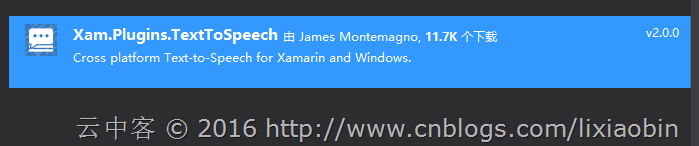
xamarin的Plugin有一个专门的统计库【xamarin/XamarinComponents】,目前统计结果如下:
| Name | Description | NuGet | Docs & Source | Creator |
|---|---|---|---|---|
| Battery Status | Gather battery level, charging status, and type. | NuGet | GitHub | @JamesMontemagno |
| Barcode Scanner | Scan and create barcodes with ZXing.NET.Mobile. | NuGet | GitHub | @Redth |
| Bluetooth LE | Scan and connect to Bluetooth devices. | NuGet | GitHub | @allanritchie911 |
| Calendar | Query and modify device calendars | NuGet | GitHub | Caleb Clarke |
| Compass | Access device compass heading. | NuGet | GitHub | @cbartonnh & @JamesMontemagno |
| Connectivity | Get network connectivity info such as type and if connection is available. | NuGet | GitHub | @JamesMontemagno |
| Cryptography | PCL Crypto provides a consistent, portable set of crypto APIs. | NuGet | GitHub | @aarnott |
| Device Info | Properties about device such as OS, Model, and Id. | NuGet | GitHub | @JamesMontemagno |
| Device Motion | Provides access to Accelerometer, Gyroscope, Magnetometer, and Compass. | NuGet | GitHub | @rdelrosario |
| Embedded Resource | Unpack embedded resource cross-platform. | NuGet | GitHub | @JosephHill |
| External Maps | Launch external maps from Lat/Long or Address. | NuGet | GitHub | @JamesMontemagno |
| File Storage/File System | PCL Storage offers cross platform storage APIs. | NuGet | GitHub | @dsplaisted |
| File Picker | Pick and save files. | NuGet | GitHub | @studyxnet |
| Fingerprint | Access Fingerprint sensor on iOS, Android, and Windows. | NuGet | GitHub | @smstuebe |
| FFImageLoading | Image loading with caching, placeholders, transformations and more | NuGet | GitHub | @molinch, @daniel-luberda |
| Geofencing | Monitor regions when user enters/exits. | NuGet | GitHub | @allanritchie911 |
| Geolocator | Easily detect GPS location of device. | NuGet | GitHub | @JamesMontemagno |
| iBeacon & Estimote | Range and monitor Bluetooth beacons. | NuGet | GitHub | @allanritchie911 |
| Lamp | Access to LED | NuGet | GitHub | @kphillpotts |
| Local Notifications | Show local notifications | NuGet | GitHub | @EdSnider, @JamesMontemagno |
| Manage Sleep | Manage auto sleep/auto lock. | NuGet | GitHub | @molinch0 |
| Media | Take or pick photos and videos. | NuGet | GitHub | @JamesMontemagno |
| Media Manager | Playback for Audio. | NuGet | GitHub | @mhvdijk |
| Messaging | Make phone call, send sms, and send e-mail | NuGet | GitHub | @cjlotz |
| Microsoft Band | Connect and communicate with the Microsoft Band from shared code! | NuGet | GitHub | @mattleibow |
| Mono.Data.Sqlite | Add Mono.Data.Sqlite to any Xamarin or Windows .NET app. | NuGet | GitHub | @mattleibow |
| Permissions | Easily check and request runtime permissions. | NuGet | GitHub | @JamesMontemagno |
| Persistent key-value store | Akavache is an asynchronous, persistent (i.e. writes to disk) key-value store. | NuGet | GitHub | @paulcbetts |
| Portable Razor | Lightweight implemenation of ASP.NET MVC APIs for mobile. | NuGet | GitHub | @JosephHill |
| Push Notifications | Cross platform iOS and Android Push Notifications. | NuGet | GitHub | @rdelrosario |
| Secure Storage | Provides secure storage for key value pairs Data | NuGet | GitHub | @sameerIOTApps |
| Settings | Simple & Consistent cross platform settings API. | NuGet | GitHub | @JamesMontemagno |
| Share | Easily share text, links, or open a browser. | NuGet | GitHub | @JamesMontemagno & @Jakob Gürtl |
| Sockets | TCP & UDP Listeners and Clients + UDP multicast. | NuGet | GitHub | @rdavis_au |
| Speech Recognition | Speech to Text. | NuGet | GitHub | @allanritchie911 |
| Text To Speech | Talk back text from shared code. | NuGet | GitHub | @JamesMontemagno |
| Toast | A simple way of showing toast/pop-up notifications. | NuGet | GitHub | @AdamPed & @EgorBo |
| User Dialogs | Message box style dialogs. | NuGet | GitHub | @allanritchie911 |
| Version Tracking | Track which versions of your app a user has previously installed. | NuGet | GitHub | @ColbyLWilliams |
| Vibrate | Vibrate any device. | NuGet | GitHub | @JamesMontemagno |
开发实践
Xamarin为Plugin开发提供了一个Visual Studio模板,通过它你可以快速开发各类Plugin。
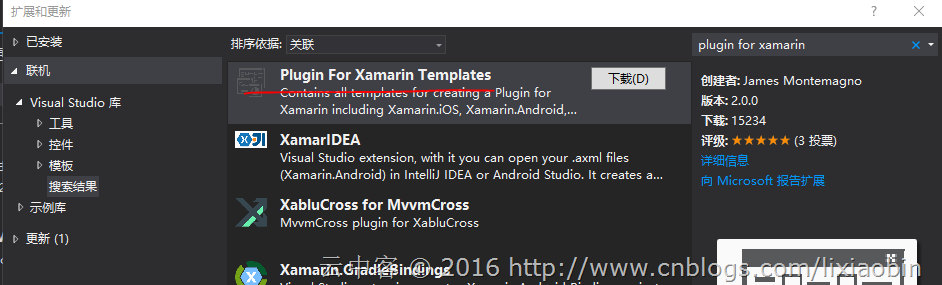
1、安装Plugin for Xamarin Templates
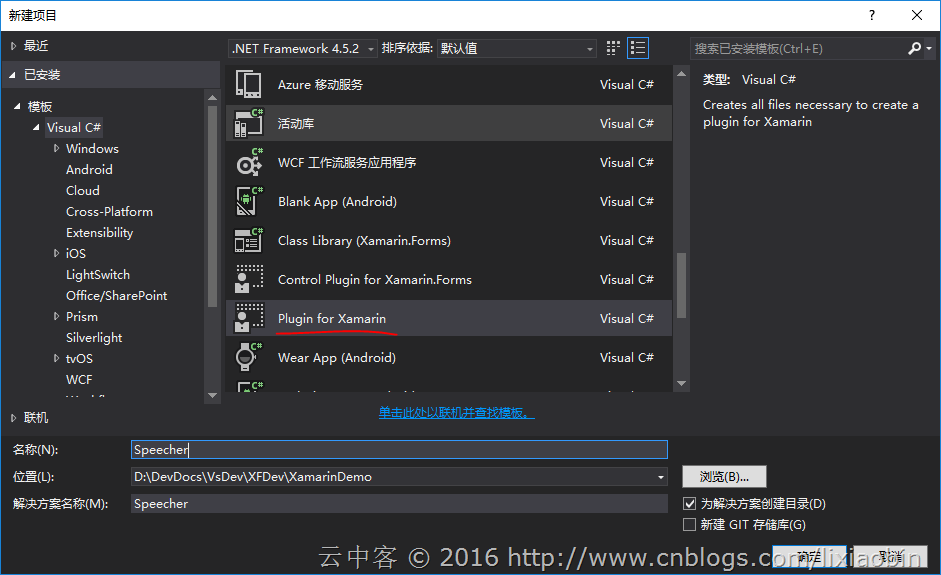
2、从Plugin for Xamarin模板新建项目
整体项目结构:
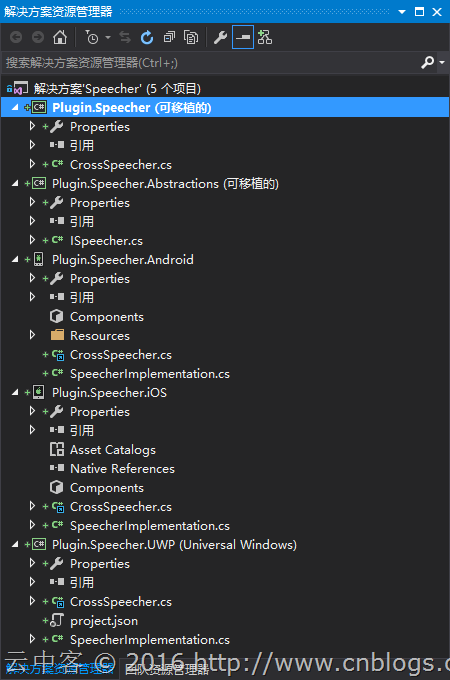
通过模板创建的项目包含三类工程文件:
- Plugin.功能名(PCL):懒汉式实例创建文件,生成Plugin.功能名.dll。(共享类文件)
- Plugin.功能名.Abstractions(PCL):接口和Enums的定义,生成Plugin.功能名.Abstractions.dll。
- Plugin.功能名.平台名(n个):接口实现,生成Plugin.功能名.dll。
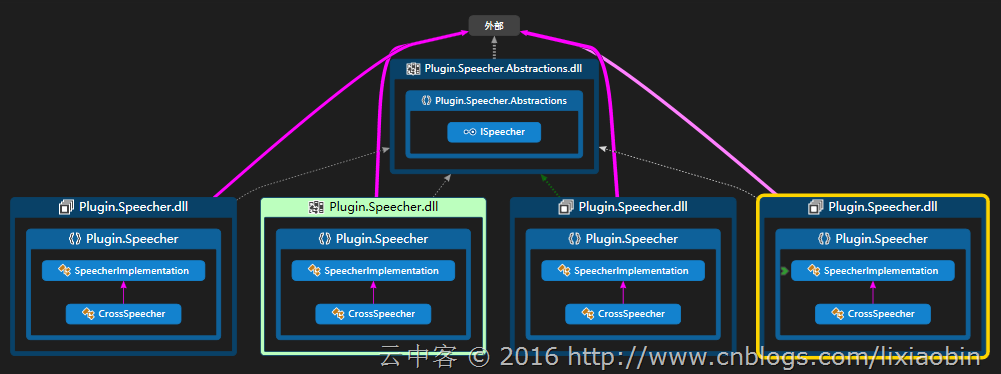
3、添加接口
namespace Plugin.Speecher.Abstractions

{

    /// <summary>

    /// Interface for Speecher

    /// </summary>

    public interface ISpeecher

    {

        void Speak(string text);

    }

}
4、各个平台接口实现
iOS平台
using AVFoundation;

using Plugin.Speecher.Abstractions;

namespace Plugin.Speecher

{

    /// <summary>

    /// Implementation for Speecher

    /// </summary>

    public class SpeecherImplementation : ISpeecher

    {

        public void Speak(string text)

        {

            var speechSynthesizer = new AVSpeechSynthesizer();

            var speechUtterance = new AVSpeechUtterance(text)

            {

                Rate = AVSpeechUtterance.MaximumSpeechRate / ,

                Voice = AVSpeechSynthesisVoice.FromLanguage("en-US"),

                Volume = 0.5f,

                PitchMultiplier = 1.0f

            };

            speechSynthesizer.SpeakUtterance(speechUtterance);

        }

    }

}
Android平台(由于没有Xamarin.Forms,所以这里使用Application.Context)
using Android.App;

using Android.Runtime;

using Android.Speech.Tts;

using Plugin.Speecher.Abstractions;

using System.Collections.Generic;

namespace Plugin.Speecher

{

    /// <summary>

    /// Implementation for Feature

    /// </summary>

    public class SpeecherImplementation : Java.Lang.Object, ISpeecher, TextToSpeech.IOnInitListener

    {

        TextToSpeech speaker;

        string toSpeak;

        public SpeecherImplementation() { }

        public void Speak(string text)

        {

            var ctx = Application.Context;

            toSpeak = text;

            if (speaker == null)

            {

                speaker = new TextToSpeech(ctx, this);

            }

            else

            {

                var p = new Dictionary<string, string>();

                speaker.Speak(toSpeak, QueueMode.Flush, p);

            }

        }

        public void OnInit([GeneratedEnum] OperationResult status)

        {

            if (status.Equals(OperationResult.Success))

            {

                var p = new Dictionary<string, string>();

                speaker.Speak(toSpeak, QueueMode.Flush, p);

            }

            else

            {

                System.Diagnostics.Debug.WriteLine("was quiet");

            }

        }

    }

}
UWP平台
using Plugin.Speecher.Abstractions;

using System;

using Windows.Media.SpeechSynthesis;

using Windows.UI.Xaml.Controls;

namespace Plugin.Speecher

{

    /// <summary>

    /// Implementation for Feature

    /// </summary>

    public class SpeecherImplementation : ISpeecher

    {

        public async void Speak(string text)

        {

            MediaElement mediaElement = new MediaElement();

            var synth = new SpeechSynthesizer();

            var stream = await synth.SynthesizeTextToStreamAsync(text);

            mediaElement.SetSource(stream, stream.ContentType);

            mediaElement.Play();

        }

    }

}
备注
如果确定一直使用Prism做开发的话,只需要定义接口与接口的实现就可以了。然后在实际项目各个平台的RegisterTypes方法中注册接口到IOC容器,
public void RegisterTypes(IUnityContainer container)
{
container.RegisterType<ISpeecher, SpeecherImplementation>();
}
使用IOC容器管理对象生存周期,比懒汉式加载更加自由方便。比如在Prism.Forms中只需构造函数添加接口作为参数就可以自动创建对象。
打包并测试
在安装Plugin for Xamarin Templates的时候其实已经安装了另外一个打包用的模板【Plugin for Xamarin NuSpec】,通过它可以快速打包。
1、添加Package配置文件【Speecher.Plugin.nuspec】
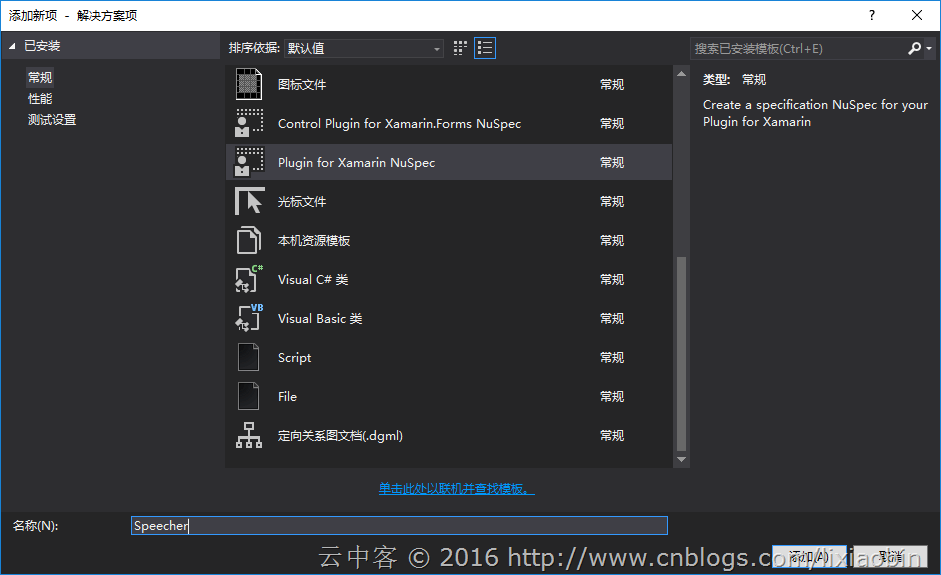
默认生成的文件如下,包含所有平台:
<?xml version="1.0" encoding="utf-8"?>

<package xmlns="http://schemas.microsoft.com/packaging/2010/07/nuspec.xsd">

    <metadata minClientVersion="2.8.3">

        <id>Plugin.Speecher</id>

        <version>1.0.</version>

        <title>Speecher Plugin for Xamarin and Windows</title>

        <authors>Your Name</authors>

        <owners>Your Name</owners>

        <licenseUrl/>

        <projectUrl/>

        <!--Default Icon, a template can be found:  https://raw.githubusercontent.com/jamesmontemagno/Xamarin-Templates/master/Plugins-Templates/icons/plugin_icon.png-->

        <iconUrl>https://raw.githubusercontent.com/jamesmontemagno/Xamarin-Templates/master/Plugins-Templates/icons/plugin_icon_nuget.png</iconUrl>

        <requireLicenseAcceptance>false</requireLicenseAcceptance>

        <description>

         Long description for your plugin.

        </description>

        <summary>Short description for your plugin.</summary>

        <tags>xamarin, pcl, xam.pcl, plugin, plugin for xamarin, windows phone, winphone, wp8, winrt, android, xamarin.forms, ios</tags>

        <dependencies>

            <group targetFramework="net">

            </group>

            <group targetFramework="win">

            </group>

            <group targetFramework="wp">

            </group>

            <group targetFramework="wpa">

            </group>

            <group targetFramework="MonoAndroid">

            </group>

            <group targetFramework="Xamarin.iOS10">

            </group>

            <group targetFramework="Xamarin.Mac20">

            </group>

            <group targetFramework="portable-net45+win+wpa81+wp80">

            </group>

            <group targetFramework="uap">

            </group>

            <group targetFramework="dotnet">

            </group>

        </dependencies>

    </metadata>

    <files>

        <!--Core-->

        <file src="Speecher\Plugin.Speecher\bin\Release\Plugin.Speecher.dll" target="lib\portable-net45+wp8+wpa81+win8+MonoAndroid10+MonoTouch10+Xamarin.iOS10+UAP10\Plugin.Speecher.dll" />

        <file src="Speecher\Plugin.Speecher\bin\Release\Plugin.Speecher.xml" target="lib\portable-net45+wp8+wpa81+win8+MonoAndroid10+MonoTouch10+Xamarin.iOS10+UAP10\Plugin.Speecher.xml" />

        <file src="Speecher\Plugin.Speecher\bin\Release\Plugin.Speecher.pdb" target="lib\portable-net45+wp8+wpa81+win8+MonoAndroid10+MonoTouch10+Xamarin.iOS10+UAP10\Plugin.Speecher.pdb" />

        <file src="Speecher\Plugin.Speecher.Abstractions\bin\Release\Plugin.Speecher.Abstractions.dll" target="lib\portable-net45+wp8+wpa81+win8+MonoAndroid10+MonoTouch10+Xamarin.iOS10+UAP10\Plugin.Speecher.Abstractions.dll" />

        <file src="Speecher\Plugin.Speecher.Abstractions\bin\Release\Plugin.Speecher.Abstractions.xml" target="lib\portable-net45+wp8+wpa81+win8+MonoAndroid10+MonoTouch10+Xamarin.iOS10+UAP10\Plugin.Speecher.Abstractions.xml" />

        <file src="Speecher\Plugin.Speecher.Abstractions\bin\Release\Plugin.Speecher.Abstractions.pdb" target="lib\portable-net45+wp8+wpa81+win8+MonoAndroid10+MonoTouch10+Xamarin.iOS10+UAP10\Plugin.Speecher.Abstractions.pdb" />

        <!--dotnet-->

        <file src="Speecher\Plugin.Speecher\bin\Release\Plugin.Speecher.dll" target="lib\dotnet\Plugin.Speecher.dll" />

        <file src="Speecher\Plugin.Speecher\bin\Release\Plugin.Speecher.xml" target="lib\dotnet\Plugin.Speecher.xml" />

        <file src="Speecher\Plugin.Speecher\bin\Release\Plugin.Speecher.pdb" target="lib\dotnet\Plugin.Speecher.pdb" />

        <file src="Speecher\Plugin.Speecher.Abstractions\bin\Release\Plugin.Speecher.Abstractions.dll" target="lib\dotnet\Plugin.Speecher.Abstractions.dll" />

        <file src="Speecher\Plugin.Speecher.Abstractions\bin\Release\Plugin.Speecher.Abstractions.xml" target="lib\dotnet\Plugin.Speecher.Abstractions.xml" />

        <file src="Speecher\Plugin.Speecher.Abstractions\bin\Release\Plugin.Speecher.Abstractions.pdb" target="lib\dotnet\Plugin.Speecher.Abstractions.pdb" />

        <!--Win Phone Silverlight-->

        <file src="Speecher\Plugin.Speecher.WindowsPhone8\bin\Release\Plugin.Speecher.dll" target="lib\wp8\Plugin.Speecher.dll" />

        <file src="Speecher\Plugin.Speecher.WindowsPhone8\bin\Release\Plugin.Speecher.xml" target="lib\wp8\Plugin.Speecher.xml" />

        <file src="Speecher\Plugin.Speecher.WindowsPhone8\bin\Release\Plugin.Speecher.pdb" target="lib\wp8\Plugin.Speecher.pdb" />

        <file src="Speecher\Plugin.Speecher.Abstractions\bin\Release\Plugin.Speecher.Abstractions.dll" target="lib\wp8\Plugin.Speecher.Abstractions.dll" />

        <file src="Speecher\Plugin.Speecher.Abstractions\bin\Release\Plugin.Speecher.Abstractions.xml" target="lib\wp8\Plugin.Speecher.Abstractions.xml" />

        <file src="Speecher\Plugin.Speecher.Abstractions\bin\Release\Plugin.Speecher.Abstractions.pdb" target="lib\wp8\Plugin.Speecher.Abstractions.pdb" />

        <!--Win Phone -->

        <file src="Speecher\Plugin.Speecher.WindowsPhone81\bin\Release\Plugin.Speecher.dll" target="lib\wpa81\Plugin.Speecher.dll" />

        <file src="Speecher\Plugin.Speecher.WindowsPhone81\bin\Release\Plugin.Speecher.xml" target="lib\wpa81\Plugin.Speecher.xml" />

        <file src="Speecher\Plugin.Speecher.WindowsPhone81\bin\Release\Plugin.Speecher.pdb" target="lib\wpa81\Plugin.Speecher.pdb" />

        <file src="Speecher\Plugin.Speecher.Abstractions\bin\Release\Plugin.Speecher.Abstractions.dll" target="lib\wpa81\Plugin.Speecher.Abstractions.dll" />

        <file src="Speecher\Plugin.Speecher.Abstractions\bin\Release\Plugin.Speecher.Abstractions.xml" target="lib\wpa81\Plugin.Speecher.Abstractions.xml" />

        <file src="Speecher\Plugin.Speecher.Abstractions\bin\Release\Plugin.Speecher.Abstractions.pdb" target="lib\wpa81\Plugin.Speecher.Abstractions.pdb" />

        <!--WinStore-->

        <file src="Speecher\Plugin.Speecher.WindowsStore\bin\Release\Plugin.Speecher.dll" target="lib\win8\Plugin.Speecher.dll" />

        <file src="Speecher\Plugin.Speecher.WindowsStore\bin\Release\Plugin.Speecher.xml" target="lib\win8\Plugin.Speecher.xml" />

        <file src="Speecher\Plugin.Speecher.WindowsStore\bin\Release\Plugin.Speecher.pdb" target="lib\win8\Plugin.Speecher.pdb" />

        <file src="Speecher\Plugin.Speecher.Abstractions\bin\Release\Plugin.Speecher.Abstractions.dll" target="lib\win8\Plugin.Speecher.Abstractions.dll" />

        <file src="Speecher\Plugin.Speecher.Abstractions\bin\Release\Plugin.Speecher.Abstractions.xml" target="lib\win8\Plugin.Speecher.Abstractions.xml" />

        <file src="Speecher\Plugin.Speecher.Abstractions\bin\Release\Plugin.Speecher.Abstractions.pdb" target="lib\win8\Plugin.Speecher.Abstractions.pdb" />

        <!--Xamarin.Android-->

        <file src="Speecher\Plugin.Speecher.Android\bin\Release\Plugin.Speecher.dll" target="lib\MonoAndroid10\Plugin.Speecher.dll" />

        <file src="Speecher\Plugin.Speecher.Android\bin\Release\Plugin.Speecher.xml" target="lib\MonoAndroid10\Plugin.Speecher.xml" />

        <file src="Speecher\Plugin.Speecher.Android\bin\Release\Plugin.Speecher.pdb" target="lib\MonoAndroid10\Plugin.Speecher.pdb" />

        <file src="Speecher\Plugin.Speecher.Abstractions\bin\Release\Plugin.Speecher.Abstractions.dll" target="lib\MonoAndroid10\Plugin.Speecher.Abstractions.dll" />

        <file src="Speecher\Plugin.Speecher.Abstractions\bin\Release\Plugin.Speecher.Abstractions.xml" target="lib\MonoAndroid10\Plugin.Speecher.Abstractions.xml" />

        <file src="Speecher\Plugin.Speecher.Abstractions\bin\Release\Plugin.Speecher.Abstractions.pdb" target="lib\MonoAndroid10\Plugin.Speecher.Abstractions.pdb" />

        <!--Xamarin.iOS-->

        <file src="Speecher\Plugin.Speecher.iOS\bin\iPhone\Release\Plugin.Speecher.dll" target="lib\Xamarin.iOS10\Plugin.Speecher.dll" />

        <file src="Speecher\Plugin.Speecher.iOS\bin\iPhone\Release\Plugin.Speecher.xml" target="lib\Xamarin.iOS10\Plugin.Speecher.xml" />

        <file src="Speecher\Plugin.Speecher.Abstractions\bin\Release\Plugin.Speecher.Abstractions.dll" target="lib\Xamarin.iOS10\Plugin.Speecher.Abstractions.dll" />

        <file src="Speecher\Plugin.Speecher.Abstractions\bin\Release\Plugin.Speecher.Abstractions.xml" target="lib\Xamarin.iOS10\Plugin.Speecher.Abstractions.xml" />

        <!--uap-->

        <file src="Speecher\Plugin.Speecher.UWP\bin\Release\Plugin.Speecher.dll" target="lib\UAP10\Plugin.Speecher.dll" />

        <file src="Speecher\Plugin.Speecher.UWP\bin\Release\Plugin.Speecher.xml" target="lib\UAP10\Plugin.Speecher.xml" />

        <file src="Speecher\Plugin.Speecher.UWP\bin\Release\Plugin.Speecher.pdb" target="lib\UAP10\Plugin.Speecher.pdb" />

        <file src="Speecher\Plugin.Speecher.Abstractions\bin\Release\Plugin.Speecher.Abstractions.dll" target="lib\UAP10\Plugin.Speecher.Abstractions.dll" />

        <file src="Speecher\Plugin.Speecher.Abstractions\bin\Release\Plugin.Speecher.Abstractions.xml" target="lib\UAP10\Plugin.Speecher.Abstractions.xml" />

        <file src="Speecher\Plugin.Speecher.Abstractions\bin\Release\Plugin.Speecher.Abstractions.pdb" target="lib\UAP10\Plugin.Speecher.Abstractions.pdb" />

        <!--Xamarin.Mac

        <file src="Speecher\Plugin.Speecher.Mac\bin\iPhone\Release\Plugin.Speecher.dll" target="lib\Xamarin.Mac20\Plugin.Speecher.dll" />

        <file src="Speecher\Plugin.Speecher.Mac\bin\iPhone\Release\Plugin.Speecher.xml" target="lib\Xamarin.Mac20\Plugin.Speecher.xml" />

        <file src="Speecher\Plugin.Speecher.Abstractions\bin\Release\Plugin.Speecher.Abstractions.dll" target="lib\Xamarin.Mac20\Plugin.Speecher.Abstractions.dll" />

        <file src="Speecher\Plugin.Speecher.Abstractions\bin\Release\Plugin.Speecher.Abstractions.xml" target="lib\Xamarin.Mac20\Plugin.Speecher.Abstractions.xml" />

        -->

    </files>

</package>
- 由于只正对iOS,Android,UWP三个平台,其他的配置都删除掉
- 固定文件名用*代替
修改后的文件如下:
<?xml version="1.0" encoding="utf-8"?>

<package xmlns="http://schemas.microsoft.com/packaging/2010/07/nuspec.xsd">

  <metadata minClientVersion="2.8.3">

    <id>Plugin.Speecher</id>

    <version>1.0.</version>

    <title>Speecher Plugin for Xamarin and Windows</title>

    <authors>NewBlifes</authors>

    <owners>NewBlifes</owners>

    <iconUrl>https://github.com/NewBLife/NewBlife.Core/blob/master/logo.png</iconUrl>

    <requireLicenseAcceptance>false</requireLicenseAcceptance>

    <description>

      Text to speech plugin.

    </description>

    <summary>Text to speech plugin.</summary>

    <tags>xamarin, pcl, xam.pcl, plugin, plugin for xamarin, windows phone, UWP, android, xamarin.forms, ios</tags>

    <dependencies>

      <group targetFramework="MonoAndroid">

      </group>

      <group targetFramework="Xamarin.iOS10">

      </group>

      <group targetFramework="portable-net45+win+wpa81+wp80">

      </group>

      <group targetFramework="uap">

      </group>

    </dependencies>

  </metadata>

  <files>

    <!--Core-->

    <file src="Speecher\Plugin.Speecher\bin\Release\Plugin.Speecher.*" target="lib\portable-net45+wp8+wpa81+win8+MonoAndroid10+MonoTouch10+Xamarin.iOS10+UAP10\" />

    <!--Xamarin.Android-->

    <file src="Speecher\Plugin.Speecher.Android\bin\Release\Plugin.Speecher.*" target="lib\MonoAndroid10\" />

    <!--Xamarin.iOS-->

    <file src="Speecher\Plugin.Speecher.iOS\bin\iPhone\Release\Plugin.Speecher.*" target="lib\Xamarin.iOS10\" />

    <!--uap-->

    <file src="Speecher\Plugin.Speecher.UWP\bin\Release\Plugin.Speecher.*" target="lib\UAP10\" />

  </files>

</package>
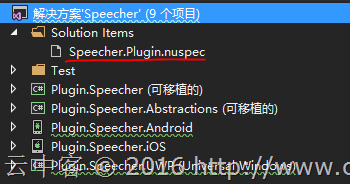
2、编译解决方案的Release版本,使用【nuget pack】命令打包

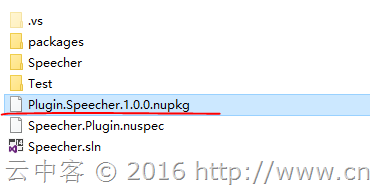
如果没有Nuget的命令行工具记得安装。
3、测试
添加本地包路径
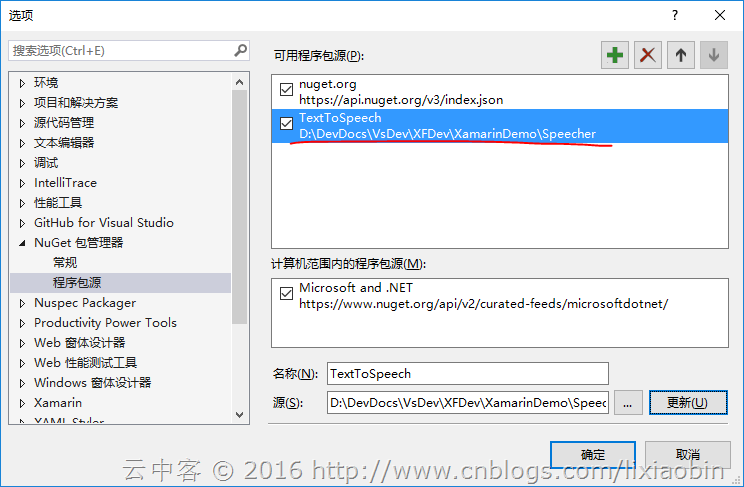
创建测试项目,添加Package引用
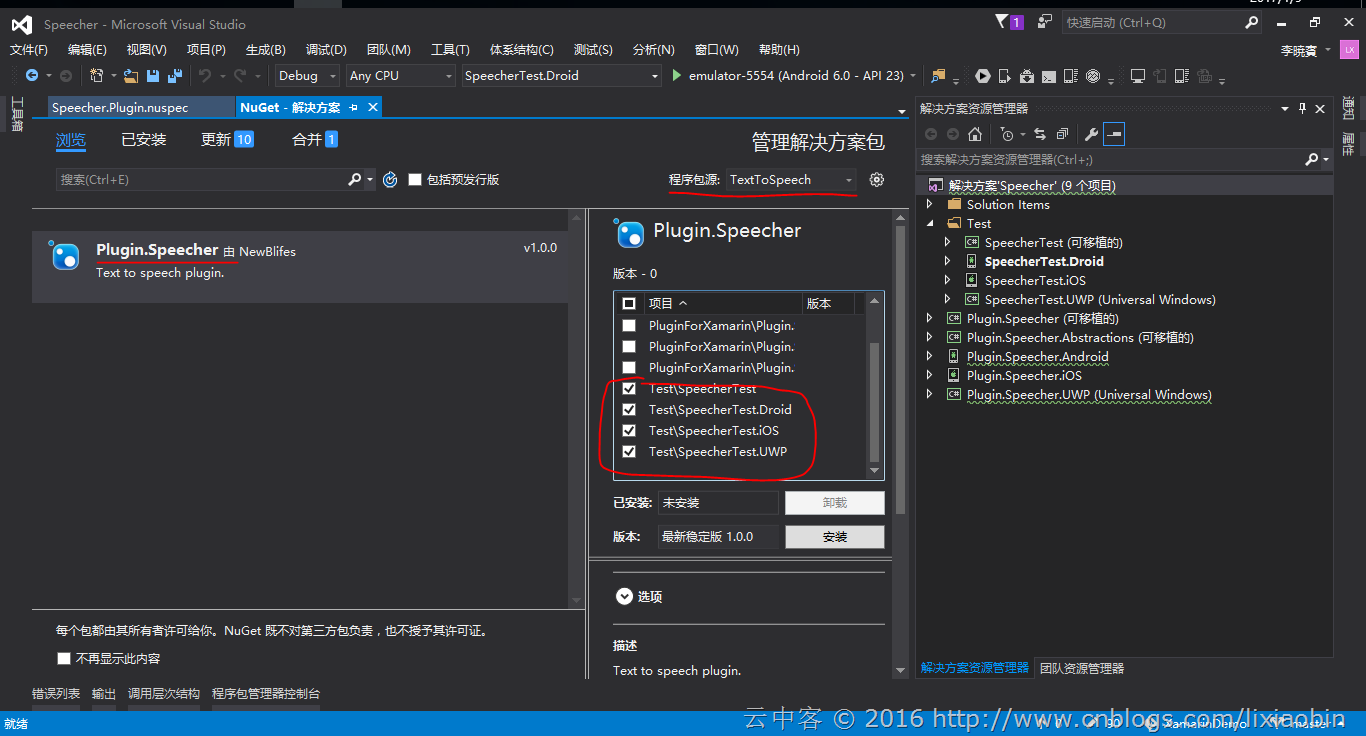
测试代码
using Plugin.Speecher;

using Prism.Commands;

using Prism.Mvvm;

namespace SpeecherTest.ViewModels

{

    public class MainPageViewModel : BindableBase

    {

        private string _speakText;

        public string SpeakText

        {

            get { return _speakText; }

            set

            {

                SetProperty(ref _speakText, value);

            }

        }

        public MainPageViewModel()

        {

        }

        public DelegateCommand SpeakCommand => new DelegateCommand(

            () =>

            {

                CrossSpeecher.Current.Speak(SpeakText);

            },

            () => !string.IsNullOrEmpty(SpeakText)).ObservesProperty(() => this.SpeakText);

    }

}
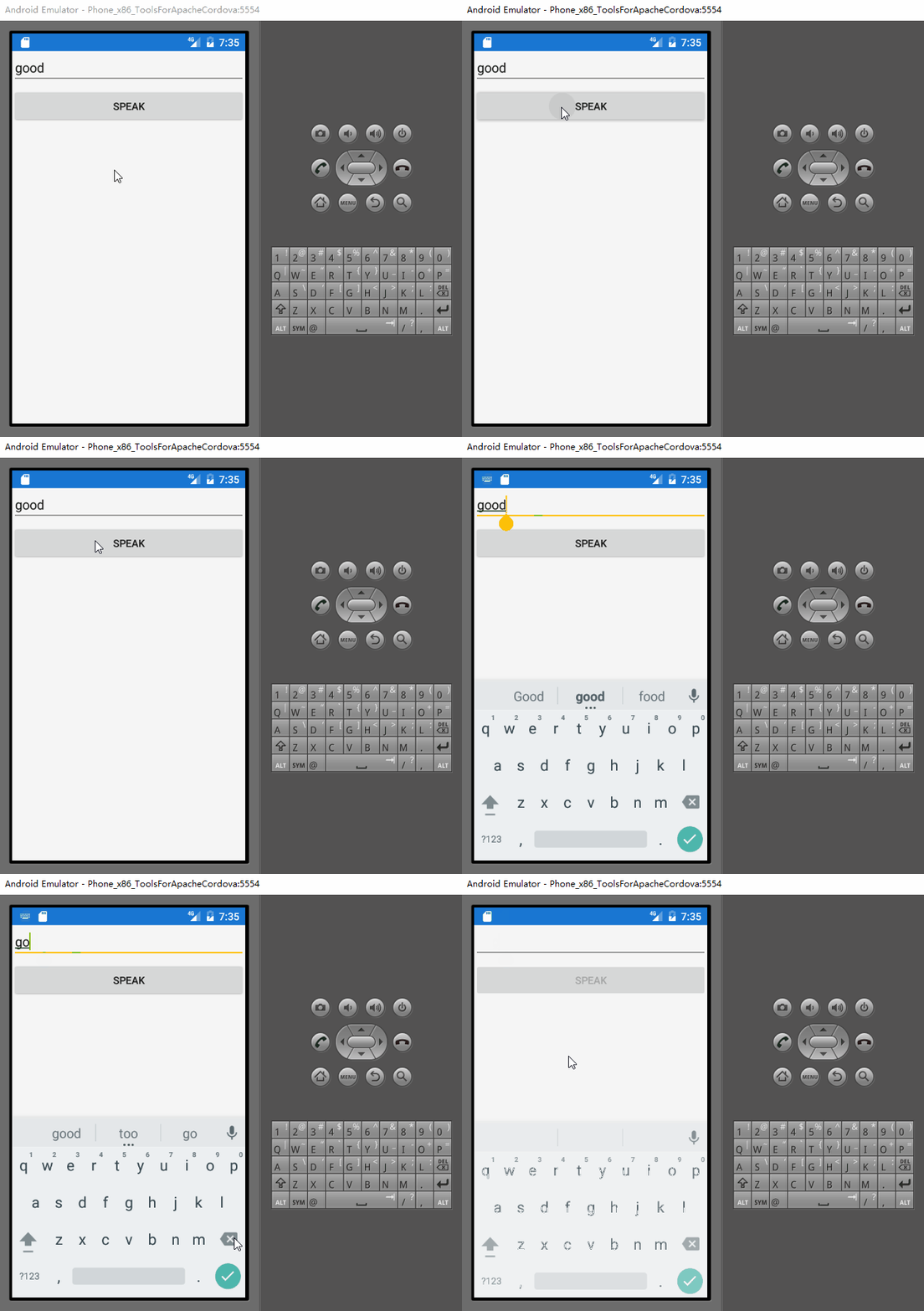
总结
通过使用Plugin For xamarin模块来开发Plugin简单又快速,你只需要关注真正的逻辑就可以。
Xamarin+Prism开发详解七:Plugin开发与打包测试的更多相关文章
- 非常不错的android应用开发详解在安卓开发中
我们在苹果开发中,总会看到XCode,Interface Builder,Object-c这如此入耳入随的单词,但往往多数人在认为XCODE看着简单,InterfaceBuilder好似操作, 而Ob ...
- EasyPR--开发详解(6)SVM开发详解
在前面的几篇文章中,我们介绍了EasyPR中车牌定位模块的相关内容.本文开始分析车牌定位模块后续步骤的车牌判断模块.车牌判断模块是EasyPR中的基于机器学习模型的一个模块,这个模型就是作者前文中从机 ...
- PayPal 开发详解(七):运行REST API SAMPLE
1.编译成功,修改配置文件 sdk_config.properties ,使用我们申请的测试帐号执行收款测试,clientId 和 clientSecret 参见 PayPal 开发详解(五) 2.将 ...
- 【转发】NPAPI开发详解,Windows版
NPAPI开发详解,Windows版 9 jiaofeng601, +479 9人支持,来自Meteor.猪爪.hanyuxinting更多 .是非黑白 .Yuan Xulei.hyolin.Andy ...
- Android USB 开发详解
Android USB 开发详解 先附上 Android USB 官方文档 Android通过两种模式支持各种 USB 外设和 Android USB 附件(实现Android附件协议的硬件):USB ...
- (转载)实例详解Android快速开发工具类总结
实例详解Android快速开发工具类总结 作者:LiJinlun 字体:[增加 减小] 类型:转载 时间:2016-01-24我要评论 这篇文章主要介绍了实例详解Android快速开发工具类总结的相关 ...
- nrf52——DFU升级USB/UART升级方式详解(基于SDK开发例程)
摘要:在前面的nrf52--DFU升级OTA升级方式详解(基于SDK开发例程)一文中我测试了基于蓝牙的OTA,本文将开始基于UART和USB(USB_CDC_)进行升级测试. 整体升级流程: 整个过程 ...
- 基于H5的微信支付开发详解
这次总结一下用户在微信内打开网页时,可以调用微信支付完成下单功能的模块开发,也就是在微信内的H5页面通过jsApi接口实现支付功能.当然了,微信官网上的微信支付开发文档也讲解的很详细,并且有实现代码可 ...
- ****基于H5的微信支付开发详解[转]
这次总结一下用户在微信内打开网页时,可以调用微信支付完成下单功能的模块开发,也就是在微信内的H5页面通过jsApi接口实现支付功能.当然了,微信官网上的微信支付开发文档也讲解的很详细,并且有实现代码可 ...
随机推荐
- yii中的restful方式输出并调用接口和判断用户是否登录状态
//创建一个控制器接口 返回的是restful方式 <?php namespace frontend\controllers; use frontend\models\Fenlei; use f ...
- 菜鸟脱壳之脱壳的基础知识(二) ——DUMP的原理
菜鸟脱壳之脱壳的基础知识(二)——DUMP的原理当外壳的执行完毕后,会跳到原来的程序的入口点,即Entry Point,也可以称作OEP!当一般加密强度不是很大的壳,会在壳的末尾有一个大的跨段,跳向O ...
- [hdu P1599] find the mincost route
[hdu P1599] find the mincost route 杭州有N个景区,景区之间有一些双向的路来连接,现在8600想找一条旅游路线,这个路线从A点出发并且最后回到A点,假设经过的路线为V ...
- jQuery获取包括当前元素的HTML
1.获取当前元素内的HTML (1)方法一 $("#current").html(); (2)方法二 document.getElementById("current&q ...
- C++解析九-数据抽象
数据抽象 数据抽象是指,只向外界提供关键信息,并隐藏其后台的实现细节,即只表现必要的信息而不呈现细节.数据抽象是一种依赖于接口和实现分离的编程(设计)技术.让我们举一个现实生活中的真实例子,比如一台电 ...
- Java toBinaryString()函数探究及Math.abs(-2147483648)=-2147483648原理探究
toBinaryString()函数 public class Customer { public static void main(String[] args) { int m=-8; System ...
- C# 用 WebClient 的 Post 方法向 WebServer 传输数据
帮朋友做一个通过Web简单传输数据的例子,百度了一下抄了段代码,完成,效果如下: 其中textBox1里面是客户端需要传输过去的数据,textBox2里面是接收到的返回数据. 代码如下: using ...
- OpenStack之Neutron分配VIP提供给两台虚拟机做高可用
一. 简单介绍 在openstack私有云平台的应用场景中,涉及多台虚拟机实例进行高可用的绑定,这里我们需要在云平台中提供一个IP给高可用场景切换,这里介绍keepalived + allow_add ...
- angular2升级到angular4历程
Angular 4 在昨天(2017-03-24)正式发布了,我的系列教程也得更新一下.步骤略繁琐,不用 cli 的项目反倒更简单一些,但是 cli 平时给我们的便利还是很多的,升级最多半年一次而已. ...
- 关于itext生成pdf的新的demo(包含简单的提取txt文件的内容 和xml内容转化为pdf)
一.用的iText版本为7.0.2版本,maven的配置如下: <dependencies> <!-- always needed --> <dependency> ...