
IBGP规划
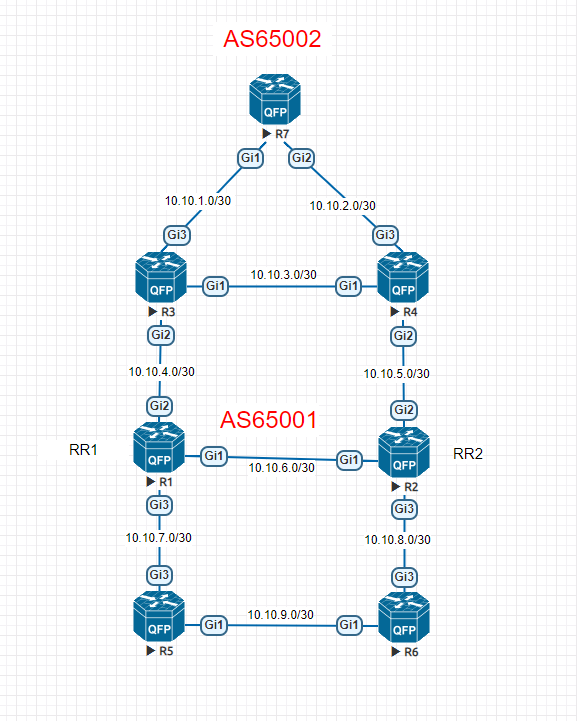
在IBGP邻居中,使用反射器减少IBGP邻居关系是一种最常用的网络结构,在上图中AS65001中有6台路由器,其中,R1和R2是一组反射器,配置如下:
R1:
!
interface Loopback0
ip address 10.255.255.1 255.255.255.255
ip router isis 10
!
interface GigabitEthernet1
ip address 10.10.6.1 255.255.255.252
ip router isis 10
negotiation auto
isis network point-to-point
isis password cisco
!
interface GigabitEthernet2
ip address 10.10.4.1 255.255.255.252
ip router isis 10
negotiation auto
isis network point-to-point
isis password cisco
!
interface GigabitEthernet3
ip address 10.10.7.1 255.255.255.252
ip router isis 10
negotiation auto
isis network point-to-point
isis password cisco
!
router isis 10
net 49.0000.1025.5255.1000.00
is-type level-2-only
!
router bgp 65001
bgp router-id 10.255.255.1
bgp cluster-id 10.255.255.1
bgp log-neighbor-changes
bgp graceful-restart restart-time 120
bgp graceful-restart stalepath-time 360
bgp graceful-restart
bgp scan-time 15
neighbor as65001 peer-group
neighbor as65001 password cisco
neighbor as65001 update-source Loopback0
neighbor as65001 route-reflector-client
neighbor as65001 next-hop-self
neighbor 10.255.255.2 remote-as 65001
neighbor 10.255.255.2 peer-group as65001
neighbor 10.255.255.3 remote-as 65001
neighbor 10.255.255.3 peer-group as65001
neighbor 10.255.255.4 remote-as 65001
neighbor 10.255.255.4 peer-group as65001
neighbor 10.255.255.5 remote-as 65001
neighbor 10.255.255.5 peer-group as65001
neighbor 10.255.255.6 remote-as 65001
neighbor 10.255.255.6 peer-group as65001
!
R2:
!
interface Loopback0
ip address 10.255.255.2 255.255.255.255
ip router isis 10
!
interface GigabitEthernet1
ip address 10.10.6.2 255.255.255.252
ip router isis 10
negotiation auto
isis network point-to-point
isis password cisco
!
interface GigabitEthernet2
ip address 10.10.5.1 255.255.255.252
ip router isis 10
negotiation auto
isis network point-to-point
isis password cisco
!
interface GigabitEthernet3
ip address 10.10.8.1 255.255.255.252
ip router isis 10
negotiation auto
isis network point-to-point
isis password cisco
!
router isis 10
net 49.0000.1025.5255.2000.00
is-type level-2-only
!
router bgp 65001
bgp router-id 10.255.255.2
bgp cluster-id 10.255.255.1
bgp log-neighbor-changes
bgp graceful-restart restart-time 120
bgp graceful-restart stalepath-time 360
bgp graceful-restart
bgp scan-time 15
neighbor as65001 peer-group
neighbor as65001 password cisco
neighbor as65001 update-source Loopback0
neighbor as65001 route-reflector-client
neighbor as65001 next-hop-self
neighbor 10.255.255.1 remote-as 65001
neighbor 10.255.255.1 peer-group as65001
neighbor 10.255.255.3 remote-as 65001
neighbor 10.255.255.3 peer-group as65001
neighbor 10.255.255.4 remote-as 65001
neighbor 10.255.255.4 peer-group as65001
neighbor 10.255.255.5 remote-as 65001
neighbor 10.255.255.5 peer-group as65001
neighbor 10.255.255.6 remote-as 65001
neighbor 10.255.255.6 peer-group as65001
!
R3:
!
interface Loopback0
ip address 10.255.255.3 255.255.255.255
ip router isis 10
!
interface GigabitEthernet1
ip address 10.10.3.1 255.255.255.252
ip router isis 10
negotiation auto
isis network point-to-point
isis password cisco
!
interface GigabitEthernet2
ip address 10.10.4.2 255.255.255.252
ip router isis 10
negotiation auto
isis network point-to-point
isis password cisco
!
interface GigabitEthernet3
ip address 10.10.1.1 255.255.255.252
negotiation auto
bfd interval 250 min_rx 250 multiplier 3
!
router isis 10
net 49.0000.1025.5255.3000.00
is-type level-2-only
!
router bgp 65001
bgp router-id 10.255.255.3
bgp log-neighbor-changes
bgp graceful-restart restart-time 120
bgp graceful-restart stalepath-time 360
bgp graceful-restart
bgp scan-time 15
neighbor 10.10.1.2 remote-as 65002
neighbor 10.10.1.2 password cisco
neighbor 10.10.1.2 fall-over bfd
neighbor 10.255.255.1 remote-as 65001
neighbor 10.255.255.1 password cisco
neighbor 10.255.255.1 update-source Loopback0
neighbor 10.255.255.1 next-hop-self
neighbor 10.255.255.2 remote-as 65001
neighbor 10.255.255.2 password cisco
neighbor 10.255.255.2 update-source Loopback0
neighbor 10.255.255.2 next-hop-self
!
R4:
!
interface Loopback0
ip address 10.255.255.4 255.255.255.255
ip router isis 10
!
interface GigabitEthernet1
ip address 10.10.3.2 255.255.255.252
ip router isis 10
negotiation auto
isis network point-to-point
isis password cisco
!
interface GigabitEthernet2
ip address 10.10.5.2 255.255.255.252
ip router isis 10
negotiation auto
isis network point-to-point
isis password cisco
!
interface GigabitEthernet3
ip address 10.10.2.1 255.255.255.252
negotiation auto
bfd interval 250 min_rx 250 multiplier 3
!
router isis 10
net 49.0000.1025.5255.4000.00
is-type level-2-only
!
router bgp 65001
bgp router-id 10.255.255.4
bgp log-neighbor-changes
bgp graceful-restart restart-time 120
bgp graceful-restart stalepath-time 360
bgp scan-time 15
neighbor 10.10.2.2 remote-as 65002
neighbor 10.10.2.2 password cisco
neighbor 10.10.2.2 fall-over bfd
neighbor 10.255.255.1 remote-as 65001
neighbor 10.255.255.1 password cisco
neighbor 10.255.255.1 update-source Loopback0
neighbor 10.255.255.1 next-hop-self
neighbor 10.255.255.2 remote-as 65001
neighbor 10.255.255.2 password cisco
neighbor 10.255.255.2 update-source Loopback0
neighbor 10.255.255.2 next-hop-self
!
R5:
!
interface Loopback0
ip address 10.255.255.5 255.255.255.255
ip router isis 10
!
interface GigabitEthernet1
ip address 10.10.9.1 255.255.255.252
ip router isis 10
negotiation auto
isis network point-to-point
isis password cisco
!
interface GigabitEthernet3
ip address 10.10.7.2 255.255.255.252
ip router isis 10
negotiation auto
isis network point-to-point
isis password cisco
!
router isis 10
net 49.0000.1025.5255.5000.00
is-type level-2-only
!
router bgp 65001
bgp router-id 10.255.255.5
bgp log-neighbor-changes
bgp graceful-restart restart-time 120
bgp graceful-restart stalepath-time 360
bgp scan-time 15
network 10.255.255.5 mask 255.255.255.255
neighbor 10.255.255.1 remote-as 65001
neighbor 10.255.255.1 password cisco
neighbor 10.255.255.1 update-source Loopback0
neighbor 10.255.255.1 next-hop-self
neighbor 10.255.255.2 remote-as 65001
neighbor 10.255.255.2 password cisco
neighbor 10.255.255.2 update-source Loopback0
neighbor 10.255.255.2 next-hop-self
!
R6:
interface Loopback0
ip address 10.255.255.6 255.255.255.255
ip router isis 10
!
interface GigabitEthernet1
ip address 10.10.9.2 255.255.255.252
ip router isis 10
negotiation auto
isis network point-to-point
isis password cisco
!
interface GigabitEthernet3
ip address 10.10.8.2 255.255.255.252
ip router isis 10
negotiation auto
isis network point-to-point
isis password cisco
!
router isis 10
net 49.0000.1025.5255.6000.00
is-type level-2-only
!
router bgp 65001
bgp router-id 10.255.255.6
bgp log-neighbor-changes
bgp graceful-restart restart-time 120
bgp graceful-restart stalepath-time 360
bgp scan-time 15
network 10.255.255.6 mask 255.255.255.255
neighbor 10.255.255.1 remote-as 65001
neighbor 10.255.255.1 password cisco
neighbor 10.255.255.1 update-source Loopback0
neighbor 10.255.255.1 next-hop-self
neighbor 10.255.255.2 remote-as 65001
neighbor 10.255.255.2 password cisco
neighbor 10.255.255.2 update-source Loopback0
neighbor 10.255.255.2 next-hop-self
!
R7:
interface Loopback0
ip address 10.255.255.7 255.255.255.255
!
interface GigabitEthernet1
ip address 10.10.1.2 255.255.255.252
negotiation auto
bfd interval 250 min_rx 250 multiplier 3
!
interface GigabitEthernet2
ip address 10.10.2.2 255.255.255.252
negotiation auto
bfd interval 250 min_rx 250 multiplier 3
!
router bgp 65002
bgp router-id 10.255.255.7
bgp log-neighbor-changes
bgp graceful-restart restart-time 120
bgp graceful-restart stalepath-time 360
bgp graceful-restart
bgp scan-time 15
network 10.255.255.7 mask 255.255.255.255
neighbor 10.10.1.1 remote-as 65001
neighbor 10.10.1.1 password cisco
neighbor 10.10.1.1 fall-over bfd
neighbor 10.10.2.1 remote-as 65001
neighbor 10.10.2.1 password cisco
neighbor 10.10.2.1 fall-over bfd
!
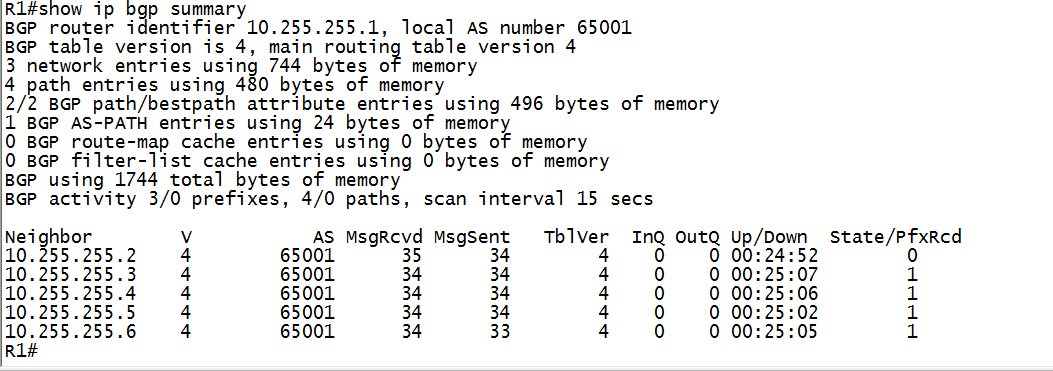
在RR1上查看BGP邻居建立情况,如下图:
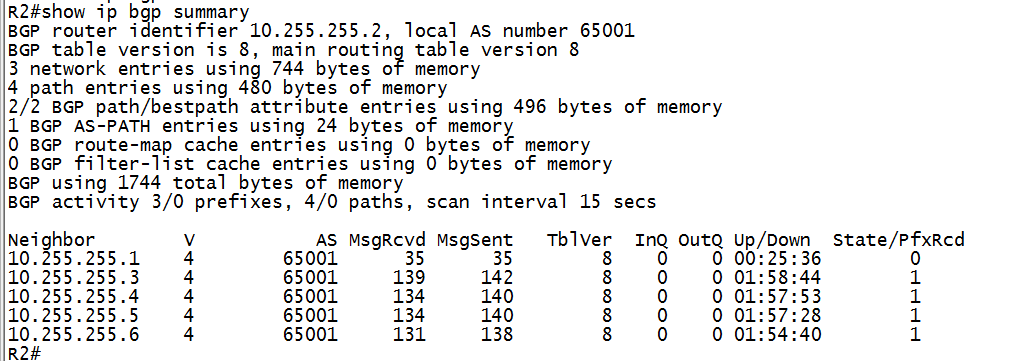
在RR2上查看BGP邻居建立情况,如下图:
规划设计要点:
- 网络中两台独立的路由器做RR,并且属于一个cluster
- 两台rr不承担流量转发的工作
IBGP规划的更多相关文章
- eBGP&iBGP 总结
3.4 BGP 原文地址:http://mp.weixin.qq.com/s?src=3×tamp=1500043305&ver=1&signature=XwiIVV ...
- shell脚本规划化模板
shell脚本规划化模板 Linux运维过程中,shell脚本是不可缺少的工具,但是每个运维人员编程的习惯都不一样,很多时候就是实现某个功能,写出来的脚本都是烂七八糟的.脚本必须规范化,应该从以后几个 ...
- IT基础架构规划方案一(网络系统规划)
背景 某集团经过多年的经营,公司业务和规模在不断发展,公司管理层和IT部门也认识到通过信息化手段可以更好地支撑公司业务运营.提高企业生产和管理效率.同时随着新建办公 ...
- 攻城记:Thinkphp框架的项目规划总结和踩坑经验
一.项目模块规划 1.项目分为PC端.移动端.和PC管理端,分为对应目录为 /Application/Home,/Application/Mobile,/Application/Admin: 对应入口 ...
- 【BZOJ-3627】路径规划 分层图 + Dijkstra + spfa
3627: [JLOI2014]路径规划 Time Limit: 30 Sec Memory Limit: 128 MBSubmit: 186 Solved: 70[Submit][Status] ...
- Google地图路线规划
Google地图路线规划: 需求:给定的两点之间Google地图路径规划和详情. 代码实现: //map定义省略 var directionsDisplay = new google.maps.Dir ...
- R语言 批量规划求解
昨天读到一个项目,是关于优化求解的. 约束条件如下: 公司里有很多客户,客户之所以不继续用我们的产品了,是因为他账户余额是负的,所以,为了重新赢回这些客户,公司决定发放优惠券cover掉客户账户的负余 ...
- Java职业生涯规划
java学习这一部分其实也算是今天的重点,这一部分用来回答很多群里的朋友所问过的问题,那就是我你是如何学习Java的,能不能给点建议?今天我是打算来点干货,因此咱们就不说一些学习方法和技巧了,直接来谈 ...
- 第二天ci项目规划 数据库设计
第二天ci项目规划 数据库设计 商品 + 用户 + 订单 数据库设计思想和方法 关于商品品牌 ,分类 ,属性 如何表示 用一个字段 还是再设计一张表 品牌和商品 是一种信息 还是两种信息 一张表一般只 ...
随机推荐
- 学习笔记TF046:TensoFlow开发环境,Mac、Ubuntu/Linux、Windows,CPU版本、GPU版本
下载TensorFlow https://github.com/tensorflow/tensorflow/tree/v1.1.0 .Tags选择版本,下载解压. pip安装.pip,Python包管 ...
- windows server 2008 R2之tomcat开机自启
方法一: 写一个批处理文件autostartup.bat用来启动tomcat,内容如下.复制时不要把复制内容也复制进去 set CATALINA_HOME=C:\apache-tomcat-8.5.3 ...
- 程序猿大牛 Jeff Atwood 的两本中文书
版权声明:本文为博主原创文章,未经博主同意不得转载. https://blog.csdn.net/happydeer/article/details/17094271 watermark/2/text ...
- bootstrap弹出模态框会给body加padding的解决方法
bootstrap弹出模态框会给body加padding,导致页面缩放的解决方法: 在页面或是css文件里加上($paddingSize为less变量,需要改成像素或是其他单位,如12px,1rem) ...
- YAML 知识点
YAML:Ain't Markup Language 的缩写 YAML文件定义了一系列带有约束说明的任务,这些任务都是以任务名开始并且至少要包含script部分. 任务是由Runners接管并且由服务 ...
- Spring Boot - 项目构建与解析
构建 Maven 项目 通过官方的 Spring Initializr 工具来产生基础项目,访问 http://start.spring.io/ ,如下图所示,该页面提供了以Maven构建Spring ...
- git中出现remote: HTTP Basic: Access denied
git中出现remote: HTTP Basic: Access denied 1.git clone时出现 Username for 'http://******': *** remote: HTT ...
- Elasticsearch -- Head插件安装
安装Head插件 由于head插件本质上还是一个nodejs的工程,因此需要安装node,使用npm来安装依赖的包. <1>安装Node.js 下载解压 wget https://node ...
- 文件处理,三元操作符,seek()函数,迭代函数和列表解析,reduce函数
1.文件读取方类型 r,r+,w,x,a, r,读文件 w,写文件,文件内容全部删除,并将新内容从第一行开始赋值 x,写文件,只有文件不存在,可写,文件存在,报错 a,在文件莫问追加信息 r+,w+, ...
- AttributeError: 'module' object has no attribute 'main'
本机环境:ubuntu16.04, ros-kinetic $ roscore 报错 Traceback (most recent call last): File , in <module& ...