
Elasticsearch -- Head插件安装
安装Head插件
由于head插件本质上还是一个nodejs的工程,因此需要安装node,使用npm来安装依赖的包。
<1>安装Node.js
下载解压
wget https://nodejs.org/dist/v6.10.2/node-v6.10.2-linux-x64.tar.xz
xz –d node-v6.10.2-linux-x64.tar.xz

tar xvf node-v6.10.2-linux-x64.tar

mv node-v6.10.2-linux-x64 /usr/local/node
配置并生效
vim /etc/profile

export NODE_HOME=/usr/local/node

export PATH=$PATH:$NODE_HOME/bin

source /etc/profile
查看版本验证
[elsearch@imok bin]$ node -v

v6.10.2

[elsearch@imok bin]$ npm -v

3.10.10
<2>下载head插件
如果未安装git ,则先安装git工具
yum install –y git

git clone https://github.com/mobz/elasticsearch-head.git
<3>安装grunt
cd elasticsearch-head

npm install -g grunt --registry=https://registry.npm.taobao.org
<4>安装插件
npm install --unsafe-perm
在elasticsearch-head目录下node_modules/grunt下如果没有grunt二进制程序,需要执行:
npm install grunt --save
<5>修改配置 elasticsearch-head下Gruntfile.js文件
修改connect配置节点
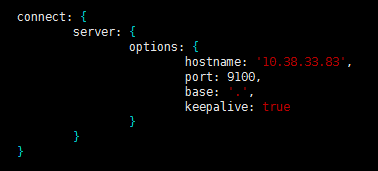
修改 _site/app.js 修改http://localhost:9200字段到本机ES端口与IP

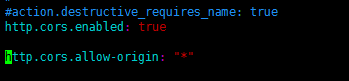
<6>修改 elasticsearch配置文件
修改elasticsearch.yml文件加入以下内容:
# 是否支持跨域

http.cors.enabled: true

# *表示支持所有域名

http.cors.allow-origin: "*"
<7>启动head插件服务(后台运行)
/elasticsearch-head/node_modules/grunt/bin/grunt server &

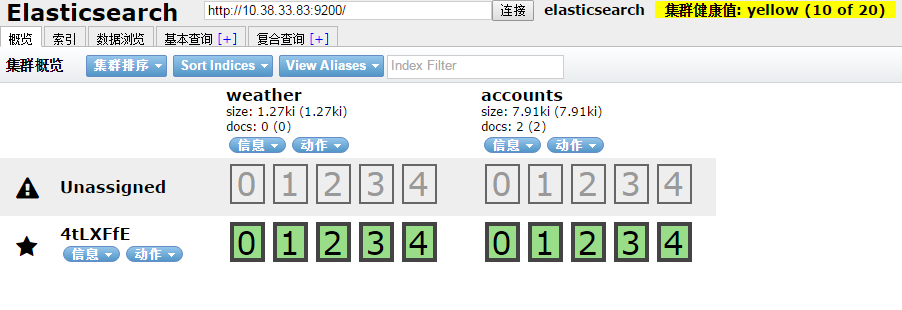
<8>查看
如下图说明安装OK
安装中文分词器
中文分词器的版本和elasticsearch的版本要一致。随笔中安装的是6.3.2版本
$ ./bin/elasticsearch-plugin install https://github.com/medcl/elasticsearch-analysis-ik/releases/download/v6.3.2/elasticsearch-analysis-ik-6.3.2.zip
安装OK后重启elasticsearch服务
安装过程遇到的问题:
[1]: max file descriptors [4096] for elasticsearch process is too low, increase to at least [65536]
解决:vim /etc/security/limits.conf ,在文件末尾添加以下参数 (* 要带上)

* soft nofile 65536

* hard nofile 131072

* soft nproc 2048

* hard nproc 4096
ulimit -n查看进程数
[2]: max virtual memory areas vm.max_map_count [65530] is too low, increase to at least [262144]
解决:修改 /etc/sysclt.conf配置
vi /etc/sysctl.conf
添加一下配置参数
vm.max_map_count=655360
执行命令
sysctl -p
重启elasticsearch服务即可。
参考:
https://www.cnblogs.com/hunttown/p/6723286.html
https://www.cnblogs.com/lizichao1991/p/7809156.html
Elasticsearch -- Head插件安装的更多相关文章
- ELK 学习笔记之 elasticsearch head插件安装
elasticsearch head插件安装: 准备工作: 安装nodejs和npm https://nodejs.org/en/download/ node-v6.11.2-linux-x64.ta ...
- Elasticsearch入门教程(一):Elasticsearch及插件安装
原文:Elasticsearch入门教程(一):Elasticsearch及插件安装 版权声明:本文为博主原创文章,遵循CC 4.0 BY-SA版权协议,转载请附上原文出处链接和本声明. 本文链接:h ...
- ElasticSearch head 插件安装
head 客户端可以很方便在上面创建索引,类型,文档,还有查询,使用它管理elasticsearch 提高效率. 在安装head 客户端之前必须安装node.js 环境,因为它是用node.js 编写 ...
- Elasticsearch 监控插件安装(elasticsearch-head与Kibana)
摘要 安装Elasticsearch插件Head与Kibana 版本 elasticsearch版本: elasticsearch-2.3.4 elasticsearch-head版本: 2.x(支持 ...
- Elasticsearch安装(四), elasticsearch head 插件安装和使用。
安装方式如下: 一.安装Elasticsearch-Head 1.插件安装方式(推荐) #在Elasticsearch目录下 $/bin/plugin -install mobz/elasticsea ...
- 新版elasticsearch的插件安装
安装 yum localinstall elasticsearch-6.1.1.rpm -y mkdir -p /elk/{data,logs} && chown -R elastic ...
- elasticsearch的插件安装
目前使用的是2.4.5版本的es 安装的时候注意以下几点 : 1.如果想所有的ip都能访问es,需要修改config下的elasticsearch.yml.修改如下 network.host=0.0. ...
- ElasticSearch head插件安装与配置
下载 下载地址:https://github.com/mobz/elasticsearch-head 安装 1. 下载到本地 git clone 2. 安装 grunt npm install -g ...
- ElasticSearch及其插件安装配置
elasticsearch安装使用 .安装步骤: 1.下载elasticsearch的rpm包: wget https://artifacts.elastic.co/downloads/elastic ...
随机推荐
- webpack.optimize.UglifyJsPlugin配置说明
https://segmentfault.com/a/1190000008995453?utm_source=tuicool&utm_medium=referral
- kibana升级之后原本保存的数据dashboards, visualizations, index patterns丢失
1,es升级注意的问题:https://www.elastic.co/guide/en/elasticsearch/reference/6.5/rolling-upgrades.html 2,kiba ...
- Luffy之课程详情页
Luffy之课程详情页 提前写好课程详情的template,并放入到Vue中 注册路由 import CourseDetail from "../components/CourseDetai ...
- 第9天【btrfs文件系统、压缩工具及for语句、程序包管理】
btrfs文件系统管理与应用(01)_recv halt centos7: mkfs.btrfs命令: -L:指定卷标 -m:元数据 -d:指定数据存储的类型,raid1.5.10.single 实验 ...
- myhome vscode plugins
├─ 1194979849.code-snippets-0.1.18├─ adamwalzer.string-converter-0.1.1├─ alefragnani.bookmarks-9.3.0 ...
- Python—集合的操作、文件的操作
1.集合的操作 2.文件的操作 1.集合的操作 定义: 1.不同元素组成,自动去重 2.无序 3.集合中的元素必须是不可变类型 1.集合的定义: >>> s1 = set('abcd ...
- erlang大法好
可惜haxe不能生成erlang.不过没关系,s6k输入法的实际执行方案,现在由typescript改用haxe.cdt3的ts地位不变. 以后这个博客大部分内容都是跟haxe/typescript相 ...
- shell脚本结构
echo $? 代表上一次命令的状态返回值,‘0’则代表为真<执行成功>,‘非零’则代表为假<执行失败>. shell脚本: <判断老男孩的年纪> [root@bo ...
- python全栈开发笔记---数据类型--综合练习题
一.有两个列表 l1 = [11,22,33] l2 = [22,33,44] a. 获取内容相同的元素列表 for item in l1: if item in l2: print(it ...
- vue全家桶(vue-cli,vue-router,vue-resource,vuex)-1
vue-cli # 全局安装 vue-cli $ npm install --global vue-cli # 创建一个基于 webpack 模板的新项目 $ vue init webpack my- ...