
Idea+maven+testNG+Selenium+ReportNG自动化框架搭建
1、Idea创建一个空的Maven项目
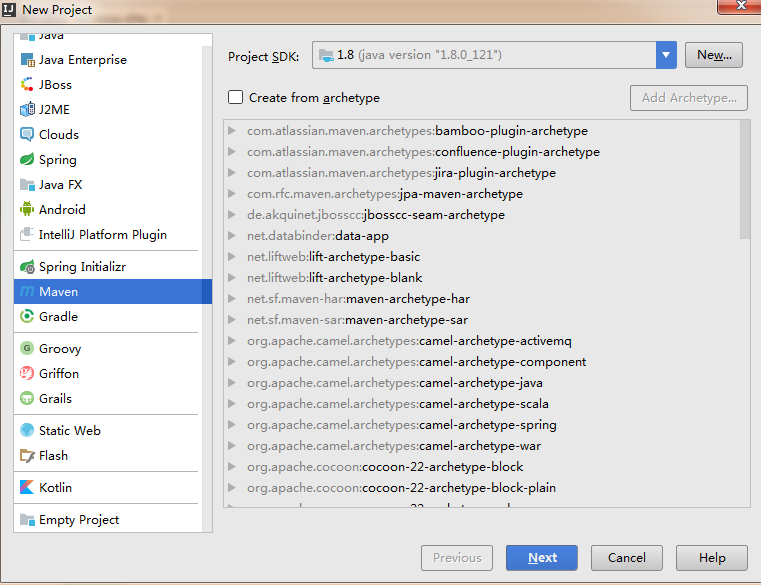
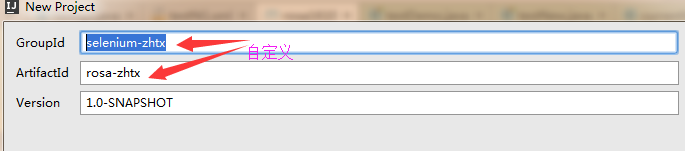
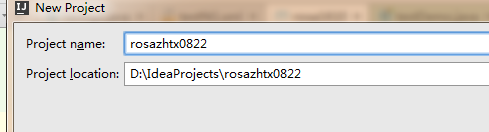
创建后默认项目目录如图所示

2、配置pom.xml文件
 <?xml version="1.0" encoding="UTF-8"?>

 <project xmlns="http://maven.apache.org/POM/4.0.0"

          xmlns:xsi="http://www.w3.org/2001/XMLSchema-instance"

          xsi:schemaLocation="http://maven.apache.org/POM/4.0.0 http://maven.apache.org/xsd/maven-4.0.0.xsd">

     <modelVersion>4.0.0</modelVersion>

     <groupId>selenium-zhtx</groupId>

     <artifactId>rosa-zhtx</artifactId>

     <version>1.0-SNAPSHOT</version>

     <!-- maven 运行测试name -->

     <name>test</name>

     <url>http://maven.apache.org</url>

     <!-- maven 引用远程库 -->

     <repositories>

         <repository>

             <id>java-net</id>

             <url>http://download.java.net/maven/2</url>

         </repository>

     </repositories>

     <!-- maven 参数配置,这里引用不同的testng.xml -->

     <properties>

         <project.build.sourceEncoding>UTF-8</project.build.sourceEncoding>

         <xmlFileName>testNG.xml</xmlFileName>

     </properties>

     <dependencies>

     <dependency>

         <groupId>org.testng</groupId>

         <artifactId>testng</artifactId>

         <version>6.9.9</version>

     </dependency>

         <dependency>

         <groupId>org.uncommons</groupId>

         <artifactId>reportng</artifactId>

         <version>1.1.4</version>

         <scope>test</scope>

         <exclusions>

             <exclusion>

                 <groupId>org.testng</groupId>

                 <artifactId>testng</artifactId>

             </exclusion>

         </exclusions>

     </dependency>

     <dependency>

         <groupId>velocity</groupId>

         <artifactId>velocity-dep</artifactId>

         <version>1.4</version>

     </dependency>

     <dependency>

         <groupId>org.seleniumhq.selenium</groupId>

         <artifactId>selenium-firefox-driver</artifactId>

         <version>2.46.0</version>

     </dependency>

     <dependency>

         <groupId>com.google.inject</groupId>

         <artifactId>guice</artifactId>

         <version>4.0</version>

     </dependency>

     <dependency>

         <groupId>org.seleniumhq.selenium</groupId>

         <artifactId>selenium-chrome-driver</artifactId>

         <version>2.46.0</version>

     </dependency>

     <dependency>

         <groupId>org.seleniumhq.selenium</groupId>

         <artifactId>selenium-htmlunit-driver</artifactId>

         <version>2.46.0</version>

     </dependency>

     <dependency>

         <groupId>org.seleniumhq.selenium</groupId>

         <artifactId>selenium-support</artifactId>

         <version>2.46.0</version>

     </dependency>

     <dependency>

         <groupId>log4j</groupId>

         <artifactId>log4j</artifactId>

         <version>1.2.16</version>

     </dependency>

 </dependencies>

     <build>

         <plugins>

             <!-- 添加插件 关联testNg.xml -->

             <plugin>

                 <groupId>org.apache.maven.plugins</groupId>

                 <artifactId>maven-surefire-plugin</artifactId>

                 <version>2.5</version>

                 <configuration>

                     <suiteXmlFiles>

                         <suiteXmlFile>res/${xmlFileName}</suiteXmlFile>

                     </suiteXmlFiles>

                 </configuration>

             </plugin>

             <!-- 添加插件,添加ReportNg的监听器,修改最后的TestNg的报告 -->

             <plugin>

                 <groupId>org.apache.maven.plugins</groupId>

                 <artifactId>maven-surefire-plugin</artifactId>

                 <version>2.5</version>

                 <configuration>

                     <properties>

                         <property>

                             <name>usedefaultlisteners</name>

                             <value>false</value>

                         </property>

                         <property>

                             <name>listener</name>

                             <value>org.uncommons.reportng.HTMLReporter,

                                 org.uncommons.reportng.JUnitXMLReporter</value>

                         </property>

                     </properties>

                     <workingDirectory>target/</workingDirectory>

                     <forkMode>always</forkMode>

                 </configuration>

             </plugin>

         </plugins>

     </build>

 </project>
pom.xml
3、创建testNG.xml文件
<?xml version="1.0" encoding="UTF-8"?>

<suite name="Suite" parallel="false">

    <test name="Test">

        <!--classes>

            <class name="">

                <methods>

                    <include name="*" />

                </methods>

            </class>

        </classes-->

        <packages>

            <package name="com.zhtx.autocase"/>

        </packages>

    </test>

    <listeners>

        <listener class-name="org.uncommons.reportng.HTMLReporter" />

        <listener class-name="org.uncommons.reportng.JUnitXMLReporter" />

    </listeners>

</suite>
testNG.xml
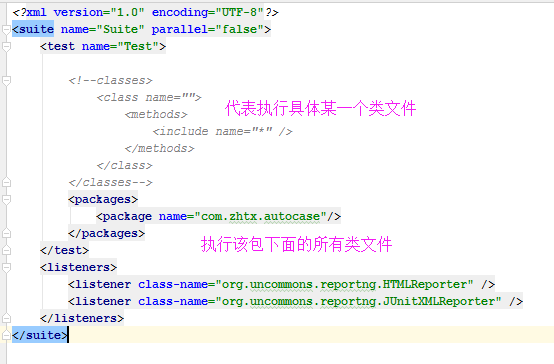
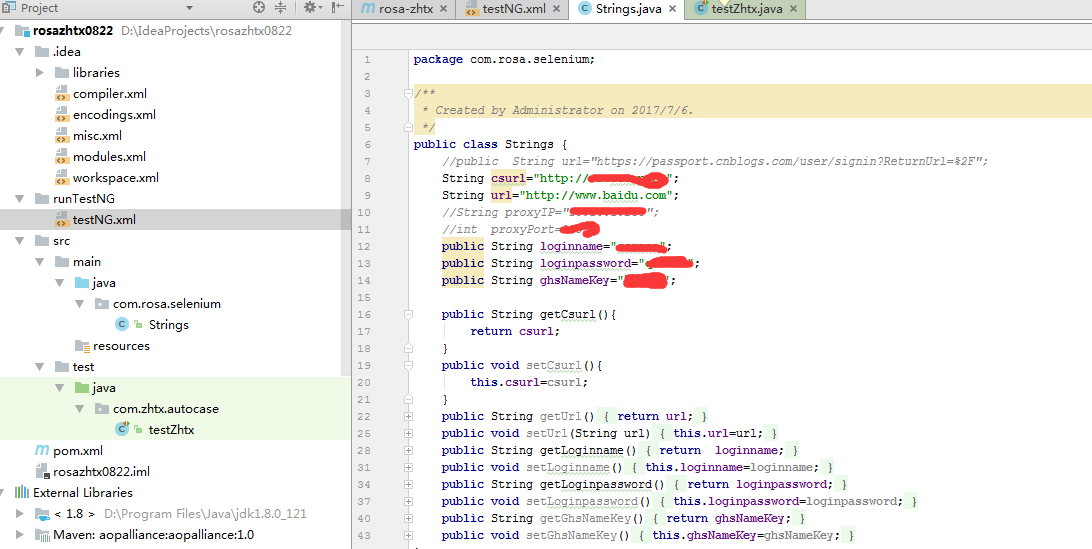
4、编写测试类testZhtx,Strings
package com.zhtx.autocase;

import java.util.Iterator;

import com.rosa.selenium.Strings;

import org.openqa.selenium.By;

import org.openqa.selenium.Cookie;

import org.openqa.selenium.WebDriver;

import org.openqa.selenium.WebElement;

import org.openqa.selenium.firefox.FirefoxDriver;

import org.openqa.selenium.firefox.FirefoxProfile;

import org.testng.annotations.AfterMethod;

import org.testng.annotations.BeforeMethod;

import org.testng.annotations.Test;

import java.io.File;

import java.io.IOException;

import java.util.Set;

import java.util.concurrent.TimeUnit;

public class testZhtx {

    WebDriver driver;

    Strings zhtx=new Strings();

    @BeforeMethod

    public void setUp(){

        //设置驱动位置

        System.setProperty("webdriver.firefox.marionette","D:\\libs\\geckodriver.exe");

        System.setProperty("webdriver.firefox.bin","D:\\Program Files\\Mozilla Firefox\\firefox.exe");

        //声明firebug等插件位置

        // File fpath=new File("D:\\libs\\firebug-2.0.18b1.xpi");

        // File fbug=new File("D:\\libs\\firepath-0.9.7-fx.xpi");

        driver=new FirefoxDriver();//声明用户信息后,声明驱动方法中要引用该profile

        //最大化窗口

        driver.manage().window().maximize();

        driver.get(zhtx.getCsurl());

    }

    @AfterMethod

    public void  tearDown(){

        driver.quit();

    }

    @Test

    public void login(){

        WebDriver newWindow;

        String current_Handles=driver.getWindowHandle();

        driver.findElement(By.xpath(".//*[@id='myform']/div/div[2]/div/div[1]/ul/li[1]/input")).clear();

        driver.findElement(By.xpath(".//*[@id='myform']/div/div[2]/div/div[1]/ul/li[1]/input")).sendKeys(zhtx.getLoginname());

        WebElement pwd=driver.findElement(By.xpath(".//*[@id='myform']/div/div[2]/div/div[1]/ul/li[2]/input"));

        pwd.clear();

        pwd.sendKeys(zhtx.getLoginpassword());

        driver.findElement(By.xpath(".//*[@id='btn_login']")).click();

        Set<String>all_handles=driver.getWindowHandles();

        Iterator<String> it=all_handles.iterator();

        while (it.hasNext()){

            String sonHandle=it.next();

            if(current_Handles==sonHandle)continue;

            WebDriver window=driver.switchTo().window(sonHandle);

        }

    }

}
testZhtx
 package com.rosa.selenium;

 /**

  * Created by Administrator on 2017/7/6.

  */

 public class Strings {

     //public  String url="https://passport.cnblogs.com/user/signin?ReturnUrl=%2F";

     String csurl="http://cs.ccoop.cn";

     String url="http://www.baidu.com";

     public String loginname="*****";

     public String loginpassword="****";

     public String ghsNameKey="****";

     public String getCsurl(){

         return csurl;

     }

     public void setCsurl(){

         this.csurl=csurl;

     }

     public String getUrl(){

         return url;

     }

     public void setUrl(String url){

         this.url=url;

     }

     public String getLoginname(){

         return  loginname;

     }

     public void setLoginname(){

         this.loginname=loginname;

     }

     public String getLoginpassword(){

         return loginpassword;

     }

     public void setLoginpassword(){

         this.loginpassword=loginpassword;

     }

     public String getGhsNameKey(){

         return ghsNameKey;

     }

     public void setGhsNameKey(){

         this.ghsNameKey=ghsNameKey;

     }

 }
Strings
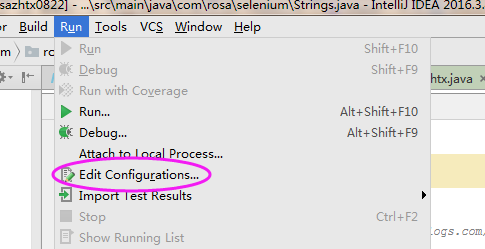
5、配置运行文件
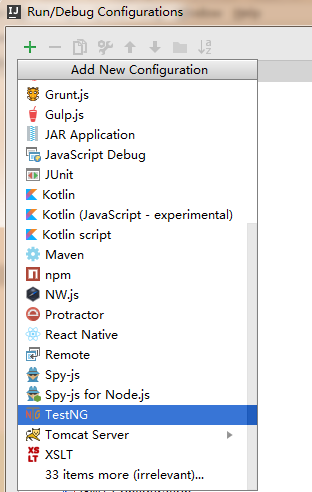
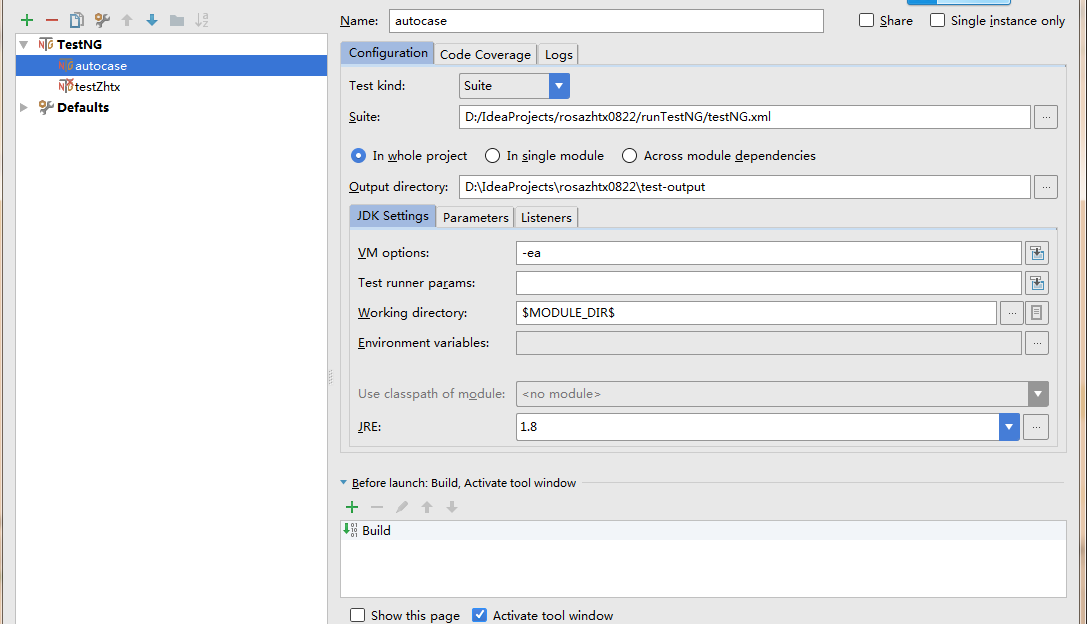
6、创建test-output文件夹,存放测试报告
7、build项目
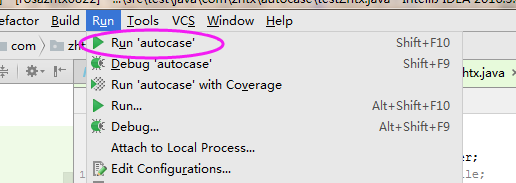
8、运行测试类
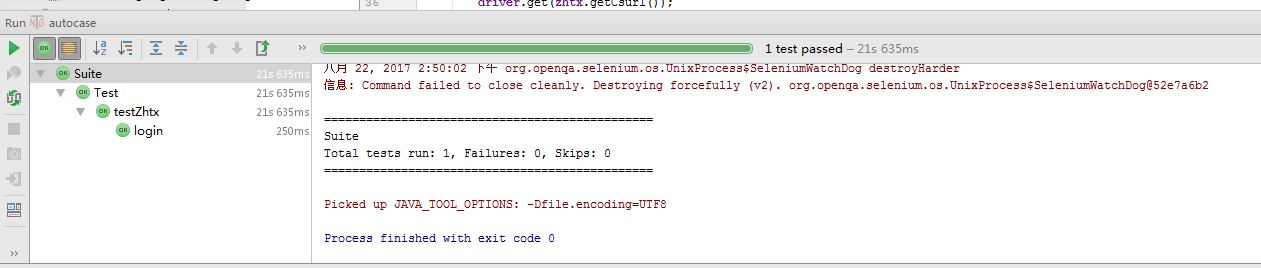
执行结果如图所示
也可以进入test-output目录查看html结果

Idea+maven+testNG+Selenium+ReportNG自动化框架搭建的更多相关文章
- 基于Python3.7 Robot Framework自动化框架搭建
一.Robot Framework 和 Selenium 的区别(面试常问) 主流自动化测试框架有Robot Framework 和 Selenium,请根据实际场景选用不同的框架,以下总结各自优缺点 ...
- UI自动化框架搭建之Python3
UI自动化框架搭建--unittest 使用的代码是Python3版本,与时俱进哈哈 解释一下我的框架目录接口(每个人框架的目录接口不一样,根据实际要求) common目录:公共模块,这个地方可以存放 ...
- Jmeter+ant+Jenkins接口自动化框架搭建
摘自:https://testerhome.com/topics/13389 一.背景 上一篇讲了Jmeter 接口自动化-脚本数据分离实例,我们知道怎么利用Jmeter去编写接口自动化脚本,但是接 ...
- IDEA+Java:Selenium+Maven+TestNG基本WebUI自动化测试环境搭建
IDEA+java:Selenium+Maven+TestNG 本文介绍的测试环境,应该是最基本的测试环境了,也是很多文章都有写,这里做一个完整的图文配置整理,方便阅读理解! 使用maven的好处,由 ...
- Appium TestNg Maven Android Eclipse java自动化环境搭建
1.环境准备 1)Eclipse + maven + appium + TestNg 确保已经在Eclipse 上面安装maven TestNg的插件 2)打开Eclipse,新建一个maven项目 ...
- 3分钟手把手带你搭建基于selenium的自动化框架
1 .什么是seleniumSelenium 是一个基于浏览器的自动化工具,它提供了一种跨平台.跨浏览器的端到端的web自动化解决方案.Selenium主要包括三部分:Selenium IDE.Sel ...
- Selenium+Java完整框架搭建(2019完整版)
一.WebDriver框架开发实战 1.框架的思想 (1)什么是框架? 框架是可以被应用开发者定制的应用骨架 (2)为什么要写框架? 提高脚本可维护性 提高编写脚本的速度 提高脚本可阅读性 (3)框架 ...
- selenium+testN自动化测试框架搭建
自动化测试框架搭建 1 Java环境的搭建 1.1访问oracle的官网下载最新版本的jdk http://www.oracle.com/technetwork/java/javase/downloa ...
- Web自动化框架搭建——前言
1.web测试功能特性 a.功能逻辑测试(功能测试),这一块所有系统都是一致的,比如数据的添加.删除.修改:功能测试案例设计感兴趣和有时间的话可以另外专题探讨: b.浏览器兼容性测试,更重要的是体验这 ...
随机推荐
- py-day3 python 全局变量和局部变量
# 全局变量 如果函数的内容无 global关键字,优先读取全局变量,无法对全局变量重新赋值, name = 'mj' def change_name(): print('change_name',n ...
- 如何在myeclipse中安装spket插件
在web开发中,经常会遇到自动提示,比如jquery.extjs等,在myeclipse写这些代码时需要自动提示,就需要安装spket插件,具体方法见下面 工具/原料 myeclipse spke ...
- USB3.0及NVME SSD安装WIN7X64
USB3.0及NVME SSD安装WIN7X64https://tieba.baidu.com/p/4822034273?pn=1所有的人都是菜鸟过来的,不过有些人懂得自己动手找到答案:有些人则是懒得 ...
- Excel宏录制、数据透视表、合并多个页签
前段时间做数据分析的时候,遇到很多报表文件需要处理,在此期间学习了很多Excel操作,特此做笔记回顾. Excel宏录制 打开开发者工具 打开Excel文件,选择”文件”-->“选项”--> ...
- 涂抹mysql笔记-mysql性能调优和诊断
<>关键性指标1.IOPS(Input/Output operations Per Second)每秒处理的I/O请求次数:需要说明的一点,通常提到磁盘读写能力,比如形容它每秒读300M写 ...
- 03-封装Response响应
package com.day5; import java.io.BufferedWriter; import java.io.IOException; import java.io.OutputSt ...
- base64 压缩上传上传图片
@{ ViewBag.Title = "dddddddd"; Layout = "~/Areas/Wap/Views/Shared/_Head.cshtml"; ...
- Android 梯形进度条、下载进度条;
额,Gif有点卡: 梯形.矩形.圆角.背景色.前景色.进度条中的文字都可以改: <?xml version="1.0" encoding="utf-8"? ...
- 实战ELK(3) Kibana安装与简单实用
第一步:下载 https://artifacts.elastic.co/downloads/kibana/kibana-6.5.1-x86_64.rpm 第二步:安装 1.安装 yum install ...
- leetcode79
class Solution { public boolean exist(char[][] board, String word) { for(int i=0; i<board.length; ...