
django之两个使用模板的例子
from django.db import models

# Create your models here.

class Book(models.Model):

    title=models.CharField(max_length=32,unique=True)

    price=models.DecimalField(max_digits=8,decimal_places=2,null=True)

    pub_date=models.DateField()

    publish=models.CharField(max_length=32)

    is_pub=models.BooleanField(default=True)

    authors=models.ManyToManyField(to="Author")

class AuthorDetail(models.Model):

    gf=models.CharField(max_length=32)

    tel=models.CharField(max_length=32)

class Author(models.Model):

    name=models.CharField(max_length=32)

    age=models.IntegerField()

    # 与AuthorDetail建立一对一的关系

    # ad=models.ForeignKey(to="AuthorDetail",to_field="id",on_delete=models.CASCADE,unique=True)

    #OneToOneField 表示创建一对一关系。on_delete=models.CASCADE 表示级联删除。假设a表删除了一条记录,b表也还会删除对应的记录

    ad=models.OneToOneField(to="AuthorDetail",to_field="id",on_delete=models.CASCADE,)
models.py
from django.conf.urls import url

from django.contrib import admin

from app01 import views

urlpatterns = [

    url(r'^admin/', admin.site.urls),

    # url(r'',views.index),#这一条不能放上面,会造成死循环

    url(r'index/$',views.index),

    url(r'books/add/$',views.add),

    url(r'books/manage/',views.manage),

    url(r'books/delete/(?P<id>\d+)',views.delete),

    url(r'books/modify/(?P<id>\d+)',views.modify),

]
urls.py
from django.shortcuts import render,HttpResponse

from app01 import models

# Create your views here.

def index(request):

    ret=models.Book.objects.all().exists()#True 和 False

    if ret:

        book_list=models.Book.objects.all()

        return render(request,'index.html',{'book_list':book_list})

    else:

        # hint='<script>alert("没有书籍,请添加书籍");window.location.href="/books/add"</script>'

        hint='<script>alert("没有书籍,请添加书籍");window.location.href="/books/add/"</script>'

        return HttpResponse(hint)

def add(request):

    if request.method=="POST":

        title=request.POST.get("title")

        price=request.POST.get("price")

        pub_date=request.POST.get("pub_date")

        publish=request.POST.get("publish")

        is_pub=request.POST.get("is_pub")

        #插入一条记录

        obj=models.Book.objects.create(title=title,price=price,publish=publish,pub_date=pub_date,is_pub=is_pub)

        print(obj.title)

        hint = '<script>alert("添加成功");window.location.href="/index/"</script>'

        return HttpResponse(hint)

    return render(request,"add.html")

def manage(request):

    ret=models.Book.objects.all().exists()

    print(ret)

    if ret:

        book_list=models.Book.objects.all()

        return render(request,"manage.html",{"book_list":book_list})

    else:

        hint='<script>alert("没有书籍,请添加书籍");window.location.href="/books/add"</script>'

        return HttpResponse(hint)

def delete(request,id):

    ret=models.Book.objects.filter(id=id).delete()

    print('删除记录%s'%ret)

    if ret[0]:

        hint='<script>alert("删除成功");window.location.href="/index/"</script>'

        return HttpResponse(hint)

    else:

        hint='<script>alert("删除失败");window.location.href="/index/"</script>'

        return HttpResponse(hint)

def modify(request,id):

    if request.method=="POST":

        title=request.POST.get('title')

        price = request.POST.get("price")

        pub_date = request.POST.get("pub_date")

        publish = request.POST.get("publish")

        is_pub = request.POST.get("is_pub")

        # 更新一条记录

        ret = models.Book.objects.filter(id=id).update(title=title, price=price, publish=publish, pub_date=pub_date,

                                                       is_pub=is_pub)

        print('更新记录%s'%ret)

        if ret:  # 判断返回值为1

            hint = '<script>alert("修改成功");window.location.href="/index/"</script>'

            return HttpResponse(hint)  # js跳转

        else:  # 返回为0

            hint = '<script>alert("修改失败");window.location.href="/index/"</script>'

            return HttpResponse(hint)  # js跳转

    book=models.Book.objects.get(id=id)

    return render(request,"modify.html",{"book":book})
views.py
{% extends 'base.html' %}

{% block title %}

    <title>查看书籍</title>

{% endblock title %}

{% block content %}

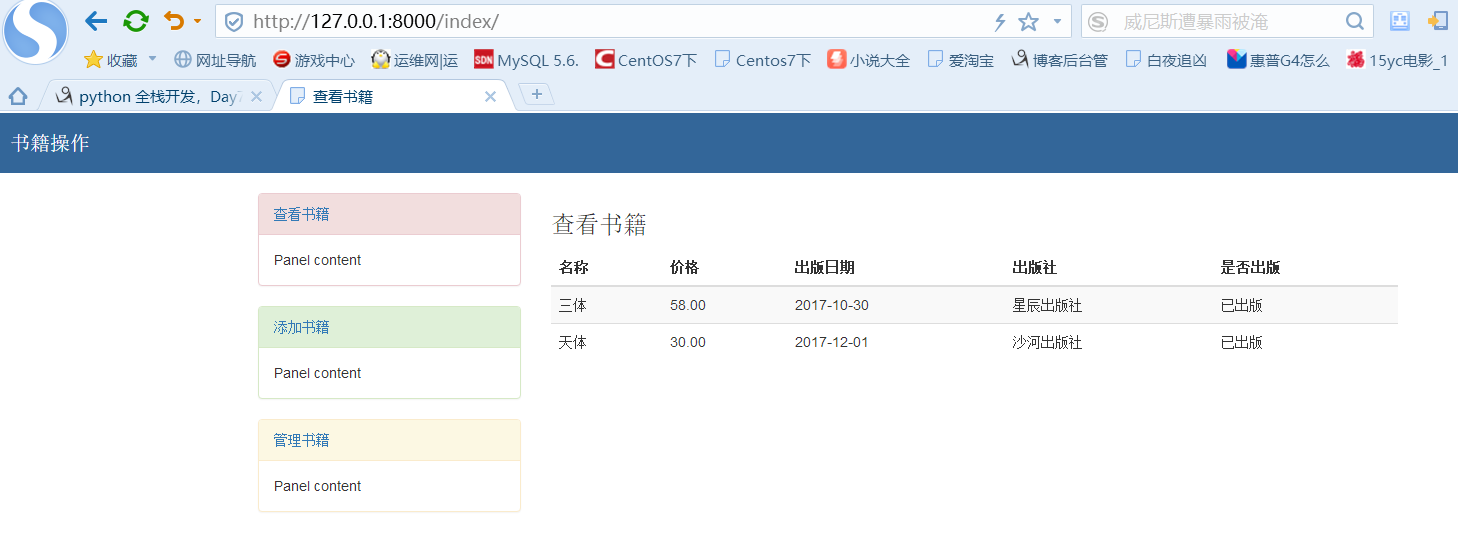
    <h3>查看书籍</h3>

    <table class="table table-hover table-striped ">

                <thead>

                     <tr>

                         <th>名称</th>

                         <th>价格</th>

                         <th>出版日期</th>

                         <th>出版社</th>

                         <th>是否出版</th>

                     </tr>

                </thead>

                <tbody>

                      {% for book in book_list %}

                      <tr>

                          <td>{{ book.title }}</td>

                          <td>{{ book.price }}</td>

                          <td>{{ book.pub_date|date:"Y-m-d" }}</td>

                          <td>{{ book.publish }}</td>

                          <td>

                              {% if book.is_pub %}

                              已出版

                              {% else %}

                              未出版

                              {% endif %}

                          </td>

                      </tr>

                      {% endfor %}

                </tbody>

            </table>

{% endblock content %}
index.html
{% extends 'base.html' %}

{% block title %}

<title>添加书籍</title>

{% endblock title %}

{% block content %}

<h3>添加书籍</h3>

<form action="" method="post">

     {% csrf_token %}

     <div class="form-group">

        <label for="">书籍名称</label>

        <input type="text" name="title" class="form-control">

    </div>

    <div class="form-group">

        <label for="">价格</label>

        <input type="text" name="price" class="form-control">

    </div>

    <div class="form-group">

         <label for="">出版日期</label>

        <input type="date" name="pub_date" class="form-control">

    </div>

    <div class="form-group">

         <label for="">出版社</label>

         <input type="text" name="publish" class="form-control">

    </div>

    <div class="form-group">

         <label for="">是否出版</label>

        <select name="is_pub" id="" class="form-control">

            <option value="">已出版</option>

            <option value="" selected="selected">未出版</option>

        </select>

    </div>

    <input type="submit" class="btn btn-success pull-right" value="添加">

</form>

{% endblock content %}
add.html
<!DOCTYPE html>

<html lang="en">

<head>

    <meta charset="UTF-8">

    {% block title %}

    <title>Title</title>

    {% endblock title %}

    <link rel="stylesheet" href="https://cdn.bootcss.com/bootstrap/3.3.7/css/bootstrap.min.css">

    <style>

        * {

            margin: 0;

            padding: 0;

        }

        .header {

            width: 100%;

            height: 60px;

            background-color: #369;

        }

        .title {

            line-height: 60px;

            color: white;

            font-weight: 100;

            margin-left: 20px;

            font-size: 20px;

        }

        .container{

            margin-top: 20px;

        }

    </style>

</head>

<body>

<div class="header">

    <p class="title">

        书籍操作

    </p>

</div>

<div class="container">

    <div class="row">

        <div class="col-md-3">

            <div class="panel panel-danger">

                <div class="panel-heading"><a href="http://127.0.0.1:8000/index/">查看书籍</a></div>

                <div class="panel-body">

                    Panel content

                </div>

            </div>

            <div class="panel panel-success">

                <div class="panel-heading"><a href="http://127.0.0.1:8000/books/add/">添加书籍</a></div>

                <div class="panel-body">

                    Panel content

                </div>

            </div>

            <div class="panel panel-warning">

                <div class="panel-heading"><a href="http://127.0.0.1:8000/books/manage/">管理书籍</a></div>

                <div class="panel-body">

                    Panel content

                </div>

            </div>

        </div>

        <div class="col-md-9">

           {% block content %}

           {% endblock content %}

        </div>

    </div>

</div>

</body>

</html>
base.html
{% extends 'base.html' %}

{% block title %}

    <title>管理书籍</title>

{% endblock title %}

{% block content %}

    <h3>管理书籍</h3>

<table class="table table-hover table-striped ">

                <thead>

                     <tr>

                         <th>名称</th>

                         <th>价格</th>

                         <th>出版日期</th>

                         <th>出版社</th>

                         <th>是否出版</th>

                         <th>删除</th>

                         <th>编辑</th>

                     </tr>

                </thead>

                <tbody>

                      {% for book in book_list %}

                      <tr>

                          <td>{{ book.title }}</td>

                          <td>{{ book.price }}</td>

                          <td>{{ book.pub_date|date:"Y-m-d" }}</td>

                          <td>{{ book.publish }}</td>

                          <td>

                              {% if book.is_pub %}

                              已出版

                              {% else %}

                              未出版

                              {% endif %}

                          </td>

                          <td>

                              <a href="/books/delete/{{ book.id }}" >

                                  <button type="button" class="btn btn-danger" data-toggle="modal" id="modelBtn">删除</button>

                              </a>

                          </td>

                          <td>

                                <a href="/books/modify/{{ book.id }}">

                                    <button type="button" class="btn btn-success" data-toggle="modal">编辑</button>

                                </a>

                          </td>

                      </tr>

                      {% endfor %}

                </tbody>

            </table>

{% endblock content %}
manage.py
{% extends 'base.html' %}

{% block title %}

<title>修改书籍</title>

{% endblock title %}

{% block content %}

<h3>修改书籍</h3>

<form action="" method="post">

     {% csrf_token %}

     <div class="form-group">

        <label for="">书籍名称</label>

        <input type="text" name="title" class="form-control" value="{{ book.title }}">

    </div>

    <div class="form-group">

        <label for="">价格</label>

        <input type="text" name="price" class="form-control" value="{{ book.price }}">

    </div>

    <div class="form-group">

         <label for="">出版日期</label>

        <input type="date" name="pub_date" class="form-control" value="{{ book.pub_date|date:"Y-m-d" }}">

    </div>

    <div class="form-group">

         <label for="">出版社</label>

         <input type="text" name="publish" class="form-control" value="{{ book.publish }}">

    </div>

    <div class="form-group">

         <label for="">是否出版</label>

        <select name="is_pub" id="" class="form-control">

            {% if book.is_pub %}

                <option value="" selected="selected">已出版</option>

                <option value="">未出版</option>

            {% else %}

                <option value="">已出版</option>

                <option value="" selected="selected">未出版</option>

            {% endif %}

        </select>

    </div>

    <input type="submit" class="btn btn-default pull-right" value="修改">

</form>

{% endblock content %}
modify.py
django使用一对多和多对多关系建表之后的增删改查
-------models.py-----
from django.db import models

# Create your models here.

class Book(models.Model):

    title=models.CharField(max_length=32)

    price=models.DecimalField(max_digits=6,decimal_places=2)

    create_time=models.DateField()

    memo=models.CharField(max_length=32,default="")

    publish=models.ForeignKey(to="Publish",default=1)

    author=models.ManyToManyField("Author")#on_delete=models.CASCADE()默认级联删除

    def __str__(self):

        return self.title

class Publish(models.Model):

    name=models.CharField(max_length=32)

    email=models.CharField(max_length=32)

class Author(models.Model):

    name=models.CharField(max_length=32)

    def __str__(self): return self.name
-----urls.py----
from django.conf.urls import url,include

from django.contrib import admin

from app01 import views

urlpatterns = [

    url(r'^admin/', admin.site.urls),

    url(r'^books/$',views.books), #查看

    url(r'^addbook/$',views.addbook), #增加

    url(r'^delbook/(\d+)/$',views.delbook), #删除

    url(r'editbook/(\d+)/$',views.editbook), #修改

]
----views.py 在app01下面-------
from django.shortcuts import render,HttpResponse,redirect

from .models import *

def books(request):

    book_list=Book.objects.all()

    return render(request,"books.html",locals())

def addbook(request):

    if request.method=="POST":

        title=request.POST.get("title") #get方法取的是html页面中的name属性

        price= request.POST.get("price")

        date = request.POST.get("date")

        publish_id=request.POST.get("publish_id")

        # author_id_list = request.POST.get("author_id_list") #此方法只能取到最后一个值

        author_id_list = request.POST.getlist("author_id_list") #有多个值的注意要用getlist

        #绑定书籍与出版社一对多的关系

        obj=Book.objects.create(title=title,price=price,create_time=date,publish_id=publish_id)

        #绑定书籍与作者多对多的关系

        obj.author.add(*author_id_list)

        # obj.author.remove(1,2) #解除关系

        # obj.author.clear() #清空所有关系

        return redirect("/books/")

    else:

        publish_list=Publish.objects.all()

        author_list=Author.objects.all()

    return render(request,"addbook.html",locals())

def delbook(request,id):

    Book.objects.filter(id=id).delete()

    return redirect("/books/")

def editbook(request,id):

    if request.method=="POST":

        title=request.POST.get("title")  #get方法取的是html页面中的name属性

        price=request.POST.get("price")

        date=request.POST.get("date")

        publish_id=request.POST.get("publish_id")

        author_id_list=request.POST.getlist("author_id_list")

        Book.objects.filter(id=id).update(title=title,price=price,create_time=date,publish_id=publish_id)

        book=Book.objects.filter(id=id).first()

        # book.author.clear()

        # book.author.add(*author_id_list)

        book.author.set(author_id_list) #相当于上面两条

        return redirect ("/books/")

    edit_obj=Book.objects.filter(id=id).first()  #加first从queryset得到 models对象

    publish_list = Publish.objects.all()

    author_list = Author.objects.all()

    return render(request,"editbook.html",locals())
----books.html----
<!DOCTYPE html>

<html lang="en">

<head>

    <meta charset="UTF-8">

    <title>Title</title>

    <link rel="stylesheet" href="/static/bs/css/bootstrap.css">

</head>

<body>

<div class="container" style="margin-top:100px">

    <div class="row">

        <div class="col-md-6 col-md-offset-3">

            <a href="/addbook/"><button class="btn btn-primary">添加数据</button></a>

            <table class="table table-bordered table-striped">

            <thead>

            <tr>

            <th>序号</th>

            <th>书名</th>

            <th>价格</th>

            <th>出版时间</th>

                <th>出版社</th>

                <th>作者</th>

                <th>操作</th>

            </tr>

            </thead>

            <tbody>

            {% for book in book_list %}

                <tr>

                    <td>{{ forloop.counter }}</td>

                    <td>{{ book.title }}</td>

                    <td>{{ book.price }}</td>

                    <td>{{ book.create_time|date:"Y-m-d" }}</td>

                <td>{{  book.publish.name }}</td>

                <td> {% for author in book.author.all %}

                    {{ author.name }}

                    {% if not forloop.last %}

                        ,

                    {% endif %}

                    {% endfor %}

                </td>

                <td>

                    <a href="/delbook/{{ book.pk }}/">删除</a>

                    <a href="/editbook/{{ book.pk }}/">编辑</a>

                </td>

                </tr>

            {% endfor %}

            </tbody>

            </table>

        </div>

    </div>

</div>

</body>

</html>
-----addbook.html-----
<!DOCTYPE html>

<html lang="en">

<head>

    <meta charset="UTF-8">

    <title>Title</title>

    <link rel="stylesheet" href="/static/bs/css/bootstrap.css">

</head>

<body>

<div class="container" style="margin-top:100px">

    <div class="row">

        <div class="col-md-6 col-md-offset-3">

            <form action="/addbook/" method="post">

                {% csrf_token %}

                <p>书籍名称<input type="text" name="title"></p>

                <p>书籍价格<input type="text" name="price"></p>

                <p>出版日期<input type="text" name="date"></p>

                <p><select name="publish_id" id="">

                    {% for publish in publish_list %}

                    <option value="{{ publish.pk }}">{{ publish.name }}</option>

                    {% endfor %}

                </select>

                </p>

                <p><select name="author_id_list" id="" multiple>

                    {% for author in author_list %}

                    <option value="{{ author.pk }}">{{ author.name }}</option>

                    {% endfor %}

                </select>

                </p>

                <input type="submit" class="btn btn-default">

            </form>

        </div>

    </div>

</div>

</body>

</html>
-------editbook.html-----
<!DOCTYPE html>

<html lang="en">

<head>

    <meta charset="UTF-8">

    <title>Title</title>

    <link rel="stylesheet" href="/static/bs/css/bootstrap.css">

</head>

<body>

<div class="container" style="margin-top:100px">

    <div class="row">

        <div class="col-md-6 col-md-offset-3">

            <form action="/editbook/{{ edit_obj.id }}/" method="post">

                {% csrf_token %}

                <p>书籍名称<input type="text" name="title" value="{{ edit_obj.title }}"></p>

                <p>书籍价格<input type="text" name="price" value="{{ edit_obj.price }}"></p>

                <p>出版日期<input type="text" name="date" value="{{ edit_obj.create_time|date:"Y-m-d" }}"></p>

                <p><select name="publish_id" id="">

                    {% for publish in publish_list %}

                        {%  if edit_obj.publish == publish %}

                        <option  selected value="{{ publish.pk }}">{{ publish.name }}</option>

                        {% else %}

                        <option value="{{ publish.pk }}">{{ publish.name }}</option>

                        {% endif %}

                    {% endfor %}

                </select>

                </p>

                <p><select name="author_id_list" id="" multiple>

                    {% for author in author_list %}

                        {%  if author in edit_obj.author.all %}

                        <option  selected value="{{ author.pk }}">{{ author.name }}</option>

                        {% else %}

                        <option value="{{ author.pk }}">{{ author.name }}</option>

                        {% endif %}

                    {% endfor %}

                </select>

                </p>

                <input type="submit" class="btn btn-default">

            </form>

        </div>

    </div>

</div>

</body>

</html>
django之两个使用模板的例子的更多相关文章
- django在视图中使用模板
在视图中使用模板 在学习了模板系统的基础之后,现在让我们使用相关知识来创建视图. 重新打开我们在前一章在 mysite.views 中创建的 current_datetime 视图. 以下是其内容 ...
- Django(十五)模板详解:模板标签、过滤器、模板注释、模板继承、html转义
一.模板的基础配置及使用 [参考]https://docs.djangoproject.com/zh-hans/3.0/topics/templates/ 作为Web框架,Django提供了模板,用于 ...
- Django基础,Day10 - template 模板引擎与路径设置
作为一个Web框架,Django需要一个方便的方式来生成动态的HTML.最常见的方法依赖于模板.模板包含所需的HTML输出的静态部分以及一些特殊的语法描述如何插入动态内容. Django框架后端默认支 ...
- Django加载静态网页模板
Django加载静态网页模板 步骤: 第一步:在子系统blog根目录下新建模版目录templates,里面新建一个login.html <!DOCTYPE html> <html l ...
- Django学习系列17:在模板中渲染待办事项
前面提到的问题中在表格中显示多个待办事项 是最后一个容易解决的问题.要编写一个新单元测试,检查模板是否也能显示多个待办事项: lists/tests.py def test_displays_all_ ...
- Django边学边记—模板
功能 产生html,且不仅仅是一个html 包含: 静态内容:html,css,js 动态内容:模板语言 使用 一般使用 Django中提供的简写函数render调用模板 render(request ...
- [Django 1.5] jQuery/Ajax 在Django使用 ,如何更新模板里里变量
最近希望实现一个页面局部刷新的功能,于是开始查阅ajax资料.幸好现在ajax很多功能都封装在jQuery这个库里面,我们可以很方便去调用.通过学习几个简单的小例子,可以实现简单的前端代码更新,还有重 ...
- Django框架之【自定义模板过滤器与标签】
本文在我的微信公众号的链接:https://mp.weixin.qq.com/s?__biz=MzU5NTU5MjcwNw==&mid=2247483674&idx=1&sn= ...
- Django-1版本的路由层、Django的视图层和模板层
一.Django-1版本的路由层(URLconf) URL配置(URLconf)就像Django所支撑网站的目录.它的本质是URL与要为该URL调用的视图函数之间的映射表:我们就是以这种方式告诉Dja ...
随机推荐
- Python3版本中的filter函数,map函数和reduce函数
一.filter函数: filter()为已知的序列的每个元素调用给定的布尔函数,调用中,返回值为非零的元素将被添加至一个列表中 def f1(x): if x>20: return True ...
- 调试lldb命令常用
0.关于iOS的UI显示调试的三方控件 Reveal “po”命令是“print object”(打印对象)的简写.“$eax”是cup的一个寄存器.在一个异常的情况下,这个寄存器将会包含一个异常对象 ...
- 小程序点击按钮清空input
大致的思路是先给标签input设置一个value <input value="{{value}}" placeholder="最大输入长度10"/> ...
- UVa839
这个引用好精髓. #include <iostream> #include <cstring> #include <string> #include <map ...
- linux shell 指令搜索顺序
在linux shell 中输入一个命令,如果有多个同名指令,shell需要按照一定规则去取优先级高的一个执行,shell命令的搜索顺序为: 1.别名,使用alias创建的命令. 2.关键字,如if, ...
- 《DSP using MATLAB》Problem 7.10
代码: %% ++++++++++++++++++++++++++++++++++++++++++++++++++++++++++++++++++++++++++++++++ %% Output In ...
- 工作中 sql 整理(一)
这篇文章记录关于SQL的内容,有些凌乱,是工作中点滴的积累,只能按照时间顺序,逐次记录. 一.update 关联更新 1.需求 Table A TableB A表中的主键和B表中的主键相关联,关联 ...
- kolla单节点部署openstack
virtualbox环境: 双网卡:enp0s3(桥接) 192.168.102.194 enp0s8(桥接) 无ip 块存储 50G 关闭防火墙,selinux. 配置yum源:wget ...
- VS2010添加虚拟机发布的WebService引用
首先,WebServer已在虚拟机中完成发布.在网页中浏览可以看到如下所示内容 需要注意的是在发布时要给网站设置IP地址.如果在添加网站时没有设置,之后可以在网站绑定中进行修改.步骤如下: 1.选中网 ...
- lvm快照
磁盘快照的使用(快照好像只可以使用一次,用过后自动删除) 首先在 /bplvm 下随便创建一个文件,如a.txt 然后执行命令 lvcreate -L 120M -s -n SNAP /dev/sto ...