
Csharp:Paging Sorting Searching In ASP.NET MVC 5
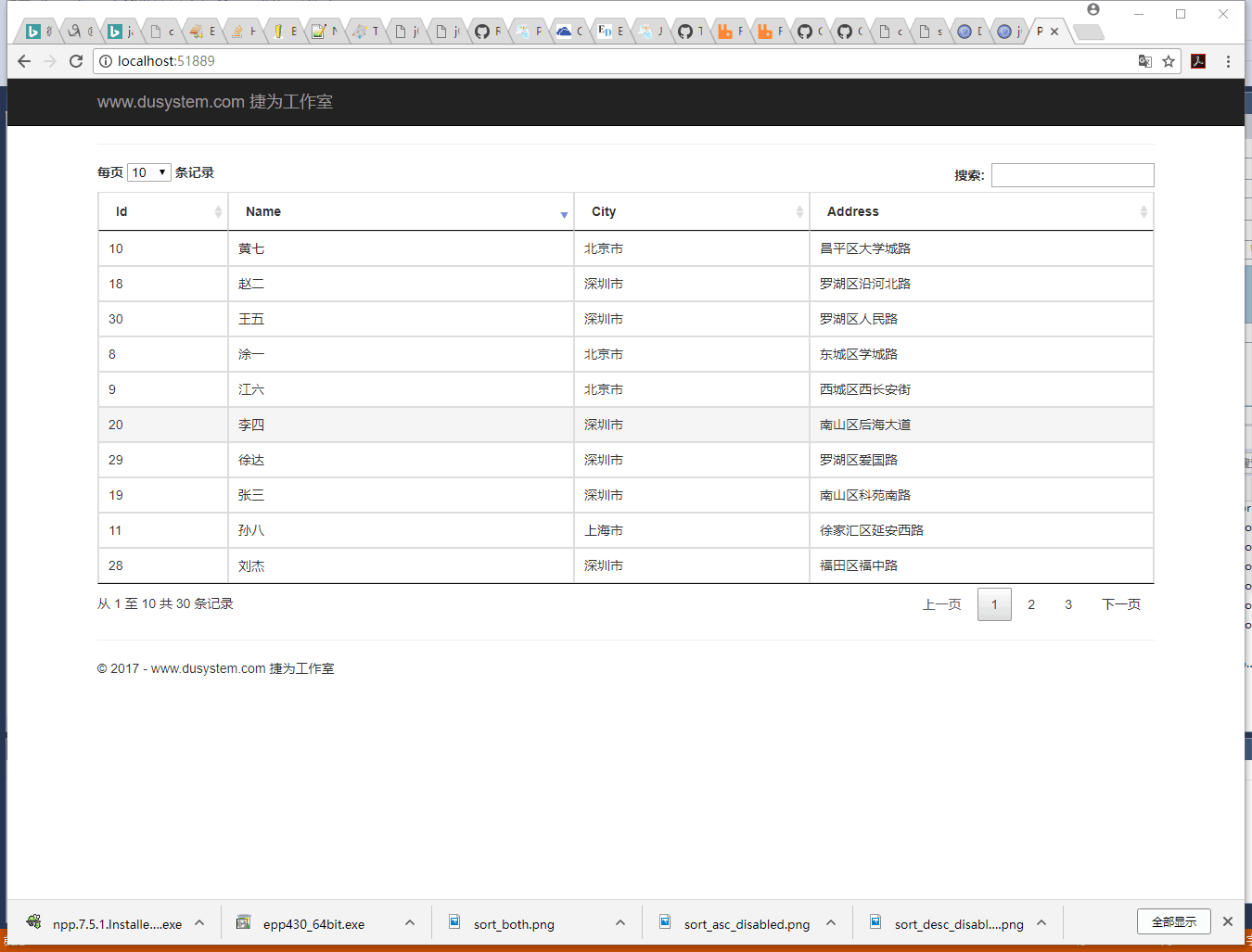
http://www.c-sharpcorner.com/UploadFile/0c1bb2/sorting-paging-searching-in-Asp-Net-mvc-5/
https://dzone.com/articles/table-sorting-pagination
https://datatables.net/
Index.cshtm:
@{

    ViewBag.Title = "Paging Sorting Searching In ASP.NET MVC 5";

}

<script src="~/Scripts/jquery-1.10.2.min.js"></script>

<link rel="stylesheet" type="text/css" href="~/css/jquery.dataTables.min.css">

<script type="text/javascript" language="javascript" src="~/Scripts/jquery.dataTables.min.zh.js" charset="utf-8"></script>

<script>

    $(document).ready(function () {

        //Call EmpDetails jsonResult Method  http://cdn.datatables.net/1.10.10/css/jquery.dataTables.min.css

        $.getJSON("Home/EmpDetails",

        function (json) {

            var tr;

        //Append each row to html table

        for (var i = 0; i < json.length; i++) {

                tr = $('<tr/>');

                tr.append("<td>" + json[i].Id + "</td>");

                tr.append("<td>" + json[i].Name + "</td>");

                tr.append("<td>" + json[i].City + "</td>");

                tr.append("<td>" + json[i].Address + "</td>");

                $('table').append(tr);

        }

        $('#EmpInfo').DataTable();

        });

    });

</script>

<hr />

<div class="form-horizontal">

    <table id="EmpInfo" class="table table-bordered  table-hover">

        <thead>

            <tr>

                <th>Id</th>

                <th>Name</th>

                <th>City</th>

                <th>Address</th>

            </tr>

        </thead>

        <tbody></tbody>

    </table>

</div>
_Layout.cshtml:
<!DOCTYPE html>

<html>

<head>

    <meta charset="utf-8" />

    <meta name="viewport" content="width=device-width, initial-scale=1.0">

    <title>@ViewBag.Title - www.dusystem.com 捷为工作室</title>

    <link href="~/Content/Site.css" rel="stylesheet" type="text/css" />

    <link href="~/Content/bootstrap.min.css" rel="stylesheet" type="text/css" />

    <script src="~/Scripts/modernizr-2.6.2.js"></script>

</head>

<body>

    <div class="navbar navbar-inverse navbar-fixed-top">

        <div class="container">

            <div class="navbar-header">

                <button type="button" class="navbar-toggle" data-toggle="collapse" data-target=".navbar-collapse">

                    <span class="icon-bar"></span>

                    <span class="icon-bar"></span>

                    <span class="icon-bar"></span>

                </button>

                @Html.ActionLink("www.dusystem.com 捷为工作室", "Index", "Home", new { area = "" }, new { @class = "navbar-brand" })

            </div>

            <div class="navbar-collapse collapse">

                <ul class="nav navbar-nav">

                </ul>

            </div>

        </div>

    </div>

    <div class="container body-content">

        @RenderBody()

        <hr />

        <footer>

            <p>© @DateTime.Now.Year - www.dusystem.com 捷为工作室</p>

        </footer>

    </div>

    <script src="~/Scripts/bootstrap.min.js"></script>

</body>

</html>
HomeController.cs:
using PagingSoringInMVC.Models;

using System;

using System.Collections.Generic;

using System.Linq;

using System.Web;

using System.Web.Mvc;

namespace PagingSoringInMVC.Controllers

{

    /// <summary>

    ///

    /// </summary>

    public class HomeController : Controller

    {

        // GET: Home

        [HttpGet]

        public ActionResult Index()

        {

            return View();

        }

        [HttpGet]

        public JsonResult EmpDetails()

        {

            //Creating List

            List<Employee> ObjEmp = new List<Employee>()

        {

            //Adding records to list

            new Employee

            {

                Id = 1, Name = "Vithal Wadje", City = "Latur", Address = "Kabansangvi"

            },

            new Employee

            {

                Id = 2, Name = "Sudhir Wadje", City = "Mumbai", Address = "Kurla"

            },

             new Employee

            {

                Id = 3, Name = "Dinesh Beniwal", City = "New Delhi", Address = "Noida"

            },

            new Employee

            {

                Id = 4, Name = "Dhananjay Kumar", City = "New Delhi", Address = "Delhi"

            },

            new Employee

            {

                Id = 5, Name = "Jitendra Gund", City = "Pune", Address = "Pune"

            },

                   new Employee

            {

                Id = 6, Name = "Anil Kumar", City = "chandigarh", Address = "chandigarh"

            },

            new Employee

            {

                Id = 7, Name = "Ramesh", City = "Mumbai", Address = "Kurla"

            },

            new Employee

            {

                Id = 8, Name = "涂一", City = "北京市", Address = "东城区学城路"

            },

            new Employee

            {

                Id = 9, Name = "江六", City = "北京市", Address = "西城区西长安街"

            },

            new Employee

            {

                Id = 10, Name = "黄七", City = "北京市", Address = "昌平区大学城路"

            },

            new Employee

            {

                Id = 11, Name = "孙八", City = "上海市", Address = "徐家汇区延安西路"

            },

            new Employee

            {

                Id = 12, Name = "Sudhir Wadje", City = "Mumbai", Address = "Kurla"

            },

             new Employee

            {

                Id = 13, Name = "Dinesh Beniwal", City = "New Delhi", Address = "Noida"

            },

               new Employee

            {

                Id = 14, Name = "Dhananjay Kumar", City = "New Delhi", Address = "Delhi"

            },

                 new Employee

            {

                Id = 15, Name = "Jitendra Gund", City = "Pune", Address = "Pune"

            },

                   new Employee

            {

                Id = 16, Name = "Anil Kumar", City = "chandigarh", Address = "chandigarh"

            },

                     new Employee

            {

                Id = 17, Name = "Ramesh", City = "Mumbai", Address = "Kurla"

            },

                       new Employee

            {

                Id = 18, Name = "赵二", City = "深圳市", Address = "罗湖区沿河北路"

            },

                                    new Employee

            {

                Id = 19, Name = "张三", City = "深圳市", Address = "南山区科苑南路"

            },

                                                 new Employee

            {

                Id = 20, Name = "李四", City = "深圳市", Address = "南山区后海大道"

            },

           new Employee

            {

                Id = 21, Name = "Vithal Wadje", City = "Latur", Address = "Kabansangvi"

            },

            new Employee

            {

                Id = 22, Name = "Sudhir Wadje", City = "Mumbai", Address = "Kurla"

            },

             new Employee

            {

                Id = 23, Name = "Dinesh Beniwal", City = "New Delhi", Address = "Noida"

            },

            new Employee

            {

                Id = 24, Name = "Dhananjay Kumar", City = "New Delhi", Address = "Delhi"

            },

            new Employee

            {

            Id = 25, Name = "Jitendra Gund", City = "Pune", Address = "Pune"

            },

            new Employee

            {

                Id = 26, Name = "Anil Kumar", City = "chandigarh", Address = "chandigarh"

            },

            new Employee

            {

                Id = 27, Name = "Ramesh", City = "Mumbai", Address = "Kurla"

            },

             new Employee

            {

                Id = 28, Name = "刘杰", City = "深圳市", Address = "福田区福中路"

            },

            new Employee

            {

                Id = 29, Name = "徐达", City = "深圳市", Address = "罗湖区爱国路"

            },

            new Employee

            {

                Id = 30, Name = "王五", City = "深圳市", Address = "罗湖区人民路"

            },

        };

            //return Json

            return Json(ObjEmp, JsonRequestBehavior.AllowGet);

        }

    }

}
Employee.cs:
using System;

using System.Collections.Generic;

using System.Linq;

using System.Text;

using System.Threading.Tasks;

namespace PagingSoringInMVC.Models

{

    public class Employee

    {

        public int Id { get; set; }

        public string Name { get; set; }

        public string City { get; set; }

        public string Address { get; set; }

    }

}
Csharp:Paging Sorting Searching In ASP.NET MVC 5的更多相关文章
- [转]Paging, Searching and Sorting in ASP.Net MVC 5
本文转自:http://www.c-sharpcorner.com/UploadFile/4b0136/perform-paging-searching-sorting-in-Asp-Net-mvc- ...
- [转]Sorting, Filtering, and Paging with the Entity Framework in an ASP.NET MVC Application (3 of 10)
本文转自:http://www.asp.net/mvc/overview/older-versions/getting-started-with-ef-5-using-mvc-4/sorting-fi ...
- ASP.NET MVC WebGrid – Performing true AJAX pagination and sorting 【转】
ASP.NET MVC WebGrid – Performing true AJAX pagination and sorting FEBRUARY 27, 2012 14 COMMENTS WebG ...
- ASP.NET MVC with Entity Framework and CSS一书翻译系列文章之目录导航
ASP.NET MVC with Entity Framework and CSS是2016年出版的一本比较新的.关于ASP.NET MVC.EF以及CSS技术的图书,我将尝试着翻译本书以供日后查阅. ...
- 【jqGrid for ASP.NET MVC Documentation】.学习笔记.2.jqGrid Model-View-Controller 分离
1 基本 分离代码 和 描述 ,在ASP.NET MVC 应用程序中是非常重要的.因此,jqGrid 的 mvc 模式使用一个共同的网格安装设置,包括 Model ,Controller 和 View ...
- ASP.NET MVC 5 實作 GridView 分頁
本文用 ASP.NET MVC 5 實作一個 GridView,功能包括: 分頁(paging).關鍵字過濾(filtering).排序(sorting).AJAX 非同步執行,外觀上亦支援 Resp ...
- ASP.NET MVC搭建项目后台UI框架—5、Demo演示Controller和View的交互
目录 ASP.NET MVC搭建项目后台UI框架—1.后台主框架 ASP.NET MVC搭建项目后台UI框架—2.菜单特效 ASP.NET MVC搭建项目后台UI框架—3.面板折叠和展开 ASP.NE ...
- ASP.NET MVC搭建项目后台UI框架—6、客户管理(添加、修改、查询、分页)
目录 ASP.NET MVC搭建项目后台UI框架—1.后台主框架 ASP.NET MVC搭建项目后台UI框架—2.菜单特效 ASP.NET MVC搭建项目后台UI框架—3.面板折叠和展开 ASP.NE ...
- ASP.NET MVC搭建项目后台UI框架—7、统计报表
ASP.NET MVC搭建项目后台UI框架—1.后台主框架 ASP.NET MVC搭建项目后台UI框架—2.菜单特效 ASP.NET MVC搭建项目后台UI框架—3.面板折叠和展开 ASP.NET M ...
随机推荐
- 分享Pos函数(比FastPos还要快)
): Integer; ): Integer; 主要用途是搜索字符串中第n个Substr. 经过测试,这2个函数的速度比直接用Pos+Copy快好几倍(如果字符串够长,可能10几倍) 比Pos+Del ...
- Linux和Windows下tomcat开机自启动设置
Linux下tomcat的开机自启动设置 1.修改系统文件rc.local:vi /etc/rc.d/rc.local rc.local是给用户自定义启动时需要执行的文件,和windows里面的“启动 ...
- golang中GOPATH的简单理解
1.为什么要配置GOPATH 配置GOPATH的用意是为了方便项目的部署和构建,以及可以直接使用go get 命令下载第三方的包到自己的项目的src下和相关的执行文件bin目录,和中间文件pkg sr ...
- [EXP]phpBB 3.2.3 - Remote Code Execution
// All greets goes to RIPS Tech // Run this JS on Attachment Settings ACP page var plupload_salt = ' ...
- 各种height 以及判断滚动条是否已拉到页面最底部
DTD已声明 IEdocument.documentElement.scrollHeight 浏览器所有内容高度 ,document.body.scrollHeight 浏览器所有内容高度docu ...
- jq版本的checkbox有radio的单选效果(可得到value值)
<!DOCTYPE html><html> <head> <meta charset="UTF-8"> <title>复 ...
- SQL Server性能优化(15)选择合适的索引
一.关于聚集索引列的选择(参考) 1. 聚集索引所在的列,或者列的组合最好是唯一的. 当我们创建的聚集索引的值不唯一时,SQL Server则无法仅仅通过聚集索引列(也就是关键字)唯一确定一行.此时, ...
- 配置 Nginx 的目录浏览功能
Nginx 默认是不允许列出整个目录的,需要配置 Nginx 自带的 ngx_http_autoindex_module 模块实现目录浏览功能 . location / { alias /opt/fi ...
- unity5.5 ugui使用美术字
文件转载自:http://www.jianshu.com/p/a4e6d1ca3ca0 项目需要使用美术字加强战斗效果表现,按以往NGUI的使用经验,这个应该很简单,随便Google一下都有数篇技术博 ...
- Spring Boot Actuator监控应用
微服务的特点决定了功能模块的部署是分布式的,大部分功能模块都是运行在不同的机器上,彼此通过服务调用进行交互,前后台的业务流会经过很多个微服务的处理和传递,出现了异常如何快速定位是哪个环节出现了问题? ...