
UEditor使用总结(与SpringMVC整合)
最近再弄富文本框,选择了UEditor,原因是:界面漂亮,百度开源的
然而,
开启整合之路(怎么做)
1.下载插件
下载只有将插件放在Webapp下,如图

2、修改
导入之后我们就需要修改一些参数已满足我们的需求。如图
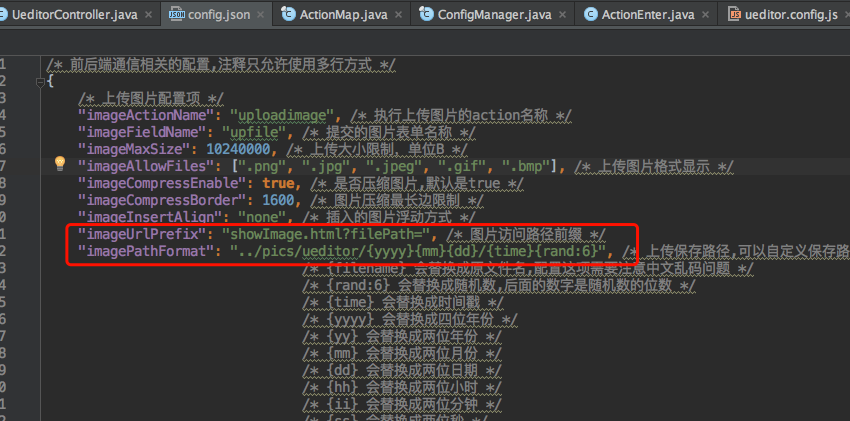
我们要修改图片的保存路径,因为插件默认是保存在项目部署的路径下,每次重新部署图片都会消失,所以我们需要将图片单独保存到一个图片服务器下,展示图片的controller如下
@RequestMapping(value = "/showImage")

public void showImage(HttpServletRequest request, HttpServletResponse response,String filePath){

String rootPath=request.getSession().getServletContext().getRealPath("/");

String absolutePath=rootPath+filePath;

//截取文件后缀名

String suffix=absolutePath.substring(absolutePath.lastIndexOf(".")+1);

String responseType = "image/jpeg";

if ("png".equals(suffix)) {

responseType = "image/png";

} else if ("jpg".equals(suffix) || "jpeg".equals(suffix)) {

responseType = "image/jpeg";

} else if ("gif".equals(suffix)) {

responseType = "image/gif";

}

response.setContentType(responseType);

FileInputStream inputStream=null;

OutputStream os=null;

try {

int count;

inputStream=new FileInputStream(absolutePath);

os=response.getOutputStream();

byte[] buffer=new byte[1024*1024];

while ((count=inputStream.read(buffer))!=-1){

os.write(buffer,0,count);

}

}catch (IOException ex){

logger.error("图片找不到{}",ex);

}finally {

if (inputStream!=null){

try {

inputStream.close();

} catch (IOException e) {

e.printStackTrace();

}

}

if (os!=null){

try {

os.flush();

os.close();

} catch (IOException e) {

e.printStackTrace();

}

}

}

}
如果不想改的话我们这样就弄好了,由于我的项目用的springMVC,如果你在web.xml那边的配置如图
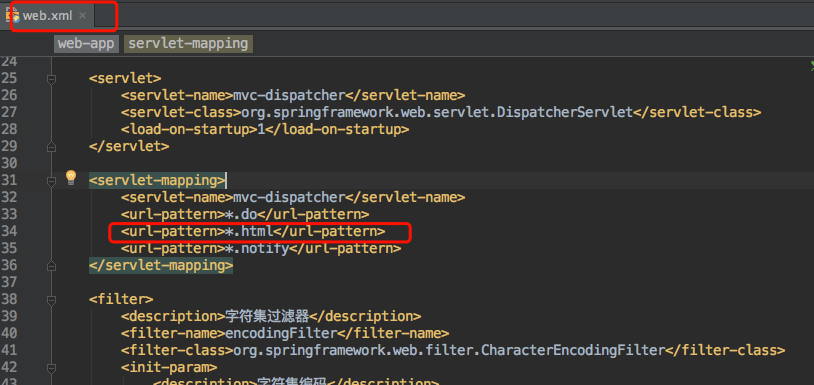
多图上传时有可能会碰到弹出框不能显示的问题
因为弹出框的静态资源是image.html,这个image.html没有对应的controller的话,被DispatcherServlet拦截之后,就会找不到controller,然后就会抛出404的错误,目前暂时的处理办法是,修个image.html的后缀为htm,使其不被拦截。
3.使用
前台使用
<script type="text/javascript" src="../static/ueditor/ueditor.config.js"></script>

<script type="text/javascript" src="../static/ueditor/ueditor.all.js"></script>

<input type="hidden" class="span12 required" name="info" id="info" value='${mallProduct.info}' />

<script id="editor" type="text/plain" style="width:96%;height:300px;" class="required"></script>

var ue = UE.getEditor('editor');

ue.ready(function() {

ue.setContent($("#info").val());

});
相关的代码结构以及原理
UEditor的上传功能是在controller.jsp中实现的
<%@ page language="java" contentType="text/html; charset=UTF-8"

pageEncoding="UTF-8"%>

<%@ page import="com.baidu.ueditor.ActionEnter" %>

<%@ page trimDirectiveWhitespaces="true" %>

<%

request.setCharacterEncoding( "utf-8" );

response.setHeader("Content-Type" , "text/html");

String rootPath = application.getRealPath( "/" );

out.write( new ActionEnter( request, rootPath ).exec() );

%>
入口在ueditor.config.js中。
=========================================================================
完美的分割线
如果你觉得用controller.jsp作为上传服务不妥的话,我们也可以修改将上传代码放入Controller中
代码如下:
package com.lyz.controller;

import com.baidu.ueditor.ActionEnter;

import org.slf4j.Logger;

import org.slf4j.LoggerFactory;

import org.springframework.stereotype.Controller;

import org.springframework.web.bind.annotation.RequestMapping;

import javax.servlet.http.HttpServletRequest;

import javax.servlet.http.HttpServletResponse;

import java.io.FileInputStream;

import java.io.IOException;

import java.io.OutputStream;

import java.io.PrintWriter;

/**

* Created by xiangwei on 2017/7/16.

*/

@Controller

@RequestMapping("/ueditor")

public class UeditorController {

private Logger logger= LoggerFactory.getLogger(UeditorController.class);

@RequestMapping(value = "/dispatch")

public void config(HttpServletRequest request, HttpServletResponse response) {

response.setContentType("application/json");

String rootPath = request.getSession().getServletContext().getRealPath("/");

response.setHeader("Content-Type" , "text/html");

try {

String exec = new ActionEnter(request, rootPath).exec();

PrintWriter writer = response.getWriter();

writer.write(exec);

writer.flush();

writer.close();

} catch (IOException e) {

logger.error("图片上传失败!");

e.printStackTrace();

}

}

}
然后修改ueditor.config.js文件中的
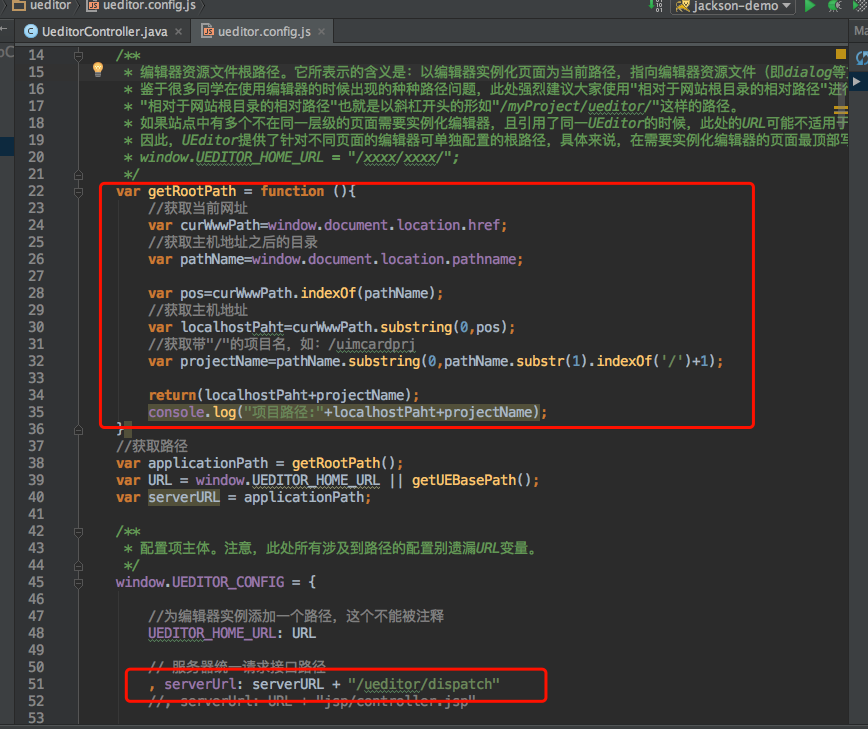
再修改ConfigManager类的getConfigPath()方法,将路径指定到config.json的路径。
如:
private String getConfigPath () {

//    return this.parentPath + File.separator + ConfigManager.configFileName;

return this.rootPath+File.separator+"static/ueditor/"+"jsp"+File.separator+ConfigManager.configFileName;

}
UEditor使用总结(与SpringMVC整合)的更多相关文章
- springMVC -- 整合UEditor(富文本编辑器)
工作中需要用到UEditor编辑文本,在与springMVC进行整合时,出现了一些问题,结果导致,在进行图片上传时出现如下提示: 上网查询了很多相关资料,此处简要记录下,防止以后遇到类似问题. 一种方 ...
- (转)Dubbo与Zookeeper、SpringMVC整合和使用
原文地址: https://my.oschina.net/zhengweishan/blog/693163 Dubbo与Zookeeper.SpringMVC整合和使用 osc码云托管地址:http: ...
- SSM整合(三):Spring4与Mybatis3与SpringMVC整合
源码下载 SSMDemo 上一节整合了Mybatis3与Spring4,接下来整合SpringMVC! 说明:整合SpringMVC必须是在web项目中,所以前期,新建的就是web项目! 本节全部采用 ...
- Dubbo与Zookeeper、SpringMVC整合和使用(负载均衡、容错)
互联网的发展,网站应用的规模不断扩大,常规的垂直应用架构已无法应对,分布式服务架构以及流动计算架构势在必行,Dubbo是一个分布式服务框架,在这种情况下诞生的.现在核心业务抽取出来,作为独立的服务,使 ...
- springmvc整合fastjson
<?xml version="1.0" encoding="UTF-8"?> <beans xmlns="http://www.sp ...
- 【转】Dubbo_与Zookeeper、SpringMVC整合和使用(负载均衡、容错)
原文链接:http://blog.csdn.net/congcong68/article/details/41113239 互联网的发展,网站应用的规模不断扩大,常规的垂直应用架构已无法应对,分布式服 ...
- 160906、Dubbo与Zookeeper、SpringMVC整合和使用(负载均衡、容错)
互联网的发展,网站应用的规模不断扩大,常规的垂直应用架构已无法应对,分布式服务架构以及流动计算架构势在必行,Dubbo是一个分布式服务框架,在这种情况下诞生的.现在核心业务抽取出来,作为独立的服务,使 ...
- Springmvc整合tiles框架简单入门示例(maven)
Springmvc整合tiles框架简单入门示例(maven) 本教程基于Springmvc,spring mvc和maven怎么弄就不具体说了,这边就只简单说tiles框架的整合. 先贴上源码(免积 ...
- SpringMVC整合Tiles框架
SpringMVC整合Tiles框架 Tiles组件 tiles-iconfig.xml Tiles是一个JSP布局框架. Tiles框架为创建Web页面提供了一种模板机制,它能将网页的布局和内容分离 ...
随机推荐
- ext4文件系统制作 - make_ext4fs 参数介绍【转】
本文转载自:http://blog.csdn.net/u011784994/article/details/53816976 make_ext4fs用于Android平台上制作ext4文件系统的镜像. ...
- poi读取word2003(.doc文档)中的表格
poi读取word2003(.doc文档)中的表格 Jakarta POI 是apache的子项目,目标是处理ole2对象.它提供了一组操纵Windows文档的Java API.在网上见到好多通过po ...
- 数据结构C++,栈的实现
#include <iostream>#include <cstdlib> template<class T>void changeLength1D(T*& ...
- Flink之流处理理论基础
目录 Introduction to Stateful Stream Processing Traditional Data Infrastructures Stateful Stream Proce ...
- Drainage Ditches(网络流(EK算法))
计算最大流,EK算法模板题. #include <stdio.h> #include <string.h> #include <queue> using names ...
- α&β测试的定义及结束的标准
α测试在系统开发接近完成时对应用系统的测试:测试后仍然会有少量的设计变更.这种测试一般由最终用户或其他人员完成,不能由程序或测试员完成. β测试当开发和测试根本完成时所做的用例,最终的错误和问题需要在 ...
- hadoop单机环境配置
1.配置一台linux服务器(当前使用CentOS7)及一些基本设置 1.1在wmware下制作一台centos服务器(桥接模式) 并设置静态ip (编辑/etc/sysmconfig ...
- 在 ef 中执行 DbContext.Table.AddRange(Enitites).ToList() 会发生什么
在 ef 中执行 DbContext.Table.AddRange(Enitites).ToList() 会发生什么 昨天和朋友摸鱼,无意之间聊到了执行 DbContext.Table.AddRang ...
- BZOJ 1724: [Usaco2006 Nov]Fence Repair 切割木板 贪心 + 堆 + 反向思考
Description Farmer John想修理牧场栅栏的某些小段.为此,他需要N(1<=N<=20,000)块特定长度的木板,第i块木板的长度为Li(1<=Li<=50, ...
- Keras手写识别例子(1)----softmax
转自:https://morvanzhou.github.io/tutorials/machine-learning/keras/2-2-classifier/#测试模型 下载数据: # downlo ...