
flume中sink到hdfs,文件系统频繁产生文件和出现乱码,文件滚动配置不起作用?
问题描述


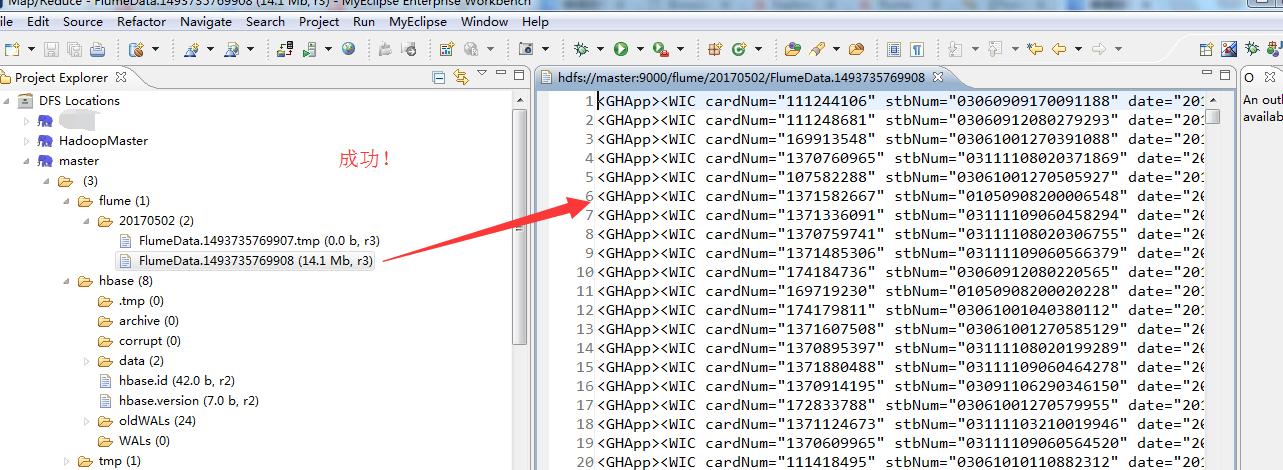
解决办法
先把这个hdfs目录下的数据删除。并修改配置文件flume-conf.properties,重新采集。
# Licensed to the Apache Software Foundation (ASF) under one

# or more contributor license agreements.  See the NOTICE file

# distributed with this work for additional information

# regarding copyright ownership.  The ASF licenses this file

# to you under the Apache License, Version 2.0 (the

# "License"); you may not use this file except in compliance

# with the License.  You may obtain a copy of the License at

#

#  http://www.apache.org/licenses/LICENSE-2.0

#

# Unless required by applicable law or agreed to in writing,

# software distributed under the License is distributed on an

# "AS IS" BASIS, WITHOUT WARRANTIES OR CONDITIONS OF ANY

# KIND, either express or implied.  See the License for the

# specific language governing permissions and limitations

# under the License.

# The configuration file needs to define the sources,

# the channels and the sinks.

# Sources, channels and sinks are defined per agent,

# in this case called 'agent'

agent1.sources = spool-source1

agent1.sinks = hdfs-sink1

agent1.channels = ch1

#Define and configure an Spool directory source

agent1.sources.spool-source1.channels=ch1

agent1.sources.spool-source1.type=spooldir

agent1.sources.spool-source1.spoolDir=/home/hadoop/data/flume/sqooldir//--/

agent1.sources.spool-source1.ignorePattern=event(_\d{}\-d{}\-d{}\_d{}\_d{})?\.log(\.COMPLETED)?

agent1.sources.spool-source1.deserializer.maxLineLength=

#Configure channel

agent1.channels.ch1.type = file

agent1.channels.ch1.checkpointDir = /home/hadoop/data/flume/checkpointDir

agent1.channels.ch1.dataDirs = /home/hadoop/data/flume/dataDirs

#Define and configure a hdfs sink

agent1.sinks.hdfs-sink1.channel = ch1

agent1.sinks.hdfs-sink1.type = hdfs

agent1.sinks.hdfs-sink1.hdfs.path = hdfs://master:9000/flume/%Y%m%d

agent1.sinks.hdfs-sink1.hdfs.useLocalTimeStamp = true

agent1.sinks.hdfs-sink1.hdfs.rollInterval =

agent1.sinks.hdfs-sink1.hdfs.rollSize =

agent1.sinks.hdfs-sink1.hdfs.rollCount =

agent1.sinks.hdfs-sink1.hdfs.minBlockReplicas=

agent1.sinks.hdfs-sink1.hdfs.idleTimeout=

#agent1.sinks.hdfs-sink1.hdfs.codeC = snappy

agent1.sinks.hdfs-sink1.hdfs.fileType=DataStream

#agent1.sinks.hdfs-sink1.hdfs.writeFormat=Text

# For each one of the sources, the type is defined

#agent.sources.seqGenSrc.type = seq

# The channel can be defined as follows.

#agent.sources.seqGenSrc.channels = memoryChannel

# Each sink's type must be defined

#agent.sinks.loggerSink.type = logger

#Specify the channel the sink should use

#agent.sinks.loggerSink.channel = memoryChannel

# Each channel's type is defined.

#agent.channels.memoryChannel.type = memory

# Other config values specific to each type of channel(sink or source)

# can be defined as well

# In this case, it specifies the capacity of the memory channel

#agent.channels.memoryChannel.capacity =
教大家一招:大家在这些如flume的配置文件,最好还是去看官网,学会扩展,别只局限于别人的博客的文档,当然可以作为参考。关键还是来源于官方!
[hadoop@master sqooldir]$ $HADOOP_HOME/bin/hadoop fs -rm -r /flume/

// :: WARN util.NativeCodeLoader: Unable to load native-hadoop library for your platform... using builtin-java classes where applicable

// :: INFO fs.TrashPolicyDefault: Namenode trash configuration: Deletion interval =  minutes, Emptier interval =  minutes.

Deleted /flume/

[hadoop@master sqooldir]$


重新开启flume

[hadoop@master flume]$ pwd

/home/hadoop/app/flume

[hadoop@master flume]$ bin/flume-ng agent -n agent1 -f conf/flume-conf.properties


如果你的问题,还有副本数的问题,自行去解决。将$HADOOP_HOME/etc/hadoop/下的hdfs-site.xml的属性(master、slave1和slave2都要修改)
<property>

                <name>dfs.replication</name>

                <value></value>

                <description>Set to  for pseudo-distributed mode,Set to  for distributed mode,Set to  for distributed mode.</description>

 </property>
记得重启hadoop集群。

flume中sink到hdfs,文件系统频繁产生文件和出现乱码,文件滚动配置不起作用?的更多相关文章
- flume中sink到hdfs,文件系统频繁产生文件,文件滚动配置不起作用?
在测试hdfs的sink,发现sink端的文件滚动配置项起不到任何作用,配置如下: a1.sinks.k1.type=hdfs a1.sinks.k1.channel=c1 a1.sinks.k1.h ...
- HDFS文件系统上传时序图 PB级文件存储时序图
自己设计的时序图. 来自为知笔记(Wiz)
- 大数据学习笔记之Hadoop(二):HDFS文件系统
文章目录 一 HDFS概念 1.1 概念 1.2 组成 1.3 HDFS 文件块大小 二 HFDS命令行操作 三 HDFS客户端操作 3.1 eclipse环境准备 3.1.1 jar包准备 3.2 ...
- Flume中的HDFS Sink配置参数说明【转】
转:http://lxw1234.com/archives/2015/10/527.htm 关键字:flume.hdfs.sink.配置参数 Flume中的HDFS Sink应该是非常常用的,其中的配 ...
- Flume监听文件目录sink至hdfs配置
一:flume介绍 Flume是一个分布式.可靠.和高可用的海量日志聚合的系统,支持在系统中定制各类数据发送方,用于收集数据:同时,Flume提供对数据进行简单处理,并写到各种数据接受方(可定制)的能 ...
- Flume实时监控目录sink到hdfs,再用sparkStreaming监控hdfs的这个目录,对数据进行计算
目标:Flume实时监控目录sink到hdfs,再用sparkStreaming监控hdfs的这个目录,对数据进行计算 1.flume的配置,配置spoolDirSource_hdfsSink.pro ...
- 在Spark shell中基于HDFS文件系统进行wordcount交互式分析
Spark是一个分布式内存计算框架,可部署在YARN或者MESOS管理的分布式系统中(Fully Distributed),也可以以Pseudo Distributed方式部署在单个机器上面,还可以以 ...
- 我理解中的Hadoop HDFS分布式文件系统
一,什么是分布式文件系统,分布式文件系统能干什么 在学习一个文件系统时,首先我先想到的是,学习它能为我们提供什么样的服务,它的价值在哪里,为什么要去学它.以这样的方式去理解它之后在日后的深入学习中才能 ...
- 将存储在本地的大量分散的小文件,合并并保存在hdfs文件系统中
import java.io.BufferedInputStream; import java.io.File; import java.io.FileInputStream; import java ...
随机推荐
- Java类和对象6
按要求编写Java应用程序. (1)建立一个名叫Cat的类: 属性:姓名.毛色.年龄 行为:显示姓名.喊叫 (2)编写主类: 创建一个对象猫,姓名为“妮妮”,毛色为“灰色”,年龄为2岁,在屏幕上输出该 ...
- 3339: Rmq Problem
Time Limit: 20 Sec Memory Limit: 128 MBSubmit: 1269 Solved: 665[Submit][Status][Discuss] Descripti ...
- PostgreSQL Replication之第四章 设置异步复制(7)
4.7 冲突管理 在PostgreSQL中,流复制数据仅在一个方向流动.XLOG由master提供给几个slave,这些slave消耗事务日志并为您提供一个较好的数据备份.您可能想知道这怎么会导致冲突 ...
- 大数问题(相加) A + B
I have a very simple problem for you. Given two integers A and B, your job is to calculate the Sum o ...
- ES6学习笔记(十四)Generator函数
清明时节雨纷纷,路上行人欲断魂. 借问酒家何处有,牧童遥指杏花村. 二零一九年农历三月初一,清明节. 1.简介 1.1.基本概念 Generator 函数也是 ES6 提供的一种异步编程解决方案,据说 ...
- [Bug]Python3.x SyntaxError: 'ascii' codec can't decode byte 0xe4 in position
安装arch后就没再用python了 昨天管服务器的大佬在跑贝叶斯分类器的时候发现正确率有问题 我赶紧去做优化,然后就有这样的报错 Python 3.6.4 (default, Jan 5 2018, ...
- CF983E NN country(倍增,差分)
题意 给定一棵树和若干条路线,每条路线相当于树上 x,y 之间的路径,途径路径上的每个点 给出若干个询问,每次询问从 u 到 v 至少需要利用几条路线 N,M,Q≤200000 题解 构建倍增数组g[ ...
- const 和 pointer
一般的: const对pointer的修饰有两种: const type * p/type const * p:表示指针指向的变量的值不能改变,无论指针改变为指向哪一个变量 type * const ...
- HDU 2253 Longest Common Subsequence Again
其实这个题我还不会,学长给了一个代码交上去过了,据说用到了一种叫做位压缩的技术,先贴代码吧,以后看懂了再来写 #include <stdio.h> #include <string. ...
- 【uva 1025】A Spy in the Metro
[题目链接]:https://uva.onlinejudge.org/index.php?option=com_onlinejudge&Itemid=8&page=show_probl ...