
性能测试以及对redis
Ignite性能测试以及对redis的对比
测试方法
为了对Ignite做一个基本了解,做了一个性能测试,测试方法也比较简单主要是针对client模式,因为这种方法和使用redis的方式特别像。测试方法很简单主要是下面几点:
- 不作参数优化,默认配置进行测试
- 在一台linux服务器上部署Ignite服务端,然后自己的笔记本作客户端
- 按1,10,20,50,100,200线程进行测试
测试环境说明
服务器:
[09:36:56] ver. 1.7.0#20160801-sha1:383273e3

[09:36:56] OS: Linux 2.6.32-279.el6.x86_64 amd64

[09:36:56] VM information: Java(TM) SE Runtime Environment 1.7.0_07-b10 Oracle Corporation Java HotSpot(TM) 64-Bit Server VM 23.3-b01

[09:36:56] Configured plugins:

[09:36:56]   ^-- None

[09:36:56]

[09:36:56] Security status [authentication=off, tls/ssl=off]
CPU:4核
内存8GB
网卡100M
虚拟机
客户机:
[13:05:32] ver. 1.7.0#20160801-sha1:383273e3

[13:05:32] OS: Windows 7 6.1 amd64

[13:05:32] VM information: Java(TM) SE Runtime Environment 1.8.0_40-b26 Oracle Corporation Java HotSpot(TM) 64-Bit Server VM 25.40-b25

[13:05:32] Initial heap size is 128MB (should be no less than 512MB, use -Xms512m -Xmx512m).

[13:05:34] Configured plugins:

[13:05:34]   ^-- None

[13:05:34]

[13:05:35] Security status [authentication=off, tls/ssl=off]

[13:05:51] Performance suggestions for grid  (fix if possible)

[13:05:51] To disable, set -DIGNITE_PERFORMANCE_SUGGESTIONS_DISABLED=true

[13:05:51]   ^-- Decrease number of backups (set 'backups' to 0)
CPU:4核,i5-4210u
内存8GB
笔记本win7 64位
网卡:100M
测试代码
package org.j2server.j2cache.cache.iginte;

import java.util.Arrays;

import org.apache.ignite.Ignite;

import org.apache.ignite.IgniteCache;

import org.apache.ignite.Ignition;

import org.apache.ignite.cache.CacheMode;

import org.apache.ignite.configuration.CacheConfiguration;

import org.apache.ignite.configuration.IgniteConfiguration;

import org.apache.ignite.spi.discovery.tcp.TcpDiscoverySpi;

import org.apache.ignite.spi.discovery.tcp.ipfinder.vm.TcpDiscoveryVmIpFinder;

public class IgniteTest {

    //测试的数据行数

    private static final Integer test_rows = 50000;

    private static final Integer thread_cnt = 10;

    private static final String cacheName = "Ignite Cache";

    private static Ignite ignite;

    private static boolean client_mode = false;

    static {

        getIgnite();

    }

    public static void main(String[] args) {

        MultiThread();

    }

    private static Ignite getIgnite() {

        if (ignite == null) {

            TcpDiscoverySpi spi = new TcpDiscoverySpi();

            TcpDiscoveryVmIpFinder ipFinder = new TcpDiscoveryVmIpFinder();

            ipFinder.setAddresses(Arrays.asList("192.168.49.204"));

            spi.setIpFinder(ipFinder);

            CacheConfiguration cacheConfiguration = new CacheConfiguration<String, DataClass>();

            cacheConfiguration.setCacheMode(CacheMode.PARTITIONED);

            cacheConfiguration.setBackups(1);

            IgniteConfiguration cfg = new IgniteConfiguration();

            cfg.setClientMode(client_mode);

            cfg.setDiscoverySpi(spi);

            cfg.setCacheConfiguration(cacheConfiguration);

            ignite = Ignition.start(cfg);

        }

        System.out.println("是否客户端模式:" + client_mode);

        return ignite;

    }

    private static void MultiThread() {

        System.out.println("==================================================================");

        System.out.println("开始测试多线程写入[线程数:"+thread_cnt+"]");

        Long startTime = System.currentTimeMillis();

        Thread[] threads = new Thread[thread_cnt];

        Ignite ignite = getIgnite();

        IgniteCache<String, DataClass> cache = ignite.getOrCreateCache(cacheName);

        for (int i = 0; i < threads.length; i++) {

            threads[i] = new Thread(new TestThread(true, cache));

        }

        for (int i = 0; i< threads.length; i++) {

            threads[i].start();

        }

        for(Thread thread : threads){

            try {

                thread.join();

            } catch (InterruptedException e) {

                e.printStackTrace();

            }

        }

        Long endTime=System.currentTimeMillis(); //获取结束时间

        float interval = endTime-startTime == 0 ? 1 : endTime-startTime;

        float tpms = (float)test_rows/interval;

        System.out.println("程序运行时间: "+ interval+"ms");

        System.out.println("每毫秒写入:"+tpms+"条。");

        System.out.println("每秒写入:"+tpms*1000+"条。");

        System.out.println("==================================================================");

        System.out.println("开始测试多线程读取[线程数:"+thread_cnt+"]");

        startTime = System.currentTimeMillis();

        Thread[] readthreads = new Thread[thread_cnt];

        for (int i = 0; i < readthreads.length; i++) {

            readthreads[i] = new Thread(new TestThread(false, cache));

        }

        for (int i = 0; i< readthreads.length; i++) {

            readthreads[i].start();

        }

        for(Thread thread : readthreads){

            try {

                thread.join();

            } catch (InterruptedException e) {

                e.printStackTrace();

            }

        }

        endTime=System.currentTimeMillis(); //获取结束时间

        interval = endTime-startTime == 0 ? 1 : endTime-startTime;

        tpms = (float)test_rows/interval;

        System.out.println("程序运行时间: "+ interval+"ms");

        System.out.println("每毫秒读取:"+tpms+"条。");

        System.out.println("每秒读取:"+tpms*1000+"条。");

    }

    static class TestThread implements Runnable {

        private boolean readMode = true;

        private IgniteCache<String, DataClass> cache;

        public TestThread(boolean readMode, IgniteCache<String, DataClass> cache){

            this.readMode = readMode;

            this.cache = cache;

        }

        @Override

        public void run() {

            for (int i = 0; i < test_rows/thread_cnt; i++) {

                if (this.readMode) {

                    cache.get(Integer.toString(i));

                } else {

                    DataClass dc = new DataClass();

                    dc.setName(Integer.toString(i));

                    dc.setValue(i);

                    dc.setStrValue("asdfadsfasfda");

                    cache.put(Integer.toString(i), dc);

                }

            }

        }

    }

}

import java.io.Serializable;

public class DataClass implements Serializable{

    private String name;

    private long value;

    private String strValue;

    public String getName() {

        return name;

    }

    public void setName(String name) {

        this.name = name;

    }

    public long getValue() {

        return value;

    }

    public void setValue(long value) {

        this.value = value;

    }

    public String getStrValue() {

        return strValue;

    }

    public void setStrValue(String strValue) {

        this.strValue = strValue;

    }

}
测试数据
最终测试的结果还是有点意思,随着线程的增长读写性能大幅提升,但是到了200的时候就开始下降。下面是测试数据:
[12:53:40] Topology snapshot [ver=20, servers=1, clients=1, CPUs=8, heap=2.8GB]

==================================================================

开始测试多线程写入[线程数:1]

程序运行时间: 49066.0ms

每毫秒写入:1.0190356条。

每秒写入:1019.0356条。

==================================================================

开始测试多线程读取[线程数:1]

程序运行时间: 51739.0ms

每毫秒读取:0.966389条。

每秒读取:966.389条。

[12:56:22] Topology snapshot [ver=22, servers=1, clients=1, CPUs=8, heap=2.8GB]

==================================================================

开始测试多线程写入[线程数:10]

程序运行时间: 6215.0ms

每毫秒写入:8.045053条。

每秒写入:8045.0527条。

==================================================================

开始测试多线程读取[线程数:10]

程序运行时间: 6526.0ms

每毫秒读取:7.661661条。

每秒读取:7661.661条。

[12:57:04] Topology snapshot [ver=24, servers=1, clients=1, CPUs=8, heap=2.8GB]

==================================================================

开始测试多线程写入[线程数:20]

程序运行时间: 4353.0ms

每毫秒写入:11.486331条。

每秒写入:11486.331条。

==================================================================

开始测试多线程读取[线程数:20]

程序运行时间: 3768.0ms

每毫秒读取:13.269639条。

每秒读取:13269.639条。

[12:57:34] Topology snapshot [ver=26, servers=1, clients=1, CPUs=8, heap=2.8GB]

==================================================================

开始测试多线程写入[线程数:50]

程序运行时间: 2657.0ms

每毫秒写入:18.818216条。

每秒写入:18818.217条。

==================================================================

开始测试多线程读取[线程数:50]

程序运行时间: 2138.0ms

每毫秒读取:23.386343条。

每秒读取:23386.344条。

[12:58:00] Topology snapshot [ver=28, servers=1, clients=1, CPUs=8, heap=2.8GB]

==================================================================

开始测试多线程写入[线程数:100]

程序运行时间: 2095.0ms

每毫秒写入:23.866348条。

每秒写入:23866.348条。

==================================================================

开始测试多线程读取[线程数:100]

程序运行时间: 1764.0ms

每毫秒读取:28.344671条。

每秒读取:28344.672条。

[12:59:19] Topology snapshot [ver=30, servers=1, clients=1, CPUs=8, heap=2.8GB]

==================================================================

开始测试多线程写入[线程数:200]

程序运行时间: 2333.0ms

每毫秒写入:21.431633条。

每秒写入:21431.633条。

==================================================================

开始测试多线程读取[线程数:200]

程序运行时间: 2049.0ms

每毫秒读取:24.402147条。

每秒读取:24402.146条。
用图形看看比较直观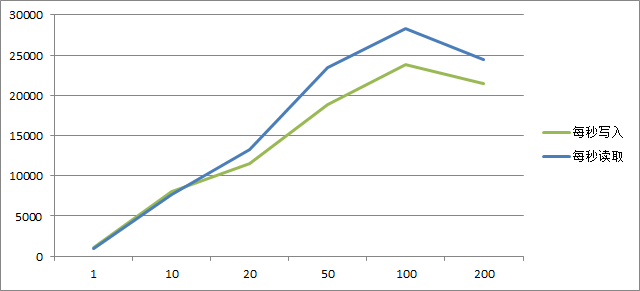
不使用客户端模式
只不过我发现如果不使用client_mode,也就是都是server模式时写入性能还是很强的,但是读取有点搓。
[14:15:02] Topology snapshot [ver=22, servers=2, clients=0, CPUs=8, heap=2.8GB]

是否客户端模式:false

==================================================================

开始测试多线程写入[线程数:1]

是否客户端模式:false

程序运行时间: 828.0ms

每毫秒写入:60.386475条。

每秒写入:60386.477条。

==================================================================

开始测试多线程读取[线程数:1]

程序运行时间: 28819.0ms

每毫秒读取:1.7349665条。

每秒读取:1734.9666条。

[14:08:55] Topology snapshot [ver=10, servers=2, clients=0, CPUs=8, heap=2.8GB]

是否客户端模式:false

==================================================================

开始测试多线程写入[线程数:10]

是否客户端模式:false

程序运行时间: 813.0ms

每毫秒写入:61.500614条。

每秒写入:61500.613条。

==================================================================

开始测试多线程读取[线程数:10]

程序运行时间: 5965.0ms

每毫秒读取:8.38223条。

每秒读取:8382.2295条。

[14:09:48] Topology snapshot [ver=12, servers=2, clients=0, CPUs=8, heap=2.8GB]

是否客户端模式:false

==================================================================

开始测试多线程写入[线程数:20]

是否客户端模式:false

程序运行时间: 812.0ms

每毫秒写入:61.576355条。

每秒写入:61576.355条。

==================================================================

开始测试多线程读取[线程数:20]

程序运行时间: 5157.0ms

每毫秒读取:9.6955595条。

每秒读取:9695.56条。

[14:10:25] Topology snapshot [ver=14, servers=2, clients=0, CPUs=8, heap=2.8GB]

是否客户端模式:false

==================================================================

开始测试多线程写入[线程数:50]

是否客户端模式:false

程序运行时间: 686.0ms

每毫秒写入:72.8863条。

每秒写入:72886.3条。

==================================================================

开始测试多线程读取[线程数:50]

程序运行时间: 4321.0ms

每毫秒读取:11.571396条。

每秒读取:11571.3955条。

[14:11:01] Topology snapshot [ver=16, servers=2, clients=0, CPUs=8, heap=2.8GB]

是否客户端模式:false

==================================================================

开始测试多线程写入[线程数:100]

是否客户端模式:false

程序运行时间: 830.0ms

每毫秒写入:60.240963条。

每秒写入:60240.965条。

==================================================================

开始测试多线程读取[线程数:100]

程序运行时间: 3963.0ms

每毫秒读取:12.616705条。

每秒读取:12616.705条。

[14:13:58] Topology snapshot [ver=20, servers=2, clients=0, CPUs=8, heap=2.8GB]

是否客户端模式:false

==================================================================

开始测试多线程写入[线程数:200]

是否客户端模式:false

程序运行时间: 1014.0ms

每毫秒写入:49.309666条。

每秒写入:49309.664条。

==================================================================

开始测试多线程读取[线程数:200]

程序运行时间: 3179.0ms

每毫秒读取:15.728216条。

每秒读取:15728.216条。
用图形看看比较直观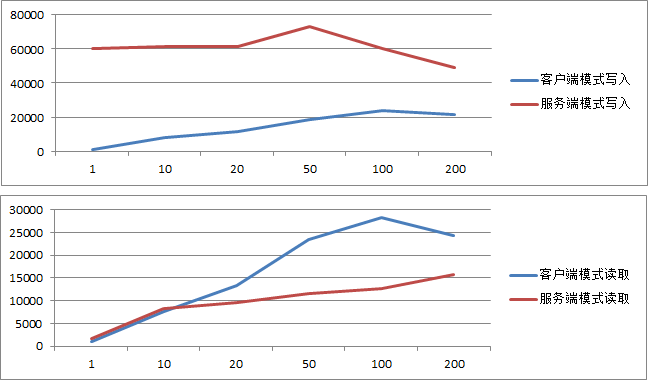
从这个数据可以看出来,在这种都是服务端的模式下,写入性能基本稳定,在达到200线程时出现衰减;而读取则基本是线性的,到100线程差不多也就到顶了。
与redis的对比
原本是想和redis作一个对比测试的,先是做了redis的测试。redis客户端用的jedis2.8.1,同时服务端用的是redis3.2.2,其他的环境和上面的一样。
结果测试数据发现redis和ignite使用客户端模式时竟然很相近。所以我怀疑是因为我对redis不了解redis没作优化导致的?但是Ignite我也是直接启动的,一点优化也没作,还是说测试的代码写法不对呢?
下面是redis的测试代码
import redis.clients.jedis.Jedis;

public class redis {

    private static final String ip = "192.168.49.200";

    private static final String auth = "your pwd";

    private static final Integer port = 6379;

    //测试的数据行数

    private static final Integer test_rows = 50000;

    //线程数

    private static final Integer thread_cnt = 200;

    public static void main(String[] args) {

        MultiThread();

    }

    private static void MultiThread() {

        System.out.println("==================================================================");

        System.out.println("开始测试多线程写入[线程数:"+thread_cnt+"]");

        Long startTime = System.currentTimeMillis();

        Thread[] threads = new Thread[thread_cnt];

        for (int i = 0; i < threads.length; i++) {

            threads[i] = new Thread(new TestThread(true));

        }

        for (int i = 0; i< threads.length; i++) {

            threads[i].start();

        }

        for(Thread thread : threads){

            try {

                thread.join();

            } catch (InterruptedException e) {

                e.printStackTrace();

            }

        }

        Long endTime=System.currentTimeMillis(); //获取结束时间

        float interval = endTime-startTime == 0 ? 1 : endTime-startTime;

        float tpms = (float)test_rows/interval;

        System.out.println("程序运行时间: "+ interval+"ms");

        System.out.println("每毫秒写入:"+tpms+"条。");

        System.out.println("每秒写入:"+tpms*1000+"条。");

        System.out.println("==================================================================");

        System.out.println("开始测试多线程写入[线程数:"+thread_cnt+"]");

        startTime = System.currentTimeMillis();

        Thread[] readthreads = new Thread[thread_cnt];

        for (int i = 0; i < readthreads.length; i++) {

            readthreads[i] = new Thread(new TestThread(false));

        }

        for (int i = 0; i< readthreads.length; i++) {

            readthreads[i].start();

        }

        for(Thread thread : readthreads){

            try {

                thread.join();

            } catch (InterruptedException e) {

                e.printStackTrace();

            }

        }

        endTime=System.currentTimeMillis(); //获取结束时间

        interval = endTime-startTime == 0 ? 1 : endTime-startTime;

        tpms = (float)test_rows/interval;

        System.out.println("程序运行时间: "+ interval+"ms");

        System.out.println("每毫秒读取:"+tpms+"条。");

        System.out.println("每秒读取:"+tpms*1000+"条。");

    }

    static class TestThread implements Runnable {

        private boolean readMode = true;

        public TestThread(boolean readMode){

            this.readMode = readMode;

        }

        @Override

        public void run() {

            Jedis j = new Jedis(ip,port);

            j.auth(auth);

            for (int i = 0; i < test_rows/thread_cnt; i++) {

                if (this.readMode) {

                    j.get("foo"+i);

                } else {

                    j.set("foo"+i, "bar"+i);

                }

            }

            j.disconnect();

        }

    }

}
对比结果视图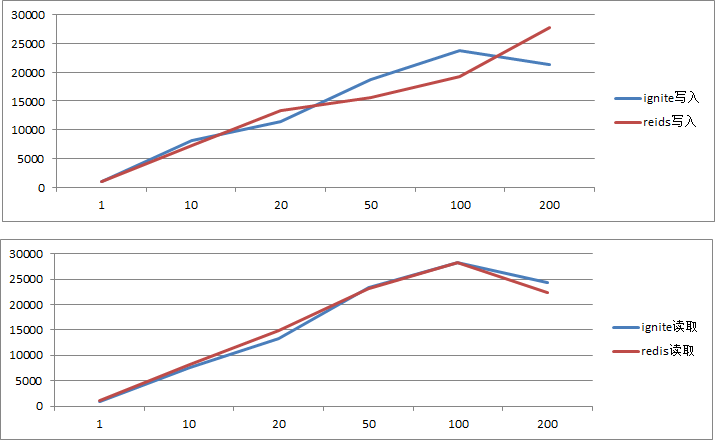
结束
原本我想着redis估计得秒了ignite,毕竟redis是这么多系统正在使用的内存数据库。ignite本身含有这么多功能按理性能肯定是比不上才对,而且ignite组成集群后是需要进行数据分块存取和备份的,而测试环境中redis则是单实例情况,这让我没太想明白啊。。还望有高手指点。。
看网上许多人测试的数据redis少点的4万+,据说可以到10万+。但我自己的测试环境差了点反正最多也没过3万,这到底会是什么原因呢?
不管如何这是一次简单的测试与尝试,结果与预期有点偏差,继续学习深入了解吧。
性能测试以及对redis的更多相关文章
- Ignite性能测试以及对redis的对比
测试方法 为了对Ignite做一个基本了解,做了一个性能测试,测试方法也比较简单主要是针对client模式,因为这种方法和使用redis的方式特别像.测试方法很简单主要是下面几点: 不作参数优化,默认 ...
- Redis性能测试Redis-benchmark
Redis-benchmark是官方自带的Redis性能测试工具 测试Redis在你的系统及你的配置下的读写性能 redis-benchmark可以模拟N个机器,同时发送M个请求 redis-benc ...
- 万字长文入门 Redis 命令、事务、锁、订阅、性能测试
作者:痴者工良 Redis 基本数据类型 Redis 中,常用的数据类型有以下几种: String:字符串类型,二进制安全字符串: Hash:哈希表: List 列表:链表结构,按照插入顺序排序的字符 ...
- 基于Twemproxy的Redis集群方案
概述 由于单台redis服务器的内存管理能力有限,使用过大内存redis服务器的性能急剧下降,且服务器发生故障将直接影响大面积业务.为了获取更好的缓存性能及扩展型,我们将需要搭建redis集群来满足需 ...
- redis入门教程
21) Redis 简介Redis 是一个开源的使用 ANSI C 语言编写.支持网络.可基于内存亦可持久化的日志型.Key-Value 数据库.2) 数据类型2.1. Redis 的 KeyRedi ...
- 利用Azure Redis Cache构建百万量级缓存读写
Redis是一个非常流行的基于内存的,低延迟,高吞吐量的key/value数据存储,被广泛用于数据库缓存,session的管理,热数据高速访问,甚至作为数据库方式提高应用程序可扩展性,吞吐量,和实施处 ...
- 基于 twemproxy 搭建 redis 集群
概述 由于单台redis服务器的内存管理能力有限,使用过大内存redis服务器的性能急剧下降,且服务器发生故障将直接影响大面积业务.为了获取更好的缓存性能及扩展型,我们将需要搭建redis集群来满足需 ...
- redis 基本原理及安装
一:什么是redis? Redis 是一个开源的,高性能的,基于键值对的缓存与存储系统.通过提供多种键值数据类型来适应不同场景下的缓存与存储需求. 二:redis数据库有什么优点? Redis数据库中 ...
- Redis 主从模式
系统:Centos6.6x64安装目录:/usr/local/主:192.168.100.103从:192.168.100.104 ,下载安装: 安装依赖: # yum install gcc tcl ...
随机推荐
- js进阶 12-7 pageY和screenY以及clientY的区别是什么
js进阶 12-7 pageY和screenY以及clientY的区别是什么 一.总结 一句话总结:pageY是距文件,screenY是获取显示器屏幕位置的坐标,clientY是页面视口. 没有滚动条 ...
- DOCKER学习心得
原文:DOCKER学习心得 前言: Docker的主要学习心得来源于<docker技术入门与实战> --2019.1.1->2019.1.5 la 着重从基础部分--实例分析-- ...
- gdb 调试多线程 神贴
gdb 调试多线程如果目标进程已经core dump了,那么 gdb -c core xxx xxx是对应的程序文件.如果目标进程还在运行,通常此时用于调试线程死锁的情况.有两种方法一是 gdb ...
- [Angular] Test Directive
directive: import { Directive, HostListener, HostBinding, ElementRef } from '@angular/core'; @Direct ...
- ios开发网络学习四:NSURLConnection大文件断点下载
#import "ViewController.h" @interface ViewController ()<NSURLConnectionDataDelegate> ...
- 【漏洞公告】Tomcat信息泄漏和远程代码执行漏洞:CVE-2017-12615/CVE-2017-12616
2017年9月19日,Apache Tomcat官方确认并修复了两个高危漏洞,漏洞CVE编号:CVE-2017-12615和CVE-2017-12616,该漏洞受影响版本为7.0-7.80之间,在一定 ...
- java 线程排查问题流程
1. 通过top命令查看当前系统CPU使用情况,定位CPU使用率超过100%的进程ID:2. 通过ps aux | grep PID命令进一步确定具体的线程信息:3. 通过ps -mp pid -o ...
- active set method(激活集方法)
在优化问题的求解中,如果待优化(最大最小)的目标函数,其解集受限于一组约束条件, g1(x)≥0,-,gk(x)≥0 约束条件定义着可行域(feasible region),对于可行域中的任一点 x ...
- #781 – 多个变换执行的顺序问题(Transform Order Matters)
原文:#781 – 多个变换执行的顺序问题(Transform Order Matters) 原文地址: https://wpf.2000things.com/2013/03/21/781-tr ...
- Erlang 学习笔记
http://wenku.baidu.com/link?url=AUQR8Hn-e-fEB_lqjXsd8XfapWj1qAK7J05JoBXFib_LlSk5qSOTia8HIxNV1XkeZi-k ...