
Spring+SpringMvc+Mybatis 框架的搭建(一)
本文是因为实习结束后学习到了新的技术,想写下来和更多人交流。开发中遇到的问题我也会一一说明,希望有更多人可以互相探讨,加入到一起来。
1. Spring+SpringMvc +Mybatis 的作用有哪些:
Spring作为一个轻量级框架,开发使用已经有很多年了,很好用的底层框架。里面的IOC,AOP详细的我只能说会使用,不能给大家更详细的说明。
Mybatis呢,主要是JDBC使用,连接数据库。它比起hibernate来说我觉得配置文件少了很多,不需要去配置什么数据库方言啊,乱七八糟的东西。
SpringMvc感觉更多的是像一个Spring精简升级版,它里面的应该就是配置文件中的启动注解还有视图的配置吧。
为什么要用这个框架而不是传统的Spring+Struts+Hibernate呢?
传统的SSH之前也学习过,首先hibernate虽然很好用可是配置太过于复杂,不如Mybatis简单明了(Mybatis的动态sql语句我觉得很实用);Struts呢太复杂!各种拦截器,处理缓存。真的配置都得配置好半天才可以。而SSM则简单了很多很多,适合小项目,自己联系时使用;
2.项目的配置:
首先我使用的工具:
编码软件:Eclipse 服务器:Tomcat 数据库:Mysql
2.1在Eclipse中建立web工程

2.2添加相应的架包
由于过多就不截图,自出省略......
2.3 建立数据库表

3.项目的开发
3.1 首先我们需要将src中的po类至Service层写好 顺序为entity—dao—mapper—Service

3.2 这里面需要注意的事项:
3.2.1 CustomerMapper中的方法名需要和CustomerMapper.xml中的id一致;


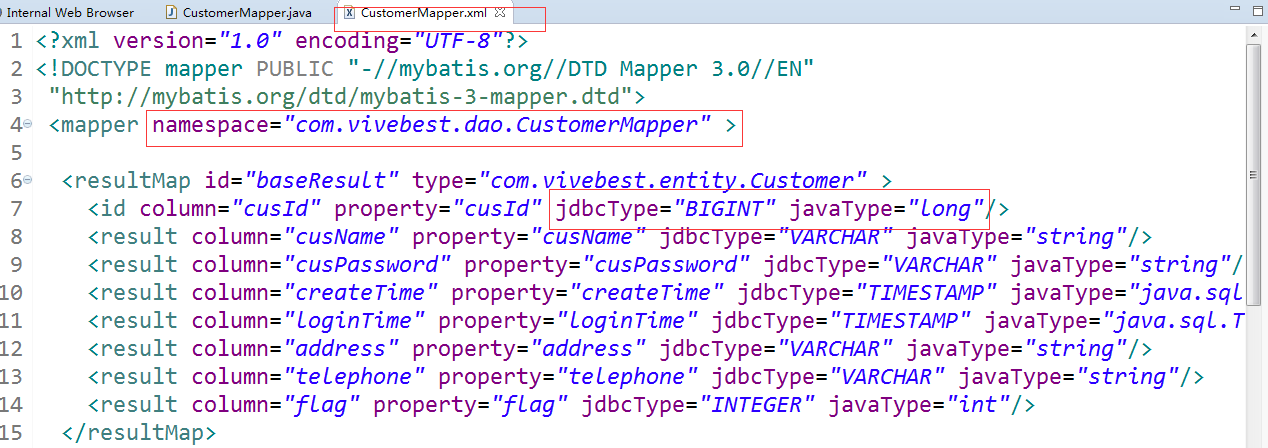
3.2.2 在写CustomerMapper.xml时 我们需要配置namespace 的路径是CustomerMapper.java的路径,在resultMap中需要说明JdbcType和javaType类型
3.2.3 编写service即实现
service类代码如下:
 package com.vivebest.service;

 import java.util.List;

 import com.vivebest.entity.Customer;

 public interface CustomerService {

 public List<Customer> getAllCustomer();

 }
serviceImpl类代码如下
 package com.vivebest.service.impl;

 import java.util.List;

 import org.springframework.beans.factory.annotation.Autowired;

 import org.springframework.stereotype.Service;

 import com.vivebest.dao.CustomerMapper;

 import com.vivebest.entity.Customer;

 import com.vivebest.service.CustomerService;

 @Service("customerService")

 public class CustomerServiceImpl implements CustomerService{

 @Autowired

 private CustomerMapper customerMapper;

 @Override

 public List<Customer> getAllCustomer() {

 // TODO Auto-generated method stub

 return customerMapper.getAllCustomer();

 }

 }
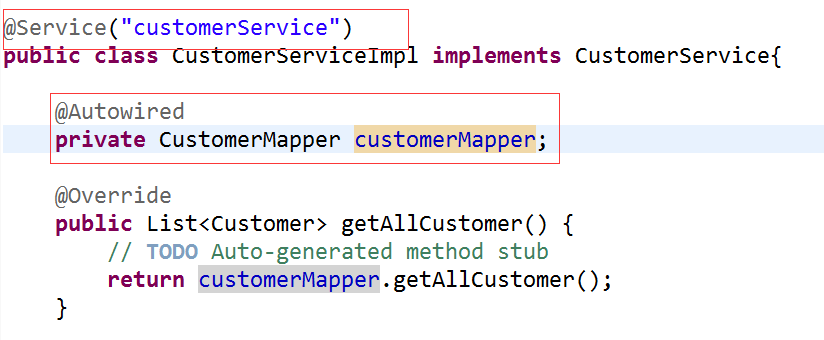
需要用到@service 和@Autowired .其中@service代表标示为服务层,@Autowired是Spring中自动装配使用,Spring会直接将UserDao类型的唯一一个bean赋值给userDao这个成员变量;
4.配置文件的配置

4.1 jdbc.properties :主要是用来配置数据库信息
 #DB

 dataSource.driverClassName=com.mysql.jdbc.Driver

 dataSource.url=jdbc:mysql://localhost:3306/?

 dataSource.username = ?

 dataSource.password = ?

 dataSource.initialSize  =  2

 dataSource.maxActive = 30

 dataSource.maxIdle = 2

 dataSource.minIdle = 2

 dataSource.maxOpenPreparedStatements = 150

 dataSource.validationQuery = SELECT 1 FROM DUAL

 dataSource.testWhileIdle = true

 dataSource.testOnBorrow = false

 dataSource.testOnReturn = false

 # \u914d\u7f6e\u95f4\u9694\u591a\u4e45\u624d\u8fdb\u884c\u4e00\u6b21\u68c0\u6d4b\uff0c\u68c0\u6d4b\u9700\u8981\u5173\u95ed\u7684\u7a7a\u95f2\u8fde\u63a5\uff0c\u5355\u4f4d\u662f\u6beb\u79d2

 dataSource.timeBetweenEvictionRunsMillis = 60000

 # \u914d\u7f6e\u4e00\u4e2a\u8fde\u63a5\u5728\u6c60\u4e2d\u6700\u5c0f\u751f\u5b58\u7684\u65f6\u95f4\uff0c\u5355\u4f4d\u662f\u6beb\u79d2

 dataSource.minEvictableIdleTimeMillis = 300000

 # \u6253\u5f00PSCache\uff0c\u5e76\u4e14\u6307\u5b9a\u6bcf\u4e2a\u8fde\u63a5\u4e0aPSCache\u7684\u5927\u5c0f

 dataSource.poolPreparedStatements = true

 dataSource.maxPoolPreparedStatementPerConnectionSize = 20

 # \u914d\u7f6e\u76d1\u63a7\u7edf\u8ba1\u62e6\u622a\u7684filter

 dataSource.filters = stat
4.2 applicationContext.xml :主要是用来配置Spring和Mybatis
 <?xml version="1.0" encoding="UTF-8"?>

 <beans xmlns="http://www.springframework.org/schema/beans"

     xmlns:xsi="http://www.w3.org/2001/XMLSchema-instance" xmlns:aop="http://www.springframework.org/schema/aop"

     xmlns:tx="http://www.springframework.org/schema/tx" xmlns:jdbc="http://www.springframework.org/schema/jdbc"

     xmlns:context="http://www.springframework.org/schema/context" xmlns:mvc="http://www.springframework.org/schema/mvc"

     xsi:schemaLocation="

      http://www.springframework.org/schema/context http://www.springframework.org/schema/context/spring-context-4.0.xsd

      http://www.springframework.org/schema/beans http://www.springframework.org/schema/beans/spring-beans-4.0.xsd

      http://www.springframework.org/schema/jdbc http://www.springframework.org/schema/jdbc/spring-jdbc-4.0.xsd

      http://www.springframework.org/schema/tx http://www.springframework.org/schema/tx/spring-tx-4.0.xsd

      http://www.springframework.org/schema/aop http://www.springframework.org/schema/aop/spring-aop-4.0.xsd

      http://www.springframework.org/schema/mvc http://www.springframework.org/schema/mvc/spring-mvc-4.0.xsd">

     <!-- 加载配置文件-->

     <context:property-placeholder location="classpath:jdbc.properties"/>

     <!-- 扫描控制包 -->

     <context:component-scan base-package="com.vivebest.service" />

     <!--   ***************以下是dataSource 和 Mybatis配置******************  -->

     <!-- dataSource -->

     <bean id="dataSource" class="com.alibaba.druid.pool.DruidDataSource" init-method="init" destroy-method="close">

         <property name="driverClassName" value="${dataSource.driverClassName}"/>

         <property name="url" value="${dataSource.url}"/>

         <property name="username" value="${dataSource.username}" />

         <property name="password" value="${dataSource.password}" />

         <property name="initialSize" value="${dataSource.initialSize}"/>

         <property name="maxActive" value="${dataSource.maxActive}"/>

         <property name="maxWait" value="30000"/>

         <property name="maxIdle" value="${dataSource.maxIdle}"/>

         <property name="minIdle" value="${dataSource.minIdle}"/>

         <property name="validationQuery" value="${dataSource.validationQuery}"/>

         <property name="testWhileIdle" value="${dataSource.testWhileIdle}"/>

         <property name="testOnBorrow" value="${dataSource.testOnBorrow}"/>

         <property name="testOnReturn" value="${dataSource.testOnReturn}"/>

         <property name="timeBetweenEvictionRunsMillis" value="${dataSource.timeBetweenEvictionRunsMillis}" />

         <property name="minEvictableIdleTimeMillis" value="${dataSource.minEvictableIdleTimeMillis}" />

         <property name="poolPreparedStatements" value="${dataSource.poolPreparedStatements}" />

         <property name="maxPoolPreparedStatementPerConnectionSize" value="${dataSource.maxPoolPreparedStatementPerConnectionSize}" />

         <property name="filters" value="${dataSource.filters}" />

     </bean>

     <!-- define the SqlSessionFactory -->

     <bean id="sqlSessionFactory" class="org.mybatis.spring.SqlSessionFactoryBean">

         <property name="dataSource" ref="dataSource" />

         <property name="configLocation" value="classpath:mybatis-config.xml" />

         <!-- 要映射类的包路径 -->

         <!--  <property name="typeAliasesPackage" value="com.vivebest.erp.entity" /> -->

         <!-- 若无上条就需要有该配置 -->

         <property name="mapperLocations" value="classpath:com/vivebest/mapper/CustomerMapper.xml"></property>  <!-- 当配置文件在其他目录时 -->

     </bean>

     <!-- scan for mappers and let them be autowired -->

     <!-- DAO接口所在包名,Spring会自动查找其下的类 -->

     <bean class="org.mybatis.spring.mapper.MapperScannerConfigurer">

        <property name="basePackage" value="com.vivebest.dao"/>

     </bean>

 </beans>
需要注意的是:value=“” 填写的是你*Mapper.xml文件的位置(我的是dao和mapper不在一个包下)


这样application就配置成功了。
4.3 web.xml配置(主要为配置Spring)
 <?xml version="1.0" encoding="UTF-8"?>

 <web-app xmlns:xsi="http://www.w3.org/2001/XMLSchema-instance" xmlns="http://java.sun.com/xml/ns/javaee" xsi:schemaLocation="http://java.sun.com/xml/ns/javaee http://java.sun.com/xml/ns/javaee/web-app_3_0.xsd" id="WebApp_ID" version="3.0">

   <display-name>bankERP</display-name>

  <!-- Spring 服务层的配置文件 -->

     <context-param>

         <param-name>contextConfigLocation</param-name>

         <param-value>classpath:applicationContext.xml</param-value>

     </context-param>

     <!-- Spring 容器启动监听器 -->

     <listener>

         <listener-class>org.springframework.web.context.ContextLoaderListener</listener-class>

     </listener>

     <!-- 配置spring核心servlet -->

     <servlet>

         <servlet-name>spring</servlet-name>

         <servlet-class>org.springframework.web.servlet.DispatcherServlet</servlet-class>

         <init-param>

               <param-name>contextConfigLocation</param-name>

               <param-value>classpath:spring-mvc.xml</param-value>

         </init-param>

         <load-on-startup>1</load-on-startup>

     </servlet>

     <!-- url-pattern配置为/,不带文件后缀,会造成其它静态文件(js,css等)不能访问。如配为*.do,则不影响静态文件的访问 -->

     <servlet-mapping>

         <servlet-name>spring</servlet-name>

         <url-pattern>*.do</url-pattern>

     </servlet-mapping>

     <!-- encode filter 支持中文转码  -->

     <filter>

         <filter-name>characterEncodingFilter</filter-name>

         <filter-class>org.springframework.web.filter.CharacterEncodingFilter</filter-class>

         <init-param>

             <param-name>encoding</param-name>

             <param-value>UTF-8</param-value>

         </init-param>

         <init-param>

             <param-name>forceEncoding</param-name>

             <param-value>true</param-value>

         </init-param>

     </filter>

     <filter-mapping>

         <filter-name>characterEncodingFilter</filter-name>

         <url-pattern>/*</url-pattern>

     </filter-mapping>

      </web-app>
Spring+SpringMvc+Mybatis 框架的搭建(一)的更多相关文章
- Spring+SpringMvc+Mybatis框架集成搭建教程
一.背景 最近有很多同学由于没有过SSM(Spring+SpringMvc+Mybatis , 以下简称SSM)框架的搭建的经历,所以在自己搭建SSM框架集成的时候,出现了这样或者那样的问题,很是苦恼 ...
- 用IntelliJ IDEA 开发Spring+SpringMVC+Mybatis框架 分步搭建四:配置springmvc
在用IntelliJ IDEA 开发Spring+SpringMVC+Mybatis框架 分步搭建三:配置spring并测试的基础上 继续进行springmvc的配置 一:配置完善web.xml文件
- 用IntelliJ IDEA 开发Spring+SpringMVC+Mybatis框架 分步搭建三:配置spring并测试
这一部分的主要目的是 配置spring-service.xml 也就是配置spring 并测试service层 是否配置成功 用IntelliJ IDEA 开发Spring+SpringMVC+M ...
- 用IntelliJ IDEA 开发Spring+SpringMVC+Mybatis框架 分步搭建二:配置MyBatis 并测试(2 配置spring-dao和测试)
用IntelliJ IDEA 开发Spring+SpringMVC+Mybatis框架 分步搭建二:配置MyBatis 并测试(1 搭建目录环境和依赖) 四:在\resources\spring 下面 ...
- 用IntelliJ IDEA 开发Spring+SpringMVC+Mybatis框架 分步搭建二:配置MyBatis 并测试(1 构建目录环境和依赖)
引言:在用IntelliJ IDEA 开发Spring+SpringMVC+Mybatis框架 分步搭建一 的基础上 继续进行项目搭建 该部分的主要目的是测通MyBatis 及Spring-dao ...
- 用IntelliJ IDEA 开发Spring+SpringMVC+Mybatis框架 分步搭建一:建立MAVEN Web项目
一:创建maven web项目er
- SSM(Spring+SpringMVC+Mybatis)框架环境搭建(整合步骤)(一)
1. 前言 最近在写毕设过程中,重新梳理了一遍SSM框架,特此记录一下. 附上源码:https://gitee.com/niceyoo/jeenotes-ssm 2. 概述 在写代码之前我们先了解一下 ...
- 【Spring】Spring+SpringMVC+MyBatis框架的搭建
1,SSM的简介 SSM(Spring+SpringMVC+MyBatis)框架集由Spring.SpringMVC.MyBatis三个开源框架整合而成,常作为数据源较简单的web项目的框架. 其中s ...
- Spring+SpringMvc+Mybatis框架集成搭建教程二(依赖配置及框架整合)
依赖导入以及框架整合 (1).打开项目的pom.xml文件,声明依赖 <project xmlns="http://maven.apache.org/POM/4.0.0" x ...
随机推荐
- Spring-Mybatis配置多数据源
可以参考: http://www.cnblogs.com/ityouknow/p/6102399.html 需要一个DatabaseConfiguration类,实现 TransactionManag ...
- SSH自动断开连接的原因、配置(转)
方法一: 用putty/SecureCRT连续3分钟左右没有输入, 就自动断开, 然后必须重新登陆, 很麻烦. 在网上查了很多资料, 发现原因有多种, 环境变量TMOUT引起,ClientAliveC ...
- css3圆环闪烁动画
<!DOCTYPE html> <html lang="en"> <head> <meta charset="UTF-8&quo ...
- js两个判断&&的值与||的值
var value1="val1"; var value2="val2"; alert(value1&&value2); //结果为val ...
- D3.js-坐标轴生成测试SVG
Bottom top Bottom top // =0) return "translate("+margin+","+i*offset+")&q ...
- 菜鸟学IT之IP基础
IT菜鸟,以后研究的方向是云计算,从基础的开始,这是第一篇博文.有不对的地方希望大家指正.IP是网络知识的基础,今天就开始学习IP. IP地址格式:IP地址就是"网络地址+主机地址" ...
- (转)Java线程面试题 Top 50
原文链接:http://www.importnew.com/12773.html 本文由 ImportNew - 李 广 翻译自 javarevisited.欢迎加入Java小组.转载请参见文章末 ...
- Java类修饰符
- JAVA加密算法系列-BASE64
package ***; import java.io.IOException; import sun.misc.BASE64Decoder; import sun.misc.BASE64Encode ...
- 什么是RESTful?
RESTful一种软件架构风格,设计风格而不是标准,只是提供了一组设计原则和约束条件.它主要用于客户端和服务器交互类的软件.基于这个风格设计的软件可以更简洁,更有层次,更易于实现缓存等机制. REST ...