
java-web中生成文档(一)
基于Java的解决方案也是很多的,包括使用Jacob、Apache POI、Java2Word、iText等各种方式,其实在从Office 2003开始,就可以将Office文档转换成XML文件,这样只要将需要填入的内容放上${}占位符,就可以使用像Freemarker这样的模板引擎将出现占位符的地方替换成真实数据,这种方式较之其他的方案要更为简单。
举个项目中实际的例子,先编辑一个word文挡
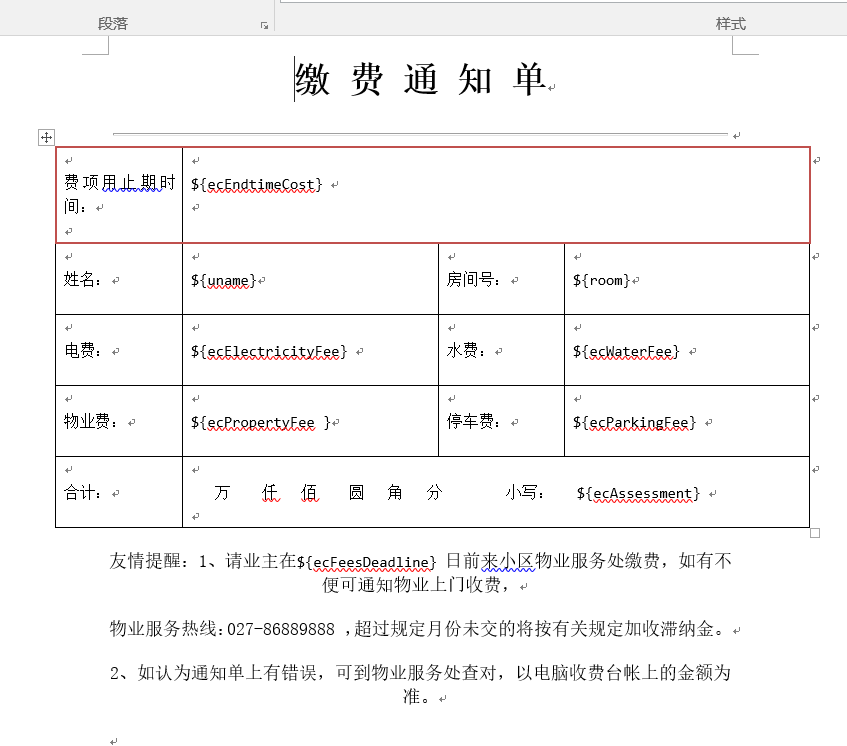
1:将文档另存为成xml格式:

2:另存之后建议用 Editplus、Notepad++、Sublime等工具打开查看一下,因为有的时候你写的占位符可能会被拆开,这样Freemarker就无法处理 了。处理成如下图所示:

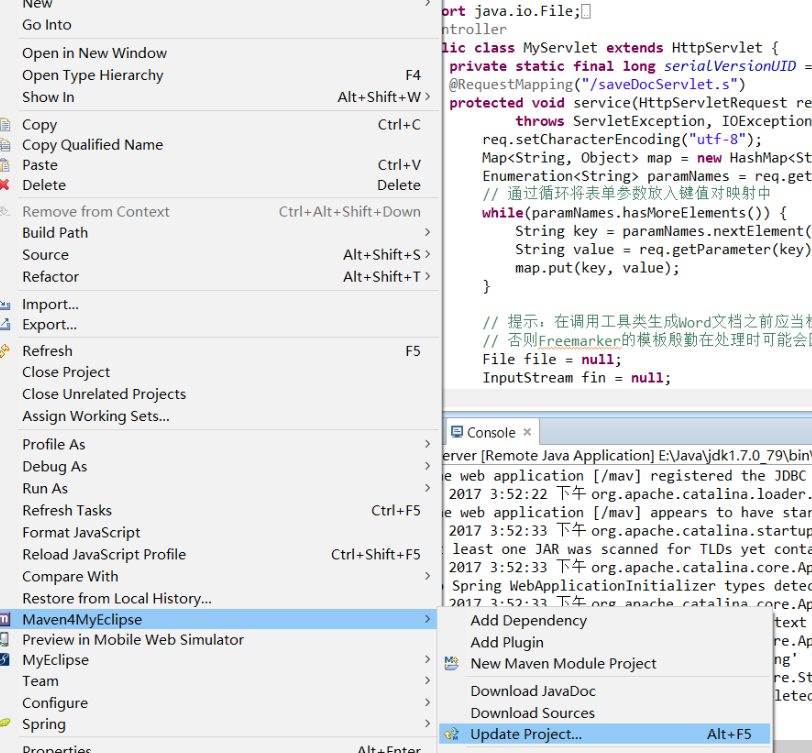
3:然后另存为.ftl格式(选择支持所有的格式),好了非代码的部分完成,开始搭建自己的项目,我使用的服务器是Tomcat 7.0.52,myelcipse2014;如果是eclipse需要配置web.xml支持servlet3的注解,在搭建项目之前需要向项目中加入freemarker的JAR文件,可以通过下面的链接获得Freemarker的最新版本:http://freemarker.org/freemarkerdownload.html
我搭建的是一个maven 的项目,进入当中找到pom文件所需有的配置文件http://mvnrepository.com/artifact/org.freemarker/freemarker
4.完成jsp的网页代码,当中要明白name的命名一定是与ftl文件中的值是对应的,这样才能取到值。上传jsp代码
<%@ page language="java" import="java.util.*" pageEncoding="UTF-8"%>
<%
String path = request.getContextPath();
String basePath = request.getScheme()+"://"+request.getServerName()+":"+request.getServerPort()+path+"/";
%>
<%@taglib prefix="c" uri="http://java.sun.com/jsp/jstl/core" %>
<html xmlns="http://www.w3.org/1999/xhtml">
<head>
<base href="<%=basePath%>">
<meta http-equiv="pragma" content="no-cache">
<meta http-equiv="cache-control" content="no-cache">
<meta http-equiv="expires" content="0">
<meta http-equiv="keywords" content="keyword1,keyword2,keyword3">
<meta http-equiv="description" content="This is my page">
<style type="text/css">
* { font-family: "微软雅黑"; }
.textField { border:none; border-bottom: 1px solid gray; text-align: center; }
#file { border:1px solid black; width: 80%; margin:0 auto; }
h1 input{ font-size:72px; }
td textarea { font-size: 14px; }
.key { width:125px; font-size:20px; }
</style>
<meta http-equiv="Content-Type" content="text/html; charset=utf-8" />
<title>缴 费 通 知 单</title>
</head>
<body>
<form action="saveDocServlet.s" method="post">
<div id="file" align="center">
<h1>缴 费 通 知 单</h1>
<hr/>
<table width="750" border="1">
<tr><td width="120" class="key">费项到期时间</td>
<td height="39" colspan="3"><input type="text" name="ecEndtimeCost" class="textField" value="${param.ecEndtimeCost }" style="border:0px"/><span style="text-align:right">日</span></td>
</tr>
<tr>
<td class="key">姓名</td>
<td width="212"><input type="text" name="uname" class="textField" value="${param.uname}" style="border:0px"/></td>
<td width="80" class="key">房号:</td>
<td width="355">
<input type="text" name="room" value="${param.room}" style="border:0px"/>
</td>
</tr>
<tr>
<td class="key">电费:</td>
<td><input type="text" name="ecElectricityFee" class="textField" style="border:0px" value="${param.ecElectricityFee }"/>元</td>
<td class="key">水费:</td>
<td><input type="text" name="ecWaterFee" class="textField" style="border:0px" value="${param.ecWaterFee }"/>元</td>
</tr>
<tr>
<td class="key">物业管理费:</td>
<td><input type="text" name="ecPropertyFee" class="textField" style="border:0px" value="${param.ecPropertyFee }"/>元</td>
<td class="key">停车费:</td>
<td><input type="text" name="ecParkingFee" class="textField" style="border:0px" value="${param.ecParkingFee }"/>元</td>
</tr>
<tr>
<td height="39" colspan="4" class="key">
合计金额: <input name="text" style="border: 0px; width:5px " /> 万 <input name="text" style="border: 0px; width:5px " /> 仟<input name="text" style="border: 0px; width:5px " /> 佰 <input name="text" style="border: 0px; width:5px " /> 拾 <input name="text" style="border: 0px; width:5px " /> 元 <input style="border: 0px; width:5px " /> 角 <input name="text" style="border: 0px; width:5px " /> 分 小写:<input name="ecAssessment" style="border: 0px; " value="${param.ecAssessment }" /> 元
</td>
</tr>
</table>
<p >友情提醒:1、请业主在<input name="ecFeesDeadline" style="border: 0px; " value="${param.ecFeesDeadline }" /> 日前来小区物业服务处缴费,如有不便可通知物业上门收费,</p>
<p >物业服务热线:027-86889888 ,超过规定月份未交的将按有关规定加收滞纳金。</p>
<p>2、如认为通知单上有错误,可到物业服务处查对,以电脑收费台帐上的金额为准。</p>
</br>
<p style=" position:relative left:600px"> <input name="text" style="border: 0px; width:25px " /> 年<input name="text" style="border: 0px; width:25px " /> 月 <input name="text" style="border: 0px; width:25px " /> 日</p>
</div>
<div align="center" style="margin-top:15px;">
<input type="submit" value="保存Word文档" />
</div>
</form>
</body>
</html>
(注意param这个el表达式对象不能用到word文档取值,保证name的值一致就行)
我在把spring-mvc中的控制器代码,给一份;如果你用servlet去写也可以,但是要支持webservice注解的需要用到servlet3.0,这是就需要去web.xml容器中写配置文件
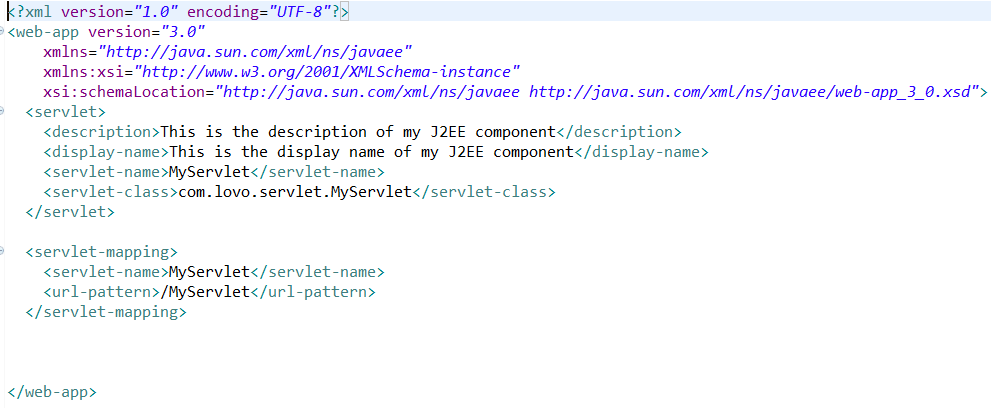
如果不支持就麻烦了,所以我使用springmvc的核心控制器写的,不多说了给代码
package com.controller.zy;

import java.io.File;
import java.io.FileInputStream;
import java.io.IOException;
import java.io.InputStream;
import java.util.Enumeration;
import java.util.HashMap;
import java.util.Map;

import javax.servlet.ServletException;
import javax.servlet.ServletOutputStream;
import javax.servlet.http.HttpServlet;
import javax.servlet.http.HttpServletRequest;
import javax.servlet.http.HttpServletResponse;

import org.springframework.stereotype.Controller;
import org.springframework.web.bind.annotation.RequestMapping;

import com.lovo.util.WordGenerator;
@Controller
public class MyServlet extends HttpServlet {
    private static final long serialVersionUID = 1L;
    @RequestMapping("/saveDocServlet.s")
    protected void service(HttpServletRequest req, HttpServletResponse resp)
            throws ServletException, IOException {
        req.setCharacterEncoding("utf-8");
        Map<String, Object> map = new HashMap<String, Object>();
        Enumeration<String> paramNames = req.getParameterNames();
        // 通过循环将表单参数放入键值对映射中
        while(paramNames.hasMoreElements()) {
            String key = paramNames.nextElement();
            String value = req.getParameter(key);
            map.put(key, value);
        }

        // 提示:在调用工具类生成Word文档之前应当检查所有字段是否完整
        // 否则Freemarker的模板殷勤在处理时可能会因为找不到值而报错 这里暂时忽略这个步骤了
        File file = null;
        InputStream fin = null;
        ServletOutputStream out = null;
        try {
            // 调用工具类WordGenerator的createDoc方法生成Word文档
            file = WordGenerator.createDoc(map, "zhy");
            fin = new FileInputStream(file);

            resp.setCharacterEncoding("utf-8");
            resp.setContentType("application/msword");
            // 设置浏览器以下载的方式处理该文件默认名为zhy.doc
            resp.addHeader("Content-Disposition", "attachment;filename=zhy.doc");

            out = resp.getOutputStream();
            byte[] buffer = new byte[512];  // 缓冲区
            int bytesToRead = -1;
            // 通过循环将读入的Word文件的内容输出到浏览器中
            while((bytesToRead = fin.read(buffer)) != -1) {
                out.write(buffer, 0, bytesToRead);
            }
        } finally {
            if(fin != null) fin.close();
            if(out != null) out.close();
            if(file != null) file.delete(); // 删除临时文件
        }
    }
}
5,还要有个工具类作为中间调用的方法使用,不用多想,代码是固定的,拿着改文件名就可以
package com.lovo.util;

import java.io.File;
import java.io.FileOutputStream;
import java.io.IOException;
import java.io.OutputStreamWriter;
import java.io.Writer;
import java.util.HashMap;
import java.util.Map;

import freemarker.template.Configuration;
import freemarker.template.Template;

public class WordGenerator {
    private static Configuration configuration = null;
    private static Map<String, Template> allTemplates = null;

    static {
        configuration = new Configuration();
        configuration.setDefaultEncoding("utf-8");
        configuration.setClassForTemplateLoading(WordGenerator.class, "/com/lovo/ftl");
        allTemplates = new HashMap<>();   // Java 7 钻石语法
        try {
            allTemplates.put("zhy", configuration.getTemplate("zhy.ftl"));
        } catch (IOException e) {
            e.printStackTrace();
            throw new RuntimeException(e);
        }
    }

    private WordGenerator() {
        throw new AssertionError();
    }

    public static File createDoc(Map<?, ?> dataMap, String type) {
        String name = "temp" + (int) (Math.random() * 100000) + ".doc";
        File f = new File(name);
        Template t = allTemplates.get(type);
        try {
            // 这个地方不能使用FileWriter因为需要指定编码类型否则生成的Word文档会因为有无法识别的编码而无法打开
            Writer w = new OutputStreamWriter(new FileOutputStream(f), "utf-8");
            t.process(dataMap, w);
            w.close();
        } catch (Exception ex) {
            ex.printStackTrace();
            throw new RuntimeException(ex);
        }
        return f;
    }

}
到这里已经完成了代码,部署到服务器就可以使用了,希望能够帮到你。
java-web中生成文档(一)的更多相关文章
- eclipse中生成文档注释--javadoc的使用
1.针对于单一的JAVA文件,在终端窗口中,使用 javadoc 文件名.java 即可生成文档注释: 2.在eclipse中生成文档注释: ①单击eclipse菜单栏中的[Project]菜单,该菜 ...
- Java基础——JavaDoc生成文档
JavaDoc生成文档 package Top1; /** * @author lwt * @version 1.0 * @since 1.8 * */ public class ...
- 使用 Swagger 自动生成 ASP.NET Core Web API 的文档、在线帮助测试文档(ASP.NET Core Web API 自动生成文档)
对于开发人员来说,构建一个消费应用程序时去了解各种各样的 API 是一个巨大的挑战.在你的 Web API 项目中使用 Swagger 的 .NET Core 封装 Swashbuckle 可以帮助你 ...
- MVC WEB api 自动生成文档
最近在一直在用webapi做接口给移动端用.但是让我纠结的时候每次新加接口或者改动接口的时候,就需要重新修改文档这让我很是苦恼.无意中发现.webapi居然有自动生成文档的功能....真是看见了救星啊 ...
- 【Java从入门到精通】day08-包机制-JavaDoc生成文档
1.包机制 为了更好地组织类,Java提供了包机制,用于区别类名的命名空间. 包语句的语法格式为: package pkg1[.pkg2[.pkg3...]]; 一般利用公司域名倒置作为包名(如www ...
- 第4天 JavaDoc生成文档&Java流程控制(第一节:用户交互Scanner)
JavaDoc生成文档 javadoc命令是用来生成自己的API文档 参数信息: @author 作者名 @version 版本号 @since 指明需要最早使用的jdk版本 @param 参数名 @ ...
- ASP.NET Core 1.0 中使用 Swagger 生成文档
github:https://github.com/domaindrivendev/Ahoy 之前文章有介绍在ASP.NET WebAPI 中使用Swagger生成文档,ASP.NET Core 1. ...
- 使用swagger在netcorewebapi项目中自动生成文档
一.背景 随着前后端分离模式大行其道,我们需要将后端接口撰写成文档提供给前端,前端可以查看我们的接口,并测试,提高我们的开发效率,减少无效的沟通.在此情况下,通过代码自动生成文档,这种需求应运而生,s ...
- JavaScript 定义类的最佳写法——完整支持面向对象(封装、继承、多态),兼容所有浏览器,支持用JSDuck生成文档
作者: zyl910 [TOC] 一.缘由 由于在ES6之前,JavaScript中没有定义类(class)语法.导致大家用各种五花八门的办法来定义类,代码风格不统一.而且对于模拟面向对象的三大支柱& ...
随机推荐
- OpenDigg安卓开源项目月报201704
由OpenDigg 出品的安卓开源项目月报第一期来啦.我们的安卓开源月报集合了OpenDigg一个月来新收录的优质安卓开源项目,方便安卓开发人员便捷的找到自己需要的项目工具. DiscreteScro ...
- Linux - 进程间通信 - 命名管道
1.命名管道的特点: (1)是管道,可用于非血缘关系的进程间的通信 (2)使用命名管道时,梁金成需要用路径表示通道. (3)命名管道以FIFO的文件形式存储于文件系统中.(FIFO:总是按照先进先出的 ...
- Unity使用GL画线
脚本需挂在相机上,如果你的脚本,编辑器报错了,Matrix stack full depth reached,加上这个方法试试GL.LoadPixelMatrix(); using System.Co ...
- Oracle空间查询 ORA-28595
可使用数据库管理系统 (DBMS) 的结构化查询语言 (SQL).数据类型和表格式来处理地理数据库或安装了 ST_Geometry 类型的数据库中所存储的信息. 例如,在ArcMap中我们使用&quo ...
- jquery分页插件的修改
前言 最近分页功能使用的比较多,所以从网上下载个jquery分页插件来使用, 之前用的都挺好的,直到昨天出现了逻辑问题,反复查看自己的代码,最后发现是点击页码后执行了多个点击事件.最后只有自己查看源码 ...
- 解析View的getDrawingCache方法
1. View 的getDrawingCache方法 有时候需要将某个view的内容以图片的方式保存下来,感觉就和截图差不多,可以使用View 的getDrawingCache方法,返回一个Bitma ...
- hdu1512 Monkey King
Problem Description Once in a forest, there lived N aggressive monkeys. At the beginning, they each ...
- Windows7系统的封装
系统装到虚拟机优化完成以后,可以装上自己想要装的软件,也可以不装做个纯净版的.今天用ES封装,首先打开一般我们只点这四项就够了,如下图 写上自己想写的,也可以不写系统默认,直接点“下一步”关闭设备管理 ...
- Python 面向对象之一
Python 面向对象之 类与属性 今天接触了一下面向对象,发现面向对象和之前理解的简直就是天壤之别,在学Linux的时候,一切皆文件,现在学面向对象了,so,一切皆对象. 之前不是一直在学的用面向函 ...
- EverythingAboutJava
1 GC gabage collection 垃圾回收Java GC系列(1):Java垃圾回收简介 http://mp.weixin.qq.com/s?src=3×tamp=149 ...