
【转】JDBC学习笔记(3)——复习和练习
转自:http://www.cnblogs.com/ysw-go/
复习部分
一、获取数据库连接
1)方式一

 1 // 获取数据库连接
 2     @Test
 3     public void testGetConnection() throws Exception {
 4         // 1.准备获取连接的四个字符串:user,jdbcurl,password,driverClass
 5         String user = "root";
 6         String password = "123456";
 7         String jdbcUrl = "jdbc:mysql://localhost:3306/atguigu";
 8         String driverClass = "com.mysql.jdbc.Driver";
 9         Class.forName(driverClass);
10         Connection connection = DriverManager.getConnection(jdbcUrl, user,
11                 password);
12         System.out.println(connection);
13     }
2)方式二:解耦合
 1 public Connection getConnection() throws IOException,
 2             ClassNotFoundException, SQLException {
 3         Properties properties = new Properties();
 4         InputStream inputStream = JDBCTest.class.getClassLoader()
 5                 .getResourceAsStream("jdbc.properties");
 6         properties.load(inputStream);
 7         String user = properties.getProperty("user");
 8         String password = properties.getProperty("password");
 9         String jdbcUrl = properties.getProperty("jdbcUrl");
10         String driverClass = properties.getProperty("driver");
11         Class.forName(driverClass);
12         Connection connection = DriverManager.getConnection(jdbcUrl, user,
13                 password);
14         return connection;
15     }
二、Statement执行更新数据的操作
我们这里把更新数据的操作。用一个通用的update函数来表示
 1     public void update() {
 2         // 1.获取数据库连接
 3         Connection connection = null;
 4         Statement statement = null;
 5         try {
 6             connection=getConnection();
 7             // 2.调用Connection对象的createStatement()方法获取
 8             // Statement对象
 9             statement=connection.createStatement();
10             // 3.准备SQL语句
11             String sql="insert into examstudent values(1,4,'412824195263214584','200523164754000','张峰','郑州',85)";
12             // 4.发送SQL语句:调用Statement对象的excuteUpdate(sql)方法
13             statement.executeUpdate(sql);
14
15         } catch (Exception e) {
16             e.printStackTrace();
17         }finally{
18             // 5.关闭数据库资源:由里向外关闭
19             releaseDB(null, statement, connection);
20         }
21     }
三、ResultSet执行查询操作
 1 @Test
 2     public void testResultSet(){
 3         Connection connection=null;
 4         Statement statement=null;
 5         ResultSet resultSet=null;
 6         try {
 7             //1.获取数据库连接
 8             connection=getConnection();
 9             //2.Statement
10             statement=connection.createStatement();
11             //3.准备SQL
12             String sql="select * from customers";
13             //4.执行SQL,得到结果集
14             resultSet=statement.executeQuery(sql);
15             //5.处理结果集
16             while(resultSet.next()){
17                 int id=resultSet.getInt(1);
18                 String name=resultSet.getString(2);
19                 String email=resultSet.getString(3);
20                 Date birth=resultSet.getDate(4);
21                 System.out.println(id);
22                 System.out.println(name);
23                 System.out.println(email);
24                 System.out.println(birth);
25                 System.out.println("----------");
26             }
27
28         } catch (Exception e) {
29             e.printStackTrace();
30         }finally{
31             releaseDB(resultSet, statement, connection);
32         }
33     }
四、工具类的使用JDBCTools
将获取连接、执行更新操作、释放资源封装在一个JDBCTools类中
 1 package com.atguigu.jdbc;
 2
 3 import java.io.IOException;
 4 import java.io.InputStream;
 5 import java.sql.Connection;
 6 import java.sql.DriverManager;
 7 import java.sql.ResultSet;
 8 import java.sql.SQLException;
 9 import java.sql.Statement;
10 import java.util.Properties;
11
12 public class JDBCTools {
13     // 更新的方法:插入、删除、更新,但是不包含select
14     public static void update(String sql) {
15         // 1.获取数据库连接
16         Connection connection = null;
17         Statement statement = null;
18         try {
19             connection = getConnection();
20             // 2.调用Connection对象的createStatement()方法获取
21             // Statement对象
22             statement = connection.createStatement();
23             // 4.发送SQL语句:调用Statement对象的excuteUpdate(sql)方法
24             statement.executeUpdate(sql);
25
26         } catch (Exception e) {
27             e.printStackTrace();
28         } finally {
29             // 5.关闭数据库资源:由里向外关闭
30             release(null, statement, connection);
31         }
32     }
33
34     // 获取数据库连接
35     public static Connection getConnection() throws IOException,
36             ClassNotFoundException, SQLException {
37         Properties properties = new Properties();
38         InputStream inputStream = JDBCTest.class.getClassLoader()
39                 .getResourceAsStream("jdbc.properties");
40         properties.load(inputStream);
41         String user = properties.getProperty("user");
42         String password = properties.getProperty("password");
43         String jdbcUrl = properties.getProperty("jdbcUrl");
44         String driverClass = properties.getProperty("driver");
45         Class.forName(driverClass);
46         Connection connection = DriverManager.getConnection(jdbcUrl, user,
47                 password);
48         return connection;
49     }
50
51     // 释放数据库资源
52     public static void release(ResultSet rs, Statement statement,
53             Connection conn) {
54         if (rs != null) {
55             try {
56                 rs.close();
57             } catch (Exception e) {
58                 // TODO: handle exception
59             }
60         }
61         if (statement != null) {
62             try {
63                 statement.close();
64
65             } catch (Exception e2) {
66                 // TODO: handle exception
67             }
68         }
69         if (conn != null) {
70             try {
71                 conn.close();
72             } catch (SQLException e) {
73                 e.printStackTrace();
74             }
75         }
76     }
77 }
练习部分
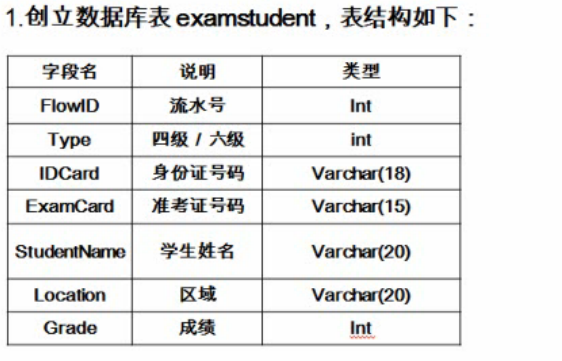
我们的练习是这样的:
新建一个表:
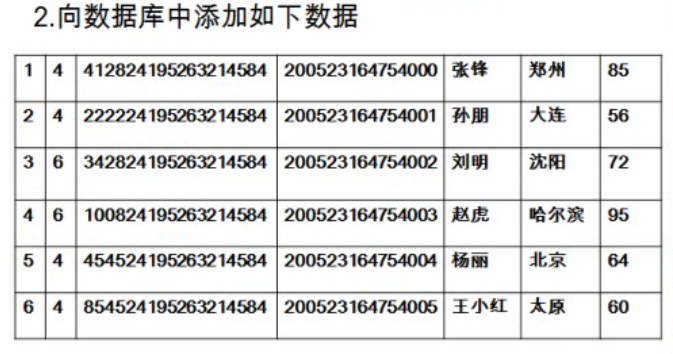
向表中插入数据:
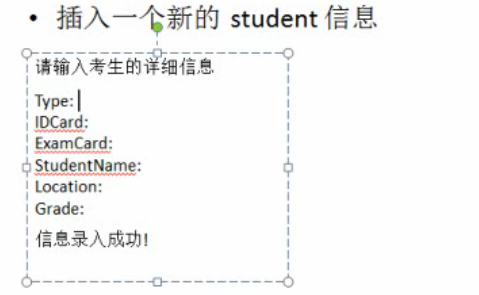
插入成功的话会出现这样的提示(我们从控制台获取要插入的数据):
第一步、用图形化界面SQLyog创建一个数据表examstudent

第二步、向数据表中插入数据
面向对象的思想去编程:将插入的数据封装在一个类Student中
  1 package com.atguigu.jdbc;
  2
  3 public class Student {
  4     // 流水号
  5     private int flowId;
  6     // 考试类型
  7     private int type;
  8     // 身份证号
  9     private String idCard;
 10     // 准考证号
 11     private String examCard;
 12     // 学生姓名
 13     private String studentName;
 14     // 学生地址
 15     private String location;
 16     // 考试成绩
 17     private int grade;
 18
 19     public int getFlowId() {
 20         return flowId;
 21     }
 22
 23     public void setFlowId(int flowId) {
 24         this.flowId = flowId;
 25     }
 26
 27     public int getType() {
 28         return type;
 29     }
 30
 31     public void setType(int type) {
 32         this.type = type;
 33     }
 34
 35     public String getIdCard() {
 36         return idCard;
 37     }
 38
 39     public void setIdCard(String idCard) {
 40         this.idCard = idCard;
 41     }
 42
 43     public String getExamCard() {
 44         return examCard;
 45     }
 46
 47     public void setExamCard(String examCard) {
 48         this.examCard = examCard;
 49     }
 50
 51     public String getStudentName() {
 52         return studentName;
 53     }
 54
 55     public void setStudentName(String studentName) {
 56         this.studentName = studentName;
 57     }
 58
 59     public String getLocation() {
 60         return location;
 61     }
 62
 63     public void setLocation(String location) {
 64         this.location = location;
 65     }
 66
 67     public int getGrade() {
 68         return grade;
 69     }
 70
 71     public void setGrade(int grade) {
 72         this.grade = grade;
 73     }
 74
 75     public Student(int flowId, int type, String idCard, String examCard,
 76             String studentName, String location, int grade) {
 77         super();
 78         this.flowId = flowId;
 79         this.type = type;
 80         this.idCard = idCard;
 81         this.examCard = examCard;
 82         this.studentName = studentName;
 83         this.location = location;
 84         this.grade = grade;
 85     }
 86
 87     public Student() {
 88
 89     }
 90
 91     // 重写Student对象的toString函数
 92     @Override
 93     public String toString() {
 94         return "Student [flowId=" + flowId + ", type=" + type + ", idCard="
 95                 + idCard + ", examCard=" + examCard + ", studentName="
 96                 + studentName + ", location=" + location + ", grade=" + grade
 97                 + "]";
 98     }
 99
100 }
从控制台获取输入信息作为插入student对象的相应的字段值,并插入到新创建的表中
 1 package com.atguigu.jdbc;
 2
 3 import java.util.Scanner;
 4
 5 import org.junit.Test;
 6
 7 public class JDBCTestCase {
 8
 9     //单元测试
10     @Test
11     public void testAddNewStudent() {
12         Student student = getStudentFromConsole();
13         addNewStudent(student);
14     }
15
16     // 从控制台输入学生的信息
17     private Student getStudentFromConsole() {
18         Scanner scanner = new Scanner(System.in);
19         Student student = new Student();
20         System.out.print("FlowId:");
21         student.setFlowId(scanner.nextInt());
22         System.out.print("Type:");
23         student.setType(scanner.nextInt());
24         System.out.print("IdCard:");
25         student.setIdCard(scanner.next());
26         System.out.print("ExamCard:");
27         student.setExamCard(scanner.next());
28         System.out.print("StudentName:");
29         student.setStudentName(scanner.next());
30         System.out.print("Location:");
31         student.setLocation(scanner.next());
32         System.out.print("Grade:");
33         student.setGrade(scanner.nextInt());
34         return student;
35     }
36
37     public void addNewStudent(Student student) {
38         String sql = "insert into examstudent" + " values("
39                 + student.getFlowId() + "," + student.getType() + ",'"
40                 + student.getIdCard() + "','" + student.getExamCard() + "','"
41                 + student.getStudentName() + "','" + student.getLocation()
42                 + "'," + student.getGrade() + ")";
43         System.out.println(sql);
44         JDBCTools.update(sql);
45     }
46
47 }
第三步、进行数据的查询(按第三张图片中要求的形式进行查询)
1).从控制台输入一个整数,确定要查询的类型
 1 /*
 2      * 1.身份证查询。 2.用准考证查询 。 3,其他,重新输入
 3      */
 4     private int getSearchTypeFromConsole() {
 5         System.out.println("请输入查询类型:1.身份证查询. 2.用准考证查询 ");
 6         Scanner scanner = new Scanner(System.in);
 7         int type = scanner.nextInt();
 8         if (type != 1 && type != 2) {
 9             System.out.println("输入有误,请重新输入!");
10             throw new RuntimeException();
11         }
12         return 0;
13     }
2).根据查询类型准备sql语句
 1 // searchType:1或者2
 2     private Student searchStudent(int searchType) {
 3         String sql = "select * from examstudent where ";
 4         Scanner scanner = new Scanner(System.in);
 5         // 1.根据输入的searchType,提示用户输入信息
 6         // 1.1若searchType=1,提示:请输入身份证号
 7         // 1.2若searchType=2,提示:请输入准考证号
 8         // 2/根据searchType确定SQL
 9         if (searchType == 1) {
10             System.out.print("请输入准考证号:");
11             String examCard = scanner.next();
12             sql = sql + "examCard='" + examCard + "'";
13         } else {
14             System.out.print("请输入身份证号:");
15             String IdCard = scanner.next();
16             sql = sql + "IdCard='" + IdCard + "'";
17         }
18
19         // 3.执行查询
20         Student student = getStudent(sql);
21         // 4.若存在结果,将查询结果封装成一个Student对象
22         return student;
23     }
执行查询操作,将结果封装成一个Student对象
 1     private Student getStudent(String sql) {
 2         Student student = null;
 3         Connection connection = null;
 4         Statement statement = null;
 5         ResultSet resultSet = null;
 6         try {
 7             connection = JDBCTools.getConnection();
 8             statement = connection.createStatement();
 9             resultSet = statement.executeQuery(sql);
10             if (resultSet.next()) {
11                 student = new Student(resultSet.getInt(1), resultSet.getInt(2),
12                         resultSet.getString(3), resultSet.getString(4),
13                         resultSet.getString(5), resultSet.getString(6),
14                         resultSet.getInt(7));
15             }
16         } catch (Exception e) {
17             e.printStackTrace();
18         } finally {
19             JDBCTools.release(resultSet, statement, connection);
20         }
21         return student;
22     }
打印查询结果:
 1 /**
 2      * 打印学生信息:若学生存在则打印具体信息,否则打印:查无此人
 3      */
 4     private void printStudent(Student student) {
 5         if (student != null) {
 6             System.out.println(student);
 7         } else {
 8             System.out.println("查无此人");
 9         }
10     }
写一个测试方法测试一下:
1 @Test
2     public void testGetStudent() {
3         // 1.得到查询的类型
4         int searchType = getSearchTypeFromConsole();
5         // 2.具体查询信息
6         Student student = searchStudent(searchType);
7         // 3.打印学生信息
8         printStudent(student);
9     }
运行结果:
请输入查询类型:1.身份证查询. 2.用准考证查询
1
请输入身份证号:3
Student [flowId=1, type=2, idCard=3, examCard=4, studentName=lili, location=dalin, grade=85]
【转】JDBC学习笔记(3)——复习和练习的更多相关文章
- JDBC学习笔记(3)——复习和练习
复习和练习 复习部分 一.获取数据库连接 1)方式一 // 获取数据库连接 @Test public void testGetConnection() throws Exception { // 1. ...
- JDBC 学习笔记(十一)—— JDBC 的事务支持
1. 事务 在关系型数据库中,有一个很重要的概念,叫做事务(Transaction).它具有 ACID 四个特性: A(Atomicity):原子性,一个事务是一个不可分割的工作单位,事务中包括的诸操 ...
- JDBC 学习笔记(十)—— 使用 JDBC 搭建一个简易的 ORM 框架
1. 数据映射 当我们获取到 ResultSet 之后,显然这个不是我们想要的数据结构. 数据库中的每一个表,在 Java 代码中,一定会有一个类与之对应,例如: package com.gerrar ...
- JDBC 学习笔记(六)—— PreparedStatement
1. 引入 PreparedStatement PreparedStatement 通过 Connection.createPreparedStatement(String sql) 方法创建,主要用 ...
- JDBC学习笔记二
JDBC学习笔记二 4.execute()方法执行SQL语句 execute几乎可以执行任何SQL语句,当execute执行过SQL语句之后会返回一个布尔类型的值,代表是否返回了ResultSet对象 ...
- JDBC学习笔记一
JDBC学习笔记一 JDBC全称 Java Database Connectivity,即数据库连接,它是一种可以执行SQL语句的Java API. ODBC全称 Open Database Conn ...
- JDBC学习笔记(2)——Statement和ResultSet
Statement执行更新操作 Statement:Statement 是 Java 执行数据库操作的一个重要方法,用于在已经建立数据库连接的基础上,向数据库发送要执行的SQL语句.Statement ...
- JDBC学习笔记(1)——JDBC概述
JDBC JDBC API是一个Java API,可以访问任何类型表列数据,特别是存储在关系数据库中的数据.JDBC代表Java数据库连接. JDBC库中所包含的API任务通常与数据库使用: 连接到数 ...
- 【转】JDBC学习笔记(2)——Statement和ResultSet
转自:http://www.cnblogs.com/ysw-go/ Statement执行更新操作 Statement:Statement 是 Java 执行数据库操作的一个重要方法,用于在已经建立数 ...
随机推荐
- 基于Spring Cloud和Netflix OSS 构建微服务-Part 1
前一篇文章<微服务操作模型>中,我们定义了微服务使用的操作模型.这篇文章中,我们将开始使用Spring Cloud和Netflix OSS实现这一模型,包含核心部分:服务发现(Servic ...
- 1624: [Usaco2008 Open] Clear And Present Danger 寻宝之路
1624: [Usaco2008 Open] Clear And Present Danger 寻宝之路 Time Limit: 5 Sec Memory Limit: 64 MBSubmit: 3 ...
- Java设计模式之《调停者模式》及应用场景
原创作品,可以转载,但是请标注出处地址:http://www.cnblogs.com/V1haoge/p/6518603.html 调停者模式. 我们想象一下这样的场景:一个系统内部通过许多的类互相之 ...
- 会话控制之session和cookie(20161107)
注:除了登录页面,每个页面,包括处理页面也要加,为了提高安全性 session尽量不用,因为很占内存 <!DOCTYPE html PUBLIC "-//W3C//DTD XHTML ...
- 使用jQuery监听扫码枪输入并禁止手动输入的实现方法
@(知识点总结)[jquery|扫码抢] 基于jQuery的扫码枪监听.如果只是想实现监听获取条码扫码信息,可以直接拿来使用,如果有更多的条码判断处理逻辑需要自己扩展. 一.功能需求 使用扫码枪扫描条 ...
- (11)连个工具类之间的比较4.Collections与Arrays
集合框架中的工具类:特点:该工具类中的方法都是静态的. Collections:常见方法: 1, 对list进行二分查找: 前提该集合一定要有序. int binarySearch(list,key) ...
- echarts柱图自定义为硬币堆叠的形式
看这标题,可能会有一些人不太明白,那么直接上图,就是柱图展示形式如下图(兼容IE8) 要想实现这样展示效果.我们想用echarts直接实现不行的,即使是纹理填充也不可行的,但是我们可以借助echart ...
- Webstorm编译TypeScript报错
Accessors are only available when targeting ECMAscript 5 and higher. 解决办法: File Watchers 在tsc.cmd命令上 ...
- 初步认识Thymeleaf:简单表达式和标签。(二)
本篇文章是对上篇文章中Thymeleaf标签的补充. 1.th:each:循环,<tr th:each="user,userStat:${users}">,userSt ...
- Akamai在内容分发网络中的算法研究(翻译总结)
作者 | 钱坤 钱坤,腾讯后台开发工程师,从事领域为流媒体CDN相关,参与腾讯TVideo平台开发维护. 原文是<Algorithmic Nuggets in Content Delivery& ...