
js封装成插件-------Canvas统计图插件编写
之前就说过,我想写一个canvas画统计图的插件,现在写好了
先说下实现的功能吧:
1.可以通过自定义X轴坐标属性和Y轴坐标属性按比例画出统计图
2.可以选择画折现图还是柱形统计图,或者两者都实现
3.可以自由定义折现颜色,坐标颜色,柱形图颜色 和canvas边框颜色,当然边框你也可以选择要或者不要
4.可以选择是否实现柱形图和折现图的动画实现
实现过程
画坐标——画箭头——做X轴和Y轴的标注——画柱形图——画折现图
 (function(window,document){

     var ChartDraws = function(options){

         if(!(this instanceof ChartDraws))return new ChartDraws(options);

         this.options = $.extend({

             //报表所需的参数

             "containerId" : "",       //canvas所在容器id

             "canvasWidth" : 400,

             "canvasHeight" : 300,

             "paddingLeft" : 20,

             "paddingTop" : 20,

             "columnChartData" :[],   //柱形图的数量和对应得名称以及百分比

             "yChartData" :[],           //y轴的数量及名称

             "axisColor" : "white",      //坐标轴颜色

             "columnChartColor" : "#EEE685", //柱形图颜色

             "isNeedAnimation" : true, //是否需要动画

             "isNeedLineChart" : true,  //是否需要折线图

             "isNeedColumnChart" : true, //是否需要柱形图

             "lineChartColor" : "#90EE90", //折线图颜色,当isNeedLineChart=true时有效

             "isNeedBorder" : false,     //canvas是否需要外边框

             "borderColor" : "white"     //外边框颜色

         },options);

         if(this.options.canvasWidth<=500)

         {

             this.axisBorderWidth = 3;

             this.fontSize = 8;

         }

         else if(this.options.canvasWidth<=800){

             this.axisBorderWidth = 4;

             this.fontSize = 12;

         }

         else{

             this.axisBorderWidth = 5;

             this.fontSize = 16;

         }

         var self = this;

         _init();

         function _init(){

             var canvasDom = document.createElement("canvas");

             canvasDom.id = self.options.containerId+"_"+"canvas";

             canvasDom.width = self.options.canvasWidth;

             canvasDom.height = self.options.canvasHeight;

             if(self.options.isNeedBorder){

                 canvasDom.style.borderWidth = 1;

                 canvasDom.style.borderStyle = "solid";

                 canvasDom.style.borderColor = self.options.borderColor;

             }

             document.getElementById(self.options.containerId).appendChild(canvasDom);

             self.context = document.getElementById(self.options.containerId+"_"+"canvas");

             self.ctx = self.context.getContext("2d");

             _drawAxis();

         }

         function _drawAxis(){

             var XYData =transformAxis( [{x:self.options.paddingLeft,y:self.options.canvasHeight-self.options.paddingTop},{x:self.options.paddingLeft,y:self.options.paddingTop},{x:self.options.canvasWidth-self.options.paddingLeft,y:self.options.paddingTop}]);

             self.ctx.strokeStyle=self.options.axisColor;

             drawLine(self.ctx,XYData,self.axisBorderWidth);

             //画三角箭头

             //画y轴三角箭头

             drawLine(self.ctx,transformAxis([{x:self.options.paddingLeft-self.axisBorderWidth,y:self.options.canvasHeight-self.options.paddingTop-self.axisBorderWidth*2},{x:self.options.paddingLeft,y:self.options.canvasHeight-self.options.paddingTop},{x:self.options.paddingLeft+self.axisBorderWidth,y:self.options.canvasHeight-self.options.paddingTop-self.axisBorderWidth*2}]),self.axisBorderWidth);

             //画x轴三角箭头

             drawLine(self.ctx,transformAxis([{x:self.options.canvasWidth-self.options.paddingLeft-self.axisBorderWidth*2,y:self.options.paddingTop+self.axisBorderWidth},{x:self.options.canvasWidth-self.options.paddingLeft,y:self.options.paddingTop},{x:self.options.canvasWidth-self.options.paddingLeft-self.axisBorderWidth*2,y:self.options.paddingTop-self.axisBorderWidth}]),self.axisBorderWidth);

             _drawCoordinatePoints();

         }

         function _drawCoordinatePoints(){

             self.reactAngleWidth = (1-2*0.04)*(self.options.canvasWidth-(2*self.options.paddingLeft))/(self.options.columnChartData.length*2-1);

             self.lineDataList = [];

             for(var i = 0;i<self.options.columnChartData.length;i++)

             {

                 drawXText(self.ctx,2*self.options.columnChartData[i].NO*self.reactAngleWidth+self.options.paddingLeft+0.04*(self.options.canvasWidth-(2*self.options.paddingLeft))+self.reactAngleWidth/2,self.options.paddingTop/2,self.options.columnChartData[i].Name);

                 self.lineDataList.push({

                     x:2*self.options.columnChartData[i].NO*self.reactAngleWidth+self.options.paddingLeft+0.04*(self.options.canvasWidth-(2*self.options.paddingLeft))+self.reactAngleWidth/2,

                     y:self.options.canvasHeight-(self.options.paddingTop+(self.options.canvasHeight-2*self.options.paddingTop)*self.options.columnChartData[i].PT)

                 })

             }

             //画Y轴title  画y轴虚线

             self.reactAngleHeight = (self.options.canvasHeight-2*self.options.paddingTop)/(self.options.yChartData.length+1);

             for(var j = 0;j<self.options.yChartData.length;j++)

             {

                 drawYText(self.ctx,3*self.options.paddingLeft/4,self.options.paddingTop+self.reactAngleHeight*(j+1),self.options.yChartData[j].Name);

                 //画虚线

                 drawDottedLine(self.ctx,self.options.paddingLeft,self.options.paddingTop+self.reactAngleHeight*(j+1),self.options.canvasWidth-self.options.paddingLeft,self.options.paddingTop+self.reactAngleHeight*(j+1),self.options.canvasWidth-2*self.options.paddingLeft,10,self.axisBorderWidth/2);

             }

             _drawColumnChart();

         }

         function _drawColumnChart(){

             //柱形图循环

             var reactAngleTimer = 1;

             function loopColumnChart()

             {

                 var columnChartLooped = window.requestAnimationFrame(loopColumnChart);

                 if(reactAngleTimer<=100)

                 {

                     for(var k=0;k<self.options.columnChartData.length;k++)

                     {

                         self.ctx.fillStyle =self.options.columnChartColor;

                         drawRectangle(self.ctx,self.lineDataList[k].x-self.reactAngleWidth/2,self.options.canvasHeight-((self.options.canvasHeight-2*self.options.paddingTop)*self.options.columnChartData[k].PT*reactAngleTimer/100+self.options.paddingTop),self.reactAngleWidth,(self.options.canvasHeight-2*self.options.paddingTop)*self.options.columnChartData[k].PT*reactAngleTimer/100);

                     }

                     reactAngleTimer++;

                 }

                 else

                 {

                     window.cancelAnimationFrame(columnChartLooped);

                     columnChartLooped = null;

                     reactAngleTimer = 1;

                     if(self.options.isNeedLineChart)

                     {

                         loopLineChart();

                     }

                 }

             }

             //折线图循环

             var lineTimer = 0;

             function loopLineChart()

             {

                 var lineChartLooped = window.requestAnimationFrame(loopLineChart);

                 if(lineTimer<self.lineDataList.length-1)

                 {

                     self.ctx.lineWidth = 2*self.axisBorderWidth/3;

                     if(lineTimer == 0)

                     {

                         drawCircle(self.ctx,self.lineDataList[lineTimer].x,self.lineDataList[lineTimer].y);

                     }

                     drawCircle(self.ctx,self.lineDataList[lineTimer+1].x,self.lineDataList[lineTimer+1].y);

                     self.ctx.beginPath();

                     self.ctx.moveTo(self.lineDataList[lineTimer].x,self.lineDataList[lineTimer].y);

                     self.ctx.lineTo(self.lineDataList[lineTimer+1].x,self.lineDataList[lineTimer+1].y);

                     self.ctx.strokeStyle = self.options.lineChartColor;

                     self.ctx.lineWidth = 2*self.axisBorderWidth/3;

                     self.ctx.stroke();

                     lineTimer++;

                 }

                 else

                 {

                     window.cancelAnimationFrame(lineChartLooped);

                     lineChartLooped = null;

                     lineTimer = 0;

                 }

             }

             //画柱形图

             function drawRectangle(context,x,y,width,height){

                 context.beginPath();

                 context.fillRect(x,y,width,height);

             }

             //画圆

             function drawCircle(context,x,y){

                 context.beginPath();

                 context.arc(x,y,self.axisBorderWidth/2,0,2*Math.PI,true);

                 context.strokeStyle=self.options.lineChartColor;

                 context.stroke();

                 context.closePath();

             }

             if(self.options.isNeedAnimation)

             {

                 if(self.options.isNeedColumnChart)

                 {

                     loopColumnChart();

                 }

                 else

                 {

                     if(self.options.isNeedLineChart) {

                         loopLineChart();

                     }

                 }

             }

             else

             {

                 if(self.options.isNeedColumnChart)

                 {

                     for(var k=0;k<self.options.columnChartData.length;k++)

                     {

                         self.ctx.fillStyle =self.options.columnChartColor;

                         drawRectangle(self.ctx,self.lineDataList[k].x-self.reactAngleWidth/2,self.options.canvasHeight-((self.options.canvasHeight-2*self.options.paddingTop)*self.options.columnChartData[k].PT+self.options.paddingTop),self.reactAngleWidth,(self.options.canvasHeight-2*self.options.paddingTop)*self.options.columnChartData[k].PT);

                     }

                 }

                 if(self.options.isNeedLineChart) {

                     for (var l = 0; l < self.lineDataList.length - 1; l++) {

                         self.ctx.lineWidth = 4;

                         if (l == 0) {

                             drawCircle(self.ctx, self.lineDataList[l].x, self.lineDataList[l].y);

                         }

                         drawCircle(self.ctx, self.lineDataList[l + 1].x, self.lineDataList[l + 1].y);

                         self.ctx.beginPath();

                         self.ctx.moveTo(self.lineDataList[l].x, self.lineDataList[l].y);

                         self.ctx.lineTo(self.lineDataList[l + 1].x, self.lineDataList[l + 1].y);

                         self.ctx.strokeStyle = self.options.lineChartColor;

                         self.ctx.lineWidth = 2*self.axisBorderWidth/3;

                         self.ctx.stroke();

                     }

                 }

             }

         }

         function transformAxis(data)

         {

             var newData=[];

             for(var i=0;i<data.length;i++){

                 newData.push({

                     x:data[i].x,

                     y:self.options.canvasHeight-data[i].y

                 })

             }

             return newData;

         }

         function drawLine(context,point,width){

             context.beginPath();

             context.moveTo(point[0].x,point[0].y);

             if(point.length>2)

             {

                 for(var i=1;i<point.length;i++)

                 {

                     context.lineTo(point[i].x,point[i].y);

                 }

             }

             context.lineWidth = width;

             context.lineJoin='round';

             context.stroke();

             context.closePath();

         }

         //画y轴title

         function drawYText(context,x,y,str) {

             context.beginPath();

             context.font = '{fontSize} Microsoft Yahei'.replace("{fontSize}",self.fontSize+"px");

             context.fillStyle = 'white';

             context.textAlign = 'right';

             context.fillText(str,x,self.options.canvasHeight-y);

             context.closePath();

         }

         //画x轴title

         function drawXText(context,x,y,str) {

             context.beginPath();

             context.font = '{fontSize} Microsoft Yahei'.replace("{fontSize}",self.fontSize+"px");

             context.fillStyle = 'white';

             context.textAlign = 'center';

             context.fillText(str,x,self.options.canvasHeight-y);

             context.closePath();

         }

         function drawDottedLine(context,x1,y1,x2,y2,totalLength,length,lineWidth){

             y1 = self.options.canvasHeight-y1;

             y2 = self.options.canvasHeight-y2;

             var dashLen = length === undefined ? 5 : length;

             //计算有多少个线段

             context.beginPath();

             var num = Math.floor(totalLength/dashLen);

             context.lineWidth = lineWidth;

             for(var i = 0 ; i < num; i++)

             {

                 context[i%2==0 ? 'moveTo' : 'lineTo'](x1+(x2-x1)/num*i,y1+(y2-y1)/num*i);

             }

             context.stroke();

         }

     };

     window.ChartDraws = ChartDraws;

 }(window,document)
话不多说,上代码
 (function(window,document){

     var ChartDraws = function(options){

         if(!(this instanceof ChartDraws))return new ChartDraws(options);

         this.options = $.extend({

             //报表所需的参数

             "containerId" : "",       //canvas所在容器id

             "canvasWidth" : 400,

             "canvasHeight" : 300,

             "paddingLeft" : 20,

             "paddingTop" : 20,

             "columnChartData" :[],   //柱形图的数量和对应得名称以及百分比

             "yChartData" :[],           //y轴的数量及名称

             "axisColor" : "white",      //坐标轴颜色

             "columnChartColor" : "#EEE685", //柱形图颜色

             "isNeedAnimation" : true, //是否需要动画

             "isNeedLineChart" : true,  //是否需要折线图

             "isNeedColumnChart" : true, //是否需要柱形图

             "lineChartColor" : "#90EE90", //折线图颜色,当isNeedLineChart=true时有效

             "isNeedBorder" : false,     //canvas是否需要外边框

             "borderColor" : "white"     //外边框颜色

         },options);

         if(this.options.canvasWidth<=500)

         {

             this.axisBorderWidth = 3;

             this.fontSize = 8;

         }

         else if(this.options.canvasWidth<=800){

             this.axisBorderWidth = 4;

             this.fontSize = 12;

         }

         else{

             this.axisBorderWidth = 5;

             this.fontSize = 16;

         }

         var self = this;

         _init();

         function _init(){

             var canvasDom = document.createElement("canvas");

             canvasDom.id = self.options.containerId+"_"+"canvas";

             canvasDom.width = self.options.canvasWidth;

             canvasDom.height = self.options.canvasHeight;

             if(self.options.isNeedBorder){

                 canvasDom.style.borderWidth = 1;

                 canvasDom.style.borderStyle = "solid";

                 canvasDom.style.borderColor = self.options.borderColor;

             }

             document.getElementById(self.options.containerId).appendChild(canvasDom);

             self.context = document.getElementById(self.options.containerId+"_"+"canvas");

             self.ctx = self.context.getContext("2d");

             _drawAxis();

         }

         function _drawAxis(){

             var XYData =transformAxis( [{x:self.options.paddingLeft,y:self.options.canvasHeight-self.options.paddingTop},
                          {x:self.options.paddingLeft,y:self.options.paddingTop},{x:self.options.canvasWidth-self.options.paddingLeft,y:self.options.paddingTop}]);

             self.ctx.strokeStyle=self.options.axisColor;

             drawLine(self.ctx,XYData,self.axisBorderWidth);

             //画三角箭头

             //画y轴三角箭头

             drawLine(self.ctx,transformAxis([{x:self.options.paddingLeft-self.axisBorderWidth,y:self.options.canvasHeight-self.options.paddingTop-self.axisBorderWidth*2},
                                            {x:self.options.paddingLeft,y:self.options.canvasHeight-self.options.paddingTop},
                                            {x:self.options.paddingLeft+self.axisBorderWidth,y:self.options.canvasHeight-self.options.paddingTop-self.axisBorderWidth*2}]),
                                            self.axisBorderWidth);

             //画x轴三角箭头

             drawLine(self.ctx,transformAxis([{x:self.options.canvasWidth-self.options.paddingLeft-self.axisBorderWidth*2,y:self.options.paddingTop+self.axisBorderWidth},
                            {x:self.options.canvasWidth-self.options.paddingLeft,y:self.options.paddingTop},
                            {x:self.options.canvasWidth-self.options.paddingLeft-self.axisBorderWidth*2,y:self.options.paddingTop-self.axisBorderWidth}]),
                            self.axisBorderWidth);

             _drawCoordinatePoints();

         }

         function _drawCoordinatePoints(){

             self.reactAngleWidth = (1-2*0.04)*(self.options.canvasWidth-(2*self.options.paddingLeft))/(self.options.columnChartData.length*2-1);

             self.lineDataList = [];

             for(var i = 0;i<self.options.columnChartData.length;i++)

             {

                 drawXText(self.ctx,2*self.options.columnChartData[i].NO*self.reactAngleWidth+self.options.paddingLeft+0.04*(self.options.canvasWidth-(2*self.options.paddingLeft))
                                                +self.reactAngleWidth/2,self.options.paddingTop/2,self.options.columnChartData[i].Name);

                 self.lineDataList.push({

                     x:2*self.options.columnChartData[i].NO*self.reactAngleWidth+self.options.paddingLeft+0.04*(self.options.canvasWidth-(2*self.options.paddingLeft))+self.reactAngleWidth/2,

                     y:self.options.canvasHeight-(self.options.paddingTop+(self.options.canvasHeight-2*self.options.paddingTop)*self.options.columnChartData[i].PT)

                 })

             }

             //画Y轴title  画y轴虚线

             self.reactAngleHeight = (self.options.canvasHeight-2*self.options.paddingTop)/(self.options.yChartData.length+1);

             for(var j = 0;j<self.options.yChartData.length;j++)

             {

                 drawYText(self.ctx,3*self.options.paddingLeft/4,self.options.paddingTop+self.reactAngleHeight*(j+1),self.options.yChartData[j].Name);

                 //画虚线

                 drawDottedLine(self.ctx,self.options.paddingLeft,self.options.paddingTop+self.reactAngleHeight*(j+1),self.options.canvasWidth-self.options.paddingLeft,self.options.paddingTop
                                                    +self.reactAngleHeight*(j+1),self.options.canvasWidth-2*self.options.paddingLeft,10,self.axisBorderWidth/2);

             }

             _drawColumnChart();

         }

         function _drawColumnChart(){

             //柱形图循环

             var reactAngleTimer = 1;

             function loopColumnChart()

             {

                 var columnChartLooped = window.requestAnimationFrame(loopColumnChart);

                 if(reactAngleTimer<=100)

                 {

                     for(var k=0;k<self.options.columnChartData.length;k++)

                     {

                         self.ctx.fillStyle =self.options.columnChartColor;

                         drawRectangle(self.ctx,self.lineDataList[k].x-self.reactAngleWidth/2,self.options.canvasHeight-((self.options.canvasHeight-2*self.options.paddingTop)*self.options.columnChartData[k].PT*reactAngleTimer/100
                                      +self.options.paddingTop),self.reactAngleWidth,(self.options.canvasHeight-2*self.options.paddingTop)*self.options.columnChartData[k].PT*reactAngleTimer/100);

                     }

                     reactAngleTimer++;

                 }

                 else

                 {

                     window.cancelAnimationFrame(columnChartLooped);

                     columnChartLooped = null;

                     reactAngleTimer = 1;

                     if(self.options.isNeedLineChart)

                     {

                         loopLineChart();

                     }

                 }

             }

             //折线图循环

             var lineTimer = 0;

             function loopLineChart()

             {

                 var lineChartLooped = window.requestAnimationFrame(loopLineChart);

                 if(lineTimer<self.lineDataList.length-1)

                 {

                     self.ctx.lineWidth = 2*self.axisBorderWidth/3;

                     if(lineTimer == 0)

                     {

                         drawCircle(self.ctx,self.lineDataList[lineTimer].x,self.lineDataList[lineTimer].y);

                     }

                     drawCircle(self.ctx,self.lineDataList[lineTimer+1].x,self.lineDataList[lineTimer+1].y);

                     self.ctx.beginPath();

                     self.ctx.moveTo(self.lineDataList[lineTimer].x,self.lineDataList[lineTimer].y);

                     self.ctx.lineTo(self.lineDataList[lineTimer+1].x,self.lineDataList[lineTimer+1].y);

                     self.ctx.strokeStyle = self.options.lineChartColor;

                     self.ctx.lineWidth = 2*self.axisBorderWidth/3;

                     self.ctx.stroke();

                     lineTimer++;

                 }

                 else

                 {

                     window.cancelAnimationFrame(lineChartLooped);

                     lineChartLooped = null;

                     lineTimer = 0;

                 }

             }

             //画柱形图

             function drawRectangle(context,x,y,width,height){

                 context.beginPath();

                 context.fillRect(x,y,width,height);

             }

             //画圆

             function drawCircle(context,x,y){

                 context.beginPath();

                 context.arc(x,y,self.axisBorderWidth/2,0,2*Math.PI,true);

                 context.strokeStyle=self.options.lineChartColor;

                 context.stroke();

                 context.closePath();

             }

             if(self.options.isNeedAnimation)

             {

                 if(self.options.isNeedColumnChart)

                 {

                     loopColumnChart();

                 }

                 else

                 {

                     if(self.options.isNeedLineChart) {

                         loopLineChart();

                     }

                 }

             }

             else

             {

                 if(self.options.isNeedColumnChart)

                 {

                     for(var k=0;k<self.options.columnChartData.length;k++)

                     {

                         self.ctx.fillStyle =self.options.columnChartColor;

                         drawRectangle(self.ctx,self.lineDataList[k].x-self.reactAngleWidth/2,self.options.canvasHeight-((self.options.canvasHeight-2*self.options.paddingTop)*self.options.columnChartData[k].PT
                                          +self.options.paddingTop),self.reactAngleWidth,(self.options.canvasHeight-2*self.options.paddingTop)*self.options.columnChartData[k].PT);

                     }

                 }

                 if(self.options.isNeedLineChart) {

                     for (var l = 0; l < self.lineDataList.length - 1; l++) {

                         self.ctx.lineWidth = 4;

                         if (l == 0) {

                             drawCircle(self.ctx, self.lineDataList[l].x, self.lineDataList[l].y);

                         }

                         drawCircle(self.ctx, self.lineDataList[l + 1].x, self.lineDataList[l + 1].y);

                         self.ctx.beginPath();

                         self.ctx.moveTo(self.lineDataList[l].x, self.lineDataList[l].y);

                         self.ctx.lineTo(self.lineDataList[l + 1].x, self.lineDataList[l + 1].y);

                         self.ctx.strokeStyle = self.options.lineChartColor;

                         self.ctx.lineWidth = 2*self.axisBorderWidth/3;

                         self.ctx.stroke();

                     }

                 }

             }

         }

         function transformAxis(data)

         {

             var newData=[];

             for(var i=0;i<data.length;i++){

                 newData.push({

                     x:data[i].x,

                     y:self.options.canvasHeight-data[i].y

                 })

             }

             return newData;

         }

         function drawLine(context,point,width){

             context.beginPath();

             context.moveTo(point[0].x,point[0].y);

             if(point.length>2)

             {

                 for(var i=1;i<point.length;i++)

                 {

                     context.lineTo(point[i].x,point[i].y);

                 }

             }

             context.lineWidth = width;

             context.lineJoin='round';

             context.stroke();

             context.closePath();

         }

         //画y轴title

         function drawYText(context,x,y,str) {

             context.beginPath();

             context.font = '{fontSize} Microsoft Yahei'.replace("{fontSize}",self.fontSize+"px");

             context.fillStyle = 'white';

             context.textAlign = 'right';

             context.fillText(str,x,self.options.canvasHeight-y);

             context.closePath();

         }

         //画x轴title

         function drawXText(context,x,y,str) {

             context.beginPath();

             context.font = '{fontSize} Microsoft Yahei'.replace("{fontSize}",self.fontSize+"px");

             context.fillStyle = 'white';

             context.textAlign = 'center';

             context.fillText(str,x,self.options.canvasHeight-y);

             context.closePath();

         }

         function drawDottedLine(context,x1,y1,x2,y2,totalLength,length,lineWidth){

             y1 = self.options.canvasHeight-y1;

             y2 = self.options.canvasHeight-y2;

             var dashLen = length === undefined ? 5 : length;

             //计算有多少个线段

             context.beginPath();

             var num = Math.floor(totalLength/dashLen);

             context.lineWidth = lineWidth;

             for(var i = 0 ; i < num; i++)

             {

                 context[i%2==0 ? 'moveTo' : 'lineTo'](x1+(x2-x1)/num*i,y1+(y2-y1)/num*i);

             }

             context.stroke();

         }

     };

     window.ChartDraws = ChartDraws;

 }(window,document));
下面还有一个是实现requestAnimationFrame浏览器兼容的
 (function(){

     var lastTime = 0;

     var prefixes = ['ms','webkit','o','moz']; //各浏览器前缀

     var requestAnimationFrame = window.requestAnimationFrame;

     var cancelAnimationFrame = window.cancelAnimationFrame;

     var prefix;

     //通过遍历各浏览器前缀,来得到requestAnimationFrame和cancelAnimationFrame在当前浏览器的实现形式

     for( var i = 0; i < prefixes.length; i++ ) {

         if ( requestAnimationFrame && cancelAnimationFrame ) {

             break;

         }

         prefix = prefixes[i];

         requestAnimationFrame = requestAnimationFrame || window[ prefix + 'RequestAnimationFrame' ];

         cancelAnimationFrame  = cancelAnimationFrame  || window[ prefix + 'CancelAnimationFrame' ] || window[ prefix + 'CancelRequestAnimationFrame' ];

     }

     //如果当前浏览器不支持requestAnimationFrame和cancelAnimationFrame,则会退到setTimeout

     if ( !requestAnimationFrame || !cancelAnimationFrame ) {

         requestAnimationFrame = function( callback, element ) {

             var currTime = new Date().getTime();

             //为了使setTimteout的尽可能的接近每秒60帧的效果

             var timeToCall = Math.max( 0, 16 - ( currTime - lastTime ) );

             var id = window.setTimeout( function() {

                 callback( currTime + timeToCall );

             }, timeToCall );

             lastTime = currTime + timeToCall;

             return id;

         };

         cancelAnimationFrame = function( id ) {

             window.clearTimeout( id );

         };

     }

     window.requestAnimationFrame = requestAnimationFrame;

     window.cancelAnimationFrame = cancelAnimationFrame;

 }());
附上<script>调用
 ChartDraws({

         "containerId" : "chart1",       //canvas所在容器id

         "canvasWidth" : 1000,

         "canvasHeight" : 250,

         "paddingLeft" : 50,

         "paddingTop" : 50,

         "columnChartData": [

             {NO:0,PT:0.2,Name:"Html/Css"},

             {NO:1,PT:0.4,Name:"Html5/Css3"},

             {NO:2,PT:0.4,Name:"JavaScript"},

             {NO:3,PT:0.5,Name:"JQuery"},

             {NO:4,PT:0.2,Name:"Angular.js"},

             {NO:5,PT:0.8,Name:"BootStrap"},

             {NO:6,PT:0.6,Name:"React.js"},

             {NO:7,PT:0.5,Name:"Java"}

         ],

         "yChartData" : [

             {NO:0,Name:"熟悉"},

             {NO:1,Name:"掌握"},

             {NO:2,Name:"精通"}

         ],

         "isNeedAnimation" : false,

         "isNeedBorder" : false,

         "isNeedLineChart":true,

         "axisColor" : "#8DEEEE"

     });

     ChartDraws({

         "containerId" : "chart2",       //canvas所在容器id

         "canvasWidth" : 1000,

         "canvasHeight" : 250,

         "paddingLeft" : 50,

         "paddingTop" : 50,

         "columnChartData": [

             {NO:0,PT:0.4,Name:"Html/Css"},

             {NO:1,PT:0.5,Name:"Html5/Css3"},

             {NO:2,PT:0.2,Name:"JavaScript"},

             {NO:3,PT:0.7,Name:"JQuery"},

             {NO:4,PT:0.2,Name:"Angular.js"},

             {NO:5,PT:0.3,Name:"BootStrap"},

             {NO:6,PT:0.8,Name:"React.js"},

             {NO:7,PT:0.2,Name:"Java"}

         ],

         "yChartData" : [

             {NO:0,Name:"熟悉"},

             {NO:1,Name:"掌握"},

             {NO:2,Name:"精通"}

         ],

         "isNeedAnimation" : false,

         "isNeedBorder" : false,

         "isNeedLineChart":false,

         "isNeedColumnChart" : true,

         "columnChartColor":"#9370DB"

     });

     ChartDraws({

         "containerId" : "chart3",       //canvas所在容器id

         "canvasWidth" : 1000,

         "canvasHeight" : 250,

         "paddingLeft" : 50,

         "paddingTop" : 50,

         "columnChartData": [

             {NO:0,PT:0.4,Name:"Html/Css"},

             {NO:1,PT:0.5,Name:"Html5/Css3"},

             {NO:2,PT:0.2,Name:"JavaScript"},

             {NO:3,PT:0.7,Name:"JQuery"},

             {NO:4,PT:0.2,Name:"Angular.js"},

             {NO:5,PT:0.3,Name:"BootStrap"},

             {NO:6,PT:0.8,Name:"React.js"},

             {NO:7,PT:0.2,Name:"Java"}

         ],

         "yChartData" : [

             {NO:0,Name:"熟悉"},

             {NO:1,Name:"掌握"},

             {NO:2,Name:"精通"}

         ],

         "isNeedAnimation" : false,

         "isNeedBorder" : true,

         "isNeedLineChart":true,

         "isNeedColumnChart" : false,

         "lineChartColor" : "#8DB6CD",

         "borderColor" : "#87CEFA"

     })
html代码
 <div class="section">

     <div id="chart1"></div>

     <div id="chart2"></div>

     <div id="chart3"></div>

  </div>
下面是一个实现后的效果图
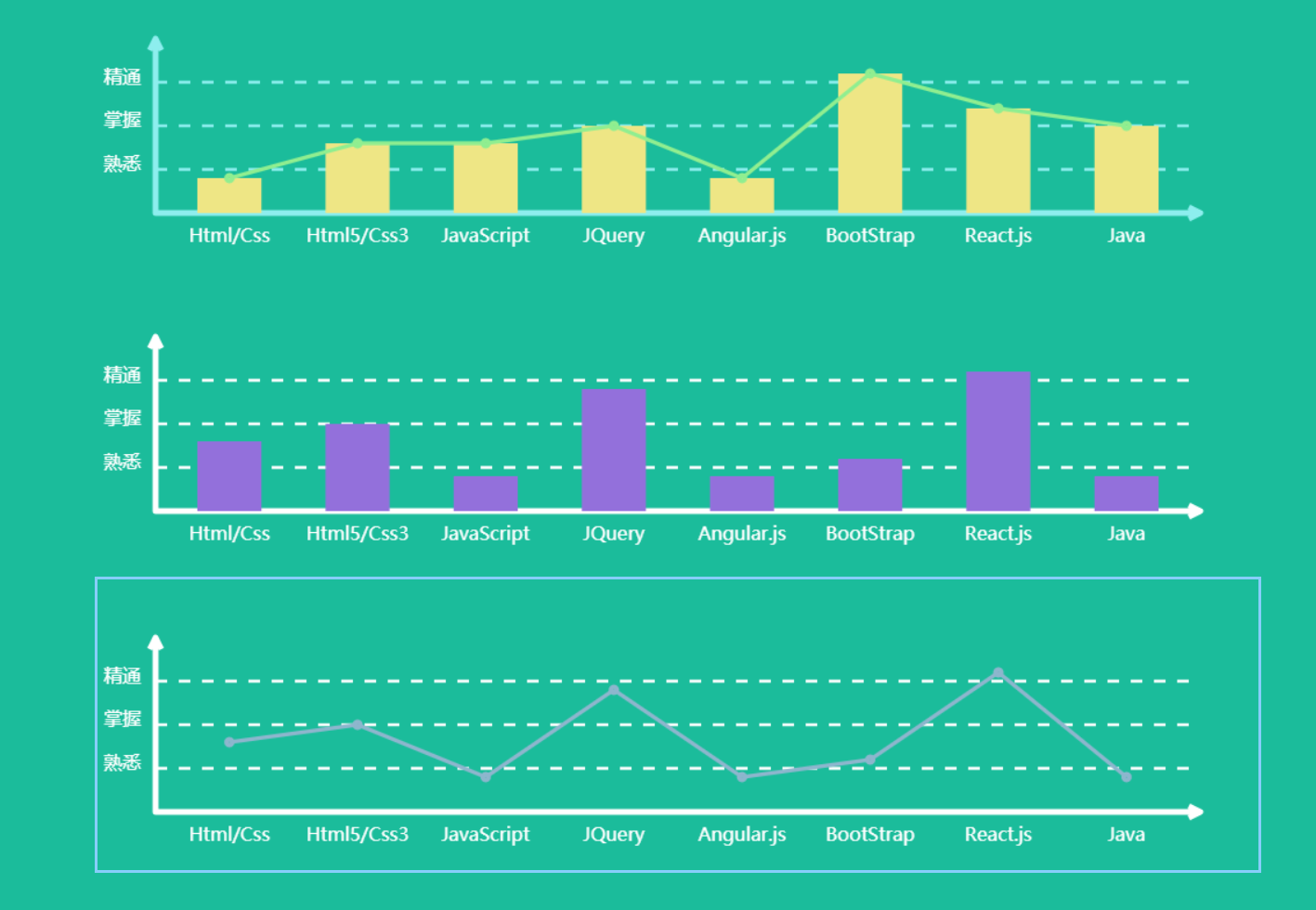
在整个编码的过程中我把代码改过一次,为什么改呢,因为在第一次的时候我在js里面使用了大量的 ChartDraws.prototype.XXXX = function(){};
后来我一想不对啊,我为什么要把这么多的方法暴露给外部呢......这不是没事找事么.......
所以现在就改成这样了,如果有不对的地方和可以改进的地方,希望路过的指点下,谢谢!还有那个白条代码背景怎么删不掉...........
js封装成插件-------Canvas统计图插件编写的更多相关文章
- js封装成插件
由于项目原因,工作一年多还没用js写过插件,项目太成熟,平时基本都是在使用已经封装好的功能插件.感觉自己好low......这两天想自己抽空写一个canvas画统计图与折现图的插件,所以就去网上学习了 ...
- JS21. 使用原生JS封装一个公共的Alert插件(HTML5: Shadow Dom)
效果预览 Shadow DOM Web components 的一个重要属性是封装--可以将标记结构.样式和行为隐藏起来,并与页面上的其他代码相隔离,保证不同的部分不会混在一起,可使代码更加干净.整 ...
- 自己做jQuery插件:将audio5js封装成jQuery语音播放插件
日前的一个项目需要用到语音播放功能.发现Audio5js符合需求且使用简单,又鉴于jQuery控件便于开发操作,于是有了以下的封装. 首先先简单介绍一下Audio5js吧. Audio5js是一个能够 ...
- JS封装移动端触摸滑动插件应用于导航banner【精装版】
自己封装了一个小插件,一个小尝试. 可用于类似于京东导航等效果,效果多样化,很方便. 欢迎大家提点意见. mrChenSwiper( {parent, child, type, parentN, c ...
- 如何将Js代码封装成Jquery插件
很多相同的Jquery代码会在很多页面使用,每次都复制粘贴太麻烦了,不如封装成一个Jquery插件就方便了,至于影响网页的速度不,我就没有测试了哈. 代码如下 这是一个自定闪烁打印文字的Jquery特 ...
- 原生JS封装Ajax插件(同域&&jsonp跨域)
抛出一个问题,其实所谓的熟悉原生JS,怎样的程度才是熟悉呢? 最近都在做原生JS熟悉的练习... 用原生Js封装了一个Ajax插件,引入一般的项目,传传数据,感觉还是可行的...简单说说思路,如有不正 ...
- 把jQuery的类、插件封装成seajs的模块的方法
这篇文章主要介绍了把jQuery的类.插件封装成seajs的模块的方法,需要的朋友可以参考下 注:本文使用的seajs版本是2.1.1 一.把Jquery封装成seajs的模块 define(func ...
- jQuery实现轮播切换以及将其封装成插件(3)
在前两篇博文中,我们写了一个普通的轮播切换.但是我们不能每一次需要这个功能就把这些代码有重新敲一次.下面我们就将它封装成一个插件. 至于什么是插件,又为什么要封装插件,不是本文考虑的内容. 我们趁着 ...
- 星级评分--封装成jquery插件
<!DOCTYPE html> <html> <head> <meta charset="utf-8"> <title> ...
随机推荐
- lnk后缀名打开方式
老娘栽了两次!! 前段时间,设计把设计图发给我,竟然是个后缀"exe"的文件,选择打开方式的时候忘记取消下图勾选: 结果懵逼了... 在网上找了个方法: 1.打开电脑"运 ...
- WordPress中函数钩子hook的作用及基本用法
WordPress 的插件机制实际上只的就是这个 Hook 了,它中文被翻译成钩子,允许你参与 WordPress 核心的运行,是一个非常棒的东西,下面我们来详细了解一下它.钩子分类 钩子分为两种,一 ...
- Windows10系统PHP开发环境配置
Windows下搭建(Apache+PHP+MySQL)=>WAMP Linux下搭建(Apache+PHP+MySQL) =>LAMP PHP开发环境配置一般有套件安装和自定义安装两种方 ...
- Python爬虫从入门到放弃(二十一)之 Scrapy分布式部署
按照上一篇文章中我们将代码放到远程主机是通过拷贝或者git的方式,但是如果考虑到我们又多台远程主机的情况,这种方式就比较麻烦,那有没有好用的方法呢?这里其实可以通过scrapyd,下面是这个scrap ...
- ps命令用法
转自:http://www.cnblogs.com/peida/archive/2012/12/19/2824418.html Linux中的ps命令是Process Status的缩写.ps命令用来 ...
- [stm32F429-DISCO-HAL] 1.先说说关于stm32Cube的一些事情。然后,Start with it...
目前,我觉得STM32CUBE最大的方便在于,可以使用STM32CubeMX软件来图形化配置外设.首先贴出官网的PDF,Getting started with STM32CubeF4 firmwar ...
- 实验演示Oracle“多版本一致读”和“Cross DDL”
http://space.itpub.net/17203031/viewspace-756336 在各种事务级别中,Oracle实现的是“Read Committed”,也就是读取的数据都是已经提 ...
- linux几个重要的按键
我们在用Windows系统时,有没有感觉快键键让我们工作更有效率,在Linux系统中仍有很好用的快捷键,这些快捷键可以辅助我们进行指令的编写与程序的中断呢,下面介绍几个经常用到的快捷键. 一.Tab- ...
- 再起航,我的学习笔记之JavaScript设计模式10(单例模式)
单例模式 单例模式(Singleton) : 又被称为单体模式,是只允许实例化一次的对象类.一个类有且仅有一个实例,并且自行实例化向整个系统提供. 命名空间 单例模式可能是JavaScript中我们最 ...
- STL容器的reserve()函数和resize()函数解析
以vector为例,我们都知道可以用reserve()和resize()函数来为容器预留空间或者调整它的大小. 不过从它俩的名字上可以看出区别: reserve():serve是"保留&qu ...