
《使用Gin框架构建分布式应用》阅读笔记:p77-p87
《用Gin框架构建分布式应用》学习第5天,p77-p87总结,总计11页。
一、技术总结
1.Go知识点
(1)context
2.on-premises software
p80, A container is like a separate OS, but not virtualized; it only contains the dependencies needed for that one application, which makes the container portable and deployable on-premises or on the cloud。
premises的意思是“the land and buildings owned by someone, especially by a company or organization(归属于某人(尤指公司、组织)的土地或建筑物)”。简单来说 on-premises software 指的是运行在本地的服务(软件)。
wiki 对这个名称的定义很好,这里直接引用“On-premises software (abbreviated to on-prem, and often written as "on-premise") is installed and runs on computers on the premises of the person or organization using the software, rather than at a remote facility such as a server farm or cloud”。
3.openssl rand命令
openssl rand -base64 12 | docker secret create mongodb_password

-
rand 命令语法:
openssl rand [-help] [-out file] [-base64] [-hex] [-engine id] [-rand files] [-writerand file] [-provider name] [-provider-path path] [-propquery propq] num[K|M|G|T]
12对应 num参数。rand详细用法参考https://docs.openssl.org/3.4/man1/openssl-rand/。对于一个命令,我们需要掌握其有哪些参数及每个参数的含义。
4.查看docker latest tag对应的版本号
(1)未下载镜像
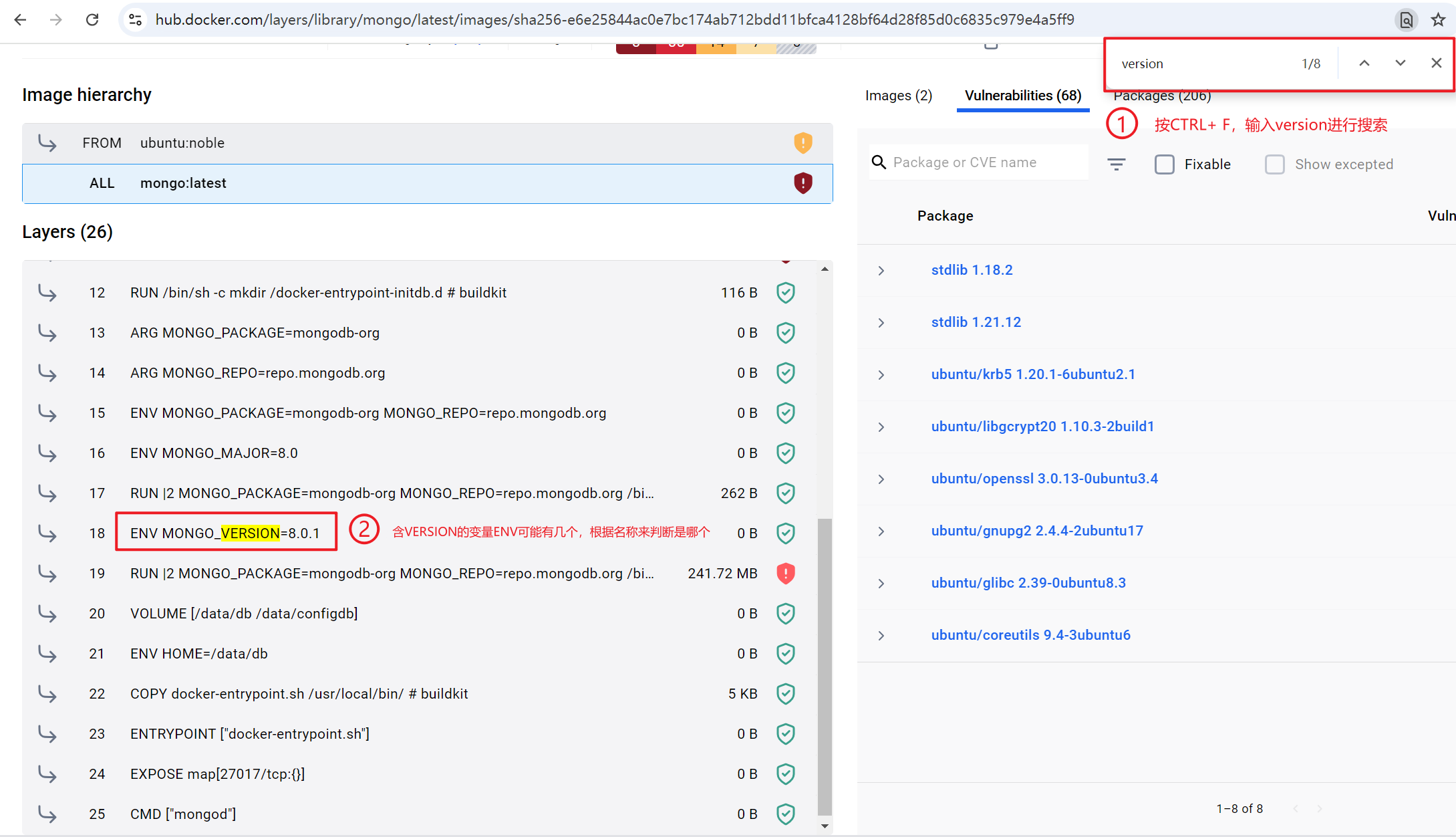
打开latest tag对应的页面,如:https://hub.docker.com/layers/library/mongo/latest/images/sha256-e6e25844ac0e7bc174ab712bdd11bfca4128bf64d28f85d0c6835c979e4a5ff9,搜索 VERSION,然后找到版本号。
(2)已下载镜像
使用 docker inspect 命令进行查看。
# docker inspect d32 | grep -i version

        "DockerVersion": "",

                "GOSU_VERSION=1.17",

                "JSYAML_VERSION=3.13.1",

                "MONGO_VERSION=8.0.1",

                "org.opencontainers.image.version": "24.04"
5.mongo-go-driver示例
书上代码使用的mongo-go-driver v1.4.5,现在已经更新到了v2.0.0,导致有些代码无法运行,建议使用最新版。这里还得再吐槽下 Go 生态圈的文档写得太糟糕了。示例:
client, _ := mongo.Connect(options.Client().ApplyURI("mongodb://localhost:27017"))

ctx, cancel = context.WithTimeout(context.Background(), 2*time.Second)

defer cancel()

_ = client.Ping(ctx, readpref.Primary())
个人认为,上面的代码 err 就不应该忽略掉。而应该是:
package main

import (

	"context"

	"github.com/gin-gonic/gin"

	"github.com/rs/xid"

	"go.mongodb.org/mongo-driver/v2/mongo"

	"go.mongodb.org/mongo-driver/v2/mongo/options"

	"go.mongodb.org/mongo-driver/v2/mongo/readpref"

	"log"

	"net/http"

	"strings"

	"time"

)

type Recipe struct {

	ID           string    `json:"id"`

	Name         string    `json:"name"`

	Tags         []string  `json:"tags"`

	Ingredients  []string  `json:"ingredients"`

	Instructions []string  `json:"instructions"`

	PublishAt    time.Time `json:"publishAt"`

}

var recipes []Recipe

func init() {

	// 方式1:使用内存进行初始化

	// recipes = make([]Recipe, 0)

	// file, err := os.Open("recipes.json")

	// if err != nil {

	// 	log.Fatal(err)

	// 	return

	// }

	// defer file.Close()

	//

	// // 反序列化:将json转为slice

	// decoder := json.NewDecoder(file)

	// err = decoder.Decode(&recipes)

	// if err != nil {

	// 	log.Fatal(err)

	// 	return

	// }

	// 方式2:使用 MongoDB 存储数据

	ctx, cancel := context.WithTimeout(context.Background(), 10*time.Second)

	defer cancel()

	// 创建连接,这里的 err 针对的是 URI 错误

	client, err := mongo.Connect(options.Client().ApplyURI("mongodb1://admin:admin@localhost:27017"))

	if err != nil {

		log.Fatal("MongoDB connect error: ", err)

	}

	// 判断连接是否成功

	if err := client.Ping(ctx, readpref.Primary()); err != nil {

		log.Fatal("MongoDB Ping error: ", err)

	}

	log.Println("Connected to MongoDB successfully.")

}

// swagger:route POST /recipes  createRecipe

//

// # Create a new recipe

//

// Responses:

//

//	200: recipeResponse

//

// NewRecipeHandler 新增recipe,是按照单个新增,所以这里名称这里用的是单数

func NewRecipeHandler(c *gin.Context) {

	var recipe Recipe

	if err := c.ShouldBindJSON(&recipe); err != nil {

		c.JSON(http.StatusBadRequest, gin.H{"error": err.Error()})

		return

	}

	recipe.ID = xid.New().String()

	recipe.PublishAt = time.Now()

	recipes = append(recipes, recipe)

	c.JSON(http.StatusOK, recipe)

}

// swagger:route GET /recipes  listRecipes

// Returns list of recipes

// ---

// produces:

// - application/json

// responses:

// '200':

// description: Successful operation

// ListRecipesHandler 差下recipes,因为是查询所有,所以名称这里用的是复数

func ListRecipesHandler(c *gin.Context) {

	c.JSON(http.StatusOK, recipes)

}

// UpdateRecipeHandler 更新 recipe,因为是单个,所以使用的是单数。

// id 从 path 获取,其它参数从 body 获取。

func UpdateRecipeHandler(c *gin.Context) {

	id := c.Param("id")

	// 数据解码

	var recipe Recipe

	if err := c.ShouldBindJSON(&recipe); err != nil {

		c.JSON(http.StatusBadRequest, gin.H{"error": err.Error()})

		return

	}

	// 判断 id 是否存在

	index := -1

	for i := 0; i < len(recipes); i++ {

		if recipes[i].ID == id {

			index = i

		}

	}

	// 如果 id 不存在

	if index == -1 {

		c.JSON(http.StatusNotFound, gin.H{"error": "recipe not found"})

		return

	}

	// 如果 id 存在则进行更新

	recipes[index] = recipe

	c.JSON(http.StatusOK, recipe)

}

// DeleteRecipeHandler 删除 recipe: 1.删除之前判断是否存在,存在就删除,不存在就提示不存在。

func DeleteRecipeHandler(c *gin.Context) {

	id := c.Param("id")

	index := -1

	for i := 0; i < len(recipes); i++ {

		if recipes[i].ID == id {

			index = i

		}

	}

	if index == -1 {

		c.JSON(http.StatusNotFound, gin.H{"message": "recipe not found"})

		return

	}

	recipes = append(recipes[:index], recipes[index+1:]...)

	c.JSON(http.StatusOK, gin.H{

		"message": "recipe deleted",

	})

}

// SearchRecipesHandler 查询 recipes

func SearchRecipesHandler(c *gin.Context) {

	tag := c.Query("tag")

	listOfRecipes := make([]Recipe, 0)

	for i := 0; i < len(recipes); i++ {

		found := false

		for _, t := range recipes[i].Tags {

			if strings.EqualFold(t, tag) {

				found = true

			}

			if found {

				listOfRecipes = append(listOfRecipes, recipes[i])

			}

		}

	}

	c.JSON(http.StatusOK, listOfRecipes)

}

func main() {

	router := gin.Default()

	router.POST("/recipes", NewRecipeHandler)

	router.GET("/recipes", ListRecipesHandler)

	router.PUT("/recipes/:id", UpdateRecipeHandler)

	router.DELETE("/recipes/:id", DeleteRecipeHandler)

	router.GET("/recipes/search", SearchRecipesHandler)

	err := router.Run()

	if err != nil {

		return

	}

}
二、英语总结
1.ephemeral
p79, I opted to go with Docker duce to its popularity and simplicity in runing ephermeral environment.
(1)ephemeral: ephemera + -al。
(2)ephemera: epi-("on") + hemera("day"), lasting one day , short-lived"。
三、其它
从目前的阅读体验来看,作者默认读者充分掌握Golang,丝毫不会展开介绍。
四、参考资料
1. 编程
(1) Mohamed Labouardy,《Building Distributed Applications in Gin》:https://book.douban.com/subject/35610349
2. 英语
(1) Etymology Dictionary:https://www.etymonline.com
(2) Cambridge Dictionary:https://dictionary.cambridge.org

欢迎搜索及关注:编程人(a_codists)
《使用Gin框架构建分布式应用》阅读笔记:p77-p87的更多相关文章
- CI框架源码阅读笔记5 基准测试 BenchMark.php
上一篇博客(CI框架源码阅读笔记4 引导文件CodeIgniter.php)中,我们已经看到:CI中核心流程的核心功能都是由不同的组件来完成的.这些组件类似于一个一个单独的模块,不同的模块完成不同的功 ...
- CI框架源码阅读笔记4 引导文件CodeIgniter.php
到了这里,终于进入CI框架的核心了.既然是“引导”文件,那么就是对用户的请求.参数等做相应的导向,让用户请求和数据流按照正确的线路各就各位.例如,用户的请求url: http://you.host.c ...
- CI框架源码阅读笔记3 全局函数Common.php
从本篇开始,将深入CI框架的内部,一步步去探索这个框架的实现.结构和设计. Common.php文件定义了一系列的全局函数(一般来说,全局函数具有最高的加载优先权,因此大多数的框架中BootStrap ...
- CI框架源码阅读笔记2 一切的入口 index.php
上一节(CI框架源码阅读笔记1 - 环境准备.基本术语和框架流程)中,我们提到了CI框架的基本流程,这里再次贴出流程图,以备参考: 作为CI框架的入口文件,源码阅读,自然由此开始.在源码阅读的过程中, ...
- CI框架源码阅读笔记1 - 环境准备、基本术语和框架流程
最开始使用CI框架的时候,就打算写一个CI源码阅读的笔记系列,可惜虎头蛇尾,一直没有行动.最近项目少,总算是有了一些时间去写一些东西.于是准备将之前的一些笔记和经验记录下来,一方面权作备忘,另一方面时 ...
- CI框架源码阅读笔记9 CI的自动加载机制autoload
本篇并不是对某一组件的详细源码分析,而只是简单的跟踪了下CI的autoload的基本流程.因此,可以看做是Loader组件的分析前篇. CI框架中,允许你配置autoload数组,这样,在你的应用程序 ...
- CI框架源码阅读笔记8 控制器Controller.php
最近时间有些紧,源码阅读系列更新有些慢.鉴于Controller中代码比较少,本次Blog先更新该文件的源码分析. 在经过路由分发之后,实际的应用Controller接管用户的所有请求,并负责与用户数 ...
- CI框架源码阅读笔记6 扩展钩子 Hook.php
CI框架允许你在不修改系统核心代码的基础上添加或者更改系统的核心功能(如重写缓存.输出等).例如,在系统开启hook的条件下(config.php中$config['enable_hooks'] = ...
- ****CI框架源码阅读笔记7 配置管理组件 Config.php
http://blog.csdn.net/ohmygirl/article/details/41041597 一个灵活可控的应用程序中,必然会存在大量的可控参数(我们称为配置),例如在CI的主配置文件 ...
- CI框架源代码阅读笔记5 基准測试 BenchMark.php
上一篇博客(CI框架源代码阅读笔记4 引导文件CodeIgniter.php)中.我们已经看到:CI中核心流程的核心功能都是由不同的组件来完毕的.这些组件类似于一个一个单独的模块,不同的模块完毕不同的 ...
随机推荐
- 【转载】 SLI导致双显卡被TensorFlow同时占用问题(Windows下) ---------- (windows环境下如何为tensorflow安装多个独立的消费级显卡)
版权声明:本文为博主原创文章,遵循 CC 4.0 BY-SA 版权协议,转载请附上原文出处链接和本声明.本文链接:https://blog.csdn.net/qq_21368481/article/d ...
- 【转载】 linux中umask命令介绍
版权声明:本文为CSDN博主「立二拆四i」的原创文章,遵循CC 4.0 BY-SA版权协议,转载请附上原文出处链接及本声明.原文链接:https://blog.csdn.net/weixin_4408 ...
- windows10开启电源模式中的休眠选项
使用管理员权限开启PowerShell,输入命令: powercfg -h on
- baselines算法库run.py模块分析
baselines算法库地址: https://gitee.com/devilmaycry812839668/baselines =================================== ...
- 成为Apache SeaTunnel贡献者的N种方式
如何参与开源贡献 参与开源贡献的常见方法有多种: 1)参与解答 在社区中, 帮助使用过程中遇到困难的人,帮他们解释框架的用法也算是一种贡献. 2)文档贡献 帮助框架来完善文档,比如说将英文文档翻译为中 ...
- Java开发环境安装笔记
目录 JDK的版本 Java 8 Java 9 Java 11 (LTS) Java 17 (LTS) Java 21 JDK的环境变量设置 JAVAHOME 和 PATH 环境变量 JAVAPATH ...
- Next.js 中为什么 App Router 可能是未来,但 Pages Router 仍然重要?
Next.js 作为一个强大的 React 框架,为开发者提供了两种路由系统:App Router 和 Pages Router.这两种路由系统各有特色,适用于不同的场景.本文将深入探讨这两种路由系统 ...
- 2024-08-28:用go语言,给定一个从1开始、长度为n的整数数组nums,定义一个函数greaterCount(arr, val)可以返回数组arr中大于val的元素数量。 按照以下规则进行n次
2024-08-28:用go语言,给定一个从1开始.长度为n的整数数组nums,定义一个函数greaterCount(arr, val)可以返回数组arr中大于val的元素数量. 按照以下规则进行n次 ...
- Windows 将透明的图片旋转,裁剪
使用 Microsoft Office Picture Manager 本来是想找个Java代码,跑一下 忽然在 Windows 图片打开方式中有一个 Microsoft Office Pictur ...
- RestoreFormer++: Towards Real-World Blind Face Restoration from Undegraded Key-Value Pairs(IEEE,2023,8)
RestoreFormer++: Towards Real-World Blind Face Restoration from Undegraded Key-Value Pairs(IEEE,2023 ...