
上传jar包到nexus私服
摘要
1通过网页上传
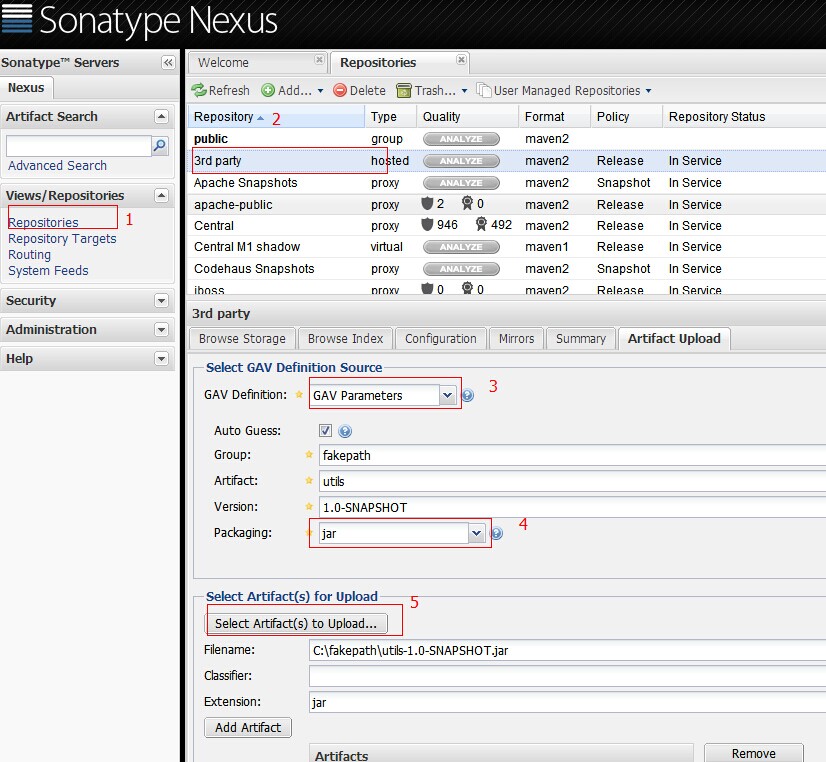
这种方法只是上传了jar包。通过maven引用当前jar,不能取得jar的依赖
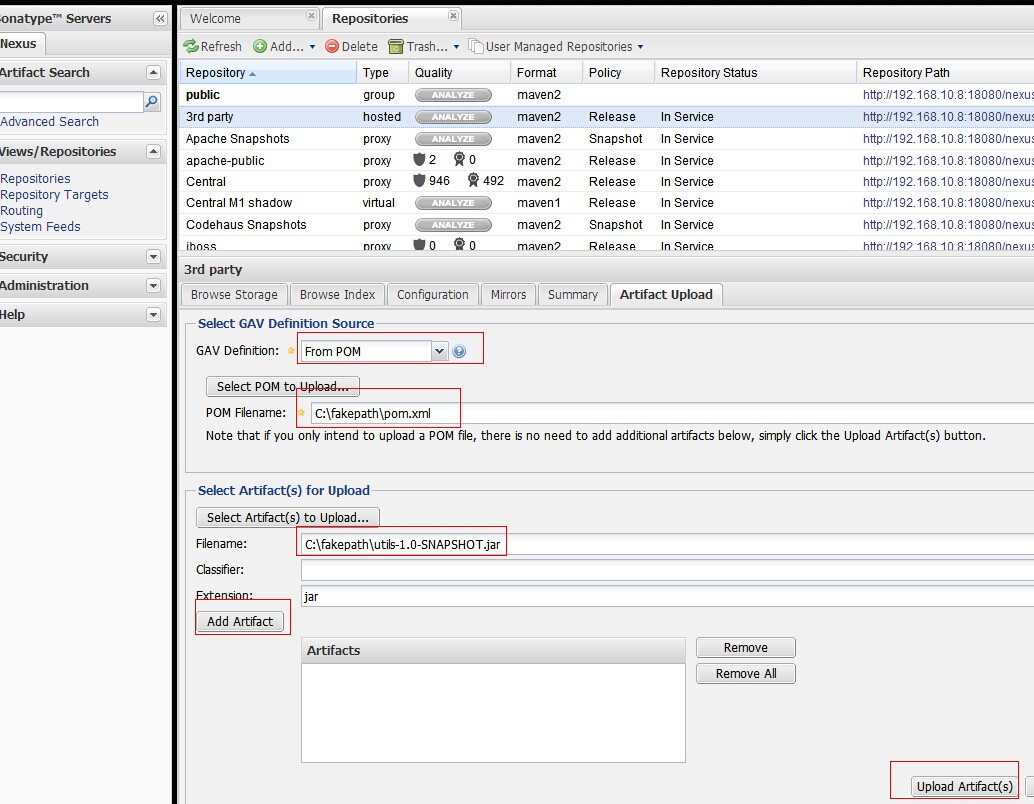
from pom的方式,选择pom文件,以及jar。通过maven引入jar时,会自动加载jar的依赖
2通过maven的方式depoly
在maven的conf/setting.xml 配置nexus私服的管理账号
在servers标签下添加server
<server>
<id>nexus-snapshots</id>
<username>repouser</username>
<password>repopwd</password>
</server>
id可自己定义一个名称 以及私服的管理管的账号密码
在mirrors和profiles下配置nexus私服
<mirrors>
<mirror>
<!--This sends everything else to /public -->
<id>nexus</id>
<mirrorOf>*</mirrorOf>
<url>http://192.168.10.8:18080/nexus/content/repositories/releases/</url>
</mirror></mirrors><profiles>
<profile>
<id>nexus</id>
<!--Enable snapshots for the built in central repo to direct -->
<!--all requests to nexus via the mirror -->
<repositories>
<repository>
<id>nexus</id>
<name>local private nexus</name>
<url>http://192.168.10.8:18080/nexus/content/groups/public</url>
<releases><enabled>true</enabled><updatePolicy>always</updatePolicy>
<checksumPolicy>warn</checksumPolicy></releases>
<snapshots><enabled>false</enabled></snapshots>
</repository>
</repositories>
<pluginRepositories>
<pluginRepository>
<id>nexus</id>
<name>local private nexus</name>
<url>http://192.168.10.8:18080/nexus/content/groups/public</url>
<releases><enabled>true</enabled><updatePolicy>always</updatePolicy>
<checksumPolicy>warn</checksumPolicy></releases>
<snapshots><enabled>false</enabled></snapshots>
</pluginRepository>
</pluginRepositories>
</profile></profiles><activeProfiles>
<!--make the profile active all the time -->
<activeProfile>nexus</activeProfile></activeProfiles>
在项目的pom.xml中配置
<distributionManagement>
<repository>
<id>nexus-releases</id>
<name>Nexus Release Repository</name>
<url>http://192.168.10.8:18080/nexus/content/repositories/releases/</url>
</repository>
<snapshotRepository>
<id>nexus-snapshots</id>
<name>Nexus Snapshot Repository</name>
<url>http://192.168.10.8:18080/nexus/content/repositories/snapshots/</url>
</snapshotRepository>
</distributionManagement>
id与settings.xml中的server的id对应
当项目package后
mvn deploy
就可以将jar上传到nexus私服
上传jar包到nexus私服的更多相关文章
- maven上传jar包到nexus私服后的存放路径 以及 使用IDEA上传jar包的步骤
maven上传jar包到nexus私服的方法,网上大神详解很多,那么上传后的jar包存放到哪里了呢? 在下使用nexus3.2.1版本,在本地搭建了私服,使用maven上传jar包.最后结果如下: 点 ...
- (转)上传jar包到nexus私服
场景:在使用私服Nexus时候经常需要上传jar包,但是对上传jar包的方式不是很熟悉,所以很有必要学习下. 1 通过网页上传 GAV Definition:选择GAV Parameters 输入JA ...
- 【转】上传jar包到nexus私服
原文:https://my.oschina.net/lujianing/blog/297128 1通过网页上传 这种方法只是上传了jar包.通过maven引用当前jar,不能取得jar的依赖 from ...
- Maven第四篇【私有仓库、上传jar包、引用私服jar包、上传本地项目到私服】
搭建私有服务器 前面已经说过了,我们使用Maven的使用,如果需要导入相对应的jar包,Maven首先会在我们的本地仓库中寻找->私有仓库->中心仓库- 然而,我们的本地仓库常常没有想要的 ...
- 上传jar包至nexus
上传命令: mvn deploy:deploy-file -DgroupId=com.xxx -DartifactId=xxx-pdf -Dversion=16.10.0 -Dpackaging=ja ...
- 上传jar包至maven私服
1.maven环境变量配置(新建系统变量,编辑Path) 2.修改maven的setting文件 2.1 私服的用户配置 2.2 私服镜像配置 2.3 (我也不知道是啥) <profile> ...
- 上传jar包到nexus
注释掉: org.springframework.boot.autoconfigure.EnableAutoConfiguration=com.meeno.boot.oa.OaAutoConfigur ...
- Nexus3.0搭建私服上传JAR包 Windows10
背景 近期换了一个项目组,用的是公司自研产品,涉及到很多内部JAR包引用,版本号很多,每次更新都是产品部给出jar包,项目组成员各自复制一套本地替换,来了新人各种安装配置,复杂度太高,这不,我一来,又 ...
- 实测Maven上传jar包到私服的方法归纳
Hello,各位小伙伴大家好,我是小栈君.好久不见,最近因为工作的缘故,导致了更新变慢,但是小栈君也在积极的做素材的规划,毕竟学习知识点的归纳和提炼需要一定的时间. 所以还请大家多多见谅,下一期的分享 ...
随机推荐
- ANDROID_MARS学习笔记_S04_008_用Listview、自定义adapter显示返回的微博数据
一.简介 运行结果 二.代码1.xml(1)activity_main.xml <?xml version="1.0" encoding="utf-8"? ...
- C++ STL 算法精选之查找篇
1.查找类算法 adjacent_find(first,last); 查找区间[first,last)内第一次出现连续的两个相等的元素,并返回指向第一个元素的迭代器,连续元素之间的比较,默认是== a ...
- mysql 区间锁 对于没有索引 非唯一索引 唯一索引 各种情况
The locks are normally next-key locks that also block inserts into the "gap" immediately b ...
- 安卓高手之路之java层Binder
很多人一提到Binder就说代理模式,人云亦云的多,能理解精髓的少. 本篇文章就从设计角度分析一下java层BInder的设计目标,以及设计思路,设计缺陷,从而驾驭它. 对于[邦德儿]的理解, 从通信 ...
- CH Round #45 能量释放
能量释放 CH Round #45 - alan有一些陷阱 III 题目描述 alan得到一块由个能量晶体构成的矿石,对于矿石中的每一个能量晶体,如果用化学物质刺激某一个能量晶体,就能使它释放能量. ...
- Jersey+Spring+Maven(转)
spring和maven的搭建参考相关文档.本文只介绍与jersey有关配置. 一.jersey在maven中的依赖包 <!-- jersey --> <dependency> ...
- 【转】Mac OS X 快捷键(完整篇)
原文网址:http://www.nooidea.com/2011/01/mac-os-x-keyboard-shortcuts.html 没有写到基本的一些组合,只是一些可能大家不太常用到但及其提高机 ...
- eclipse android重新安装遇到各种问题
1.JAVA_HOME环境变量失效的解决办法 原文网址:http://www.cnblogs.com/yjmyzz/p/3521554.html 晚上把oracle自带的weblogic给卸载了,然后 ...
- List<object>排序 z
一般我們在撰寫程式時,很常會使用到List<>來裝取自定義的類別陣列,跟一般的陣列插在哪呢?!好處是什麼?!好處就是一般的陣列需要先 宣告長度,而List<>不用,所以在資料個 ...
- Kruskal算法构造最小生成树
Kruskal算法来构造最小生成树,我总结了分为以下步骤: (1)建图,构造Kruskal边集,边集元素应该包括该边的起始顶点.终止顶点.权值: (2)将边集按权值从小到大的顺序进行排序: (3)从小 ...