
【转】上传jar包到nexus私服
原文:https://my.oschina.net/lujianing/blog/297128
1通过网页上传
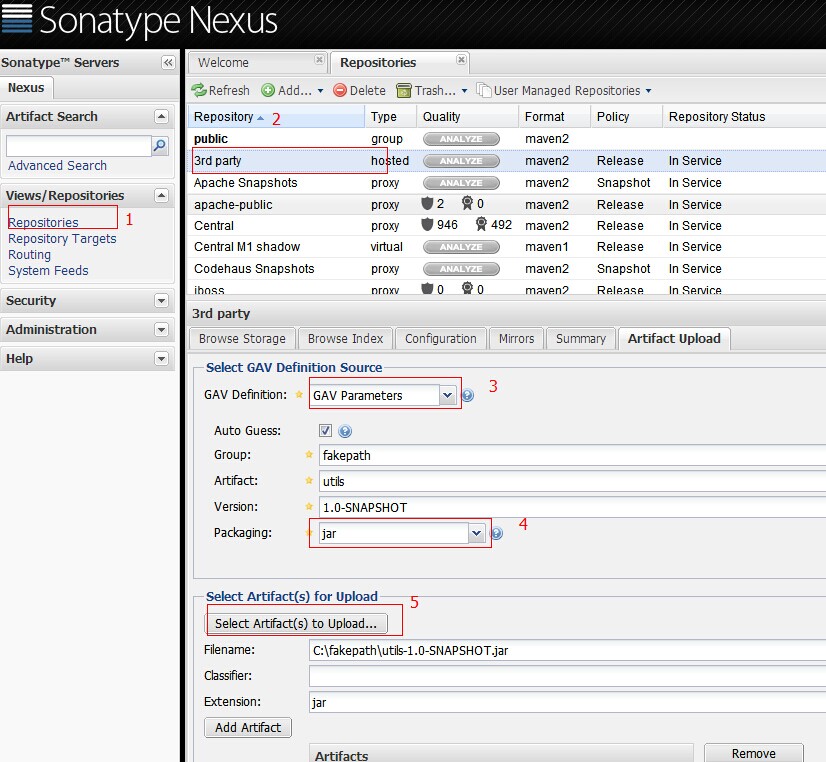
这种方法只是上传了jar包。通过maven引用当前jar,不能取得jar的依赖
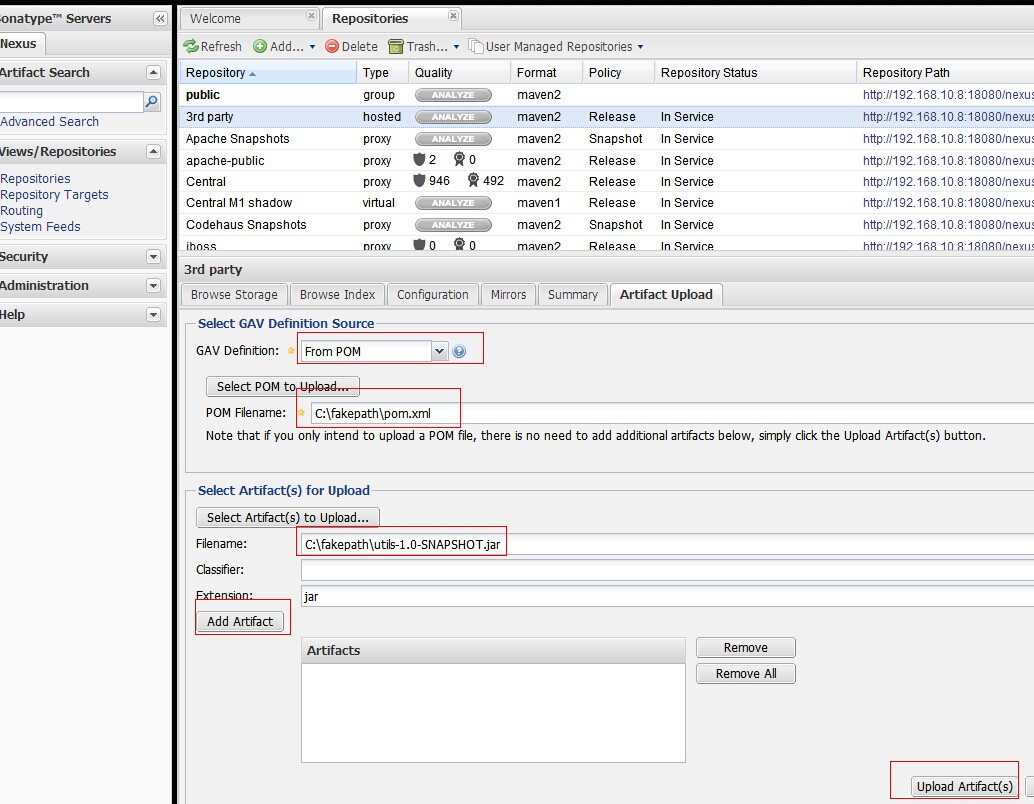
from pom的方式,选择pom文件,以及jar。通过maven引入jar时,会自动加载jar的依赖
2通过maven的方式depoly
在maven的conf/setting.xml 配置nexus私服的管理账号
在servers标签下添加server
   <server>

      <id>nexus-snapshots</id>

      <username>repouser</username>

      <password>repopwd</password>

    </server>
id可自己定义一个名称 以及私服的管理管的账号密码
在mirrors和profiles下配置nexus私服
<mirrors>

    <mirror>

      <!--This sends everything else to /public -->

      <id>nexus</id>

      <mirrorOf>*</mirrorOf>

      <url>http://192.168.10.8:18080/nexus/content/repositories/releases/</url>

    </mirror>

  </mirrors>

  <profiles>

    <profile>

      <id>nexus</id>

      <!--Enable snapshots for the built in central repo to direct -->

      <!--all requests to nexus via the mirror -->

      <repositories>

        <repository>

            <id>nexus</id>

            <name>local private nexus</name>

            <url>http://192.168.10.8:18080/nexus/content/groups/public</url>

            <releases><enabled>true</enabled><updatePolicy>always</updatePolicy>

            <checksumPolicy>warn</checksumPolicy></releases>

            <snapshots><enabled>false</enabled></snapshots>

        </repository>

      </repositories>

      <pluginRepositories>

        <pluginRepository>

            <id>nexus</id>

            <name>local private nexus</name>

            <url>http://192.168.10.8:18080/nexus/content/groups/public</url>

            <releases><enabled>true</enabled><updatePolicy>always</updatePolicy>

            <checksumPolicy>warn</checksumPolicy></releases>

            <snapshots><enabled>false</enabled></snapshots>

        </pluginRepository>

       </pluginRepositories>

    </profile>

  </profiles>

  <activeProfiles>

    <!--make the profile active all the time -->

    <activeProfile>nexus</activeProfile>

  </activeProfiles>
在项目的pom.xml中配置
 <distributionManagement>

        <repository>

            <id>nexus-releases</id>

            <name>Nexus Release Repository</name>

            <url>http://192.168.10.8:18080/nexus/content/repositories/releases/</url>

        </repository>

        <snapshotRepository>

            <id>nexus-snapshots</id>

            <name>Nexus Snapshot Repository</name>

            <url>http://192.168.10.8:18080/nexus/content/repositories/snapshots/</url>

        </snapshotRepository>

    </distributionManagement>
id与settings.xml中的server的id对应
当项目package后
mvn deploy就可以将jar上传到nexus私服
上传jar至Nexus Repository Manager失败问题总结
参考:https://my.oschina.net/skyzwg/blog/846195
上传一直各种原因失败。于是逐步排查,总结出了几个小Tips:
创建的仓库类型一定要是hosted类型的,否则无法上传(之前一直报405)
Snapshot库发布的版本必须以SNAPSHOT结尾
release发布的版本不能以SNAPSHOT结尾
【转】上传jar包到nexus私服的更多相关文章
- maven上传jar包到nexus私服后的存放路径 以及 使用IDEA上传jar包的步骤
maven上传jar包到nexus私服的方法,网上大神详解很多,那么上传后的jar包存放到哪里了呢? 在下使用nexus3.2.1版本,在本地搭建了私服,使用maven上传jar包.最后结果如下: 点 ...
- (转)上传jar包到nexus私服
场景:在使用私服Nexus时候经常需要上传jar包,但是对上传jar包的方式不是很熟悉,所以很有必要学习下. 1 通过网页上传 GAV Definition:选择GAV Parameters 输入JA ...
- 上传jar包到nexus私服
摘要 通过网页和maven两种方式,上传本地的jar到nexus私服,以及引用jar时,自动引用依赖 1通过网页上传 这种方法只是上传了jar包.通过maven引用当前jar,不能取得jar的依赖 ...
- Maven第四篇【私有仓库、上传jar包、引用私服jar包、上传本地项目到私服】
搭建私有服务器 前面已经说过了,我们使用Maven的使用,如果需要导入相对应的jar包,Maven首先会在我们的本地仓库中寻找->私有仓库->中心仓库- 然而,我们的本地仓库常常没有想要的 ...
- 上传jar包至nexus
上传命令: mvn deploy:deploy-file -DgroupId=com.xxx -DartifactId=xxx-pdf -Dversion=16.10.0 -Dpackaging=ja ...
- 上传jar包至maven私服
1.maven环境变量配置(新建系统变量,编辑Path) 2.修改maven的setting文件 2.1 私服的用户配置 2.2 私服镜像配置 2.3 (我也不知道是啥) <profile> ...
- 上传jar包到nexus
注释掉: org.springframework.boot.autoconfigure.EnableAutoConfiguration=com.meeno.boot.oa.OaAutoConfigur ...
- Nexus3.0搭建私服上传JAR包 Windows10
背景 近期换了一个项目组,用的是公司自研产品,涉及到很多内部JAR包引用,版本号很多,每次更新都是产品部给出jar包,项目组成员各自复制一套本地替换,来了新人各种安装配置,复杂度太高,这不,我一来,又 ...
- 实测Maven上传jar包到私服的方法归纳
Hello,各位小伙伴大家好,我是小栈君.好久不见,最近因为工作的缘故,导致了更新变慢,但是小栈君也在积极的做素材的规划,毕竟学习知识点的归纳和提炼需要一定的时间. 所以还请大家多多见谅,下一期的分享 ...
随机推荐
- Java新人拿到一台新的电脑需要装配什么
适用对象:新手 装备:win10 一.IDEA 插件等 说明 其他 TranslationPlugin 翻译插件 GitHub地址 MyBatis-Generator 自动生成Mybatis文件 Al ...
- 【SSH网上商城项目实战03】使用EasyUI搭建后台页面框架
转自:https://blog.csdn.net/eson_15/article/details/51312490 前面两节,我们整合了SSH并且抽取了service和action部分的接口,可以说基 ...
- JSP9大内置对象
JSP9大内置对象 JSP9个内置对象:out对象 用于输出各种数据reuest对象 封装了来自客户端的各种信息response对象 封装了服务器的响应信息exception对象 封装了程序运行过程中 ...
- CodeForces 598A(水)
还是要注意int和long long的范围,以及double型的问题 pow函数经常会报一个double型的错,参考这篇文章 http://blog.csdn.net/lawrencesgj/arti ...
- CodeForces 604A(浮点数)
这道题需要注意一个点,浮点数的误差问题 判断里的0.3*a[i]换成3*a[i]/10就过了 这个后面还要专门研究一下 #include <iostream> #include <s ...
- C#与.NET的区别和C#程序结构
C#语言及其特点 (1)语法简洁,不允许直接操作做内存,去掉指针操作 (2)彻底的面向对象设计,C#具有面向对象所应用的一切特性:封装.继承.多态 (3)与Web紧密结合,C#支持绝大多数的Web标准 ...
- JSTL总结摘要
一 概述 1.什么是JSTL? JSP Standard Taglib,一个定义了一系列标签的标签库,以取代在JSP页面中嵌套的java代码,经常与EL结合使用,使页面风格统一,维护方便. JSTL标 ...
- html开发那些不好的习惯,和问题。
最近网上看了好多html开发中那些问题和不好的习惯,顺手总结一下. 一.上下间距 在开发中你会发现你明明设置的两个p标签上下间距为20px但你实际测量中会发现他会多4~8px,这是为什么呢!如果你是老 ...
- can't start Git: git.exe
can't start Git: git.exe :不能启动Git 这是因为Git的可执行文件的路径不正确,需要手动设置,. 找到设置Git的窗口 然后修改一下路径就行了 点击OK就可以了.
- 原生JavaScript插件开发[转]
一起学习下 插件的开发,原生的. 看了这文章 JavaScript插件开发从入门到精通系列---原生JavaScript插件开发 附上 读完小结: 看了下,比较小白的方式就是把一些代码,放到一个单独的 ...