
selenium webdriver启动Chrome浏览器后无法输入网址的解决办法
通过selenium webdriver启动Chrome浏览器,脚本如下:
from selenium import webdriver
browser = webdriver.Chrome()
browser.get("http://www.baidu.com")
browser.find_element_by_id("kw").send_keys("selenium")
browser.find_element_by_id("su").click()
browser.quit()
浏览器启动成功,但是地址无法输入,报错:ConnectionResetError: [WinError 10054] 远程主机强迫关闭了一个现有的连接。
浏览器显示如下:
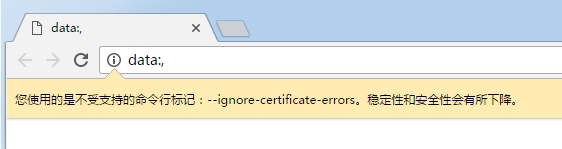
selenium版本:3.0.1
python版本3.5
Chrome版本:54.0.2840.99 m
修改以下部分脚本
option= webdriver.ChromeOptions()
option.add_argument('--user-data-dir=C:\\Users\FF\AppData\Local\Google\Chrome\\User Data') #设置成用户自己的数据目录
browser = webdriver.Chrome(chrome_options=option)
修改后重新运行,报错:selenium.common.exceptions.WebDriverException: Message: unknown error: Runtime.executionContextCreated has invalid 'context': {"auxData":{"frameId":"3624.1","isDefault":true},"id":1,"name":"","origin":"://"}
(Session info: chrome=54.0.2840.99)
(Driver info: chromedriver=2.9.248315,platform=Windows NT 6.1 SP1 x86_64)
表示chrome浏览器版本为54.0.2840.99,但是chromedriver版本为2.9.248315。版本不兼容
网上找了遇到相同问题的解决办法 http://blog.csdn.net/u012246342/article/details/52860949
下载v2.24版本的chromedriver.exe替换原有的chromedriver.exe(下载地址: http://chromedriver.storage.googleapis.com/index.html?path=2.24/ )
重新运行脚本,第一次运行较慢,最终超时失败,第二次运行成功!!
下面是关于加载Chrome配置的方法(网上copy的,保存留用):
一、加载所有Chrome配置
用Chrome地址栏输入chrome://version/,查看自己的“个人资料路径”,然后在浏览器启动时,调用这个配置文件,代码如下:
#coding=utf-8
from selenium import webdriver
option = webdriver.ChromeOptions()
option.add_argument('--user-data-dir=C:\Users\Administrator\AppData\Local\Google\Chrome\User Data') #设置成用户自己的数据目录
driver = webdriver.Chrome(chrome_options=option)
二、修改浏览器的User-Agent来伪装你的浏览器访问手机m站
#coding=utf-8
from selenium import webdriver
option = webdriver.ChromeOptions()
option.add_argument('--user-agent=iphone')
driver = webdriver.Chrome(chrome_options=option)
driver.get('http://www.taobao.com/')
三、浏览器启动时安装crx扩展
#coding=utf-8
from selenium import webdriver
option = webdriver.ChromeOptions()
option.add_extension('d:\crx\AdBlock_v2.17.crx') #自己下载的crx路径
driver = webdriver.Chrome(chrome_options=option)
driver.get('http://www.taobao.com/')
selenium webdriver启动Chrome浏览器后无法输入网址的解决办法的更多相关文章
- selenium webdriver 启动三大浏览器Firefox,Chrome,IE
selenium webdriver 启动三大浏览器Firefox,Chrome,IE 1.安装selenium 在联网的情况下,在Windows命令行(cmd)输入pip install selen ...
- selenium webdriver启动IE浏览器失败的解决办法
通过selenium webdriver启动IE浏览器失败,报错:selenium.common.exceptions.WebDriverException: Message: Unexpected ...
- ChromeDriver启动Chrome浏览器后,地址栏只显示data;——chromeDriver版本不对
ChromeDriver启动Chrome浏览器后,地址栏只显示data; 错误原因: chromeDriver版本不对,不同版本的chromeDriver对应不同版本的chrome浏览器 chrome ...
- 【Selenium专题】WebDriver启动Chrome浏览器(一)
selenium操作chrome浏览器需要有ChromeDriver驱动来协助.一.什么是ChromeDriver?ChromeDriver是Chromium team开发维护的,它是实现WebDri ...
- Webdriver启动Firefox浏览器后,页面显示空白
在使用pycharm码代码时编译总是出错,后来验证发现浏览器启动后出现问题.白白耗了我2个小时.我把我的解决方案写出来,希望对大家有帮助. 1.现象:起初安装的时候总是能正常运行,有一天突然发现Web ...
- 【Selenium专题】WebDriver启动Chrome浏览器(二)
官方API Constructor Summary ChromeDriver() Creates a new ChromeDriver using the default server configu ...
- jenkins里跑selenium webdriver,Chrome浏览器不能打开&&unknown error: unable to discover open pages
在windows的cmd里面执行 “python test.py”,毫无问题,浏览器正常打开,测试结果也正常. 问题: 但如果是在jenkins里,选择 “execute windows batch ...
- Selenium webdriver 操作chrome 浏览器
Step1: 下载chromedriver. 下载路径: http://chromedriver.storage.googleapis.com/index.html 选择一个合适的下载即可.我下载的是 ...
- selenium webdriver 使用Chrome 浏览器
首先需要有ChromeDriver驱动来协助.ChromeDriver是实现WebDriver有线协议的一个单独的服务.ChromeDriver通过chrome的自动代理框架控制浏览器,ChromeD ...
随机推荐
- .animate动画
.animate(params, [duration], [easing], [callback]) params: 结果样式属性 duration: 动画时长 也可以用 slow normal fa ...
- C# 窗体靠近屏幕边缘自动隐藏*学习(类似于QQ)
using System; using System.Collections.Generic; using System.Drawing; using System.Windows.Forms; us ...
- Ajax基础--JavaScript实现
ajax原理 1.ajax 即“Asynchronous JavaScript and XML”(异步 JavaScript 和 XML),也就是无刷新数据读取. 通俗地讲就是:AJAX 通过在后台与 ...
- Bootstrap_表单_表单控件状态
一.焦点状态 焦点状态是通过伪类“:focus”来实现.Bootstrap框架中表单控件的焦点状态删除了outline的默认样式,重新添加阴影效果. <form role="form& ...
- dedecms 文章排列方式
orderby='sortrank' 文档排序方式orderby='hot' 或 orderby='click' 表示按点击数排列orderby='sortrank' 或 orderby='pubda ...
- hadoop 2.2.0 eclipse 插件编译 及相关eclipse配置图解
https://github.com/winghc/hadoop2x-eclipse-plugin 官网 http://kangfoo.github.io/article/2013/12/build- ...
- [BZOJ 1055] [HAOI2008] 玩具取名 【记忆化搜索】
题目链接:BZOJ - 1055 题目分析 这种类似区间 DP 的记忆化搜索都是很相近的,比如字符串压缩和字符串扩展都差不多. 都是将现在 Solve 的区间分成子区间,再求解子区间. 这道题 Sol ...
- 【技术贴】解决使用maven jetty启动后无法加载修改过后的静态资源
如何使用jetty自动热部署修改后的所有文件,比如js,jpg,class等,哇咔咔 太爽啦比tomcat舒服多了. jetty模式是不能修改js文件的,比如你现在调试前端js,发现在myeclips ...
- Shuffle'm Up
poj3087:http://poj.org/problem?id=3087 题意:题意简化之后的就是:给你两个长度均为c的字符串s1,s2,然后给你一个2*c的串ss,现在每次从s2,中取一个,然后 ...
- Gnome Tetravex
zoj1008:http://acm.zju.edu.cn/onlinejudge/showProblem.do?problemCode=1008 题目意思是有一个游戏,即给出一个图,该图是由n*n个 ...