
liunx驱动之字符设备的注册
上一篇文章学习了如何编写linux驱动,通过能否正常加载模块进行验证是否成功,有做过liunx应用开发的小伙伴都知道驱动会在‘/dev’目录下以文件的形式展现出来,所以只是能加载驱动模块不能算是完成驱动的开发,而linux驱动分为三类,现在开始学习字符设备的注册。
一、主备材料
因为我主要是学习arm开发板的驱动编写,所以以后的测试中我都是以开发板测试为主,如果有想了解ubuntu下的测试或驱动编写的小伙伴,请阅读上一篇文章linux设备驱动编写入门
开发环境:VMware
操作系统:ubuntu
开发版:湃兔i2S-6UB
库文件:linux开发板或ubuntu的内核源码
二、注册字符设备
经过我的了解注册字符设备主要有两种方法,分为指定设备号注册和自动分配设备号注册两种方式。
1.通过指定字符设备号进行注册
通过指定设备号注册通常称为静态注册,主要注册函数有两个
a.linux2.4版本之前的注册方式是通过register_chrdev函数
int register_chrdev(unsigned int major, const char *name,const struct file_operations *fops);
major:主设备号
name:字符设备名称
fops:file_operations结构体
使用这个函数注册是会有很大的缺点,因为linux的设备号分为主设备号和次设备号,而这个函数注册时会将主设备号的次设备号全部进行注册,所以2.4版本后引入了新的静态函数进行注册。
b.register_chrdev_region()函数
int register_chrdev_region(dev_t from, unsigned count, const char *name);
from:注册的指定起始设备编号,比如:MKDEV(100, 0),表示起始主设备号100, 起始次设备号为0
count:需要连续注册的次设备编号个数
*name:字符设备名称
细心的小伙伴会发现注册的函数中缺少了file_operations结构体,没错2.4版本后确实有所改变,具体的注册方式见后续步骤。
c.设备号获取
因为静态注册是通过指定设备号进行注册的,那么设备号应该设备为多少才不会和设备已有的冲突了,为此我们可以通过一个命令查看设备已经在使用的主设备号,我们只需要选择一个没有使用的即可,命令如下
cat /proc/devices
2.通过自动分配设备号进行注册
采用动态的方式获取主设备号,就不需要通过指令查看后在指定具体的设备号,为编写程序提供了便捷,可以通过alloc_chrdev_region函数获取设备号
int alloc_chrdev_region(dev_t *dev, unsigned baseminor, unsigned count,const char *name);
*dev: 存放起始设备编号的指针,当注册成功, *dev就会等于分配到的起始设备编号,可以通过MAJOR()和MINNOR()函数来提取主次设备号
baseminor:次设备号基地址,也就是起始次设备号
count:需要连续注册的次设备编号个数
*name:字符设备名称
3.注销字符设备
因为linux的函数基本是成对存在饿,所以有注册函数便有注销函数,以下是注销函数
int unregister_chrdev(unsigned int major,const char *name)

int register_chrdev_region(dev_t from, unsigned count, const char *name)
从函数名既可以看出,unregister_chrdev注销函数对应注册函数是register_chrdev,而register_chrdev_region和alloc_chrdev_region注册函数都是通过register_chrdev_region函数来注销的。
4.cdev使用
通过以上介绍的三个字符设备的注册函数可知、register_chrdev_region和alloc_chrdev_region函数注册时缺少file_operations这个结构体的参数,而使用这两个函数进行注册时需要使用cdev_init和cdev_add函数添加file_operations结构体到系统中,卸载时通过cdev_del将file_operations从系统中卸载。
通过include/linux/cdev.h文件可知cdev结构体的成员,如下所示:
struct cdev {

       struct kobject    kobj;                   // 内嵌的kobject对象

       struct module   *owner;                   //所属模块

       const struct file_operations  *ops;       //操作方法结构体

       struct list_head  list;              //与 cdev 对应的字符设备文件的 inode->i_devices 的链表头

       dev_t dev;                    //起始设备编号,可以通过MAJOR(),MINOR()来提取主次设备号

       unsigned int count;                     //连续注册次设备号的个数

};
初始化cdev结构体,并将file_operations结构体放入cdev-> ops 中
void cdev_init(struct cdev *cdev, const struct file_operations *fops)
添加cdev结构体到系统中
int cdev_add(struct cdev *p, dev_t dev, unsigned count)
最后在卸载驱动之前别忘记将cdev结构体从系统中移除
void cdev_del(struct cdev *p)
到此注册字符设备的函数已经介绍完了
三、file_operations结构体
在介绍字符设备时会有一个file_operations结构体的参数,现在开始了接一下file_operations结构体,在include/linux/fs.h文件中我们可以看到结构体的定义,原型如下所示
struct file_operations {

	struct module *owner;

	loff_t (*llseek) (struct file *, loff_t, int);

	ssize_t (*read) (struct file *, char __user *, size_t, loff_t *);

	ssize_t (*write) (struct file *, const char __user *, size_t, loff_t *);

	ssize_t (*read_iter) (struct kiocb *, struct iov_iter *);

	ssize_t (*write_iter) (struct kiocb *, struct iov_iter *);

	int (*iterate) (struct file *, struct dir_context *);

	unsigned int (*poll) (struct file *, struct poll_table_struct *);

	long (*unlocked_ioctl) (struct file *, unsigned int, unsigned long);

	long (*compat_ioctl) (struct file *, unsigned int, unsigned long);

	int (*mmap) (struct file *, struct vm_area_struct *);

	int (*mremap)(struct file *, struct vm_area_struct *);

	int (*open) (struct inode *, struct file *);

	int (*flush) (struct file *, fl_owner_t id);

	int (*release) (struct inode *, struct file *);

	int (*fsync) (struct file *, loff_t, loff_t, int datasync);

	int (*aio_fsync) (struct kiocb *, int datasync);

	int (*fasync) (int, struct file *, int);

	int (*lock) (struct file *, int, struct file_lock *);

	ssize_t (*sendpage) (struct file *, struct page *, int, size_t, loff_t *, int);

	unsigned long (*get_unmapped_area)(struct file *, unsigned long, unsigned long, unsigned long, unsigned long);

	int (*check_flags)(int);

	int (*flock) (struct file *, int, struct file_lock *);

	ssize_t (*splice_write)(struct pipe_inode_info *, struct file *, loff_t *, size_t, unsigned int);

	ssize_t (*splice_read)(struct file *, loff_t *, struct pipe_inode_info *, size_t, unsigned int);

	int (*setlease)(struct file *, long, struct file_lock **, void **);

	long (*fallocate)(struct file *file, int mode, loff_t offset,

			  loff_t len);

	void (*show_fdinfo)(struct seq_file *m, struct file *f);

#ifndef CONFIG_MMU

	unsigned (*mmap_capabilities)(struct file *);

#endif

};
通过file_operations结构体可知,字符设备的实现方法都有哪些,实现方式如下所示
static int test_open(struct inode *inode, struct file *filp)

{

    return 0;

}

static int test_release(struct inode *inode, struct file *filp)

{

    return 0;

}

static ssize_t test_read(struct file *filp, __user char *buf, size_t count, loff_t *ppos)

{

    return 0;

}

static ssize_t test_write(struct file *filp, const char __user *buf, size_t count, loff_t *ppos)

{

    return 0;

}

/*

 *字符设备操作集合

 */

static const struct file_operations test_fops = {

    .owner = THIS_MODULE,

    .open = test_open,

    .release = test_release,

    .read = test_read,

    .write = test_write,

};
现在字符设备注册已经完成了,结果上一节设备驱动的源码进行实现。
四、字符设备注册源码
1.使用register_chrdev方式注册的源码如下所示
hell_demo1.c文件
#include <linux/module.h>

#include <linux/kernel.h>

#include <linux/init.h>

#include <linux/fs.h>

#include <linux/slab.h>

#include <linux/uaccess.h>

#include <linux/io.h>

#include <linux/cdev.h>

#define HELLO1_NAME "hello1"

#define HELLO1_MAJOR 300

static char readbuf[100];

static char writebuf[100];

static char kerneldata[] = {"hello This is the kernel data"};

static int hello1_open(struct inode *inode, struct file *filp)

{

    return 0;

}

static int hello1_release(struct inode *inode, struct file *filp)

{

    return 0;

}

static ssize_t hello1_read(struct file *filp, __user char *buf, size_t count, loff_t *ppos)

{

    int ret = 0;

    memcpy(readbuf, kerneldata, sizeof(kerneldata));

    ret = copy_to_user(buf, readbuf, count);

    if(ret == 0) {

    } else {

    }

    return 0;

}

static ssize_t hello1_write(struct file *filp, const char __user *buf, size_t count, loff_t *ppos)

{

    int ret = 0;

    ret = copy_from_user(writebuf, buf, count);

    if(ret == 0) {

        printk("kernel recevdata:%s\r\n", writebuf);

    } else {

    }

    return 0;

}

/*

 *字符设备操作集合

 */

static const struct file_operations hello1_fops = {

    .owner = THIS_MODULE,

    .open = hello1_open,

    .release = hello1_release,

    .read = hello1_read,

    .write = hello1_write,

};

static int __init hello1_init(void)

{

    int ret = 0;

    printk("hello1_init\r\n");

    /*注册字符设备*/

    register_chrdev(HELLO1_MAJOR, HELLO1_NAME, &hello1_fops);

    if(ret < 0) {

        printk("hell01 init failed!\r\n");

    } else {

        printk("hello1 init ok");

    }

    return 0;

}

static void __exit hello1_exit(void)

{

    printk("hello1_exit\r\n");

    /*注销字符设备*/

    unregister_chrdev(HELLO1_MAJOR, HELLO1_NAME);

}

/*

 *

 *模块入口与出口函数

 *

 */

module_init(hello1_init);

module_exit(hello1_exit);

MODULE_LICENSE("GPL");

MODULE_AUTHOR("jiaozhu");
2.使用register_chrdev_region和alloc_chrdev_region方式注册的源码如下所示
hell_demo2.c文件
#include <linux/module.h>

#include <linux/kernel.h>

#include <linux/init.h>

#include <linux/fs.h>

#include <linux/slab.h>

#include <linux/uaccess.h>

#include <linux/io.h>

#include <linux/cdev.h>

#define HELLO2_NAME "hello2"

#define HELLO2_COUNT 1

/*设备结构体*/

struct hello2_dev{

    struct cdev cdev;   /*字符设备*/

    dev_t devid;        /*设备号*/

    int major;          /*主设备号*/

    int minor;          /*次设备号*/

};

struct hello2_dev hello2;

static char readbuf[100];

static char writebuf[100];

static char kerneldata[] = {"hello This is the kernel data"};

static int hello2_open(struct inode *inode, struct file *filp)

{

    return 0;

}

static int hello2_release(struct inode *inode, struct file *filp)

{

    return 0;

}

static ssize_t hello2_read(struct file *filp, __user char *buf, size_t count, loff_t *ppos)

{

    int ret = 0;

    memcpy(readbuf, kerneldata, sizeof(kerneldata));

    ret = copy_to_user(buf, readbuf, count);

    if(ret == 0) {

    } else {

    }

    return 0;

}

static ssize_t hello2_write(struct file *filp, const char __user *buf, size_t count, loff_t *ppos)

{

    int ret = 0;

    ret = copy_from_user(writebuf, buf, count);

    if(ret == 0) {

        printk("kernel recevdata:%s\r\n", writebuf);

    } else {

    }

    return 0;

}

/*

 *字符设备操作集合

 */

static const struct file_operations hello2_fops = {

    .owner = THIS_MODULE,

    .open = hello2_open,

    .release = hello2_release,

    .read = hello2_read,

    .write = hello2_write,

};

static int __init hello2_init(void)

{

    int ret = 0;

    printk("hello2_init\r\n");

    /*设置设备号*/

    if(hello2.major){

    	hello2.devid = MKDEV(hello2.major, 0);

    	ret = register_chrdev_region(hello2.devid, HELLO2_COUNT, HELLO2_NAME);

    } else {

    	ret = alloc_chrdev_region(&hello2.devid, 0, HELLO2_COUNT, HELLO2_NAME);

    	hello2.major = MAJOR(hello2.devid);

    	hello2.minor = MINOR(hello2.devid);

    }

    if(ret < 0) {

    	printk("hello2 chrdev_region err!\r\n");

    	return -1;

    }

    printk("hello2 major = %d, minor = %d\r\n",hello2.major, hello2.minor);

    /*注册字符设备*/

    hello2.cdev.owner = hello2_fops.owner;

    cdev_init(&hello2.cdev, &hello2_fops);

    ret = cdev_add(&hello2.cdev, hello2.devid, HELLO2_COUNT);

    return 0;

}

static void __exit hello2_exit(void)

{

    printk("hello2_exit\r\n");

    /*删除字符设备*/

    cdev_del(&hello2.cdev);

    /*注销字符设备*/

    unregister_chrdev_region(hello2.devid, HELLO2_COUNT);

}

/*

 *

 *模块入口与出口函数

 *

 */

module_init(hello2_init);

module_exit(hello2_exit);

MODULE_LICENSE("GPL");

MODULE_AUTHOR("jiaozhu");
3.不论使用哪种方式Makefile文件的内容基本一样,只需要更改一下‘obj-m’对应的驱动文件即可,hell_demo2项目的工程如下所示
Makefile文件
KERNELDIR := /home/xfg/linux/imx_6ull/i2x_6ub/system_file/i2SOM-iMX-Linux

CURRENT_PATH := $(shell pwd)

obj-m := hello_demo2.o

build: kernel_modules

kernel_modules:

    $(MAKE) -C $(KERNELDIR) M=$(CURRENT_PATH) modules

clean:

    $(MAKE) -C $(KERNELDIR) M=$(CURRENT_PATH) clean
为了方便测试,在内核中使用了copy_to_user和copy_from_user函数,因为内核态和用户态之间的空间不能直接访问,所以需要使用这两个函数进行数据的拷贝。
内核空间-->用户空间
unsigned long copy_to_user(void *to, const void *from, unsigned long n)
to:目标地址(用户空间)
from:源地址(内核空间)
n:将要拷贝数据的字节数
用户空间-->内核空间
返回:成功返回0,失败返回没有拷贝成功的数据字节数
unsigned long copy_from_user(void *to, const void *from, unsigned long n)
to:目标地址(内核空间)
from:源地址(用户空间)
n:将要拷贝数据的字节数
返回:成功返回0,失败返回没有拷贝成功的数据字节数
五、测试
将编译好的.ko文件拷贝到arm开发版的/lib/modules/4.1.43+目录下
make

sudo cp hello_demo2.ko /home/rootfs/lib/modules/4.1.43+ -f
启动开发板加载驱动模块
lsmod

modprobe hello_demo2

lsmod
加载结果如下图所示:

成功加载驱动后,使用cat /proc/devices命令查看设备号并创建设备属性节点
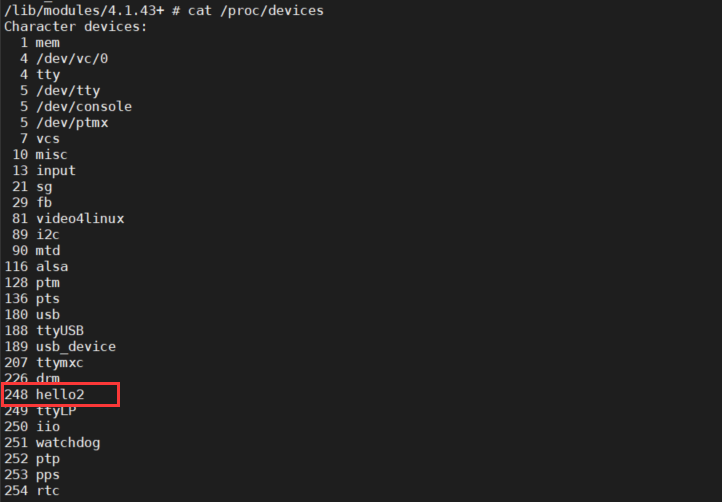
cat /proc/devices

mknod /dev/hello2 c 248 0
创建设备属性节点后会在/dev目录下存在hello2的文件,如下图所示

到此我们的驱动已经编写完成,在下一篇文章中将会编写一个程序对驱动进行验证,有需要的小伙伴下一篇文章见。
六、参考文献
使用register_chrdev_region()系列来注册字符设备:https://www.cnblogs.com/lifexy/p/7827559.html
linux驱动开发--copy_to_user 、copy_from_user函数实现内核空间数据与用户空间数据的相互访问https://blog.csdn.net/xiaodingqq/article/details/80150347
liunx驱动之字符设备的注册的更多相关文章
- linux驱动---字符设备的注册register_chrdev说起
首先我们在注册函数里面调用了register_chrdev(MEM_MAJOR,"mem",&memory_fops),向内核注册了一个字符设备. 第一个参数是主设备号,0 ...
- Linux驱动设计——字符设备驱动(一)
Linux字符设别驱动结构 cdev结构体 struct cdev { struct kobject kobj; struct module *owner; const struct file_ope ...
- 深入浅出:Linux设备驱动之字符设备驱
一.linux系统将设备分为3类:字符设备.块设备.网络设备.使用驱动程序: 字符设备:是指只能一个字节一个字节读写的设备,不能随机读取设备内存中的某一数据,读取数据需要按照先后数据.字符设备是面向流 ...
- 【转】深入浅出:Linux设备驱动之字符设备驱动
深入浅出:Linux设备驱动之字符设备驱动 一.linux系统将设备分为3类:字符设备.块设备.网络设备.使用驱动程序: 字符设备:是指只能一个字节一个字节读写的设备,不能随机读取设备内存中的某一数据 ...
- 【Linux驱动】字符设备驱动
一.linux系统将设备分为3类:字符设备.块设备.网络设备.使用驱动程序: 1.字符设备:是指只能一个字节一个字节读写的设备,不能随机读取设备内存中的某一数据,读取数据需要按照先后数据.字符设备是面 ...
- linux设备驱动之字符设备驱动模型(1)
一:字符设备驱动 在linux下面,应用层看到的一切皆为文件(名字)所有的设备都是文件,都可以调用open,read,write来操作,而在内核中每个中每个设备有唯一的对应一个设备号: APP ( ...
- 蜕变成蝶~Linux设备驱动之字符设备驱动
一.linux系统将设备分为3类:字符设备.块设备.网络设备.使用驱动程序: 字符设备:是指只能一个字节一个字节读写的设备,不能随机读取设备内存中的某一数据,读取数据需要按照先后数据.字符设备是面向流 ...
- 深入浅出:Linux设备驱动之字符设备驱动
一.linux系统将设备分为3类:字符设备.块设备.网络设备.使用驱动程序: 字符设备:是指只能一个字节一个字节读写的设备,不能随机读取设备内存中的某一数据,读取数据需要按照先后数据.字符设备是面向流 ...
- linux设备驱动之字符设备驱动模型(2)
在上一篇中我们已经了解了字符设备驱动的原理,也了解了应用层调用内核函数的机制,但是我们每次操作设备,都必须首先通过mknod命令创建一个设备文件名,比如说我们要打开u盘,硬盘等这些设备,难道我们还要自 ...
随机推荐
- 052.Python前端Django框架路由层和视图层
一.路由层(URLconf) 1.1 路由层简单配置 URL配置(URLconf)就像Django 所支撑网站的目录.它的本质是URL与要为该URL调用的视图函数之间的映射表:你就是以这种方式告诉Dj ...
- python中的threading模块使用说明
这段时间使用python做串口的底层库,用到了多线程,对这部分做一下总结.实际用完了后再回过头去看python的官方帮助文档,感觉受益匪浅,把里面的自己觉得有用的一些关键点翻译出来,留待后续查验.th ...
- php反转字符串的三种方法
(假设有字符串abcd,用php实现字符串翻转) 1.第一种php有自带的函数strrev可以轻松实现: $str = 'abcd'; //第一种自带strrev实现翻转 echo strrev($s ...
- .NET5 WPF进阶教程
一.概要 本系列将继<.net wpf快速入门教程>带领大家了解wpf,帮助各位在初级向中级过渡的中掌握基本该具备的能力.本系列视频长度大约在15分钟到30分钟左右,视频内容不仅仅会讲解技 ...
- redis全解
Redis全解 1.什么是Redis? Redis本质上是一个Key-Value类型的内存数据库,很像memcached,整个数据库统统加载在内存当中进行操作,定期通过异步操作把数据库数据flush到 ...
- The Superego 实验四 团队作业1:软件研发团队组建
项目 内容 课程班级博客链接 班级博客链接 这个作业要求链接 作业要求链接 团队名称 The Superego 团队的课程学习目标 (1)组建团队,建设团队文化,申请开通团队博客 (2)团队之间相互协 ...
- YOLO v4分析
YOLO v4分析 YOLO v4 的作者共有三位:Alexey Bochkovskiy.Chien-Yao Wang 和 Hong-Yuan Mark Liao.其中一作 Alexey Bochko ...
- 基于TensorRT 3的自动驾驶快速INT8推理
基于TensorRT 3的自动驾驶快速INT8推理 Fast INT8 Inference for Autonomous Vehicles with TensorRT 3 自主驾驶需要安全性,需要一种 ...
- CodeGen标记循环
CodeGen标记循环 标记循环是一个模板文件构造,它允许您迭代CodeGen拥有的标记信息的集合.为了使用标记循环,必须基于至少定义了一个字段标记的存储库结构生成代码. 标 ...
- 实用的jar包加密方案
前言 jar包相信大家都很熟悉,是通过打包java工程而获得的产物,但是jar包是有一个致命的缺点的,那就是很容易被反编译,只需要使用jd-gui就可以很容易的获取到java源码. 如果你想要防止别人 ...