
selenium启动IE失败,并报错:Unexpected error launching Internet Explorer. Protected Mode settings are not the same for all zones
1.selenium去启动IE时,报错:
Started InternetExplorerDriver server (32-bit)
2.50.0.0
Listening on port 24641
Only local connections are allowed
Exception in thread "main" org.openqa.selenium.WebDriverException: Unexpected error launching Internet Explorer. Protected Mode settings are not the same for all zones. Enable Protected Mode must be set to the same value (enabled or disabled) for all zones. (WARNING: The server did not provide any stacktrace information)
Command duration or timeout: 1.17 seconds
2.启动时的代码为:
package com.chrome.test;
import org.openqa.selenium.ie.InternetExplorerDriver;
public class Login_IETest {
public static void main(String[] args) {
// 申明driver对象
System.setProperty("webdriver.ie.driver", "D:\\selenium\\IEDriverServer.exe");
InternetExplorerDriver driver = new InternetExplorerDriver();
// 获取并在浏览器中打开 百度 链接
driver.get("http://www.baidu.com");
// 关闭当前焦点所在的窗口
driver.close();
}
}
解决方法一:
这个是因为IE浏览器: 工具==》Internet选项==》安全 界面下四个区域设置了 “启用保护模式” ,而我们要做的就是 不启用保护模式
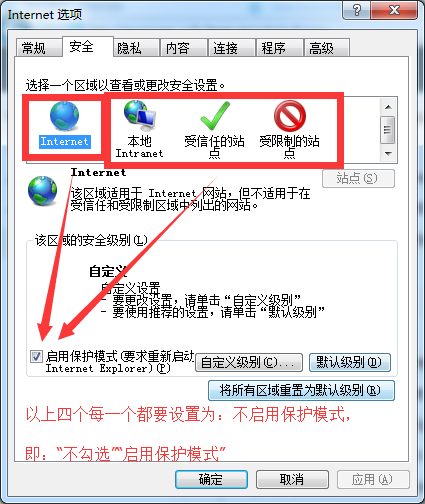
方法一:比较简单直接去IE浏览器设置就OK了
解决方法二:
package com.chrome.test;
import org.openqa.selenium.ie.InternetExplorerDriver;
import org.openqa.selenium.remote.DesiredCapabilities;
public class Login_IETest {
public static void main(String[] args) {
// 申明driver对象
System.setProperty("webdriver.ie.driver", "D:\\selenium\\IEDriverServer.exe");
// IE的常规设置,便于执行自动化测试
DesiredCapabilities ieCapabilities = DesiredCapabilities.internetExplorer();
ieCapabilities.setCapability(InternetExplorerDriver.INTRODUCE_FLAKINESS_BY_IGNORING_SECURITY_DOMAINS, true);
InternetExplorerDriver driver = new InternetExplorerDriver(ieCapabilities);
// 获取并在浏览器中打开 百度 链接
driver.get("http://www.baidu.com");
// 关闭当前焦点所在的窗口
driver.close();
}
}
方法二:是直接使用加粗的那段代码对IE进行常规设置,方法一和方法二各有其特点,根据自己的需要get吧!
selenium启动IE失败,并报错:Unexpected error launching Internet Explorer. Protected Mode settings are not the same for all zones的更多相关文章
- 解决selenium 启动ie浏览器报错:Unexpected error launching Internet Explorer. Protected Mode settings are not the same for all zones
启动ie代码: System.setProperty("webdriver.ie.driver", "bin/IEDriverServer.exe"); Web ...
- 【Python + Selenium】初次用IE浏览器之报错:selenium.common.exceptions.WebDriverException: Message: Unexpected error launching Internet Explorer. Protected Mode settings are not the same for all zones.
初次用IE浏览器运行自动化程序时,报错:selenium.common.exceptions.WebDriverException: Message: Unexpected error launchi ...
- python3+selenium使用浏览器IE的时候,无法打开IE浏览器,老是报错: Unexpected error launching Internet Explorer. Protected Mode settings are not the same for all zones
python3+selenium使用浏览器IE的时候,老是报错: Unexpected error launching Internet Explorer. Protected Mode settin ...
- selenium启动IE浏览器报错:selenium.common.exceptions.WebDriverException: Message: Unexpected error launching Internet Explorer. Protected Mode settings are not the same for all zones. Enable Protected Mode mu
意思是浏览器的保护模式设置不一致所导致 解决方案-->修改IE设置 将所有区域的保护模式勾选去掉即可
- 【Selenium】【BugList6】调用IE,未启用保护模式,报:selenium.common.exceptions.WebDriverException: Message: Unexpected error launching Internet Explorer. Protected Mode settings are not the same for all zones.
>>> driver = webdriver.Ie() 解决方法: 1.打开Ie浏览器 , 工具 ->Internet选项 ->安全 2.去掉4个区域的安全保护模式
- 【解决问题】failed: java.lang.RuntimeException: org.openqa.selenium.WebDriverException: Unexpected error launching Internet Explorer.
failed: java.lang.RuntimeException: org.openqa.selenium.WebDriverException: Unexpected error launchi ...
- selenium2Library报错: Unexpected error launching Internet Explorer. Browser zoom level was set to 119%. It should be set to 100%
Exception in thread "main" org.openqa.selenium.remote.SessionNotFoundException: Unexpected ...
- Selenium2学习-037-WebUI自动化实战实例-IE浏览器显示比例问题:org.openqa.selenium.remote.SessionNotFoundException: Unexpected error launching Internet Explorer. Browser zoom level was set to 94%. It should be set to 100%
好久没有写博文了,今天在给部门新人演示 Selenium WebDriver 启动其支持的各种浏览器时,启动 IE 时总是无法打开对应的百度网址,页面如下所示:
- selenium启动IE浏览器报错:Unexpected error launching Internet Explorer. Browser zoom level was set to
解决此问题的方法就是查看自己的浏览器是否没有放大至100%,如下 如果不是100%就会报错
随机推荐
- JS输出为[object object]
问题描述:在控制台打印时应输出对象,但是却输出[object object] 解决办法:先将数据转换为json格式,然后再转换为json对象 JSON.parse(JSON.stringify(use ...
- 第39天学习打卡(UDP多线程在线咨询 URL)
UDP多线程在线咨询 package com.kuang.chat; import java.io.BufferedReader; import java.io.InputStreamReade ...
- 基于docker快速搭建hbase集群
一.概述 HBase是一个分布式的.面向列的开源数据库,该技术来源于 Fay Chang 所撰写的Google论文"Bigtable:一个结构化数据的分布式存储系统".就像Bigt ...
- 死磕Spring之IoC篇 - 开启 Bean 的加载
该系列文章是本人在学习 Spring 的过程中总结下来的,里面涉及到相关源码,可能对读者不太友好,请结合我的源码注释 Spring 源码分析 GitHub 地址 进行阅读 Spring 版本:5.1. ...
- vscode中js文件使用typescript语法报错,如何解决
原因:由于vcode自身的语法检查有些问题 解决办法:在设置里面加上 "javascript.validate.enable": false 禁用默认的 js 验证 总结: 由于v ...
- 微信小程序折线图表折线图加区域图
1.先来个效果图 这里我用的是插件@antv/f2-canvas(安装的方法如下) npm init 此处如果直接使用官方npm install 可能会出现没有node_modules错误 npm i ...
- Linux:使用systemd管理进程
Blog:博客园 个人 概述 systemd是目前Linux系统上主要的系统守护进程管理工具,由于init一方面对于进程的管理是串行化的,容易出现阻塞情况,另一方面init也仅仅是执行启动脚本,并不能 ...
- 简单的ssm练手联手项目
简单的ssm练手联手项目 这是一个简单的ssm整合项目 实现了汽车的品牌,价格,车型的添加 ,修改,删除,所有数据从数据库中拿取 使用到了jsp+mysql+Mybatis+spring+spring ...
- Azure Front Door(一)为基于.net core 开发的Azure App Service 提供流量转发
一,引言 之前我们讲解到使用 Azure Traffic Manager.Azure LoadBalancer.Azure Application Gateway,作为项目的负载均衡器来分发流量,转发 ...
- 测试平台系列(3) 给Hello World添加日志
给Hello World添加日志 回顾 通过上篇内容,我们已经使用「Flask」完成了我们的第一个接口.我们可以看到,使用「Flask」来编写接口是十分简单的.那么接下来,我们丰富一下上面的例子. 需 ...