
解决selenium 启动ie浏览器报错:Unexpected error launching Internet Explorer. Protected Mode settings are not the same for all zones
启动ie代码:
         System.setProperty("webdriver.ie.driver", "bin/IEDriverServer.exe");

         WebDriver driver = new InternetExplorerDriver();

         String url =  "http://www.baidu.com";

         driver.get(url);
启动ie报错:
Started InternetExplorerDriver server (64-bit)
2.44.0.0
Listening on port 10375
FAILED: fff2
org.openqa.selenium.remote.SessionNotFoundException: Unexpected error launching Internet Explorer. Protected Mode settings are not the same for all zones. Enable Protected Mode must be set to the same value (enabled or disabled) for all zones. (WARNING: The server did not provide any stacktrace information)
Command duration or timeout: 1.50 seconds
Build info: version: '2.48.2', revision: '41bccdd10cf2c0560f637404c2d96164b67d9d67', time: '2015-10-09 13:08:06'
System info: host: 'FC000329PC1', ip: '169.254.242.52', os.name: 'Windows 7', os.arch: 'x86', os.version: '6.1', java.version: '1.8.0_45'
Driver info: org.openqa.selenium.ie.InternetExplorerDriver
at sun.reflect.NativeConstructorAccessorImpl.newInstance0(Native Method)
at sun.reflect.NativeConstructorAccessorImpl.newInstance(NativeConstructorAccessorImpl.java:62)
at sun.reflect.DelegatingConstructorAccessorImpl.newInstance(DelegatingConstructorAccessorImpl.java:45)
at java.lang.reflect.Constructor.newInstance(Constructor.java:422)
at org.openqa.selenium.remote.ErrorHandler.createThrowable(ErrorHandler.java:206)
at org.openqa.selenium.remote.ErrorHandler.throwIfResponseFailed(ErrorHandler.java:164)
at org.openqa.selenium.remote.RemoteWebDriver.execute(RemoteWebDriver.java:647)
解决办法:
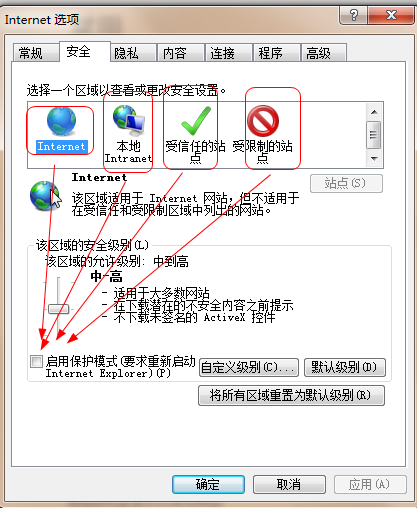
internet 选项,进入安全标签,分别点击internet ,本地intranet,受信任的站点,受限制的站点,四个设置,全部去掉勾选“启用保护模式” 或者全部勾选“启用保护模式”,即保持这四个设置一致,要么全部勾选,要么全部去掉勾选,就可以启动ie浏览器了
解决selenium 启动ie浏览器报错:Unexpected error launching Internet Explorer. Protected Mode settings are not the same for all zones的更多相关文章
- selenium启动IE失败,并报错:Unexpected error launching Internet Explorer. Protected Mode settings are not the same for all zones
1.selenium去启动IE时,报错: Started InternetExplorerDriver server (32-bit)2.50.0.0Listening on port 24641On ...
- python3+selenium使用浏览器IE的时候,无法打开IE浏览器,老是报错: Unexpected error launching Internet Explorer. Protected Mode settings are not the same for all zones
python3+selenium使用浏览器IE的时候,老是报错: Unexpected error launching Internet Explorer. Protected Mode settin ...
- 【Python + Selenium】初次用IE浏览器之报错:selenium.common.exceptions.WebDriverException: Message: Unexpected error launching Internet Explorer. Protected Mode settings are not the same for all zones.
初次用IE浏览器运行自动化程序时,报错:selenium.common.exceptions.WebDriverException: Message: Unexpected error launchi ...
- selenium启动IE浏览器报错:selenium.common.exceptions.WebDriverException: Message: Unexpected error launching Internet Explorer. Protected Mode settings are not the same for all zones. Enable Protected Mode mu
意思是浏览器的保护模式设置不一致所导致 解决方案-->修改IE设置 将所有区域的保护模式勾选去掉即可
- 【Selenium】【BugList6】调用IE,未启用保护模式,报:selenium.common.exceptions.WebDriverException: Message: Unexpected error launching Internet Explorer. Protected Mode settings are not the same for all zones.
>>> driver = webdriver.Ie() 解决方法: 1.打开Ie浏览器 , 工具 ->Internet选项 ->安全 2.去掉4个区域的安全保护模式
- 【解决问题】failed: java.lang.RuntimeException: org.openqa.selenium.WebDriverException: Unexpected error launching Internet Explorer.
failed: java.lang.RuntimeException: org.openqa.selenium.WebDriverException: Unexpected error launchi ...
- Selenium2学习-037-WebUI自动化实战实例-IE浏览器显示比例问题:org.openqa.selenium.remote.SessionNotFoundException: Unexpected error launching Internet Explorer. Browser zoom level was set to 94%. It should be set to 100%
好久没有写博文了,今天在给部门新人演示 Selenium WebDriver 启动其支持的各种浏览器时,启动 IE 时总是无法打开对应的百度网址,页面如下所示:
- selenium2Library报错: Unexpected error launching Internet Explorer. Browser zoom level was set to 119%. It should be set to 100%
Exception in thread "main" org.openqa.selenium.remote.SessionNotFoundException: Unexpected ...
- selenium启动IE浏览器报错:Unexpected error launching Internet Explorer. Browser zoom level was set to
解决此问题的方法就是查看自己的浏览器是否没有放大至100%,如下 如果不是100%就会报错
随机推荐
- BZOJ 3110 ZJOI 2013 K大数查询 树套树(权值线段树套区间线段树)
题目大意:有一些位置.这些位置上能够放若干个数字. 如今有两种操作. 1.在区间l到r上加入一个数字x 2.求出l到r上的第k大的数字是什么 思路:这样的题一看就是树套树,关键是怎么套,怎么写.(话说 ...
- [Angular 2] Using Array ...spread to enforce Pipe immutability
Pipes need a new reference or else they will not update their output. In this lesson you will use th ...
- Linux字符设备驱动file_operations
struct _file_operations struct _file_operations在Fs.h这个文件里面被定义的,如下所示: struct file_operations { struct ...
- 关于Discuz!nt论坛编辑器图片上传bug,flash域的问题
正在整discuz!nt,现在没有什么人弄了把? 上个星期突然来了个bug,搞死我了,论坛图片不能上传,上传卡在100%没反应了,于是我发现ajax发送到AttachUpload.cs时queryst ...
- 读取oracle页面或者进程卡住不动(死锁)
oracle最坑爹的地方:你insert update delete之后 或者kill死锁的时候记得一定要提交事务不然就是死锁卡在那里了 记住 kill死锁也是要提交事务的 select * ...
- sql server代理中作业执行SSIS包失败
RT,执行失败了,总是只提示一句“以xxxx用户身份执行失败”,很难找原因. 引用 http://bbs.csdn.net/topics/300059148 Sql2005如何用dtexec运行ssi ...
- js动态加载html,加载后的页面元素某些事件失效的解决方案
用 live 来绑定 例如: $("#items li .addToCartimg").live("click",function(){ $('.popDeta ...
- Uploadify插件使用方法
1.下载所需文件 2.导入所需文件,还需要应用jquery.js文件 3.导入css.js uploadify.css.jquery.uploadify.min.js 4.前端代码 p标签存放uplo ...
- seajs原理解析
一: 1.本文是基于seajs2.2.1编写的,之后版本应该大同小异 2.本文仅代表个人观点,如有理解错误,敬请指出,大家一起学习 二: 1.首先放一张我画的流程图 这是我理解的seajs的基本的所有 ...
- [Leetcode][016] 3Sum Closest (Java)
题目: https://leetcode.com/problems/3sum-closest/ [标签]Array; Two Pointers [个人分析] 这道题和它的姊妹题 3Sum 非常类似, ...